4OM-1075-002.pdf - 第76页
1.3 Machine Information 1.3.1 "Machine Information" Window • • • • • Window Layout V arious machine information is displayed while the machine is run- ning. While the "Machine Information" window is a…
Table 4B1-6
Check Codes Display Section (A) Display Section (B)
990107 Install the vibratory stick feeder. (Feeder Base #1)
990108 Install the vibratory stick feeder. (Feeder Base #2)
990109 Install the vibratory stick feeder. (Feeder Base #3)
99010a Install the vibratory stick feeder. (Feeder Base #4)
99010b Feeder Empty (Feeder Base #1)!!
99010c Feeder Empty (Feeder Base #2)!!
99010d Feeder Empty (Feeder Base #3)!!
99010e Feeder Empty (Feeder Base #4)!!
990201 Feeder Ready Check Set the feeder pullout Feeder Base #1 Safty Bar
990202 Set the feeder pullout Feeder Base #2 Safty Bar
990203 Set the feeder pullout Feeder Base #3 Safty Bar
990204 Set the feeder pullout Feeder Base #4 Safty Bar
990301 Feeder Alternate Prepare for the feeder that can be used for compo-
nent picks.
1.2 "CHECK" Windows
0308-001 2-3-6 AHB01ETRP
1.3 Machine Information
1.3.1 "Machine Information" Window
••
••
• Window Layout
Various machine information is displayed while the machine is run-
ning.
While the "Machine Information" window is active, the machine
keeps on running.
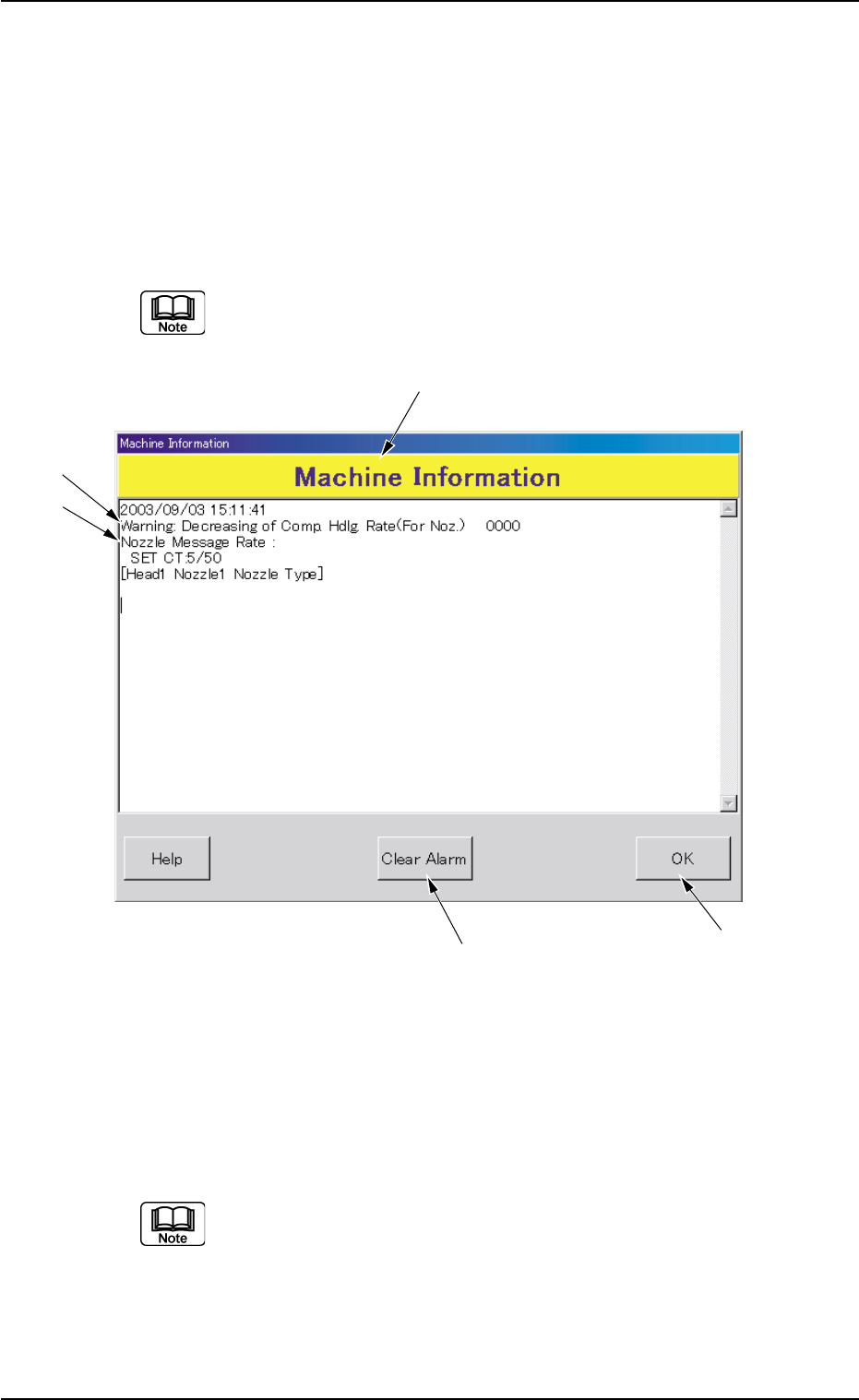
Fig. 4B2-1 Example of "Machine Information"
••
••
• Window Composition
*1 Machine Information
The machine information is displayed.
Refer to "1.3.2 List of Check Messages" for details.
1.3 Machine lnformation
*5
*4
*1
*2
*3
0308-001 2-3-7 AHB01ETRP

*2 Display Section A
Displayed is the outline of the machine information.
*3 Display Section B
Displayed are the details of the machine information.
*4 [OK] Button
When pressed, this button closes the "Machine Information" win-
dow.
*5 [Clear Alarm] Button
When pressed, this button cancels an alarm (sound) only.
1.3 Machine lnformation
0308-001 2-3-8 AHB01ETRP