NR_Mechanischer_Stopper.pdf - 第227页
Assembly Instructions PCB Stopper Single Conveyor SIPL ACE S-27HM / HS-60 / D4 / D 3 / HF- / X-Series << > Edition 06/2007 << > 227 18 Sof tware configuration and testing of the stopper O Inst all the s…
Assembly Instructions PCB Stopper Single Conveyor SIPLACE S-27HM / HS-60 / D4 / D3 / HF- / X-Series
Edition 06/2007
226
Legend Basic unit stopper (Summary) 17
6 Ultrasonic proximity switch
9 DIN 933-M4 x 16-PA
11 Sliding part
12 Countersunk screw DIN965-M3 x 6-A2
13 DIN 988-5x10x0.1-St 2 K 50
14 DryLin N linear guide system NEK-01-27P
15 Stop carriage
27 Spring plunger M5
Assembly Instructions PCB Stopper Single Conveyor SIPLACE S-27HM / HS-60 / D4 / D3 / HF- / X-Series << >
Edition 06/2007 << >
227
18 Software configuration and testing of
the stopper
O Install the software version 505.03 or 601.03 or higher, if this has not already been done.
Use the corresponding software installation instructions for this.
18
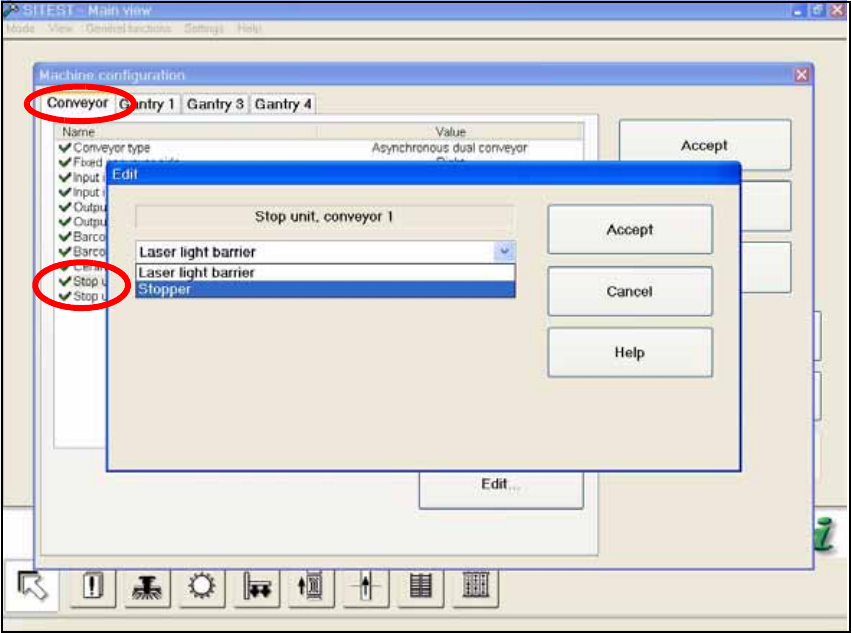
O Change over to the SITEST and in the "Machine configuration" menu activate the stopper for
every conveyor track by changing from "Laser light barrier" to "Stopper".
Fig. 204
A message is displayed that the machine has been reconfigured and is closing down. 18
O Confirm this message.
Assembly Instructions PCB Stopper Single Conveyor SIPLACE S-27HM / HS-60 / D4 / D3 / HF- / X-Series
Edition 06/2007
228
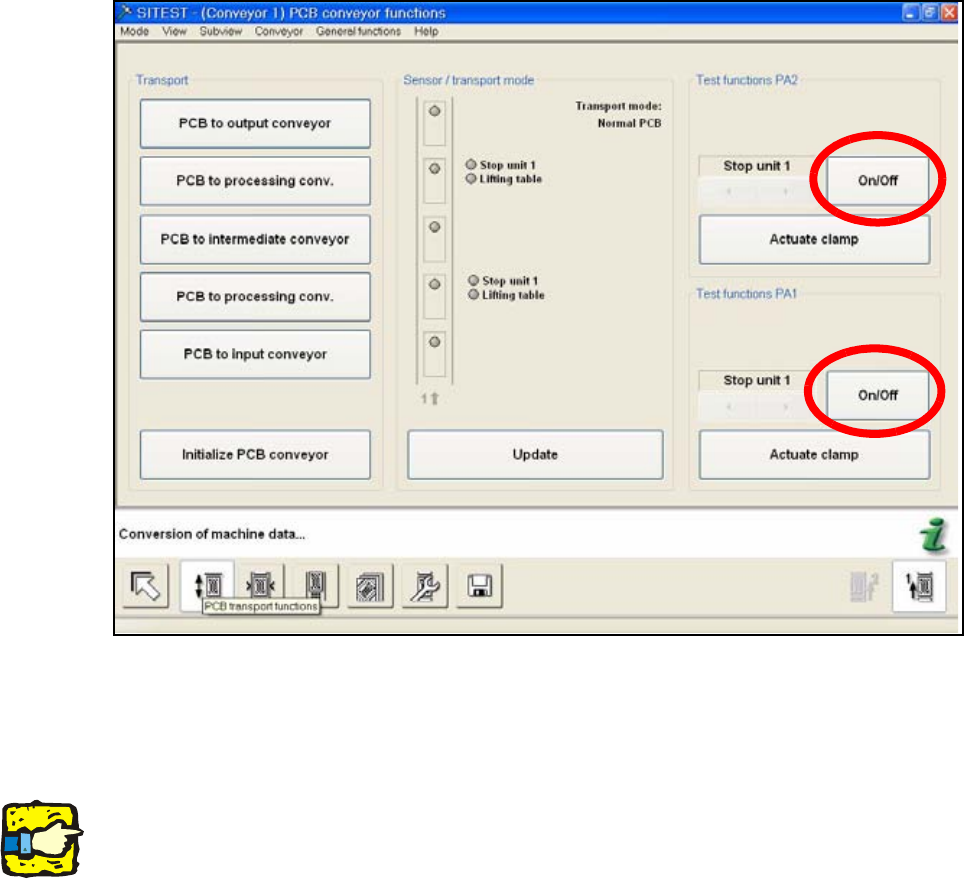
O After the restart, change over to the SITEST Conveyor Functions.
Here you can test the stoppers with the On/Off button.
O Test each stopper individually with the "On/Off" button.
Fig. 205
O Test the conveyor limit switch for each conveyor lane by reducing the width to 52mm.
18
18
18
Note: Check the correct cable laying and the correct pneumatic tubing to prevents the PCB con-
veyor and the stoppers from being damaged. 18
18