SussPA300UserGuide.pdf - 第24页
SUSS / PA300 / User Manual / M10-121841-00 / February 2002 23 4.5 Electronics Rack M a i n m i c r o c o n t r o l l e r b o a r d M i sc . O u t p u t i n t e r f a c e c a r d ( C 4 ) M a i n f u s e s ( F 1 / F 2 ) F …
22
SUSS / PA300 / User Manual / M10-121841-00 / February 2002
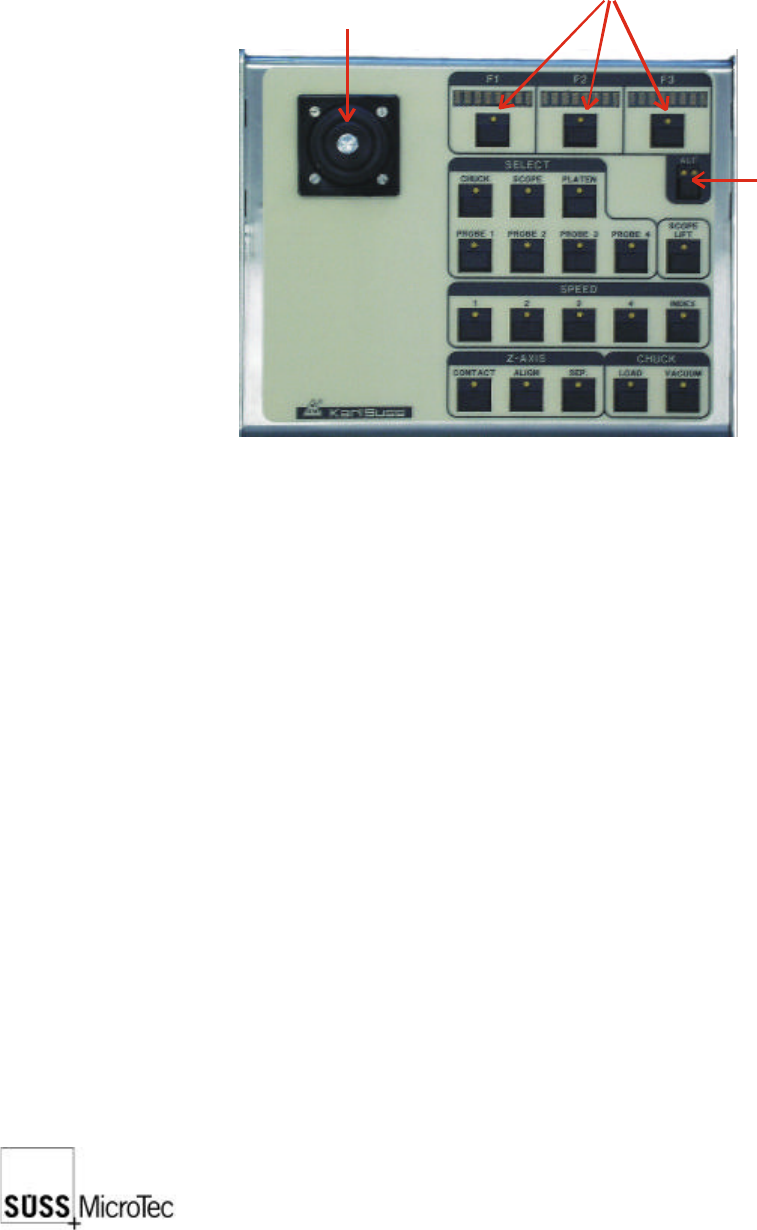
4.4 Joystick Controller
For further explanation please refer to section 7.3.
The Joystick Controller provides remote control of all probe system motorized stages
including the wafer chuck, microscope, ProbeHeads and platen. The most common
functions such as load, vacuum, go and set home, contact and two-point alignment
are also provided. It can be used with or without a PC.
Joystick
(X, Y movement of
chuck or scope)
Mode key
Position & function displays
SUSS / PA300 / User Manual / M10-121841-00 / February 2002
23
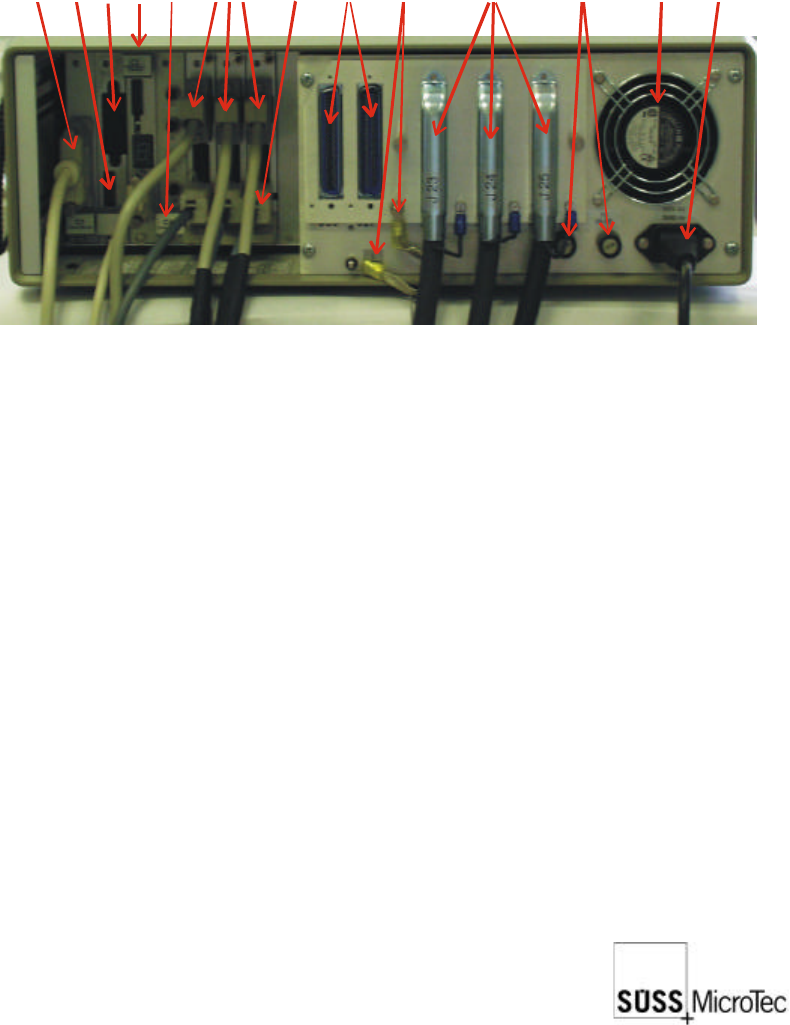
4.5 Electronics Rack
Main
m
i
c
r
o
c
o
n
t
r
o
l
l
e
r
b
o
a
r
d
Misc
.
O
u
t
p
u
t
i
n
t
e
r
f
a
c
e
c
a
r
d
(
C
4
)
Main
f
u
s
e
s
(
F
1
/
F
2
)
Flex
i
b
l
e
g
r
o
u
n
d
c
o
n
t
a
c
t
s
Main
p
o
w
e
r
s
u
p
p
l
y
Moto
r
i
z
e
d
P
r
o
b
e
H
e
a
d
s
(
1
e
a
c
h
)
Cont
r
o
l
(
e
n
d
l
i
m
i
t
s
,
e
n
c
o
d
e
r
signa
l
s
,
L
E
D
s
)
Con
t
r
o
l
B
o
x
i
n
t
e
r
f
a
c
e
Res
e
r
v
e
s
o
c
k
e
t
s
f
o
r
m
o
t
o
r
i
z
e
d
t
u
r
r
e
t
/
optio
n
s
i
.
e
.
:
A
u
t
o
m
a
t
i
c
p
r
o
b
e
r
i
n
p
u
t
s
Pow
e
r
s
u
p
p
l
y
s
o
c
k
e
t
s
(
x
3
)
IEEE
Prob
e
r
c
o
n
n
e
c
t
i
o
n
s
Add
r
e
s
s
S
w
i
t
c
h
Extra
c
t
o
r
f
a
n
Please also refer to section 2.10 for further information.

24
SUSS / PA300 / User Manual / M10-121841-00 / February 2002
5 Material Requirements
5.1 Wafer Handling
YES / NO Wafers are inserted manually, one at a time, into this equipment
YES / NO This equipment is provided with a single-wafer transport mechanism
and port in compliance with SEMI E8 (Specification for Wafer Transport
Systems: Interface Co-ordinates)
YES / NO Wafers are inserted into this equipment in wafer carriers (cassettes)
Please note that automated wafer handling is optional. The specifications are not,
however, included in this manual.
5.2 Wafer Carriers
This equipment is does not accept wafers delivered in SEMI standard carriers
(cassettes).
5.3 Wafer Alignment
Wafer flat/notch alignment is not required.
5.4 Loading a Substrate or Wafer
1. Press the load button on the Joystick Controller. The chuck will move to its most
forward and lowest position. (Please refer to the ProberBench
®
Manual for how
to set this position).
2. Open the loading lid taking safety precautions into consideration.
3. Place the substrate or wafer onto the chuck. Press the vacuum button on the
Joystick controller and the LED should light up.
4. Close the loading lid and press the GoHome button.
5. Proceed with the alignment procedure (see section 7.3.1).