00198152-02_OM_VirtualInkspotHandling_for_SSW7xx_EN.pdf - 第12页
Virtual Inkspot Handling for SSW 7xx / Operating Manual 10/2017 Edition 12 4 Configuration with XML Files NOTICE VIH files provided by the customer are interp reted by the first machine. There is no ASM Board Gate Keeper…

Virtual Inkspot Handling for SSW 7xx / Operating Manual 10/2017 Edition
11
VIH with XML files VIH with MES and BGK
File input format: XML
– File input format: XML, Wafer format
mapped with SIPLACE VIH XML Wrapper.
Notice: Any input format, e.g. CSV, may be
implemented on a customer SOKO request.
– Via a public OIB programming interface.
The customer must implement the
"BoardNotification" interface of the ASM
Board Gate Keeper as a web service. This
interface allows to whisper VIH information
into the first physical machine based on a
barcode either read by any of the station
cameras or an external barcode reader
system.
Table 3-1: System requirements and compatibility
Traceability is not mandatory but recommended. If the Requires PCB barcode verification setting
is enabled under the Traceability settings in the Board Editor of SIPLACE Pro, the board stops
when reading the PCB barcode has failed.
3.1 Restrictions
– VIH with XML files: mixed lines (e.g. SW 7xx and 605x) are only possible if all stations can
access the shared drive on which the XML files are stored.
– VIH with XML files: external barcode readers are not supported.
– VIH with MES and BGK: a mix of physical and virtual inkspots is not permitted. The SIPLACE
Pro board is not allowed to contain any inkspots (global or subpanel).
– VIH is defined per setup. If the customer has products for both VIH and not VIH he has to
switch off VIH in the setup before downloading a product not supporting VIH (or create a copy
of the setup with this setting being switched off).
– If another device e.g. AOI is present between the placement machines, whispering is only
possible if the placement machine after the AOI is equipped with a barcode reader and is
defined as a line (SMEMA cluster) in SIPLACE Pro. If not, the inkspots will be read again in the
placement machine after the AOI.
Virtual Inkspot Handling for SSW 7xx / Operating Manual 10/2017 Edition
12
4 Configuration with XML Files
NOTICE
VIH files provided by the customer are interpreted by the first machine.
There is no ASM Board Gate Keeper involved.
This option is also known as "iSkip"!
4.1 SIPLACE Pro Settings
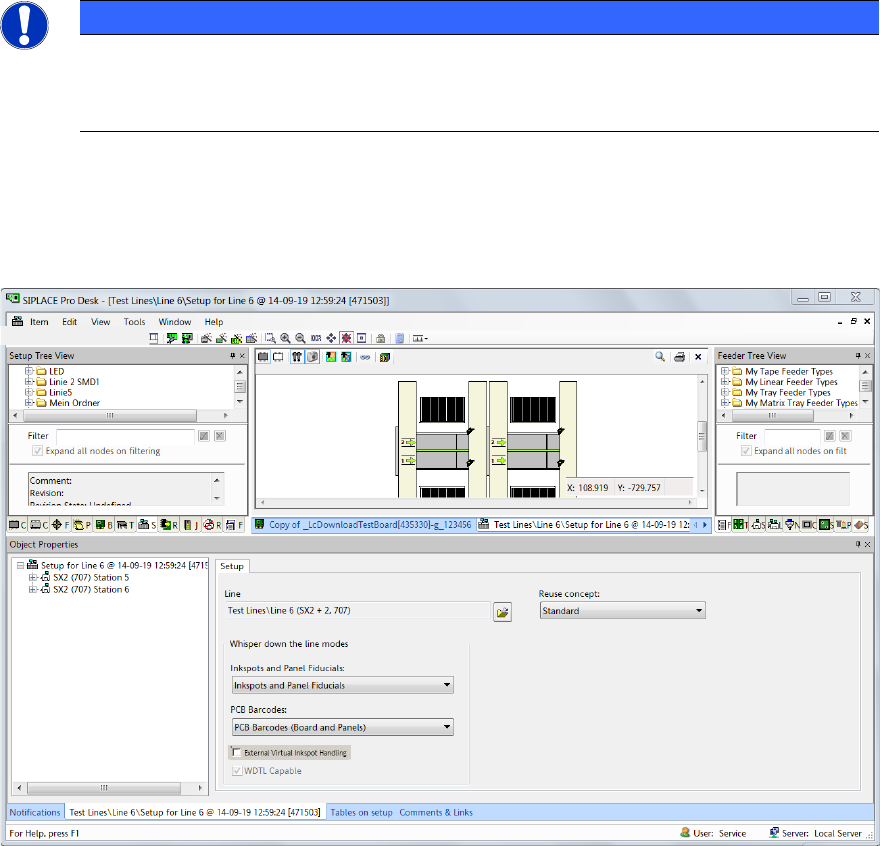
► Open the setup in the Setup Editor of SIPLACE Pro.
Figure 4-1: Opening setup in SIPLACE Pro
► From the PCB Barcodes drop-down list select PCB Barcodes (Board and Panels) for the
internal barcode reader.
► If a line consists of multiple machines, select External Inkspots Only from the Inkspots and
Panel Fiducials drop-down list.
The available settings for the Whisper down the line option are listed in Table 5-1.
Virtual Inkspot Handling for SSW 7xx / Operating Manual 10/2017 Edition
13
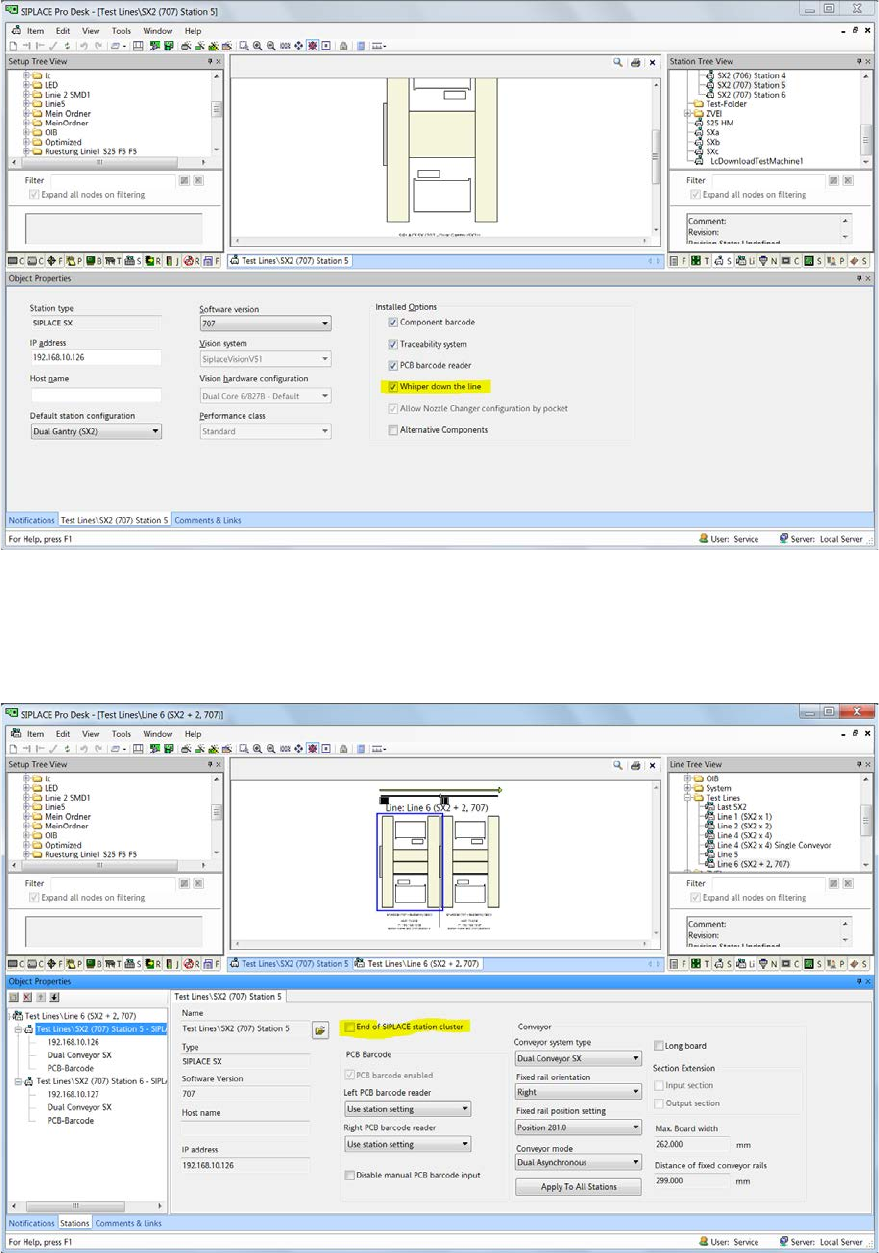
► Open the Station Editor.
Figure 4-2: Station Editor
► Select the Whisper down the line option for all used stations.
► Open the line object in the Line Editor.
Figure 4-3: Line Editor
► Ensure that all machines but the last one are not the End of SIPLACE station cluster.
Therefore disable this option for all machines but the last one.