00198152-02_OM_VirtualInkspotHandling_for_SSW7xx_EN.pdf - 第42页
Virtual Inkspot Handling for SSW 7xx / Operating Manual 10/2017 Edition 42 7 Troubleshooting 7.1 VIH with XML File s – Checking the Configurat ion A feasibility check is p erformed for the configur ation after machine bo…
Virtual Inkspot Handling for SSW 7xx / Operating Manual 10/2017 Edition
41
– No support for angles. Also no support for angles of 90°, 180° and 270°.
– Only the top child of a panel-in-panel structure is considered. All other panels, even if they
contain placements, are ignored (= always placed).
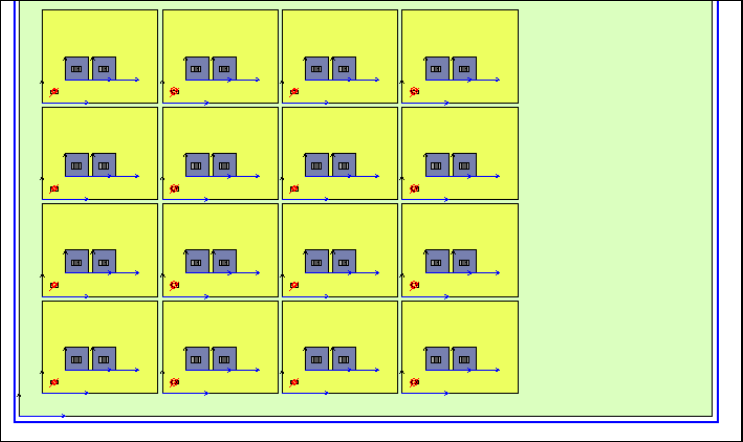
In the following figure, only the blue panels are used for VIH. The yellow ones are not
considered (= always placed), neither the board side directly (green).
Figure 6-8: Used panels
In the following example only panels marked with 1 are placed.
Example
WAFER_MAP = {
WAFER_ID = "some id"
MAP_TYPE = "Ascii"
NULL_BIN = "."
ROWS = 4
COLUMNS = 4
FLAT_NOTCH = 0
SUPPLIER_NAME = "some supplier"
LOT_ID = "some lot id"
X_SIZE = 42
Y_SIZE = 24
BIN = "1" 2"Pass" ""
BIN = "0" 10"Fail" ""
some other bins
MAP = {
....
0110
0000
0000
}
}
Restrictions:
– There is only one passing bin. In this case it is BIN = "1" 2"Pass" ""
– All values in the bins are alphanumeric or punctuation marks or * or #
Letters like á, ö, ß and whitespaces are not allowed there.
Virtual Inkspot Handling for SSW 7xx / Operating Manual 10/2017 Edition
42
7 Troubleshooting
7.1 VIH with XML Files – Checking the Configuration
A feasibility check is performed for the configuration after machine booting (e.g., if WDTL is active
on the station only but not in SIPLACE Pro).
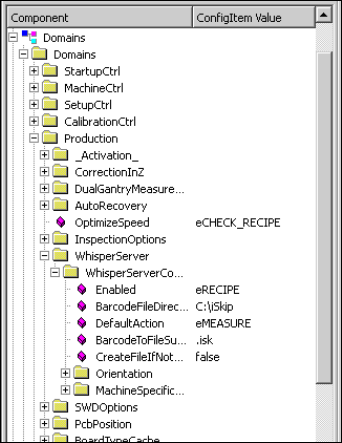
At the station the activation and configuration can be checked on the station console under
Configuration – Component …\Domains\Domains\Production\WhisperServer.
Figure 7-1: Checking configuration
Virtual Inkspot Handling for SSW 7xx / Operating Manual 10/2017 Edition
43
7.2 VIH with MES and BGK – No Valid Data
If the station sends a whisper request to the BGK or the preceding station and gets valid data, the
board is produced skipping the panels omitted by BGK.
If the station did not receive valid data the station stops and the board is displayed in yellow.
Possible errors may be:
– BGK is not available
– MES is not available
– MES has no data for the board
– MES data does not fit to the board
In case of an error the operator can perform one of the following actions:
– Provide BGK / MES / correct MES respectively and repeat the whisper request.
– Continue the board – the full board will then be produced.
– Abort the board and remove it from the station / line.