00198152-02_OM_VirtualInkspotHandling_for_SSW7xx_EN.pdf - 第6页
Virtual Inkspot Handling for SSW 7xx / Operating Manual 10/2017 Edition 6 2 Functionality With the Virtual Inkspot Handling opt ion (in the following refe rred to as VIH ), external systems can define which panel s of a …
Virtual Inkspot Handling for SSW 7xx / Operating Manual 10/2017 Edition
5
1 Introduction
This document describes the SIPLACE Virtual Inkspot Handling option (VIH) and how to
configure it for station software 7xx. It also contains information on the scope of delivery and
requirements for successful operation.
1.1 Scope of Delivery
Please contact the sales representative to obtain an offer for this service!
1.1.1 Packages
● SIPLACE Line Operations Software Package, item no. [00116525-xx] containing:
– Whispering Down the Line for Barcode
● This Operating Manual, item no. [00198152-xx]
1.1.2 Languages
The software is available in English and German. The documentation is available in English.
Virtual Inkspot Handling for SSW 7xx / Operating Manual 10/2017 Edition
6
2 Functionality
With the Virtual Inkspot Handling option (in the following referred to as VIH), external systems
can define which panels of a board are to be produced and which ones shall be skipped. A panel is
a defined portion of a board. Compared to the physical inkspot concept, this concept is more
flexible.
– It can be included into the ongoing production process as external systems may decide for
each panel individually, if it is in a good or bad state and further process steps should be
omitted. Typically, an external system has already measured a board and has the information
which panels are good and which are bad. Using this information via VIH has the advantage
that no physical inkspots have to be read by the PCB camera. This enhances the performance
especially for boards with a large number of panels.
– It can be used if panels have no space for a physical inkspot.
This chapter gives an overview of the VIH history and functionality.
2.1 WDTL from Station Software 704.1
From station software version 704.1, the WDTL function was improved as follows:
– No configuration is required at the station. Configuration is performed via the line (SMEMA
cluster) and the inkspot handling is enabled in the setup.
– Additionally, inkspot files can be used for defining inkspots. All settings are made locally in XML
files and configured at the first station in the line.
– Information on inkspots is read by the barcode reader on the 1
st
placement machine and is
transmitted to the next placement machines in the line.
– WDTL is based on the identification of boards with the board transport sensors.
– No barcode readers required on the succeeding placement machines.
Requirements:
– One Whispering down the line license per station is required to use WDTL of inkspots.
– The feature only works in pure 704 SW lines, whispering to a station with another station
software version, e.g. 605 is not possible.
– If another device e.g. AOI is present between the placement machines, whispering is only
possible if the placement machine after the AOI is equipped with a barcode reader and is
defined as a line (SMEMA cluster) in SIPLACE Pro. If not, the inkspots will be read again in the
placement machine after the AOI.
Virtual Inkspot Handling for SSW 7xx / Operating Manual 10/2017 Edition
7
2.2 VIH with XML Files from Station Software 706.0
From station software version 706.0, the VIH option can be activated on the station software GUI.
NOTICE
This option is also known as "iSkip"!
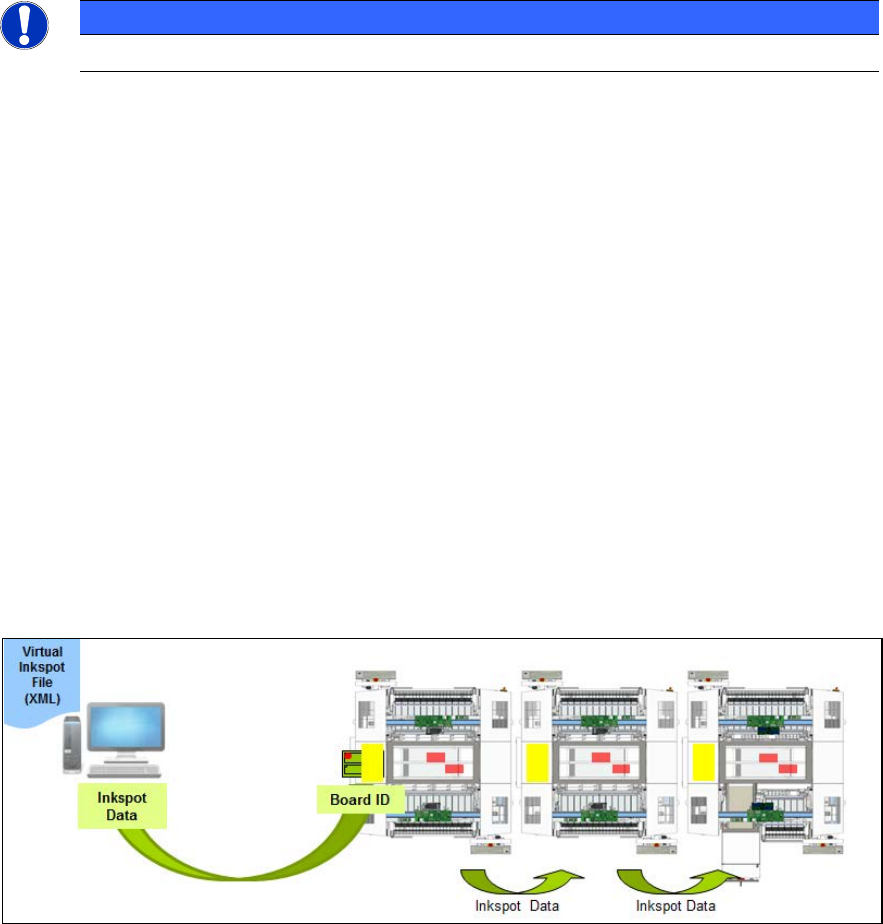
An external system provides inkspot files that are stored on a shared drive. These files describe the
panels to be produced per board identified by a PCB barcode. The inkspots have to be defined in
the board description and the panels can be assigned via a matrix that is stretched over the board
in SIPLACE Pro. VIH transfers these files to the station software when a new board has entered
the station. The next station receives this data by the standard Whisper Down The Line option.
– The inkspot files (from board manufacturer or from an external system) can be used by every
station in the line.
– All settings are made locally at the station in XML files. These files have to be enabled on the
station software GUI.
– The inkspot handling is enabled in SIPLACE Pro.
– The inkspot files are named according to the barcode (e.g. SWT-LP3-O-0007). There is no
restriction for the suffix.
– The inkspot files are stored at a shared drive and can be moved or deleted automatically after
the board was placed (configurable).
– The board with its clusters is described in a matrix format (rows and columns). Rows and
columns are mapped according to their geometric location on the board. For each cluster, the
configuration "placement" or "no placement" has to be defined. The matrix is configurable
(please refer to chapter 6 File Description and Mapping).
– Configuration changes get effective after a new job download or machine reboot.
Figure 2-1: Workflow VIH with XML files
Workflow
– The 1
st
placement machine reads the PCB barcode with an internal or external barcode reader.
– The external system delivers inkspot data with the panels to be produced according to the
board ID.
– The inkspot data is transferred to the next placement machine(s) by the Whisper Down The
Line option after the board has been read.