00198152-02_OM_VirtualInkspotHandling_for_SSW7xx_EN.pdf - 第41页
Virtual Inkspot Handling for SSW 7xx / Operating Manual 10/2017 Edition 41 – No support for angl es. Also no support for angl es of 90°, 180° and 270°. – Only the top child of a panel - in - panel structur e is considere…
Virtual Inkspot Handling for SSW 7xx / Operating Manual 10/2017 Edition
40
6.3 Wafer Map Format
In the VIH interface via the BoardGateKeeper, panel names must be supplied. However, in the
inkspot files on disk there are no panel names but row and column information instead. The rows
and columns have to be mapped to a panel name.
6.3.1 Mapping Rows and Columns to a Panel Name
For this, the following two algorithms are implemented in the SIPLACE VIH XML Wrapper:
Naming Convention
Rows and columns are mapped based on a naming convention. By default the names of the panels
are PanelName_Row_Column (e.g. something_5_7).
Restrictions:
– Only rectangular boards are supported. These are boards having the same number of columns
on each row.
– There is no check whether the naming is correct or not. E.g., there is no check whether the
rows and columns are switched.
Geometric
Rows and columns are mapped according to their geometric location on the board.
Restrictions:
– Only rectangular boards are supported. These are boards having the same number of columns
on each row.
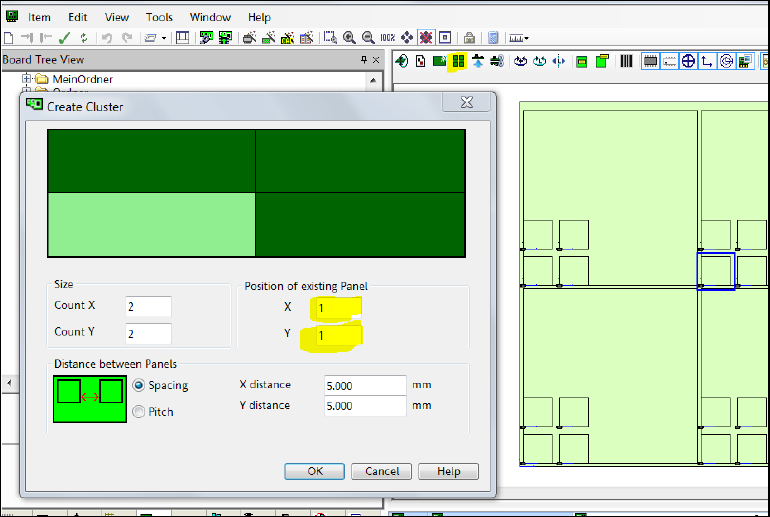
– In each panel matrix, the position of the original panel must be 1,1:
Figure 6-7: Position of original panel
Virtual Inkspot Handling for SSW 7xx / Operating Manual 10/2017 Edition
41
– No support for angles. Also no support for angles of 90°, 180° and 270°.
– Only the top child of a panel-in-panel structure is considered. All other panels, even if they
contain placements, are ignored (= always placed).
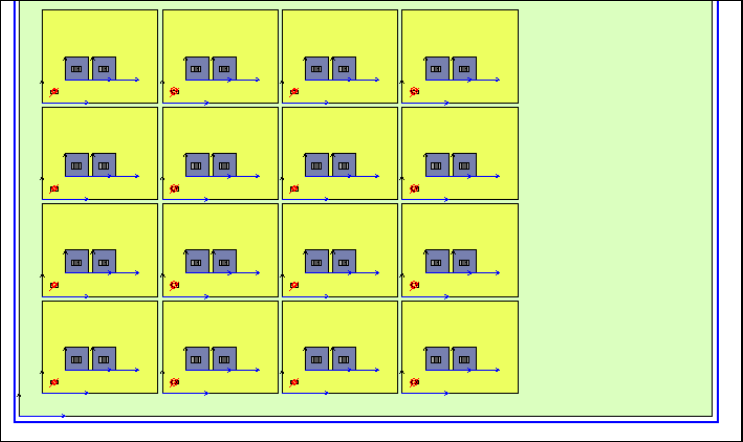
In the following figure, only the blue panels are used for VIH. The yellow ones are not
considered (= always placed), neither the board side directly (green).
Figure 6-8: Used panels
In the following example only panels marked with 1 are placed.
Example
WAFER_MAP = {
WAFER_ID = "some id"
MAP_TYPE = "Ascii"
NULL_BIN = "."
ROWS = 4
COLUMNS = 4
FLAT_NOTCH = 0
SUPPLIER_NAME = "some supplier"
LOT_ID = "some lot id"
X_SIZE = 42
Y_SIZE = 24
BIN = "1" 2"Pass" ""
BIN = "0" 10"Fail" ""
some other bins
MAP = {
....
0110
0000
0000
}
}
Restrictions:
– There is only one passing bin. In this case it is BIN = "1" 2"Pass" ""
– All values in the bins are alphanumeric or punctuation marks or * or #
Letters like á, ö, ß and whitespaces are not allowed there.
Virtual Inkspot Handling for SSW 7xx / Operating Manual 10/2017 Edition
42
7 Troubleshooting
7.1 VIH with XML Files – Checking the Configuration
A feasibility check is performed for the configuration after machine booting (e.g., if WDTL is active
on the station only but not in SIPLACE Pro).
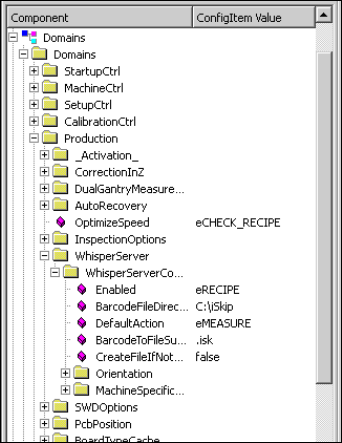
At the station the activation and configuration can be checked on the station console under
Configuration – Component …\Domains\Domains\Production\WhisperServer.
Figure 7-1: Checking configuration