00198152-02_OM_VirtualInkspotHandling_for_SSW7xx_EN.pdf - 第8页
Virtual Inkspot Handling for SSW 7xx / Operating Manual 10/2017 Edition 8 Requirements – Barcode readers h ave to be available in the f irst machine of the line with WDTL enabled or externally wit h WDTL enabled if the b…
Virtual Inkspot Handling for SSW 7xx / Operating Manual 10/2017 Edition
7
2.2 VIH with XML Files from Station Software 706.0
From station software version 706.0, the VIH option can be activated on the station software GUI.
NOTICE
This option is also known as "iSkip"!
An external system provides inkspot files that are stored on a shared drive. These files describe the
panels to be produced per board identified by a PCB barcode. The inkspots have to be defined in
the board description and the panels can be assigned via a matrix that is stretched over the board
in SIPLACE Pro. VIH transfers these files to the station software when a new board has entered
the station. The next station receives this data by the standard Whisper Down The Line option.
– The inkspot files (from board manufacturer or from an external system) can be used by every
station in the line.
– All settings are made locally at the station in XML files. These files have to be enabled on the
station software GUI.
– The inkspot handling is enabled in SIPLACE Pro.
– The inkspot files are named according to the barcode (e.g. SWT-LP3-O-0007). There is no
restriction for the suffix.
– The inkspot files are stored at a shared drive and can be moved or deleted automatically after
the board was placed (configurable).
– The board with its clusters is described in a matrix format (rows and columns). Rows and
columns are mapped according to their geometric location on the board. For each cluster, the
configuration "placement" or "no placement" has to be defined. The matrix is configurable
(please refer to chapter 6 File Description and Mapping).
– Configuration changes get effective after a new job download or machine reboot.
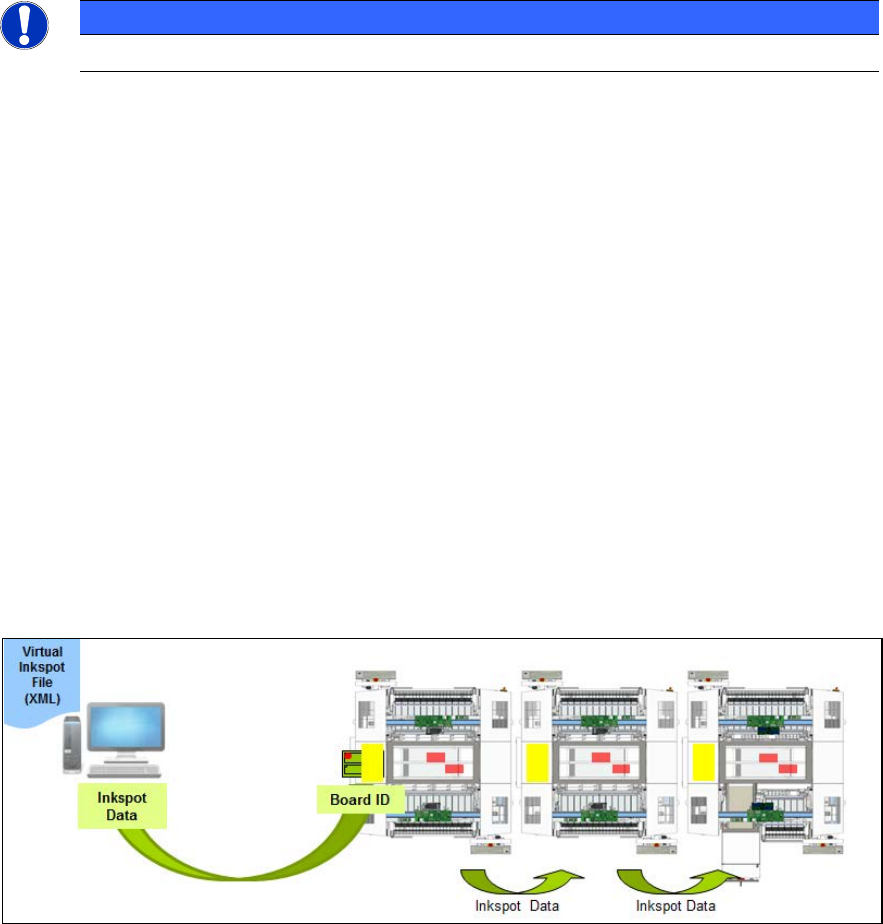
Figure 2-1: Workflow VIH with XML files
Workflow
– The 1
st
placement machine reads the PCB barcode with an internal or external barcode reader.
– The external system delivers inkspot data with the panels to be produced according to the
board ID.
– The inkspot data is transferred to the next placement machine(s) by the Whisper Down The
Line option after the board has been read.
Virtual Inkspot Handling for SSW 7xx / Operating Manual 10/2017 Edition
8
Requirements
– Barcode readers have to be available in the first machine of the line with WDTL enabled or
externally with WDTL enabled if the barcode is submitted via the BGK. Barcode reader and
assembly kit depend on the conveyor mode and machine type.
– Depending on where the barcode is located, a barcode reader is needed on the top or the
bottom of the board. In case of a double-sided board with a barcode only on one side, barcode
readers are required on both sides.
Virtual Inkspot Handling for SSW 7xx / Operating Manual 10/2017 Edition
9
2.3 VIH with MES and BGK from Station Software 707.0
An external Manufacturing Execution System (MES) provides inkspot information (directly or via
mapped inkspot files) that describes the panels to be produced per board identified by a barcode.
The inkspots must not be defined in the board description and the panels are assigned according
to the board and panel names defined in SIPLACE Pro. The Windows service BoardGateKeeper
(BGK) acts as a medium between the line hardware (scanner or transportation systems) and the
line software (such as 3rd party applications, MES). The BGK inquires the inkspot information from
the MES and behaves like a preceding station to the first station in the line. The PCB barcode and
the inkspot information are transmitted via WDTL by the BGK to the first station. Thereafter, the
inkspot information is transferred via WDTL from the first station to the succeeding stations.
The barcode can be read either with a barcode reader or with the PCB camera. Thus, the
placement machine only has to be equipped with a barcode reader at the bottom. Alternatively, the
barcode can be transmitted via the BGK to the machine by using an external barcode reader.
NOTICE
As of SIPLACE Pro 15.0 and station software 711.0:
External barcode readers can be used in front of any placement machine in the line
together with the BGK. The BGK can be defined as the whisper predecessor of any
station in the line. Please refer to the Board Gate Keeper User Manual,
item no.: [00900022-xx].
To ensure that the PCB camera can read the barcode a "TOP Level Barcode" has to be defined as
barcode fiducial. If necessary, panel barcodes can also be defined as barcode fiducials.
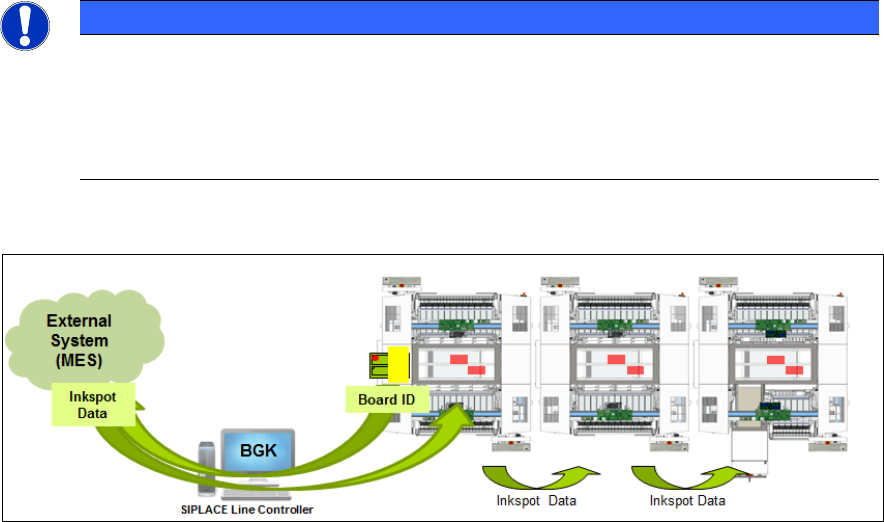
Figure 2-2: Workflow VIH with MES and BGK
Workflow
– The 1
st
placement machine reads the PCB barcode with a barcode reader or the PCB camera.
– The PCB barcode is sent to the MES via the OIB interface of the BGK.
– The MES returns inkspot data with the panels to be produced. The panel names are defined in
SIPLACE Pro.
– The inkspot data is transferred to the next placement machine(s) by the Whisper Down The
Line option.