00198152-02_OM_VirtualInkspotHandling_for_SSW7xx_EN.pdf - 第15页
Virtual Inkspot Handling for SSW 7xx / Operating Manual 10/2017 Edition 15 Orientation Matrix definiti on or inkspot file handling. MachineSpecif icActions CreateAction : Definition which machin e shall create the inkspo…
Virtual Inkspot Handling for SSW 7xx / Operating Manual 10/2017 Edition
14
4.2 Station Software Settings
The inkspot file has to be configured and activated at the first station in the line. A template file is
available under C:\Sirio\Type\, file name: WhisperServerConfigurationTemplate.xml. Machine-
specific settings are assigned by the machine identification (MID) of the single machine.
► Create a copy of the template file.
► Adapt the copied file according to your requirements.
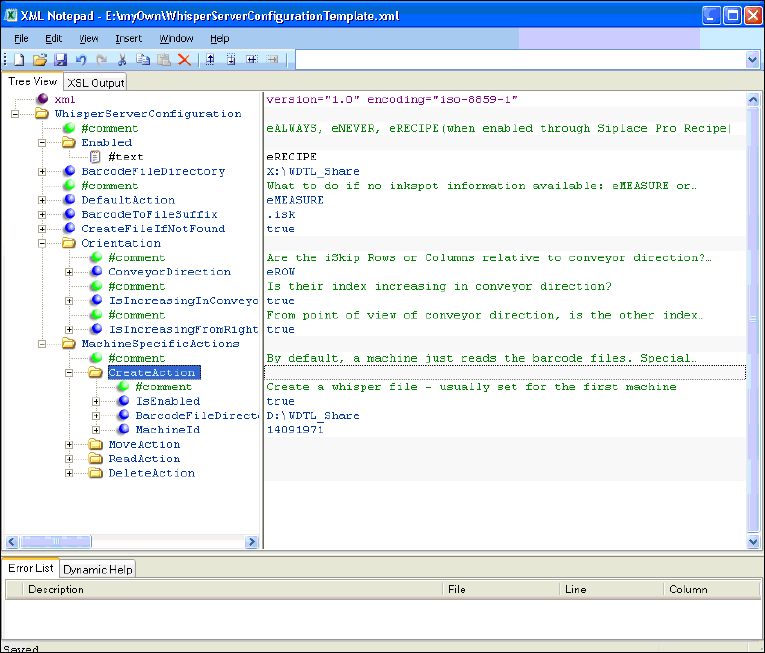
Figure 4-4: Configuring inkspot file
Configuration example
Enabled
eRECIPE means that WDTL is active if enabled in SIPLACE Pro as well (job-download).
BarcodeFileDirectory
Read and write access to the barcode files.
DefaultAction
Describes the behavior if the barcode files are not available or the barcode is not readable.
CreateFileIfNotFound
True if the file is created by the first station.
Virtual Inkspot Handling for SSW 7xx / Operating Manual 10/2017 Edition
15
Orientation
Matrix definition or inkspot file handling.
MachineSpecificActions
CreateAction: Definition which machine shall create the inkspot file (defined by the MID) and
where the file shall be saved.
MoveAction: Definition which station shall move the file to a special directory (e.g. for
traceability reasons). Usually, this is performed by the last machine.
ReadAction: Definition if the file shall be read from another shared drive.
DeleteAction: Definition if the file shall be deleted (usually performed by the last machine).
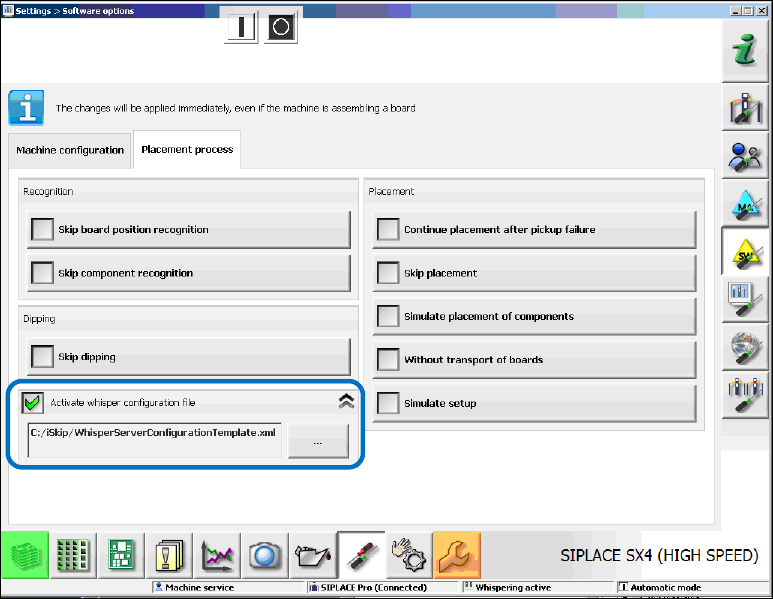
The inkspot file has to be activated in the Service view under Settings – Software options.
Figure 4-5: Activating whisper configuration file at the station
► Enable the Activate whisper configuration file option.
► Select the adapted inkspot file.

Virtual Inkspot Handling for SSW 7xx / Operating Manual 10/2017 Edition
16
5 Configuration with MES and BGK
NOTICE
VIH files provided by the customer are interpreted by software running at the Line
Computer using the "MES" interface provided by the ASM Board Gate Keeper.
No placement machine in the line has to process those VIH files.
5.1 SIPLACE VIH XML Wrapper
The SIPLACE VIH XML Wrapper is a converter whose purpose is to use customer-defined VIH
formats (please refer to chapter 6 File Description and Mapping). It works with internal and external
barcode readers as well.
The official interface for doing VIH is providing panel names to be omitted, as defined in SIPLACE
Pro, to the BoardGateKeeper via a Web interface. The SIPLACE VIH XML Wrapper can also
handle row and column positions by finding out the name of the corresponding panel in SIPLACE
Pro.
The SIPLACE VIH XML Wrapper runs as a Windows service in the background. There is a tray
icon displaying the status.
Restrictions
– The board must not have any placements directly on the board side. All placements must be
within some panel.
– If a panel is not described in the inkspot file, it is placed.
5.1.1 Installing the SIPLACE VIH XML Wrapper
Perform the following steps to install the SIPLACE VIH XML Wrapper:
► Run the Siplace.VihXmlWrapper.Setup.msi.