JX-300LED_SPE_EN01.pdf - 第35页
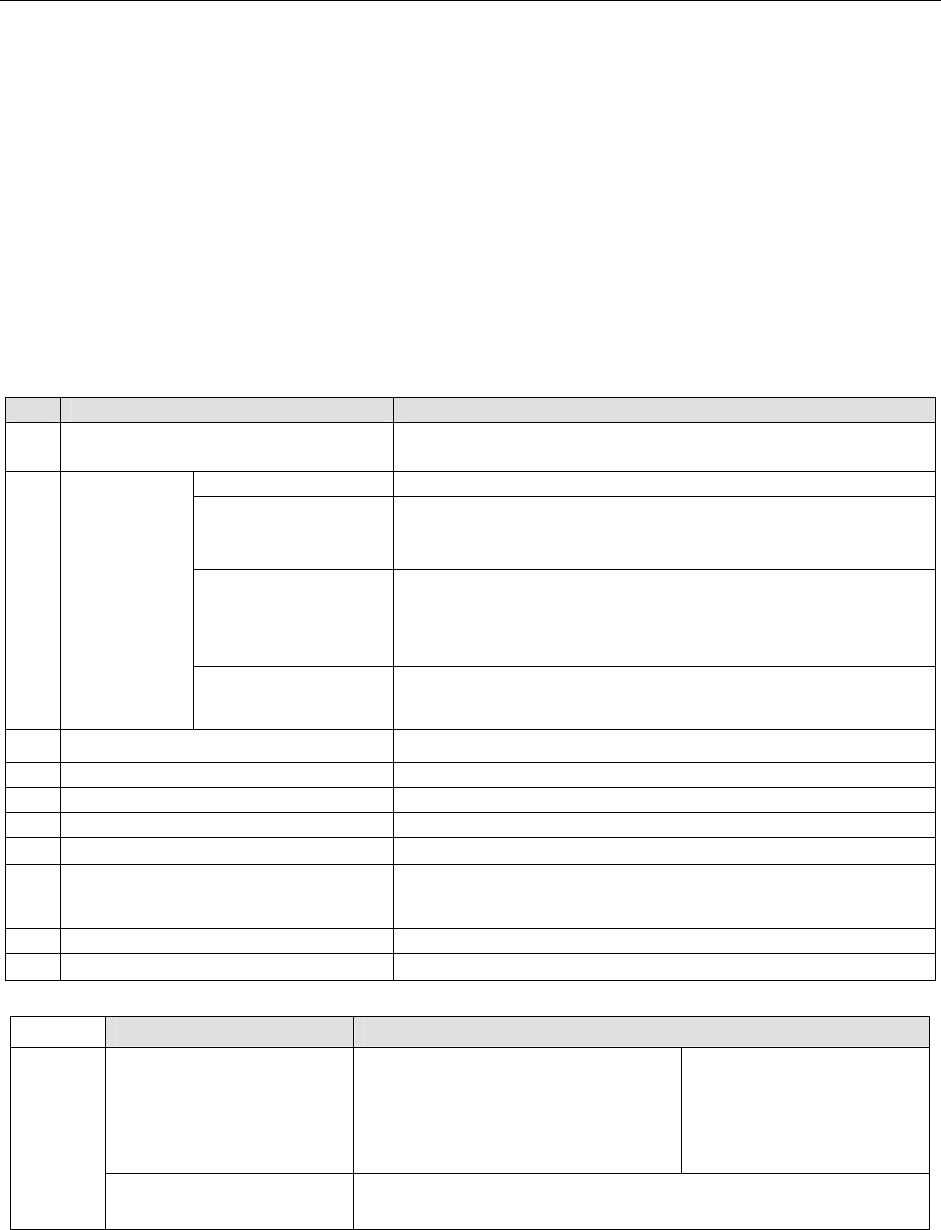
- 31 - 6.4.3 Options No. Descriptio n TR5SNR Option ( See Note 1 .) ① Ultra-slow mode ( See Note 2 ) To pull out/store the tray base to which components are supplie d, this function changes the motor/ cylinder speed to a…
- 30 -
6.4 TR Series
TR series device supplies the machine with a tray component.Only a TR5SNR is available.
To attach an MTS on the machine, you have to install a TR5S attachment unit on the rear
of the main unit.
6.4.1 Overview
(1) TR5SNR (MTS: Matrix Tray Server)
This matrix tray server is to be installed on the rear bank of the machine, and pulls out
all trays at a time so that the head of the machine can pick up components directly
from the trays. Since the head of the machine directly picks up components, even
irregularly-shaped components can be supplied easily.
6.4.2 Specifications
Specifications TR5SNR
1
Method for supplying the machine with
components
Pulling out of all trays at a time
Number of units 40
Minimum size of a tray
that can be supplied
(See Note 2)
Width: 150mm
Length: 90mm
Thickness: 5mm
Maximum size of a
tray that can be
supplied
(See Note 3,4)
Width: 340mm
Length: 230mm
Thickness: 23mm
2
Tray unit
(See Note 1)
Mass
500g or less/tray (total of the mass of a tray and that of a
component(s))
3 Component size
Maximum 33.5mm
4 Mass (kg) 217 (standard)
5 Occupied position 80
6 Pick-up pad -
7 Length of the conveyor rails -
8 Voltage of the power supply
The 3-phase power supply of the main unit is used as a
single-phase power supply. (200, 220, 240, 380, 400 or 415V AC)
9 Apparent power 800VA
10 Air consumption (ANR) 3 L/min
Note1: The following types of tray units (tray bases) on which trays can be set are provided:
Type of a tray unit Description
Tray unit (ST)
One-touch style of holder unit that
pushes down a tray with its spring
pressure.
A tray can be replaced with another
one easily.
When a tray whose material
is soft is used, replace the
screw-type holder with the
corresponding one. (Option)
TR5SNR
Tray unit (A)
Unit that fixes a tray with screws.
It is appropriate for a tray whose material is soft. (Option)
Note2: When you use a TR5SNR and an optional waffle tray holder, the minimum size is 50 mm (W) ×
50 mm (L).
Note3: The thickness is a dimension from the bottom of a tray to the top of the tray or a component,
which is higher.
Note4: When you use a tray whose thickness is more than 9 mm with a TR5SNR, put a tray every one
step.

- 31 -
6.4.3 Options
No. Description TR5SNR Option (
See Note 1
.)
①
Ultra-slow mode
(
See Note 2
)
To pull out/store the tray base to which components are supplied,
this function changes the motor/cylinder speed to a low speed in
order to prevent components from jumping out. This speed setting
is performed by a production program.
②
Stacker with
opening/closing cover
To prevent the tray base from jumping out when setting the tray
base in the stacker, this stacker is provided with a cover for fixing
the tray base without level difference of the tray base.
③
2-inch
waffle tray holder
Tray holder for setting a ☐50-mm waffle tray
Note1:The above functions of the TR series are factory-set options.
Note2:Ultra-slow mode is displayed as “Low speed 2” on the operation screen of the machine.

- 32 -
7. Control System
7.1 Control
7.1.1 Saving a program
The machine stores a production program onto the SSD in the main unit.
When you use a USB port, you can store it on an external storage device also.
7.1.2 Limit of a production program
- Maximum number of placement points per circuit :3,000 points
- Maximum number of circuits per PWB :1,200 for a matrix board
200 for a non-matrix board
- Maximum number of points per PWB :10,000 points
- Maximum number of component data records :Maximum number of component
types that can be attached on the
machine
- Maximum number of component pick-up records :Same as the above.
- Maximum number of registered marks :50 sets of area marks/component
positioning marks
- Number of necessary BOC marks :When the X-aixs of a board
Up to 610 mm : 1 set (2 to 3 marks)
From 610 to 1,200 mm : 2 sets (4 to 6 marks)
From 1,200 to 1,500 mm : 3 sets (6 to 9 marks)
7.2 Production Mode
The following three production modes are available during production:
PWB production
- Specifies the number of PWBs you plan to produce and produces PWBs actually.
Trial mode
- Performs a trial PWB production.
You can select the PWB pick-up position tracking function or PWB placement position
tracking function that is to be performed after placement.
Dry run mode
- Checks the PWB pick-up/placement process without using any component.
You can select the PWB pick-up/placement position tracking function.