00194591-01.pdf - 第13页
Installation Guide SIPLACE Setup Center 3 In stal latio n Edition 03/2005 EN 3.2 Installation of SIPLACE Se tup Center and Possible Setup Types 13 3.2.1.2 Step 2 → The Ins tallShield Wizard wil l gui de you throu gh the …
3 Installation Installation Guide SIPLACE Setup Center
3.2 Installation of SIPLACE Setup Center and Possible Setup Types Edition 03/2005 EN
12
3.2.1 Starting Installation - First Steps
These steps are identical for all setup types. The subsequent steps only differ once you have se-
lected the setup type you require.
3
Run through the following steps to start the installation and then refer to the relevant section for
your specific setup type.
3
3.2.1.1 Step 1
→Insert the SIPLACE Setup Center installation CD into the CD-ROM drive. The installation rou-
tine starts automatically.
→You can also start the installation by running the Setup.exe program located in the root direc-
tory on the installation CD.
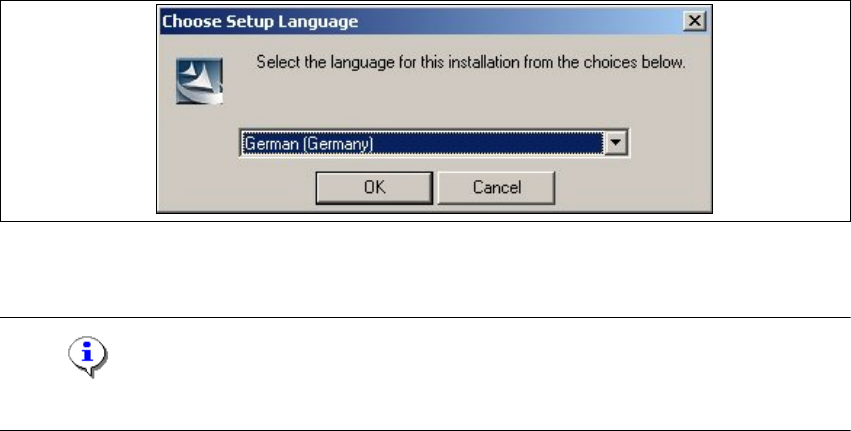
This starts the user-controlled installation of SIPLACE Setup Center; you are prompted to se-
lect the installation language.
3
3
Fig. 3.2 - 1 "Choose Setup Language" dialog box
→Select the language you want and click OK.
Note
This decision only relates to the language used during the installation routine! 3
Installation Guide SIPLACE Setup Center 3 Installation
Edition 03/2005 EN 3.2 Installation of SIPLACE Setup Center and Possible Setup Types
13
3.2.1.2 Step 2
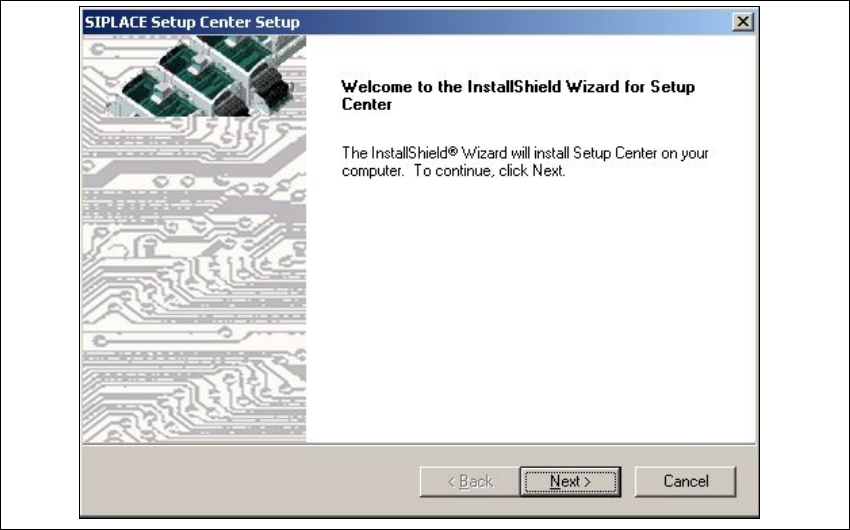
→The InstallShield Wizard will guide you through the program setup process.
3
Fig. 3.2 - 2 InstallShield Wizard box for SIPLACE Setup Center
→Click Next.
3 Installation Installation Guide SIPLACE Setup Center
3.2 Installation of SIPLACE Setup Center and Possible Setup Types Edition 03/2005 EN
14
3.2.1.3 Step 3
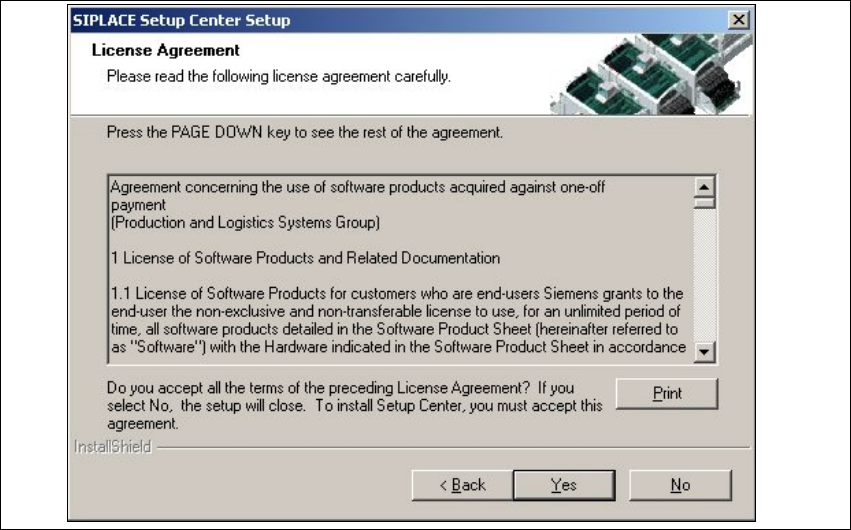
→Read the license agreement of Siemens AG relating to use of this software.
3
Fig. 3.2 - 3 "Software License Agreement" dialog box
→The installation routine continues if you click the Yes to accept the license agreement.
→Clicking No cancels the installation.
→Clicking Print will print the License Agreement on the default printer of the PC.