THDP-TMDP_Instructions-077054003.pdf - 第19页
Functional check Using accessories that are shipped with your probe and a source that supplies AC line voltage, perform the following procedure: W ARNING: T o reduce risk of shock or fire, ensure that the accessories are…

Bandwidth limit button and indicators
Press the BANDWIDTH LIMIT button to limit the probe bandwidth to 5 MHz. 5 MHz is close to the switching frequency of most switching
transistors (FET
s) in switch mode power supplies (SMPS).
The 5 MHz filter assists in the characterization and testing of power supplies in switch mode by removing all high frequency content, noise
and harmonics from the measurement.
Press the button again to return to the FULL position, which selects the full specified bandwidth of the probe.
Audible overrange on/off button and indicators
The audible overrange is an audible alarm that indicates when the measured signal exceeds the selected range. The alarm is enabled
when the probe is first powered on.
Press the AUDIBLE OVERRANGE button to light the OFF LED and disable the feature. T
o enable the alarm, press the button again to light
the ON LED.
Probe operating information
18
Functional check
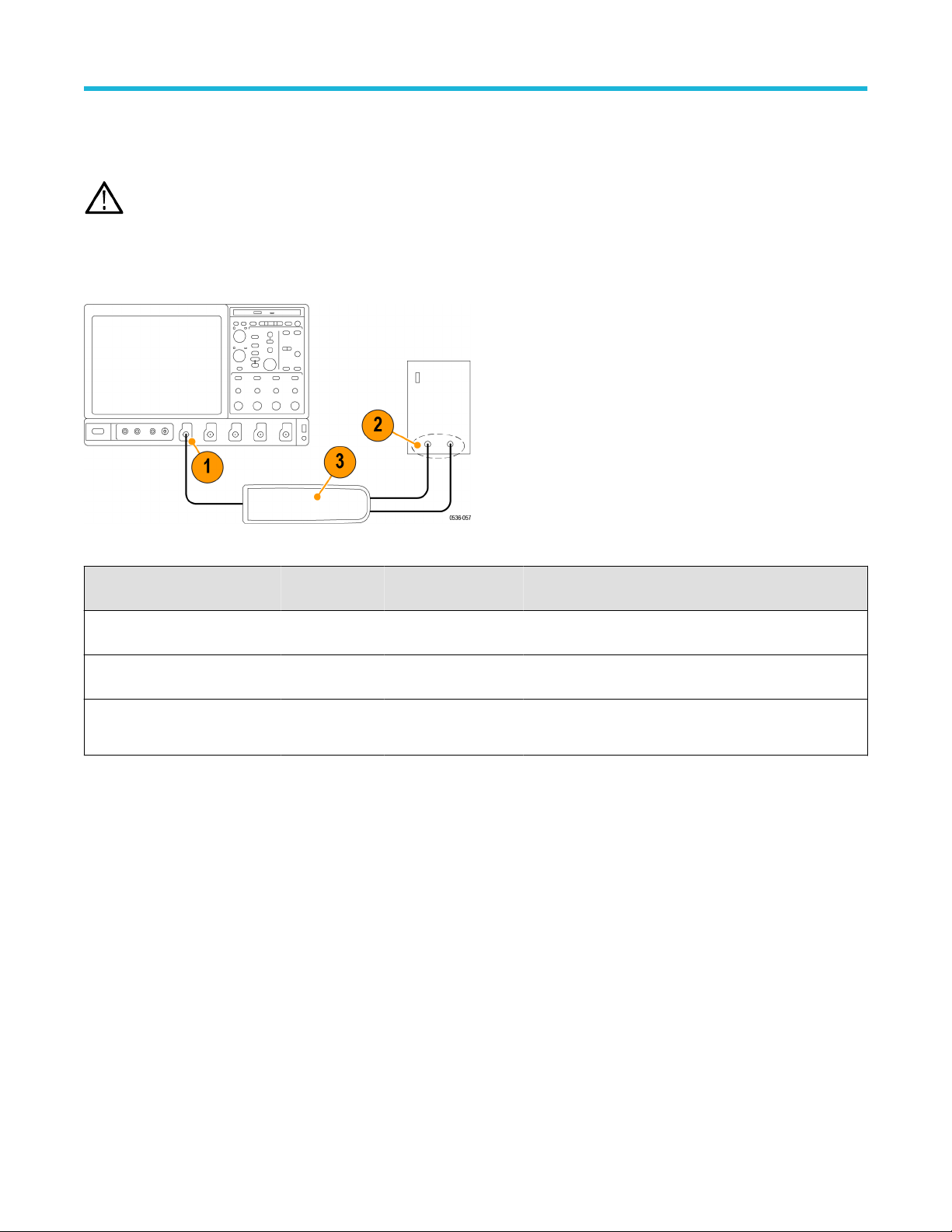
Using accessories that are shipped with your probe and a source that supplies AC line voltage, perform the following procedure:
WARNING: T
o reduce risk of shock or fire, ensure that the accessories are fully mated before you connect to voltage sources
above 42 Vpk.
1. Connect the output of the probe to the oscilloscope input channel.
2. Connect the probe inputs to the AC voltage source.
3. Connect the inputs, set the voltage range, and perform the check as each row of the following table indicates.
Figure 4: Functional check setup
Input 1 (+ or
–)
Input 2 (– or +) Mode Range setting Check
Hot Ground or
Neutral
Differential High (6000 V, 1500 V,
or 750 V)
Measurement instrument displays or indicates the line
voltage
Hot Ground or
Neutral
Differential Low (600 V, 150 V, or
75 V)
Measurement instrument displays or indicates the line
voltage. Overrange indicator lights if the input is ~20% over
Hot Hot (same
connection)
Common Mode High or low
No signal. If a DC offset voltage is present, zero the DC
offset using the AutoZero function.
Probe operating information
High Voltage Differential Probes THDP0100/0200 and TMDP0200 User Manual 19
AutoZero
The host instrument includes a feature that nulls the DC of
fset at the output of the probe. To initiate the AutoZero routine, do the following:
1. Allow the probe and oscilloscope to warm up for 20 minutes.
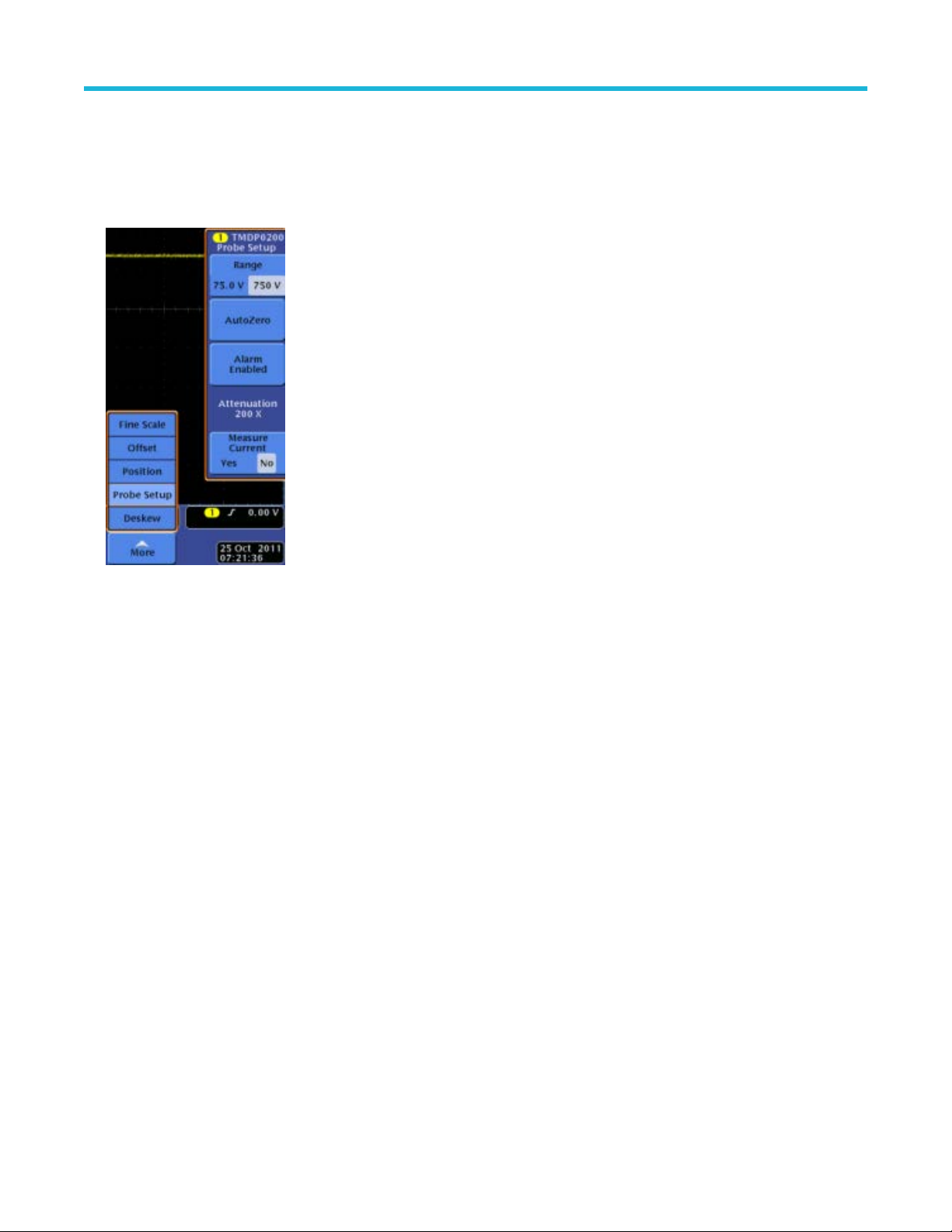
2. Press the MENU button on the probe to display the Probe Setup screen on the oscilloscope.
Figure 5: Probe Setup screen
3. Connect the probe inputs together with the hook tips.
4. Press AutoZero on the Probe Setup screen to initiate the AutoZero routine. If the AutoZero routine does not yield suf
ficient results, use
the DC Offset Zero procedure.
DC offset zero
The offset stored through this feature is retained in the probe between probe power cycles. To set the probe DC offset to 0 V, do the
following:
1. Set the oscilloscope offset for the probe channel to 0 volts.
2. Connect the probe inputs together with the hook tips.
3. Press and hold the probe BANDWIDTH LIMIT and RANGE buttons until the OVERRANGE LED on the probe begins flashing, and then
quickly release the buttons (about 2 seconds).
4. Use the probe BANDWIDTH LIMIT or RANGE buttons to set the probe offset voltage to 0 V, as displayed on the oscilloscope. The
BANDWIDTH LIMIT button decreases the offset voltage and the RANGE button increases it.
5. Press the AUDIBLE OVERRANGE button on the probe to store the value. The OVERRANGE LED on the probe stops flashing to
confirm that the value has been stored.
6. Repeat steps 3 on page 20 through 5 on page 20 for the other range setting on the probe. If you cannot null the offset with these steps,
then use the DC Offset Zero Reset procedure that follows.
Probe operating information
20