4OM-1011-002.pdf - 第153页
0305-001 Tg0860-PM-MM 6.10 PICK-UP LOCA TION (T APE·VIB. STICK) Display • The offset teaching operation is performed on the pick-up location of the components to be supplied from the tape and vibratory stick feeders. Whe…

0305-001 Tg0860-PM-MM
*1 [TAPE・VIB. STICK] Key
When this key is pressed, the “PICK-UP LOCATION (TAPE・VIB.
STICK)” display appears on the screen.
Perform the offset teaching operation on the following parameters through
manual alignment operation.
• PICK-UP LOCATION ADJUSTMENT X, Y in the component library
data
• FEEDER (B) OFFSET X and Y
• OFFSET X, Y in the component data
*2 [TRAY] Key (Option)
When this key is pressed, the “PICK-UP LOCATION (TRAY)” display
appears on the screen.
Note: This display cannot be opened while the pallet is being drawn out.
Perform the offset teaching operation on the following parameters through
manual alignment operation.
• PITCH X (mm), Y (mm) and SIDE LG. X (mm), Y (mm) in the compo-
nent library data
• FEEDER (B) OFFSET X and Y
• OFFSET X, Y and PICK-UP LOCATION ADJUSTMENT X, Y
3-101
6.9 PICK-UP LOCATION Display
0305-001 Tg0860-PM-MM
6.10 PICK-UP LOCATION (TAPE·VIB. STICK) Display
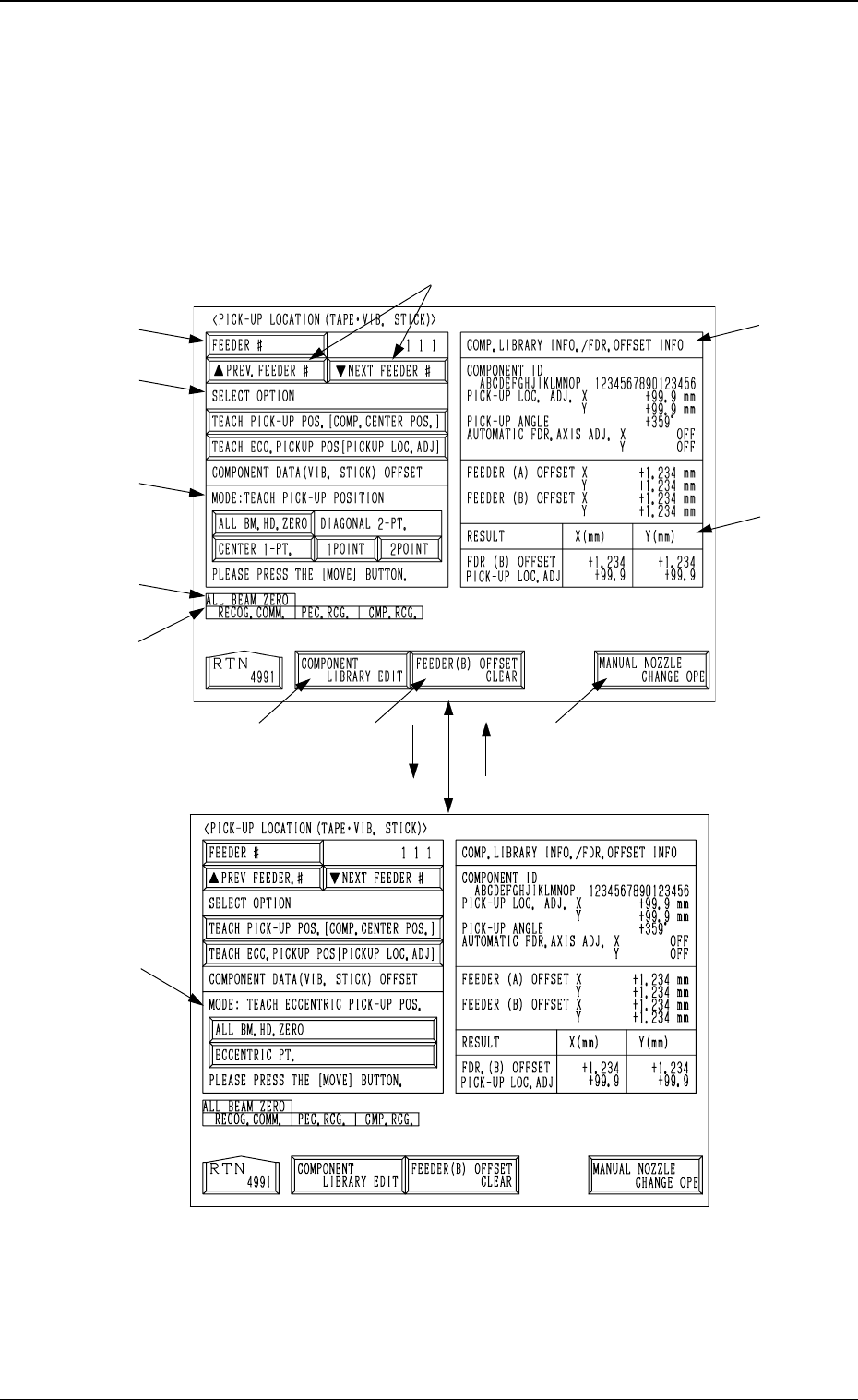
• The offset teaching operation is performed on the pick-up location of the
components to be supplied from the tape and vibratory stick feeders.
When the [TAPE・VIB. STICK] key is pressed at the “PICK-UP LOCA-
TION” display, the following display appears on the screen.
*7
*11
*2
*1
*3
*4
*12
*8 *9
*10
*6
*5
[TEACH ECC. PICKUP POS
[PICKUP LOC. ADJ]] Key
[TEACH PICK-UP POS. [COMP.
CENTER POS.]] Key
3-102
6.10 PICK-UP LOCATION (TAPE·VIB. STICK) Display
Fig. 4C172
Fig. 4C173
0305-001 Tg0860-PM-MM
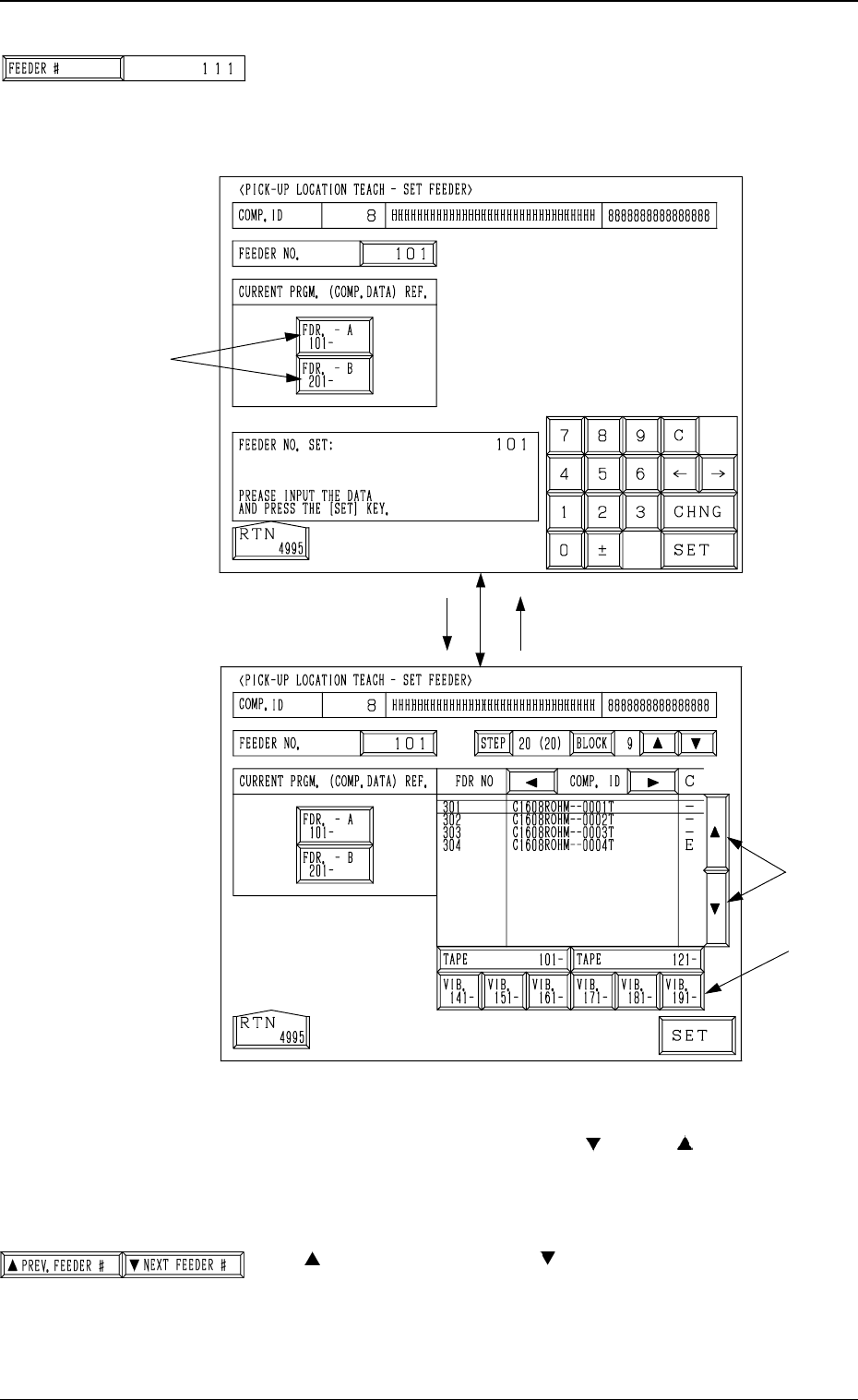
*1 [FEEDER #] Key
When this key is pressed, the “PICK-UP LOCATION
TEACH - SET FEEDER” display (Fig. 4C175) appears on
the screen, enabling the setting of the feeder No. whose
pick-up location must be taught.
Procedure for Feeder Selection
(1) Select one of the keys A to specify the feeder base.
(2) Select the feeder No., using the [ ] or the [ ] key B.
To teach the data related to the vibratory stick feeder,
select one of the keys C to specify the feeder carriage.
(3) Press the [SET] key.
*2 [ PREV. FEEDER #] and [ NEXT FEEDER #] Keys
The feeder Nos. registered in the component data of the
current program are scrolled up or down.
This function automatically skips the feeder Nos. which are
not specified in the current program or the feeder Nos. for
which no components are set in the component data.
[FDR. -A 101- ]
B
C
[101]
Fig. 4C175
A
Fig. 4C176
3-103
6.10 PICK-UP LOCATION (TAPE·VIB. STICK) Display
Fig. 4C174
Fig. 4C177