4OM-1011-002.pdf - 第245页
0305-001 Tg0860-PM-MM 9.4 RECOGNITION LIGHTING Display 3-194 9.4 RECOGNITION LIGHTING Display When the [RECOGNITION LIGHTING] key is pressed at the “UNIT AD- JUSTMENT” display , the following display appears on the scree…

0305-001 Tg0860-PM-MM
[L-CONVEYOR (−) HI-SPEED] Key
When this key is selected and the [MOVE] button is pressed, the L con-
veyor moves backward at high speed.
[L-CONVEYOR (−) LOW-SPEED] Key
When this key is selected and the [MOVE] button is pressed, the L con-
veyor moves backward at low speed.
[P-CONVEYOR (+) HI-SPEED] Key
When this key is selected and the [MOVE] button is pressed, the P con-
veyor moves forward at high speed.
[P-CONVEYOR (+) LOW-SPEED] Key
When this key is selected and the [MOVE] button is pressed, the P con-
veyor moves forward at low speed.
[P-CONVEYOR (−) HI-SPEED] Key
When this key is selected and the [MOVE] button is pressed, the P con-
veyor moves backward at high speed.
[P-CONVEYOR (−) LOW-SPEED] Key
When this key is selected and the [MOVE] button is pressed, the P con-
veyor moves backward at low speed.
[R-CONVEYOR (+) HI-SPEED] Key
When this key is selected and the [MOVE] button is pressed, the R con-
veyor moves forward at high speed.
[R-CONVEYOR (+) LOW-SPEED] Key
When this key is selected and the [MOVE] button is pressed, the R con-
veyor moves forward at low speed.
[R-CONVEYOR (−) HI-SPEED] Key
When this key is selected and the [MOVE] button is pressed, the R con-
veyor moves backward at high speed.
[R-CONVEYOR (−) LOW-SPEED] Key
When this key is selected and the [MOVE] button is pressed, the R con-
veyor moves backward at low speed.
9.3 CONVEYOR ADJUSTMENT Display
3-193
0305-001 Tg0860-PM-MM
9.4 RECOGNITION LIGHTING Display
3-194
9.4 RECOGNITION LIGHTING Display
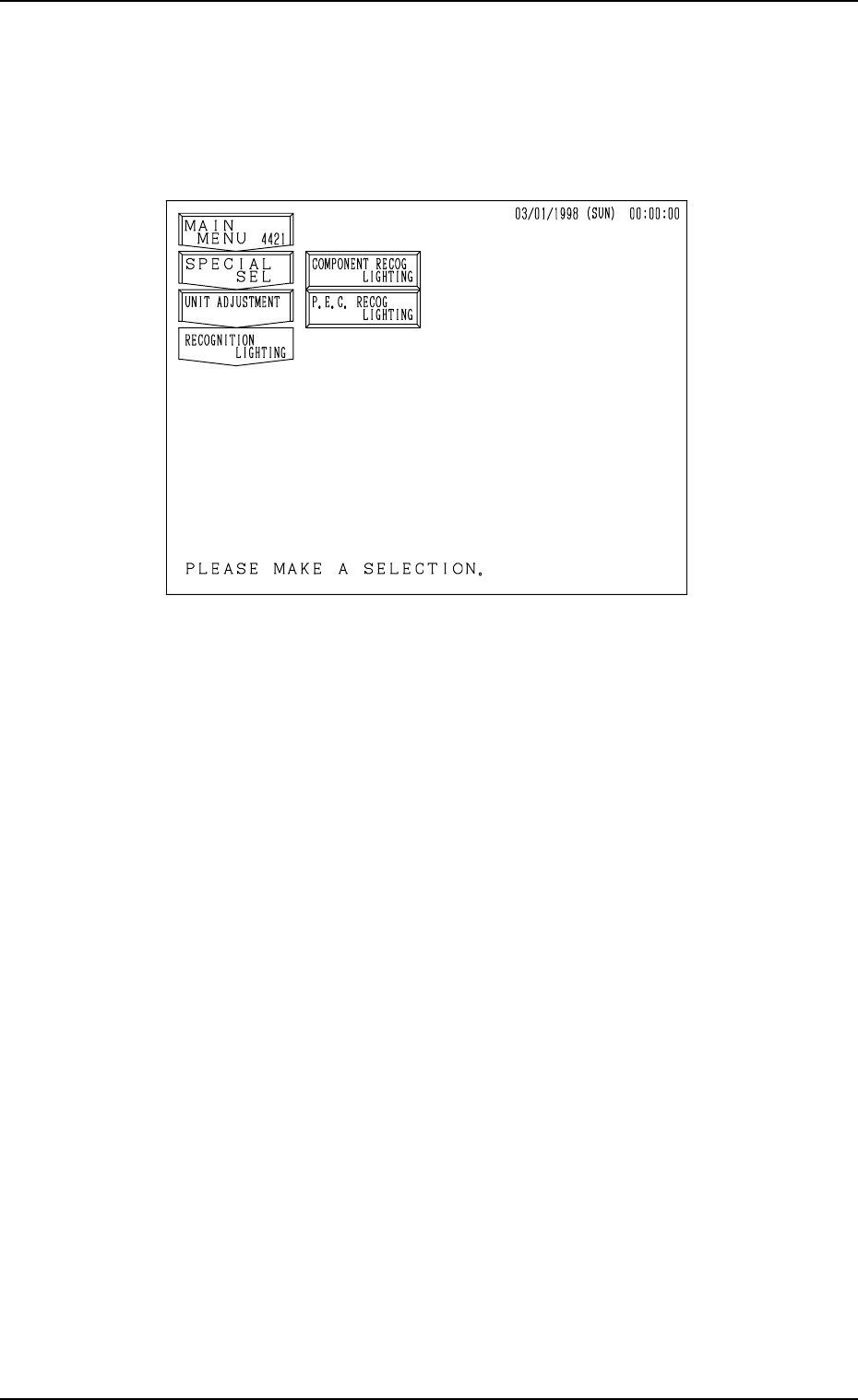
When the [RECOGNITION LIGHTING] key is pressed at the “UNIT AD-
JUSTMENT” display, the following display appears on the screen.
[COMPONENT RECOG LIGHTING] Key
When this key is pressed, the “COMPONENT RECOG LIGHTING” dis-
play appears on the screen, enabling the illumination check operations in
each individual blocks for component recognition lighting.
[P.E.C. RECOG LIGHTING] Key
When this key is pressed, the “P.E.C. RECOG LIGHTING” display ap-
pears on the screen, enabling the illumination check operations for P.E.C.
recognition lighting.
Fig. 4C343
0305-001 Tg0860-PM-MM
9.4 RECOGNITION LIGHTING Display
3-195
9.4.1 COMPONENT RECOG LIGHTING Display
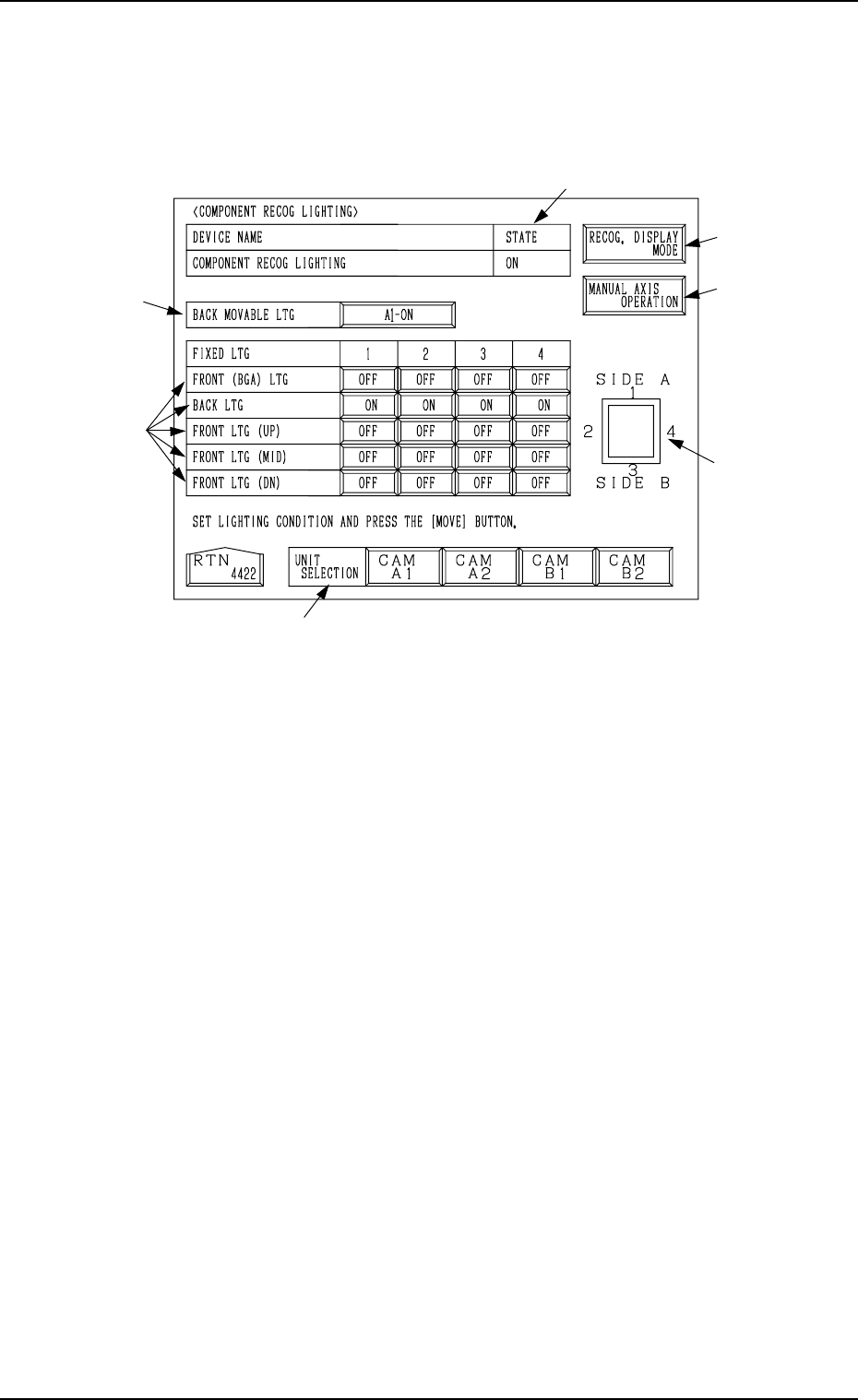
When the [COMPONENT RECOG LIGHTING] key is pressed at the “REC-
OGNITION LIGHTING” display, the following display appears on the screen.
When the [MOVE] button is pressed after the following items *1, *2, and *3
are set, the lamps for component recognition can be turned ON.
*1 UNIT SELECTION
Select a unit for which the lamps for component recognition lighting must
be turned ON.
The [CAM A1], the [CAM A2], the [CAM B1], or the [CAM B2] key can
be selected.
*2 BACK MOVABLE LTG
Every time the key beside this label is pressed, the expression on the key
changes in the order “OFF” → “A1-ON” → “A2-ON” → “B1-ON” →
“B2-ON”.
*3 FRONT (BGA) LTG, BACK LTG, FRONT LTG (UP), FRONT LTG
(MID), and FRONT LTG (DN)
Press the keys corresponding to the directions 1, 2, 3, and 4 of each unit to
set “OFF” or “ON” individually.
Indicated in *4 are the directions which correspond to the labels “1”, “2”,
“3”, and “4”.
*4 Shown is the positional relation for component recognition lighting.
*5 STATE
Shown is the state "ON" or "OFF" of the lamps for component recognition
lighting.
*2
*3
*1
*6
*4
*7
*5
Fig. 4C344