4OM-1011-002.pdf - 第63页
0305-001 Tg0860-PM-MM Third Page T OT AL HANDLING ERR./TOT AL COMPONENTS Shown are the total number of pick-up errors, the total num- ber of components to be picked up, and the percentage of picked components per total n…

0305-001 Tg0860-PM-MM
P.C.B. WAIT
INPUT WAIT
Shown is the time measured when the machine is
completely in the waiting mode (the machine is wait-
ing for a P.C.B. to be loaded from the input machine).
OUTPUT WAIT
Shown is the time measured when the machine is
completely in the waiting mode (the machine is wait-
ing for a P.C.B. to be unloaded to the output ma-
chine).
OTHERS (Automatic Operation)
Show is the time required for bad mark detection
(option), P.C.B. transfer, pick-up actions before the
first component placement, etc.
STOP TIME
Shown is the period of time during which component place-
ment operation is interrupted for component replenishment,
etc.
ERROR STOP
ERROR ALARM
Shown is the period of time during which an alarm
(light tower ON) is issued.
RECOVERY
Shown is the time between error cancellation and re-
start of machine operation.
FEEDER RELOAD
Shown is the period of time during which components
are supplied.
OTHERS (STOP)
Shown is the period of time during which the machine
performs the set-up, program change, idling operations,
etc.
SET UP TIME
Shown is the period of time during which the [OPERA-
TION/SET UP] switch is set to the “SET UP” side.
TEST MODE TIME
Shown is the period of time during which test run is per-
formed according to the test mode parameters.
3-11
3.1 PATTERN PROGRAM MANAGEMENT DATA Display
0305-001 Tg0860-PM-MM
Third Page
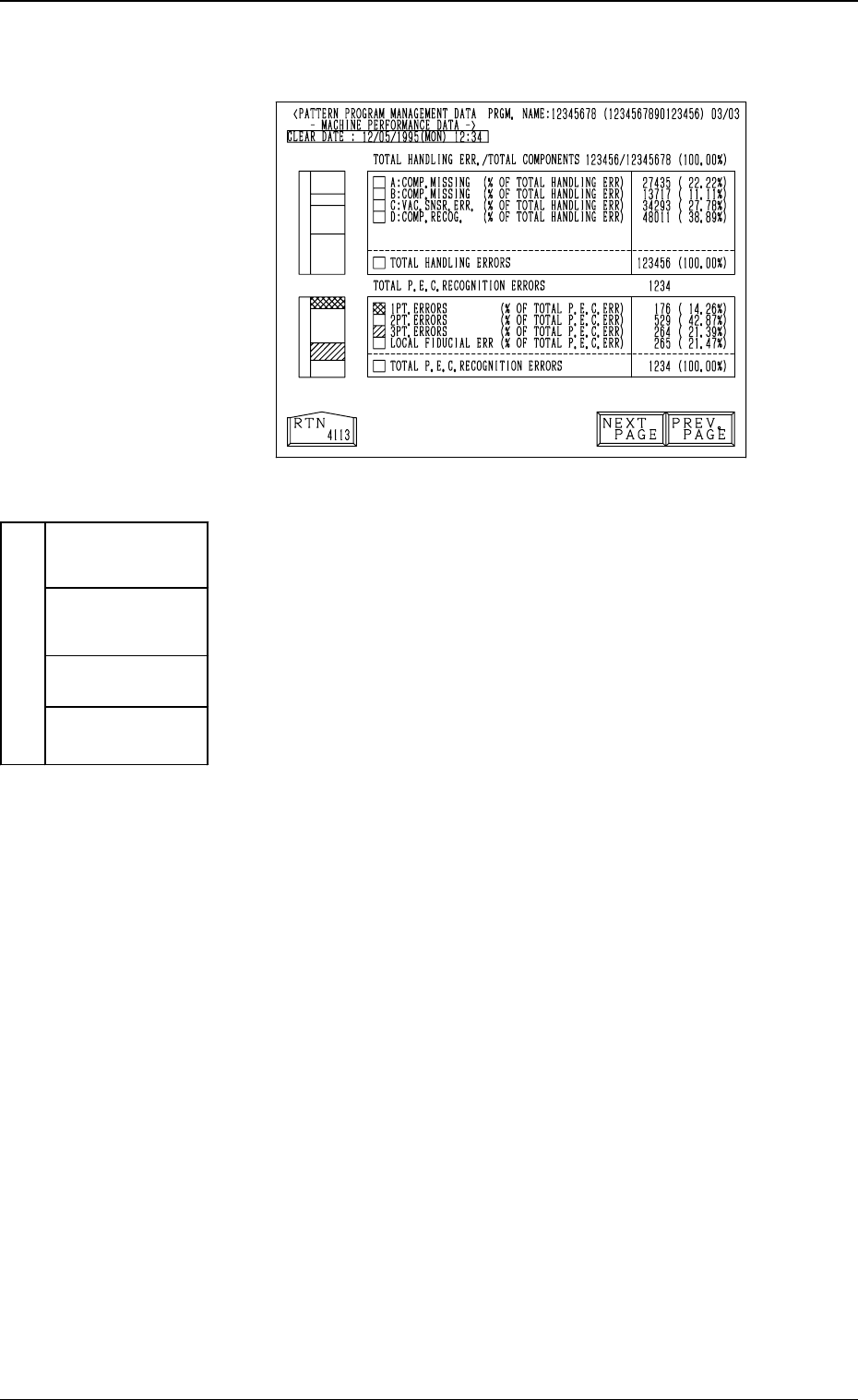
TOTAL HANDLING ERR./TOTAL COMPONENTS
Shown are the total number of pick-up errors, the total num-
ber of components to be picked up, and the percentage of
picked components per total number of pick-up errors.
COMP. MISSING (% OF TOTAL HANDLING ERR)
Shown are the number of component missing errors
detected by the vacuum sensor and the percentage of
component missing errors per total number of pick-
up errors.
COMP. MISSING (% OF TOTAL HANDLING ERR)
Shown are the number of component missing errors
detected in the recognition process and the percent-
age of component missing errors per total number of
pick-up errors.
VAC. SNSR. ERR. (% OF TOTAL HANDLING ERR)
Shown are the number of component pick-up errors
detected by the vacuum sensor (errors not detected
through the component recognition) and the percent-
age of the component pick-up errors per total number
of pick-up errors.
COMP. RECOG. (% OF TOTAL HANDLING ERR)
Shown are the number of errors detected in the rec-
ognition process and the percentage of errors per to-
tal number of pick-up errors.
Each parameter allocated to the
total handling error area is classi-
fied by colors and charted by col-
umns.
Data is updated every 5 seconds.
COMP. MISSING
(Sensor) (Sky Blue)
COMP. MISSING
(Recognition)
(Yellow)
VAC. SNSR. ERR.
(Green)
TOTAL HANDLING ERR.
(Magenta)
COMP. RECOG.
(Dark Gray)
3.1 PATTERN PROGRAM MANAGEMENT DATA Display
Fig. 4C13
3-12
Fig. 4C14
0305-001 Tg0860-PM-MM
TOTAL P.E.C. RECOGNITION ERRORS
Shown is the total number of errors detected by the P.E.C.
recognition function.
The number of errors detected by the global P.E.C. recog-
nition function and the number of errors detected by the
B.B.R. recognition function are added and displayed.
1PT. ERRORS (% OF TOTAL P.E.C. ERR)
Shown are the total number of errors detected on the
first fiducial mark and the percentage of the detected
errors per total number of all errors detected by the
P.E.C. recognition function.
2PT. ERRORS (% OF TOTAL P.E.C. ERR)
Shown are the total number of errors detected on the
second fiducial mark and the percentage of the de-
tected errors per total number of all errors detected
by the P.E.C. recognition function.
3PT. ERRORS (% OF TOTAL P.E.C. ERR)
Shown are the total number of errors detected on the
third fiducial mark and the percentage of the detected
errors per total number of all errors detected by the
P.E.C. recognition function.
LOCAL FIDUCIAL ERR (% OF TOTAL P.E.C. ERR)
Shown are the total number of recognition errors in
each individual components and the percentage of the
detected errors per total number of all errors detected
by the P.E.C. recognition function.
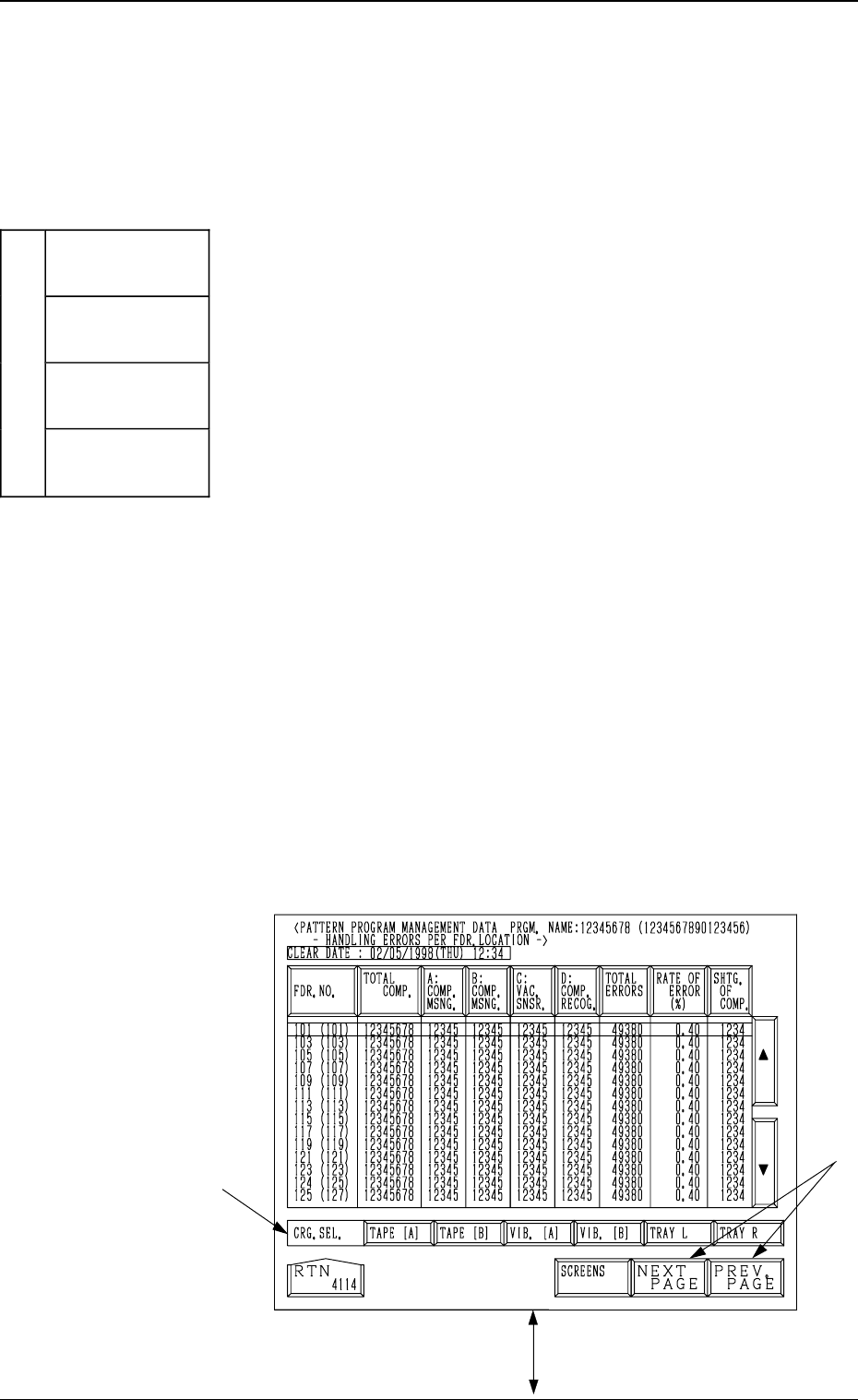
(3) Handling Errors Per Feeder Location
When the pattern program to be checked is selected by
pressing the corresponding “NAMES (XX/XX)” key and
the [HANDLING ERR. PER FDR. LCTN.] key is pressed,
the following display appears on the screen.
Every time the [SCREENS] key is pressed, another dis-
play appears on the screen.
Note: The -marked items are optional.
Fig. 4C16
*A
[SCREENS] Key
3.1 PATTERN PROGRAM MANAGEMENT DATA Display
3-13
Each parameter allocated to the
total P.E.C. recognition error area
is classified by colors and charted
by columns.
(Data is updated every 5 seconds.)
1PT. ERRORS
(Blue)
2PT. ERRORS
(Light Green)
3PT. ERRORS
(Blue)
TOTAL P.E.C. RECOGNITION
ERRORS (Light Red)
LOCAL
FIDUCIAL ERR
(Light Gray)
Fig. 4C15