OPERATING MANAUAL(FOR ENGINEERS).pdf - 第126页
Page 5-30 3Y3C-E-EMD05-A01-00
Page 5-29
TEACHING
5
Teaching the Mount Position
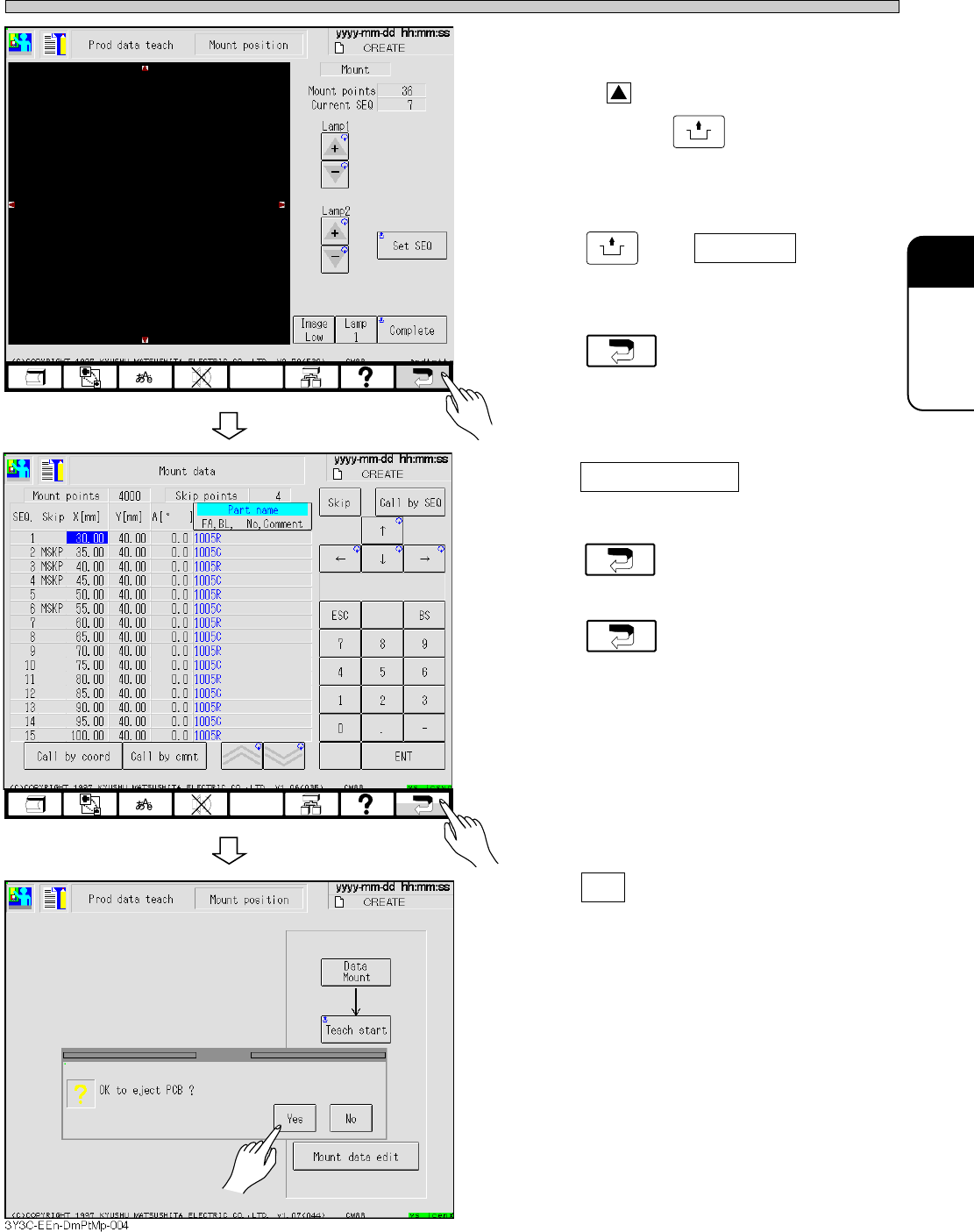
12. When editing is needed,
after checking SEQ No., press red
triangle, around the recognition
screen holding
UNLOCK
to move the
center of pattern to the center of
screen.
13. Press
UNLOCK
and Complete .
• Mount coordinates are renewed.
14. Press and return to the
screen for procedure 6.
15. Press Mount data edit on the screen
for procedure 6 again, and check that
the coordinates are renewed, then
press .
16. Press again.
17. Press Yes .
• Board is carried out and teaching is finished.
• Production data teaching screen appears.
3Y3C-E-EMD05-A01-02
4G3C-EEn-DmPtMp-001
3Y3C-EEn-DmMd-002

Page 5-30
3Y3C-E-EMD05-A01-00
Page 6-1
3Y3C-E-EMD06-A01-00
Chapter 6
FILE OPERATION
FILE OPERATION
File Operation
This section describes the operations related to PT100 and floppy disk such as
saving the data created and loading the data saved in the disk to this machine.
The highlighted part in selecting device means the device selected now.
• PT100 ----------------------- Object device is changed to PT100.
• Floppy Disk --------------- Object device is changed to floppy disk.
Each function to be used in file operation is divided to main operation and
sub operation.
• Main operation
Loading and saving data
• Sub operation
Deleting data, Initializing the floppy disk, loading coordinate data and
recognition data
∗ Refer to “PT100-G Programing manual” attached to PT100-G, for sending data from
PT100 to this machine.