00197467-01_SM_DLM3-4_Kunde_en.pdf - 第84页
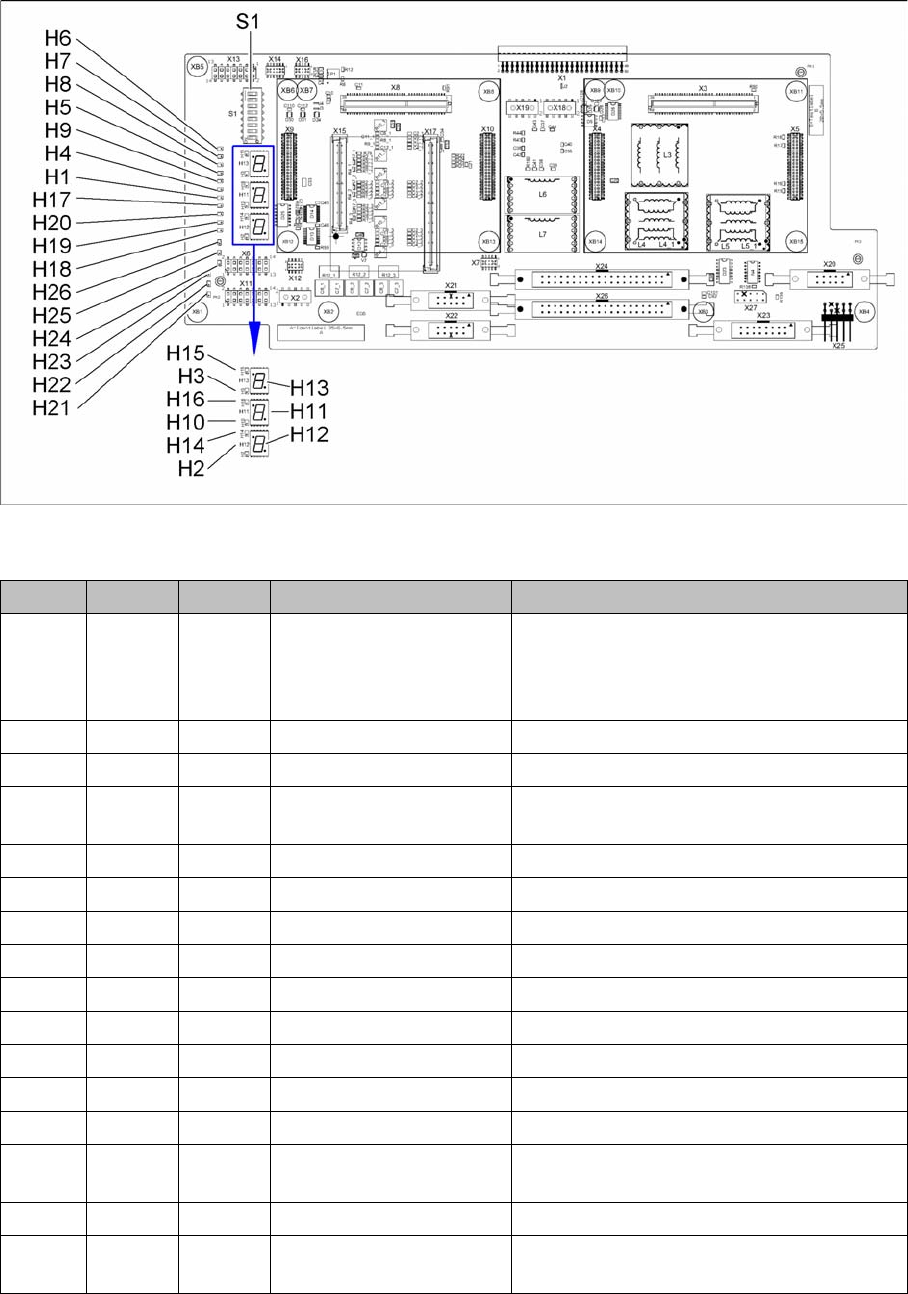
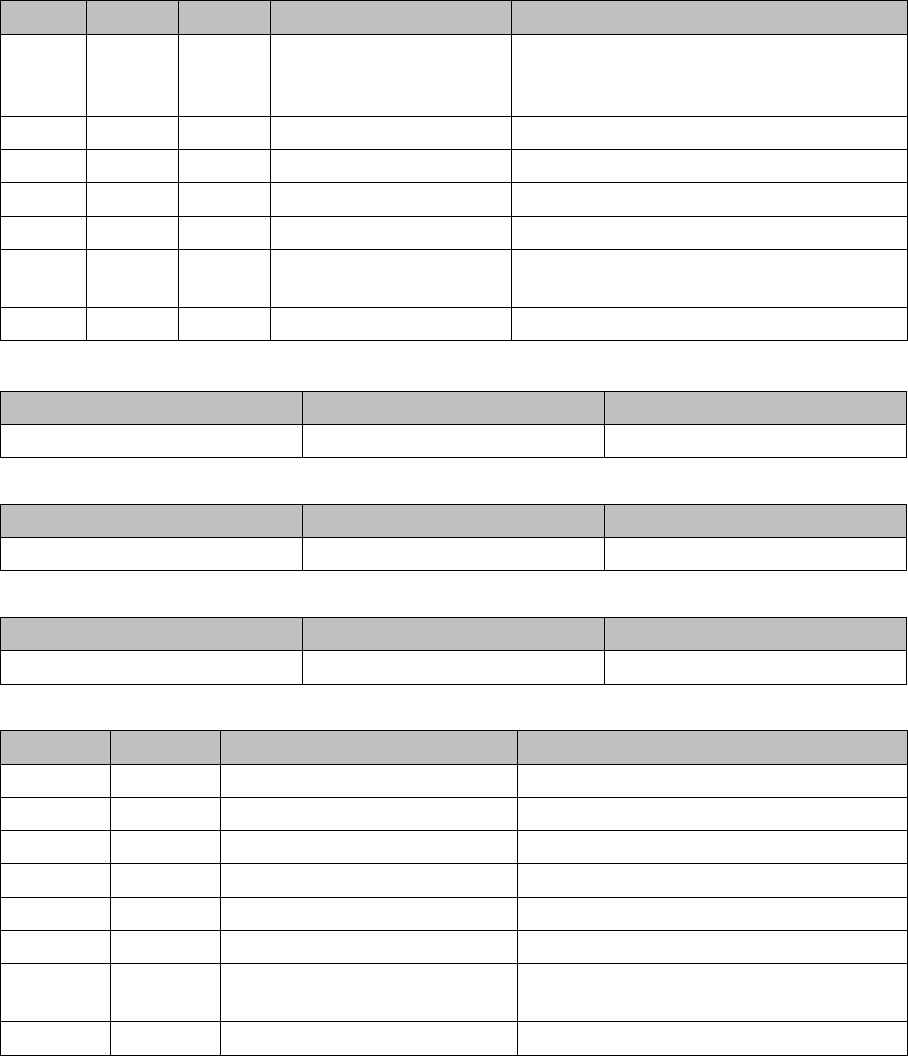
Description of the Circuit Boards Base adapter DLM [03081413-xx] 84 Service Manual SIPLACE Placement Heads DLM3/DLM4 7-segment displa y H11 [03081413-03] 7-segment displa y H12 [03081413-03] 7-segment displa y H13 [03081…
Description of the Circuit Boards
Base adapter DLM [03081413-xx]
Service Manual SIPLACE Placement Heads DLM3/DLM4 83
6
6 Description of the Circuit Boards
Description of the Circuit Boards
6.1
6.1 Base adapter DLM [03081413-xx]
Base adapter DLM [03081413-xx]
03081413-03
LED [03081413-03]
LED Color Status Signal name Description
H1 RD ON POWERFAIL_LOCAL_N „LOC“-PowerFail board:
ON, when 1.5VDC, 3.3VDC, 5VDC and
15VDC are outside the permissible toler
-
ance
H2 RD ON V_DISP_XC167 XC167 error
H3 RD ON V_DISP_HCU1 HCU1 error
H4 RD ON FPGA_TEST_5 24VDC PowerFail:
when voltage < 23VDC
H5 RD ON FPGA_TEST_1 15VDC PowerFail
H6 RD ON FPGA_TEST_6 1.5VDC PowerFail
H7 RD ON FPGA_TEST_2 3.3VDC PowerFail
H8 RD ON FPGA_TEST_4 5VDC PowerFail
H9 RD ON FPGA_TEST_3 Not used
H10 RD ON V_DISP_HCU2 HCU2 error
H14 GN ON V_DISP_XC167 XC167 OK
H15 GN ON F_DISP_HCU1 HCU1 OK
H16 GN ON V_DISP_HCU2 HCU2 OK
H17 RD ON +V-LS Overcurrent display or switching off the light
barriers on the stepping motor
H18 RD ON DZS ERR Overcurrent, „Swivel in“ stepping motor
H19 RD ON ZHS ERR Overcurrent, "Pick-up/placement circuit"
stepping motor
Description of the Circuit Boards
Base adapter DLM [03081413-xx]
84 Service Manual SIPLACE Placement Heads DLM3/DLM4
7-segment display H11 [03081413-03]
7-segment display H12 [03081413-03]
7-segment display H13 [03081413-03]
Dip switch S1 [03081413-03]
H20 RD - BAS ERR Not used:
Overcurrent, "Placement/pick-up station"
stepping motor
H21 GN - - Not used
H22 GN ON Z D „Z axis bottom“ light barrier activated
H23 GN ON Z-U „Z axis top“ light barrier activated
H24 GN ON DZS INT „Swivel in DP drive“ stepping motor
H25 GN ON ZHS INT "Pick-up/placement circuit" stepping motor,
light barrier activated
H26 GN ON BAS_INT Stepping motor for "Reject" valve drive
Display Status Description
Decimal point Flashes HCU2 OK
Display Status Description
Decimal point Flashes X167 OK
Display Status Description
Decimal point Flashes HCU1 OK
Switch Status Signal name Description
S1.1 OFF HCU_CM_FPGA_IO_2 „S0“ (gantry coding), not used
S1.2 OFF HCU_CM_FPGA_IO_3 „S1“ (gantry coding), not used
S1.3 OFF HCU1_RESET_N „R_HCU1“, ON: Reset HCU1
S1.4 OFF HCU2_RESET_N „R_HCU2“, ON: Reset HCU2
S1.5 OFF RSINS „R_X167“, ON: Reset TQ module
S1.6 OFF HCU_COM_BOOT_N „B_HCUX“, ON: set HCU to boot mode
S1.7 OFF BOOTSTR „B_XC167“, ON: set TQ module to boot
mode
S1.8 - - „FREE“, not used
LED Color Status Signal name Description
Description of the Circuit Boards
SP_12 Digital Intermediate Distributor [00330648-05]
Service Manual SIPLACE Placement Heads DLM3/DLM4 85
6.2
6.2 SP_12 Digital Intermediate Distributor [00330648-05]
SP_12 Digital Intermediate Distributor [00330648-05]
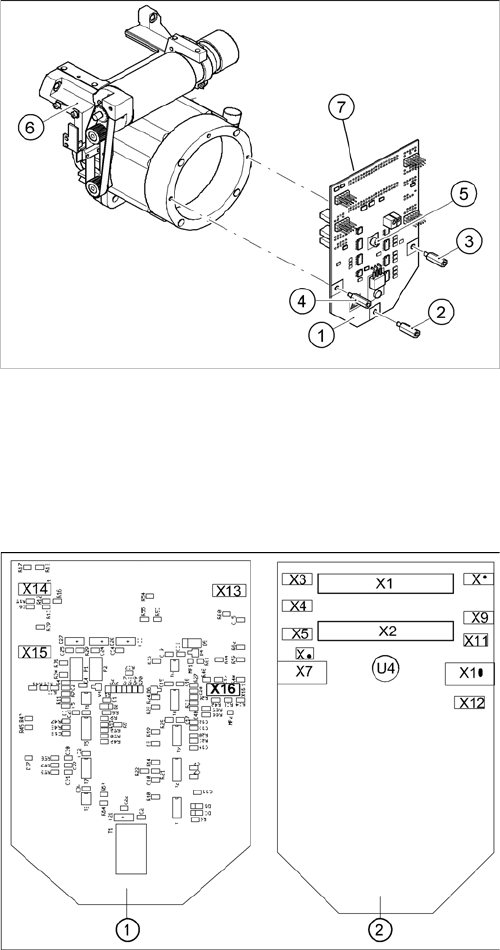
The intermediate distributor (1) is fixed to the front part (6) with four spacer bolts (items 2, 3, 4 and 5).
The cover of the intermediate distributor is fixed with push buttons.
Two 40-pin flat ribbon cables run from plug X1 and X2 on the intermediate distributor to socket X14 / X13
on the head board.
Intermediate distributor
1. Intermediate distributor
2. Spacer bolt M3x10
3. Spacer bolt M3x10
4. Spacer bolt M3x10
5. Spacer bolt M3x10
6. Front section of C&P
7. Connectors X1 and X2 (on the rear side)
Position of the sockets
1. Front of the intermediate distributor
2. Back of the intermediate distributor
U4 = pressure sensor