NXTII spec.pdf - 第43页
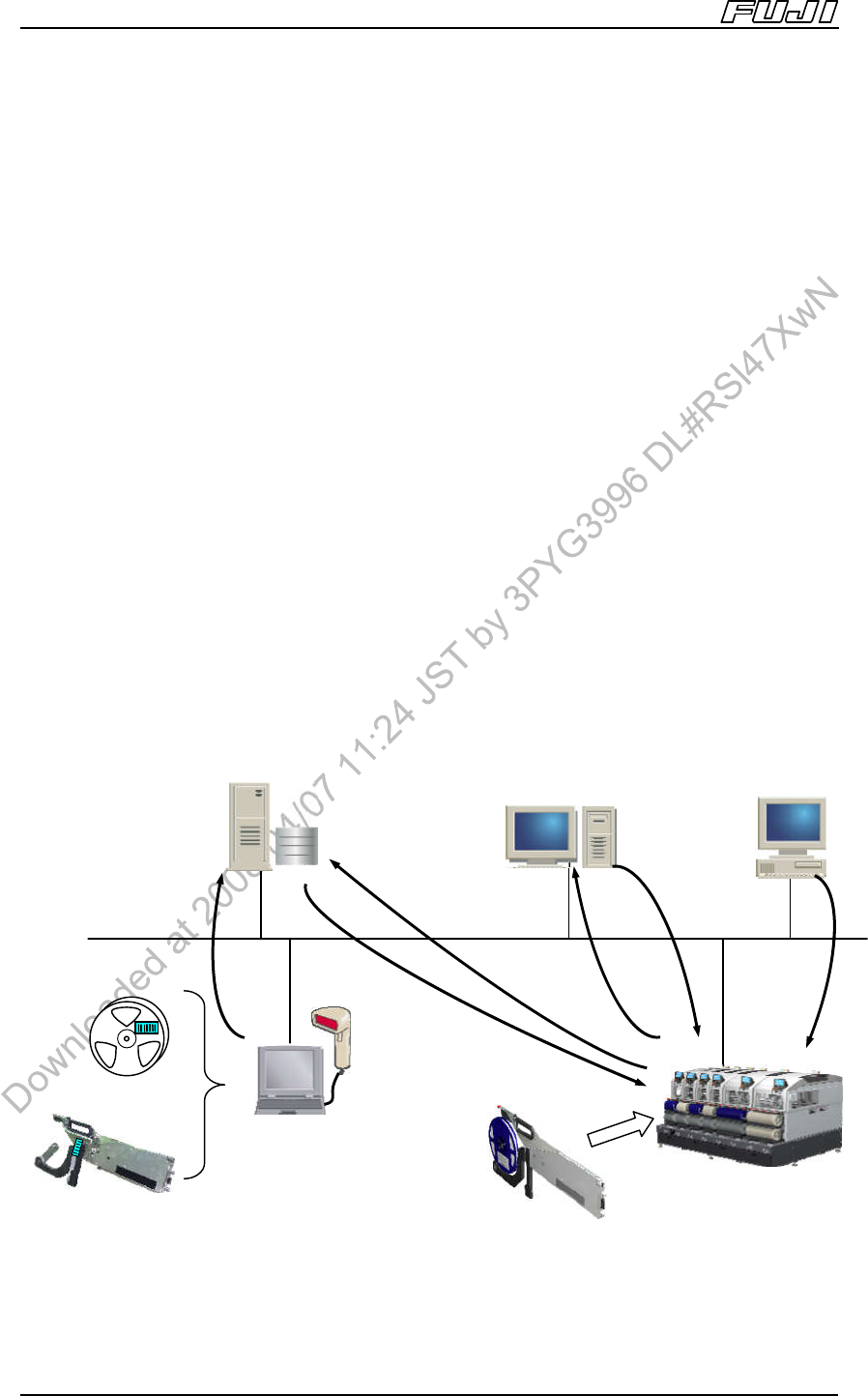
NXT Related Software Edition 2.0E - 43 - NXT II S pecifications 8.3. Fujitrax This system h as been designed to re alize maximum levels of control for parts loaded on machines in the SMT line, and who se wide range of …
NXT Related Software
Edition 2.0E - 42 - NXT II Specifications
Relationship
data
Machine
settings
Job
Product
information
Feeder
Information
Parts
information
Fujitrax database
Fuji Flexa
A
ccessor
y
Software
Fujitrax
Kitting Station
8. NXT Related Software
8.1. NXT Accessory Software
This is a stand alone piece of software providing machine control capabilities.
All machine settings are performed using this software. Furthermore, it provides
the user with a powerful tool when performing maintenance and inspections.
The main features of the NXT Accessory Software are as follows.
• Data management
• Data editing
• Maintenance support
Note:
A separate computer is required for installation of the NXT Accessory Software.
The computer at which this software is installed is referred to as the “Engineering panel”.
8.2. Fuji Flexa
The Fuji Flexa host software is designed for creation of production programs,
control of the machines, and the acquisition of production information.
Administration of job data for the NXT should be performed using Fuji Flexa.
NXT Related Software
Edition 2.0E - 43 - NXT II Specifications
8.3. Fujitrax
This system has been designed to realize maximum levels of control for parts
loaded on machines in the SMT line, and whose wide range of features include
remaining parts administration, and acquisition of reel parts quantity information,
feeder related information, and also device slot information from the production
program.
By linking with NXTII Fuji feeders (Fuji Intelligent Feeders), Fujitrax is able to
eliminate part misloading, provide parts out warnings, perform feeder
administration, and also prevent defective PCBs and enhance productivity.
Furthermore, it is possible to prevent the occurrence of defective PCBs by
acquiring traceability data for each PCB.
Fujitrax software and hardware are available separately.
Fujitrax: Traceable Realtime Administration
<Dynamic Alternate Feeder>
It is possible to arbitrarily set alternate feeders on empty slots on the feeder
pallet when using Fujitrax, therefore dispensing with the need to prepare multiple
empty slots for alternate feeders and set alternate feeder positions in the
program as was required previously. Furthermore, this enables uninterrupted
operation without performing splicing, and prevents the operator from mistakenly
splicing the wrong part.
<Tray Part Non-Stop Supply (Tray Unit-L)>
If the Fujitrax system is adopted, and supply parts are set on the drawer area
below tray unit-L, tray parts are automatically fed following parts out based on
parts out warnings, enabling continuous tray part supply without stopping the
machine.
Also, by mounting a barcode reader on the tray unit-L, tray drawer barcodes are
read automatically when using tray verify with position check (option). By
registering tray drawer barcode and tray part combinations at the Fujitrax system
in advance, it is possible to prevent incorrect setting of parts at the machine.
NXT Related Software
Edition 2.0E - 44 - NXT II Specifications
<Top magazine priority mode production (tray unit-LT)>
With top magazine priority mode production, parts are supplied from the top of
the magazine. Based on the Fujitrax parts out warning, prepared parts are set at
the bottom of the magazine. When they are set, the attached ID reader inside
tray unit-LT reads the tray drawer automatically. By registering the tray drawer ID
and the tray parts combination in the Fujitrax system before production, the
number and type of tray parts can be confirmed, and the tray parts can be stored
in the desired slot at the bottom of the magazine.
In order to store used trays, empty slots (3 slots) must be specified at the top of
the machine.
< Free Feeder Allocation Function>
When using Fujitrax, it is possible to commence production even though the
parts allocation on certain modules differs from that set in the production
program.
As a result, provided that the parts required for that module are prepared in
advance, they can be freely allocated to any slot within the same module.
However, it is not possible to freely allocate parts to different modules.
Furthermore, it is not possible to use this function together with the above
dynamic alternate feeder function.
<Main Functions Enabled by Adopting Fujitrax>
• Incorrect part setting prevention function
• Parts out warning function
• PCB traceability data acquisition
• PCB ID (2D code) read function using the NXT fiducial mark camera
Note: Please refer to the “Fujitrax Specifications” for further details on Fujitrax specifications.