00192377-02.pdf - 第79页
SIPLACE S-23 HM 2 Retrofitting Instruct. S-23 HM to SW V 502.xx incl. RV6-DLM 1 Head (Option) 07/01 Issue 2.8 Sequence: Modifying H ardware 79 Fig. 2.8.1 View of Control Unit before Modification Å In the con trol unit, p…

2 Retrofitting Instruct. S-23 HM to SW V 502.xx incl. RV6-DLM1 Head (Option) SIPLACE S-23 HM
2.8 Sequence: Modifying Hardware 07/01 Issue
78
2.8 Sequence: Modifying Hardware
2.8.1 De-installing the Touch-Screen Driver
Å Your first step should be to de-install the old touch-screen driver as follows:
Settings -> System control -> Software -> "Monitor-Mice" -> Remove.
2.8.2 Preparatory Steps
Å Push the gantry/placement head into the area over the PCB conveyor.
The function for changing the component table - "All gantires in set-up position" - exists only
with Version 502.01 and later).
Å Undock the movable component changeover table from the machine and move it out of the
machine.
Å Turn the machine OFF; isolate it from the mains; turn the compressed air OFF at the com-
pressed air unit and bleed the needle valve on the compressed air unit (see DANGER text in
Section 2.4).
2.8.3 Installing the Conveyor Control TSP 210 and the I/O Boards KSP 219
DANGER
Comply with the safety notes in Section 2.4.
Comply with DIN EN 60204 during all work inside the machine frame. 2
Described below is the exchange of the I/O boards KSP-P218-A32 by the I/O subsystem consist-
ing of the assemblies:
– KSP-P219-A32 (I/O board),
– TSP-210 (conveyor control) and
– Backplane P219
You will need:
Conversion kit "URS S23HM auf SW502 incl. head, modular", Item no. 00356654-01
Å Open the folding doors of the machine frame at the control unit/terminal panel, left board slot.
SIPLACE S-23 HM 2 Retrofitting Instruct. S-23 HM to SW V 502.xx incl. RV6-DLM1 Head (Option)
07/01 Issue 2.8 Sequence: Modifying Hardware
79
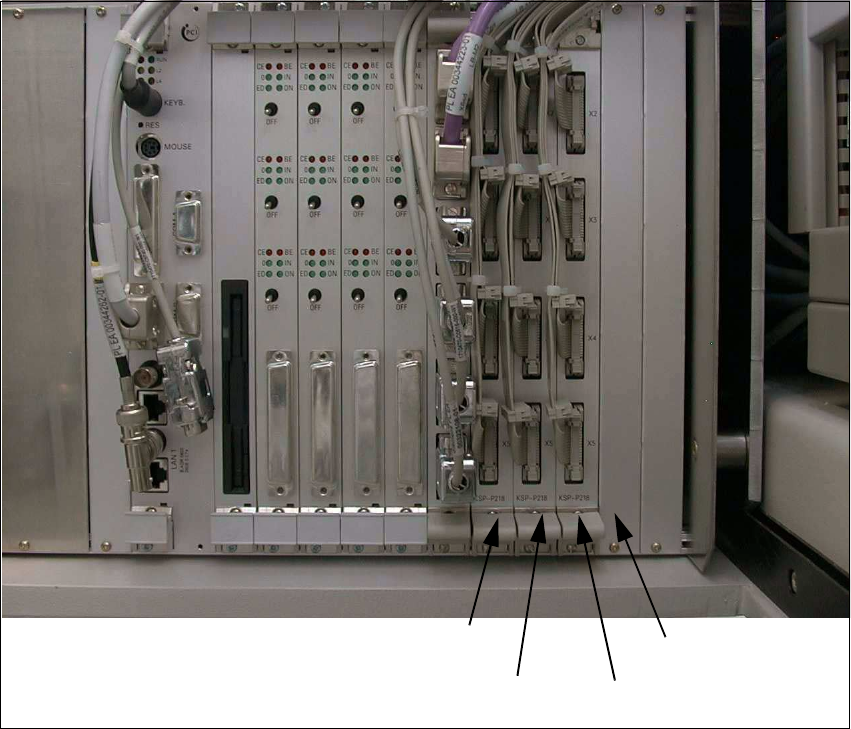
Fig. 2.8.1 View of Control Unit before Modification
Å In the control unit, pull the following from I/O boards KSP-P218-A32
(SMP board slot 8 – 10, see: Fig. 2.8.1): 12 connectors X2se – X5se, X2sf – X5sf, X2sg – X5sg.
Å Remove the 3 I/O boards KSP-P218-A32 (see: Fig. 2.8.1).
Å Take the front panel off SMP board slot 11 (see: Fig. 2.8.1).
Å At the top right of the control unit, remove the screw fastening the control unit (1 socket hex
head cap screw M5, size 4).
Å Make certain that none of the cables are pinched or are under tension:
Carefully pull out the control unit, disconnect it from the guide and set it down.
Front panel
SMP board slot
SMP board slot 8
KSP-P218 (se)
KSP-P218 (sg)
SMP board slot 10
KSP-P218 (sf)
SMP board slot 9
2 Retrofitting Instruct. S-23 HM to SW V 502.xx incl. RV6-DLM1 Head (Option) SIPLACE S-23 HM
2.8 Sequence: Modifying Hardware 07/01 Issue
80
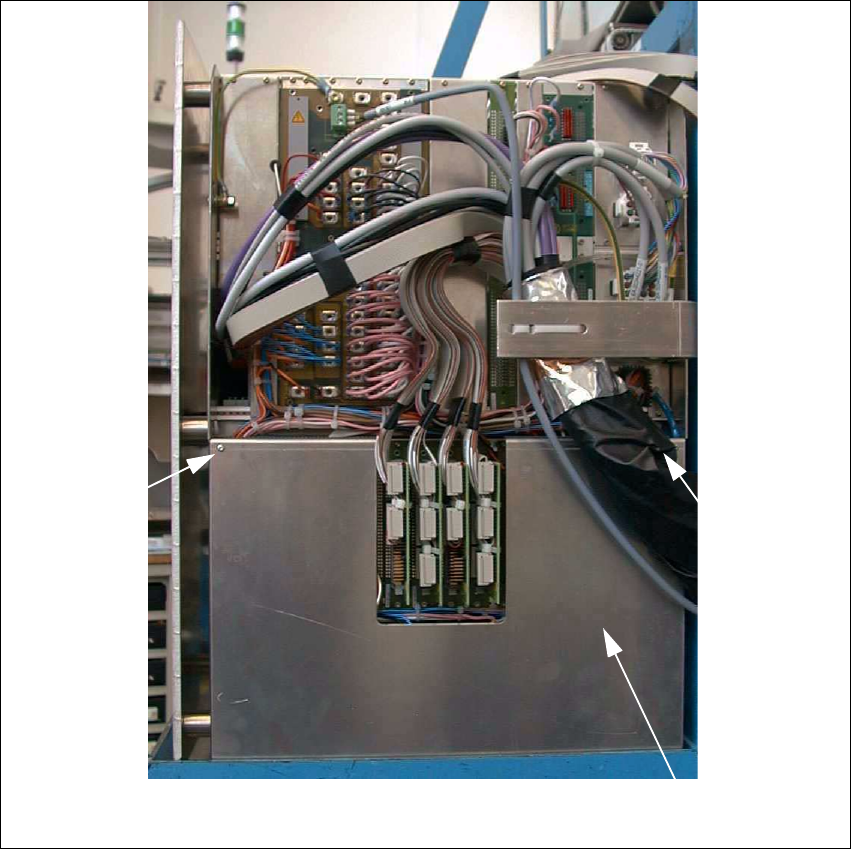
Fig. 2.8.2 Back of the Control Unit
Å On the back of the control unit, remove the cover over the SMP and AMS backplane (cover
007, see: Fig. 2.8.2): Undo 4 screws M2.5 internal serration T8.
Cover 007
Screw
Screw