XPM2_XPM3 Technical Ref Manual Conveyor1.pdf - 第37页
VI TRO NICS-SOLTEC REFLO W SOLDERING SYSTEMS Oc tober 10, 2008 37 XPM 2 / XPM 3 Technical Reference M anual C onv ey or Sy stem s CONVEYOR DRIVE SYST EM The ov en co ntroll er supp li es an analo g v oltage reference s i…
VITRONICS-SOLTEC REFLOW SOLDERING SYSTEMS
October 10, 2008
36
XPM2 / XPM3 Technical Reference Manual Conveyor Systems
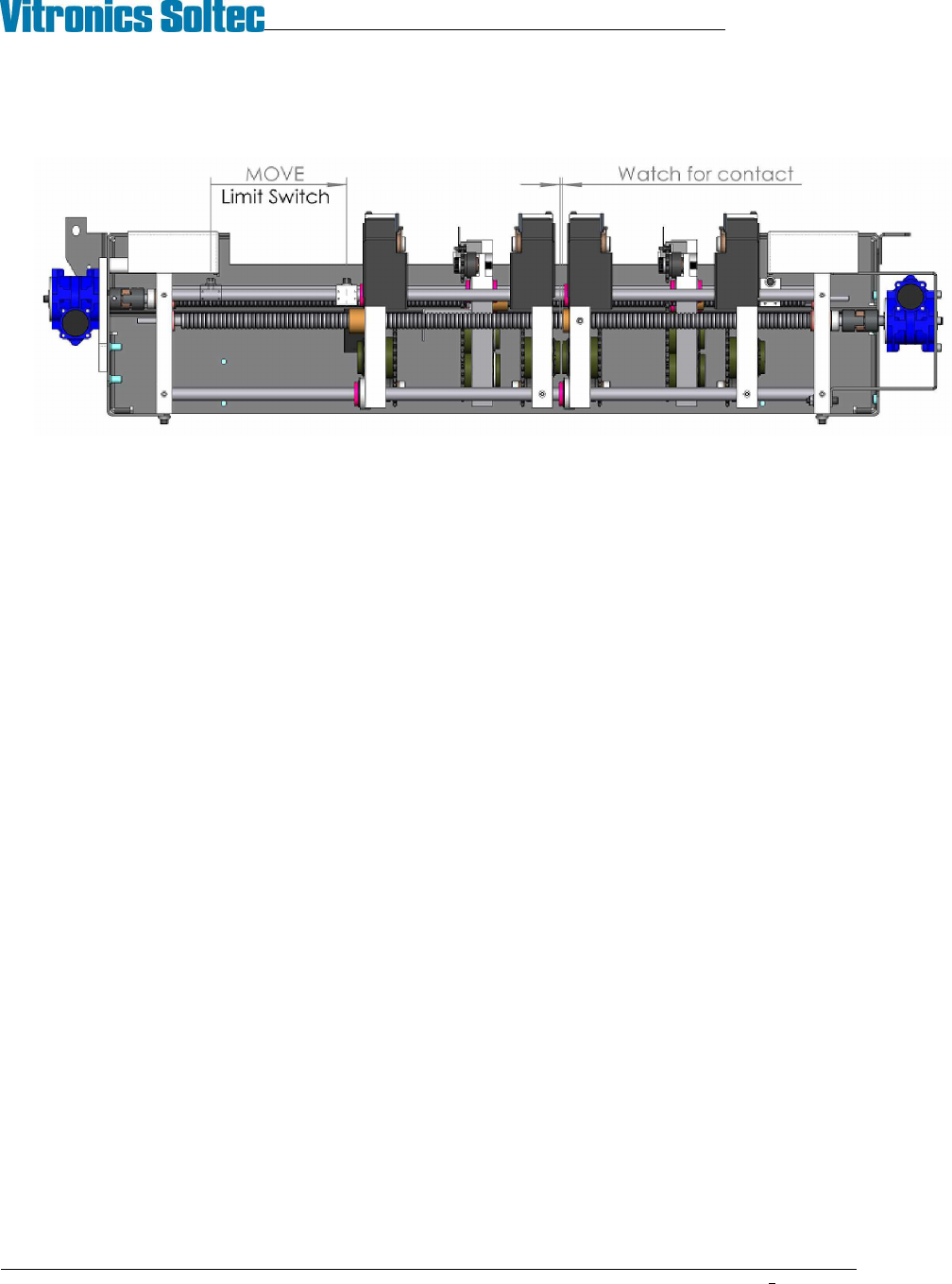
15. Reset the location of the end of travel limit switch block so that it stops the moveable rail before the lane 1
moveable end plate contacts the lane 2 fixed endplate.
16. Verify all lane parallel and XCS height measurements before returning machine to service.
VITRONICS-SOLTEC REFLOW SOLDERING SYSTEMS
October 10, 2008
37
XPM2 / XPM3 Technical Reference Manual Conveyor Systems
CONVEYOR DRIVE SYSTEM
The oven controller supplies an analog voltage reference signal between 0 and 10 volts to the conveyor motor
electronics to set the desired conveyor speed. The A42 board divides it in half and passes it through an Opamp to
avoid loading and signal loss issues from the resistor voltage divider before it sends it to pin 9 on the Integramotor.
The internal Integramotor electronics require a regulated power supply between 20 and 28 volts to operate,
otherwise the electronics indicate a fault condition and the motor will not operate. The internal Integramotor
electronics control the motor speed based on a 0- 5VDC reference signal that is supplied by dividing the 0-10VDC
analog output voltage in half.
The speed of a brushless motor is not controlled by varying the voltage to the windings of the motor like a brush
type or a universal motor is controlled. The speed and rotation direction of a brushless motor is controlled in a
similar method to that of a stepper motor. Through switching the motor windings on and off in a specific sequence
for a specific direction. The faster the windings are switched on and off using the specified sequence the faster the
motor rotates.
One major difference with a brushless motor versus a stepper motor is that a brushless motor has built in hall-
effect sensors that are used by the drive electronics to sense and to regulate how fast the motor is rotating. A
stepper motor has no internal feedback and no speed regulation.
The internal Integramotor electronics switch the windings of the motor faster as the 0-5VDC reference signal is
increased while regulating the speed of the motor through the feedback from the built in hall-effect sensors.
A hall-effect sensor built into the conveyor motor supplies pulses to the oven controller, which is used by the
controller for feedback to close loop the conveyor speed to the setpoint by varying the analog voltage signal to the
conveyor motor electronics.
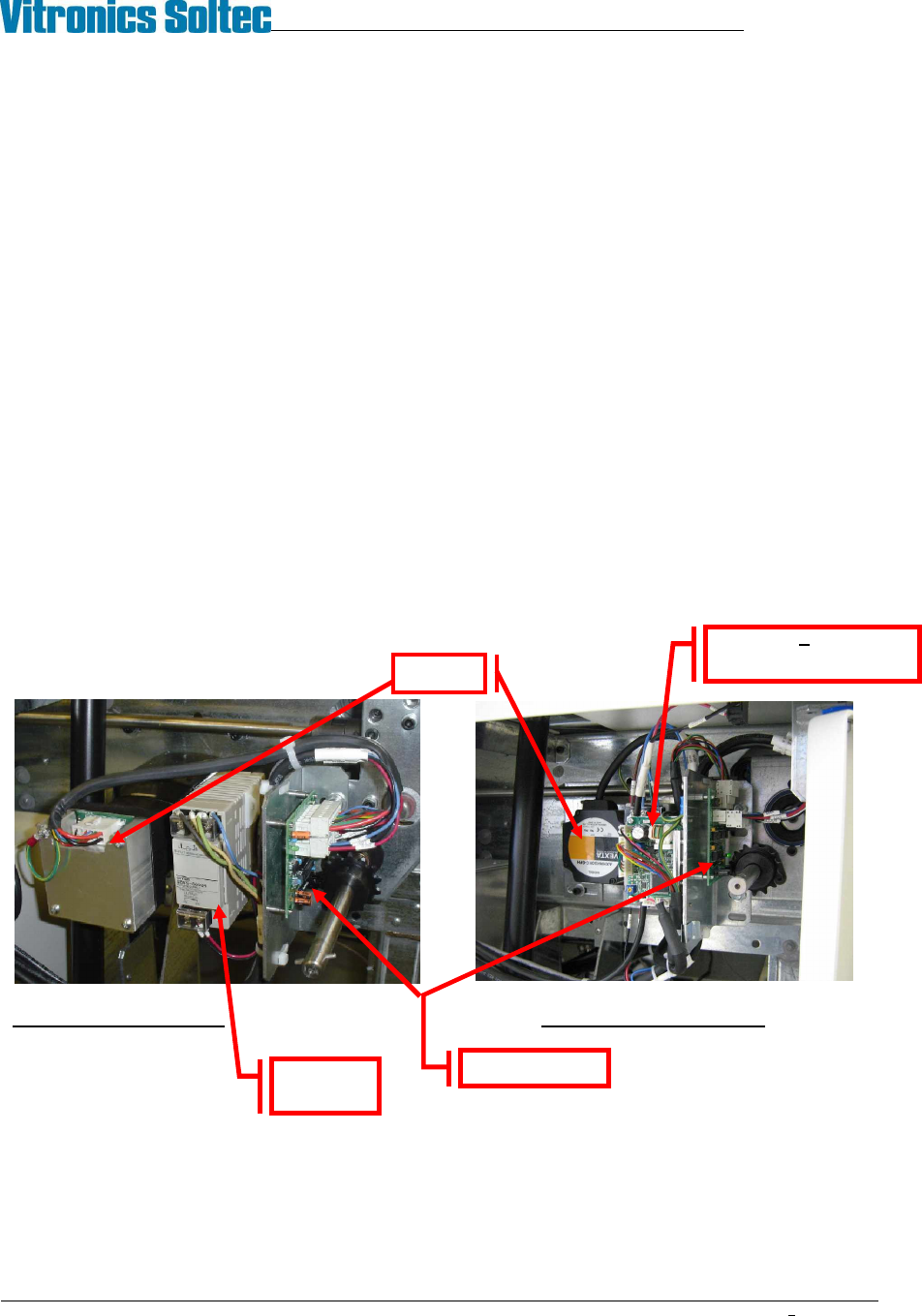
Integra Motor assembly Oriental Motor Assembly
Set up the Conveyor Drive within the Oven Operation Program.
NOTE: This operation may require a password.
G5 Power
supply
A42 Board
Motor
V1 Board Oriental
motor only

VITRONICS-SOLTEC REFLOW SOLDERING SYSTEMS
October 10, 2008
38
XPM2 / XPM3 Technical Reference Manual Conveyor Systems
If the conveyor motor does not rotate, check the following:
Verify that the conveyor is switched on in the PC oven software.
Verify that K37 is energized and that A1-K8 is also energized.
Verify that 120 VAC is present at the G5 power supply or verify that the green LED on the front of the power
supply is on.
If 120VAC is not present then make sure that A1-K8 is energized on the A1 board, that F68 is not tripped and
that the inrush current limiter on pins 1 and 2 of connector P52 on the A1 board are intact.
Verify the analog voltage reference signal to the A42 board.
The signal should be +10 VDC between pins 1(+) and 2 (-) on connector P2 of A42 when the analog output is
at full scale.
If there is no signal present, make sure that the controller rack has +15 VDC at pin 4 of connector P26 of the
A1 board. (-15 is not present or required on the new controller)
If +15 VDC is present , but the drive is not receiving +10 VDC, there is either a wiring error or the DI board is
faulty, or a poor wire connection.
If motor turns, but no speed is reported, check the following:
Verify that the hex drive shaft is rotating.
Verify that the sprocket installed on the hex drive shaft is also rotating.
Verify that LED2 on A42 is flashing as each sprocket tooth from the sprocket on the hex drive shaft passes by
the fork shaped sensor on A42.
If LED2 is not flashing on A42 and the hex shaft and sprocket are rotating then perform the following:
Verify the alignment of the sprocket with the fork shaped sensor on A42. The sensing area on the fork shaped
sensor is on the top most edge of the sensor and only the tips of the sprocket teeth should be extending into
the opening on the sensor. If the sprocket teeth extend too far the sensor won't detect the gaps between each
sprocket tooth and will sense the hub around the sprocket teeth instead.
If LED2 on A42 does not light or never changes state then test the following.
Verify that 5VDC is present between pins 1(+) and 3(-) of connector P3 on A42. The 5VDC is required to
operate the logic components on A42.
If the polarity is reversed or if connector P1 and P3 are reversed on A42 then A42 will have to be replaced
after the wiring has been corrected. Because reverse polarity and or 24VDC will permanently damage all of
the logic components on A42.
If 5VDC is present and LED2 on A42 still doesn't change state then perform the following:
Shut off the conveyor motor.
Unplug connector P4 from A42.
Loosen and remove the (2) 1/4-20 bolts that secure the bracket that A42 is mounted on to the front of the rail
width gearbox.
With the A42 assembly separated from the sprocket on the hex drive shaft pass a small object back and forth
between the top most tip of the fork sensor while observing LED42 on A42.
A pen or the tip of your finger can be used.
If LED2 still does not change state and 5VDC is present between pins 1(+) and 3(-) of connector P3 on A42
then A42 is defective and needs to be replaced.
After the conveyor system has been repaired, run the conveyor calibration routine in the Oven Control Program.