XPM2_XPM3 Technical Ref Manual Conveyor1.pdf - 第41页
VI TRO NICS-SOLTEC REFLO W SOLDERING SYSTEMS Oc tober 10, 2008 41 XPM 2 / XPM 3 Technical Reference M anual C onv ey or Sy stem s AUTO CHAIN LUBE TANK/PUMP ASSY Operation: The lubricatio n pu m p motor speed is 1 rpm wit…
VITRONICS-SOLTEC REFLOW SOLDERING SYSTEMS
October 10, 2008
40
XPM2 / XPM3 Technical Reference Manual Conveyor Systems
COMPUTER CONTROLLED EDGE-RAIL LUBRICATION
Computer Controlled Edge-Rail Lubrication is:
!
Standard, (installed on all ovens)
)
An option, (NOT installed on all ovens)
DESCRIPTION:
The edge-rail lubrication system is designed to improve the lifetime of the rail chain conveyor by periodically
applying lubrication to the chain during oven operation.
Two modes of lubrication are available, automatic and manual. Systems with automatic chain lubrication are also
capable of performing manual chain lubrication, initiated by the operator, through the Oven Operation Program.
OPERATION:
fi Following the enabling of an output from the controller, the system pumps oil from the reservoir, through
tubing, to stainless steel brush/wheels which are touching the chain and the oil is applied to the chain.
fi It is the user s responsibility to ensure that this reservoir is always filled with the required lubricant. The
system generates a warning message when it calculates that the oil in the reservoir is getting low.
fi The lubricant type is DARMEX OIL # 773ND
During the lubrication process, the oil is applied for two complete cycles of the chain. The user may determine the
number of chain cycles between automatic lubrications. 275 is the default number.
The number of complete lubrications held within one reservoir is set to the factory default of 50. The system will
display a warning whenever it calculates that the reservoir level is getting low when the number of lubrication
cycles that have occurred reaches the tank count number in the lubrication setup screen. Since the amount of oil
dispensed in one application is system dependent, the number of complete lubrications is best found by trial and
error.
Construction:
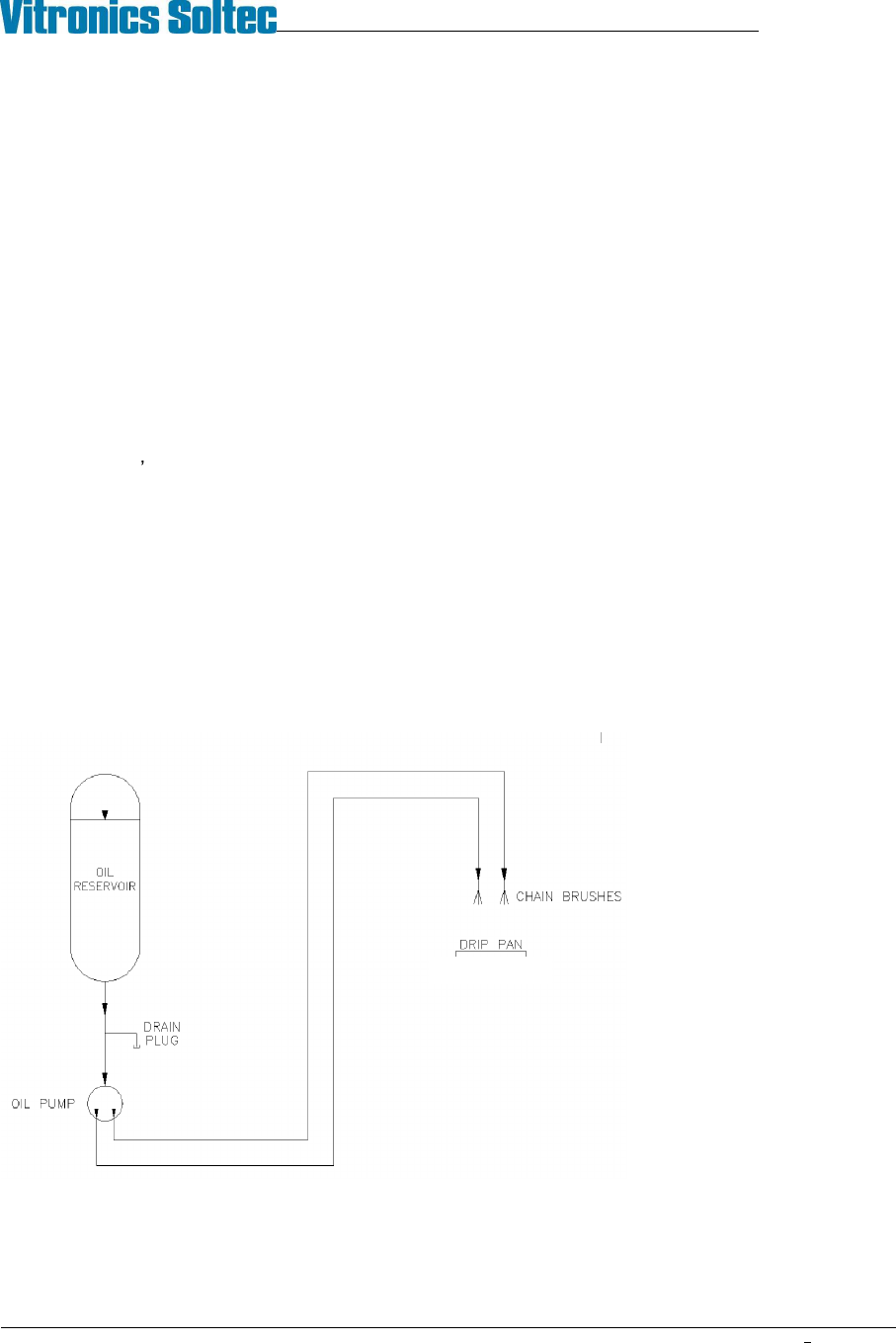
The Auto Chain Lube System
consists of a 1 quart
polypropylene oil reservoir,
drain plug, electrically powered
pump, tubing for oil
distribution, and two stainless
steel brushes for the
application of lubricating oil
directly to both oven conveyor
chains.
Auto Chain Lube System Schematic
VITRONICS-SOLTEC REFLOW SOLDERING SYSTEMS
October 10, 2008
41
XPM2 / XPM3 Technical Reference Manual Conveyor Systems
AUTO CHAIN LUBE TANK/PUMP ASSY
Operation:
The lubrication pump motor speed is 1 rpm with a displacement of .06cc per stroke (rev). The pump will output 1
drop of oil for each minute of conveyor chain travel. The oil is sent through the oil distribution hoses up to the
stainless steel brushes.
Priming:
Priming the system through the software can be very time consuming because of the low displacement of the
pump...
Priming should only be necessary after:
1. Servicing the auto lube system
2. The reservoir has been allowed to run dry and air has been pumped into the lube lines
Location:
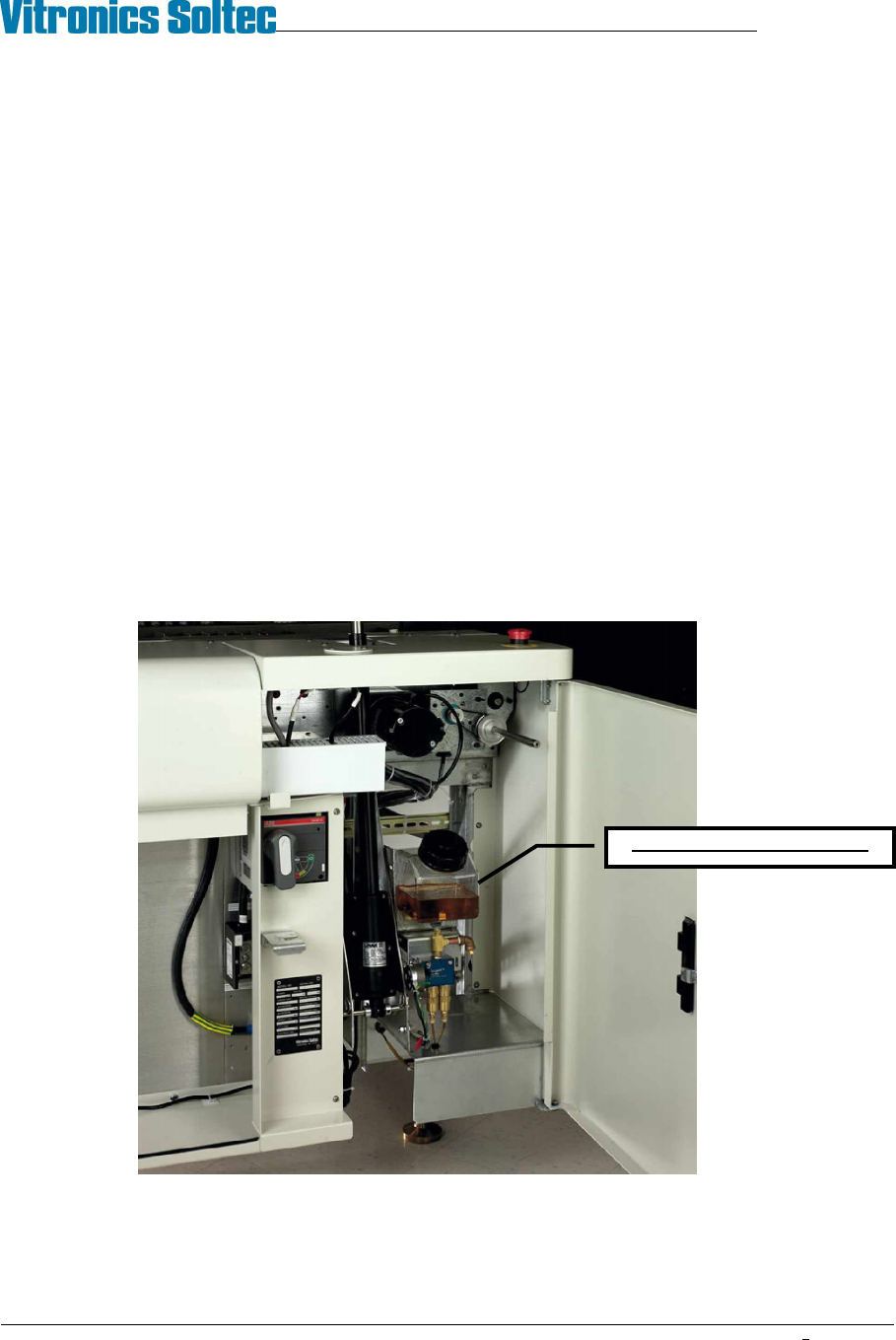
The Lubrication Tank-Pump Assembly is mounted to the frame at the front of the oven, inside the utility cabinet, at
the exit end of the oven.
CHAIN LUBE RESERVOIR
VITRONICS-SOLTEC REFLOW SOLDERING SYSTEMS
October 10, 2008
42
XPM2 / XPM3 Technical Reference Manual Conveyor Systems
INITIAL SETUP
The following process is done at the time the oven is built. It should be required only after repair or service of the
Autolube System.
1) Locate the lubrication reservoir. ( see illustration above )
2) Fill the reservoir with the lubricant, Darmex (Vitronics-Soltec P/N 1227204). (Remove the cap and pour the
lubrication into the top of the reservoir.
3) Start the oven conveyor before you prime the lube system.
4) In the Oven Control Software click on the Oil Can Icon. This will bring up the Chain Lubrication utility dialog box.
Click on the box for Lube for Prime Period.
5) Priming the autolube system can take as much 6 hours depending on the size of the oven. The priming operation will
not shut-off automatically, therefore it MUST be monitored to prevent excess oil from dripping on the floor.
(During normal Manual & Auto Lube operations, the system does stop automatically)
NORMAL OPERATION
First, refer to Rail Chain Lubrication in the How Do I section under the Help menu in the oven software..
To perform a single manual lubrication of the conveyor chain:
Select manual lubrication in the Oven Control Software by clicking on the Oil Can Icon. This will bring up the Chain
Lubrication utility dialog box. Click on the box for Lube for Chain Distance. The conveyor chain will run, and lube oil will
be applied for two complete cycles of the chain(s).
For automatic lubrication of the conveyor chain on a regular basis:
Select automatic lubrication in the Oven Control Software by clicking on the Oil Can icon. This will bring up the Chain
Lubrication utility dialog box. Put a check mark in the box for Use Automatic Lubrication.
In automatic mode, the lubrication process does not interrupt oven processing. The chain will be lubed while there is
product in the oven.
ALARMS:
When the alarm count for lubrications has been reached a Low Oil Message will be displayed at the bottom of the
Operating Screen. Automatic or manual lubrication will not be permitted until the reservoir has been filled, and the alarm
reset. Reset the lubrication counter in the Oven Control Software by clicking on the Oil Can icon. This will bring up the
Chain Lubrication utility dialog box. Click on the box for Reset Lubrication Counter After Filling Tank.
This is the best time to adjust the cycles between lubes and/or the number of lubes before Low Oil Message
alarm.