00197496-01_UM_SiClusterMultiline_DE_EN.pdf - 第140页
How to Configure a Multi Line Job Ideal Line Cycle Times 4.6.1 Initial Setups Added - Result 140 SIPLACE SiCluster Multiline SIPLACE SiCluster Multiline Tab: configuration : tab: cycle times Example The ideal cycle times…
How to Configure a Multi Line Job
4.6.1 Initial Setups Added - Result Ideal Line Cycle Times
SIPLACE SiCluster Multiline SIPLACE SiCluster Multiline 139
Result
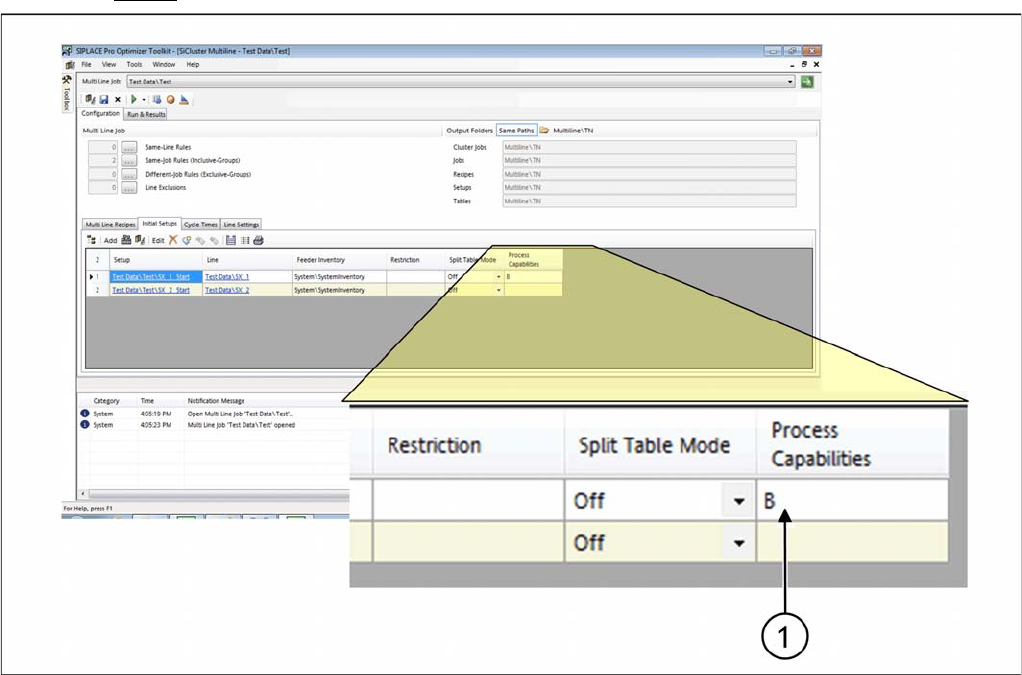
Result: process capability for setup
▪ Attribute B will be entered in the column Process capabilities.
▪ All recipes in the multi line job which have the attribute B, will be distributed on this line or on other
lines with the process capability B during clustering.
4.8
4.8 Ideal Line Cycle Times
Ideal Line Cycle Times
The ideal cycle time is a prerequisite for optimization of the multi line jobs. The ideal cycle times for the
recipes on the lines are generated in the Cycle Times tab. Since recipes can only be allocated to lines
for which an ideal cycle time exists, you need to calculate an ideal cycle time for each recipe on at least
one line, in order to make recipe-line assignment possible. The ideal cycle time for a recipe on the line
is the recipe cycle time calculated in the optimization runtime you defined, for the production with a setup
which has been specially optimized for this recipe and, if applicable, for its inclusive group.
If the ideal cycle time has already been calculated, this can be loaded from the clipboard.
As an option, you can define whether to supplement the minimum recipe cycle time for your production
line with the recipe-line-specific cycle time lower threshold. These cycle time lower thresholds forms the
minimum cycle time for the recipes which arise outside the placement process e.g. from a printer, test
system or furnace.
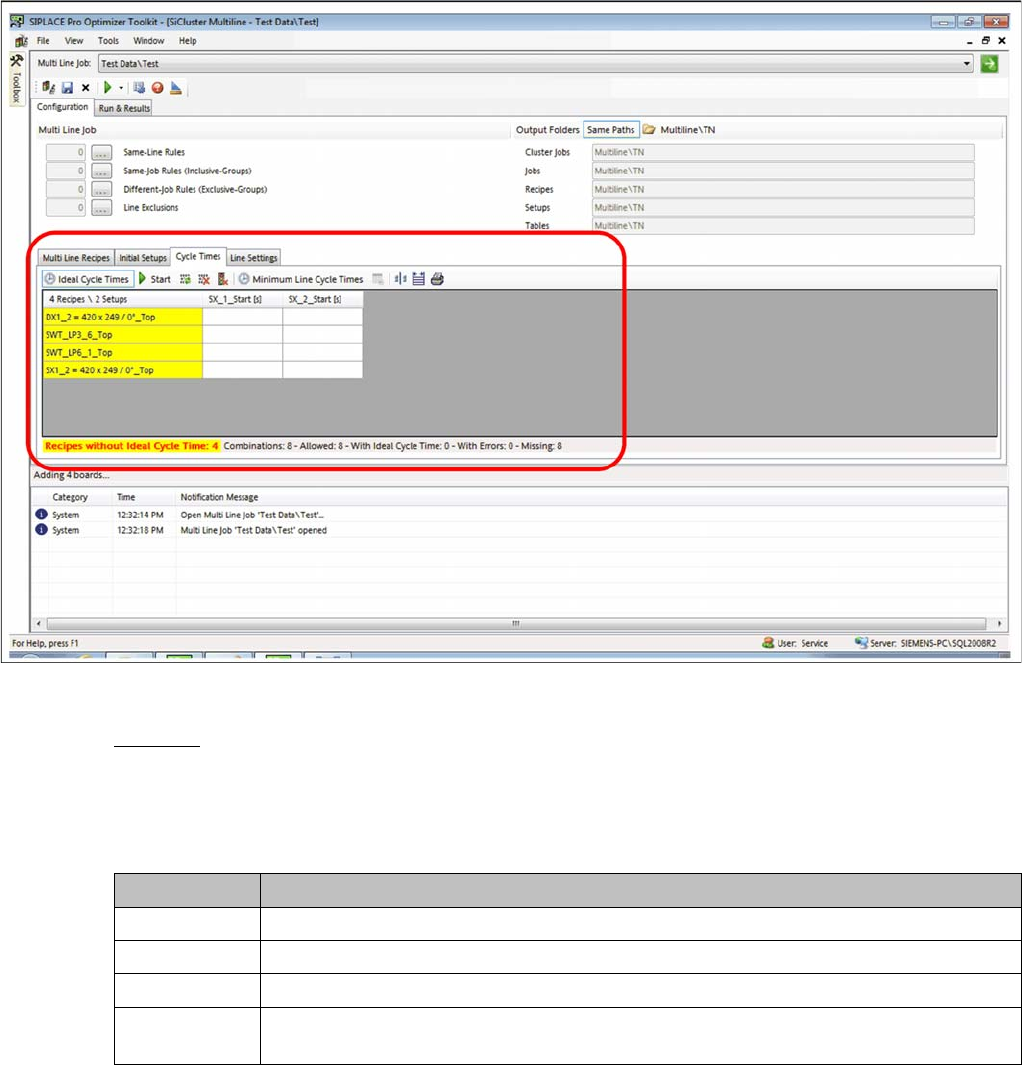
► Go to Configuration and select the Cycle Times tab.
How to Configure a Multi Line Job
Ideal Line Cycle Times 4.6.1 Initial Setups Added - Result
140 SIPLACE SiCluster Multiline SIPLACE SiCluster Multiline
Tab: configuration: tab: cycle times
Example
The ideal cycle times are not yet present for any of the existing lines and need to be calculated. This is
shown by the yellow marking of cells. The process requirements for the boards will be fulfilled (marked
white).
The recipe and setup statuses will be color-coded in the cells of the table.
Status Description
White The line fulfills the process requirements of the respective boards.
Gray The line does not fulfill the process requirements for the board.
Yellow The ideal cycle times are not yet present and need to be created.
Red Errors have occurred when generating the ideal cycle times. To localize the source of
the error, doubleclick on the relevant table cell to start the Optimizer Messages.
How to Configure a Multi Line Job
4.6.1 Initial Setups Added - Result Ideal Line Cycle Times
SIPLACE SiCluster Multiline SIPLACE SiCluster Multiline 141
Creating ideal cycle times
Tab: cycle times: creating ideal cycle times
Procedure
Define the required settings in the SiCluster Multiline menu, at Settings . See also ."4.8.1 Dialog
Box: Settings" [ ➙ 143].
► Start calculation of the ideal cycle times with Start .
⇨ Calculation begins with the help of the Multi Job Optimization.
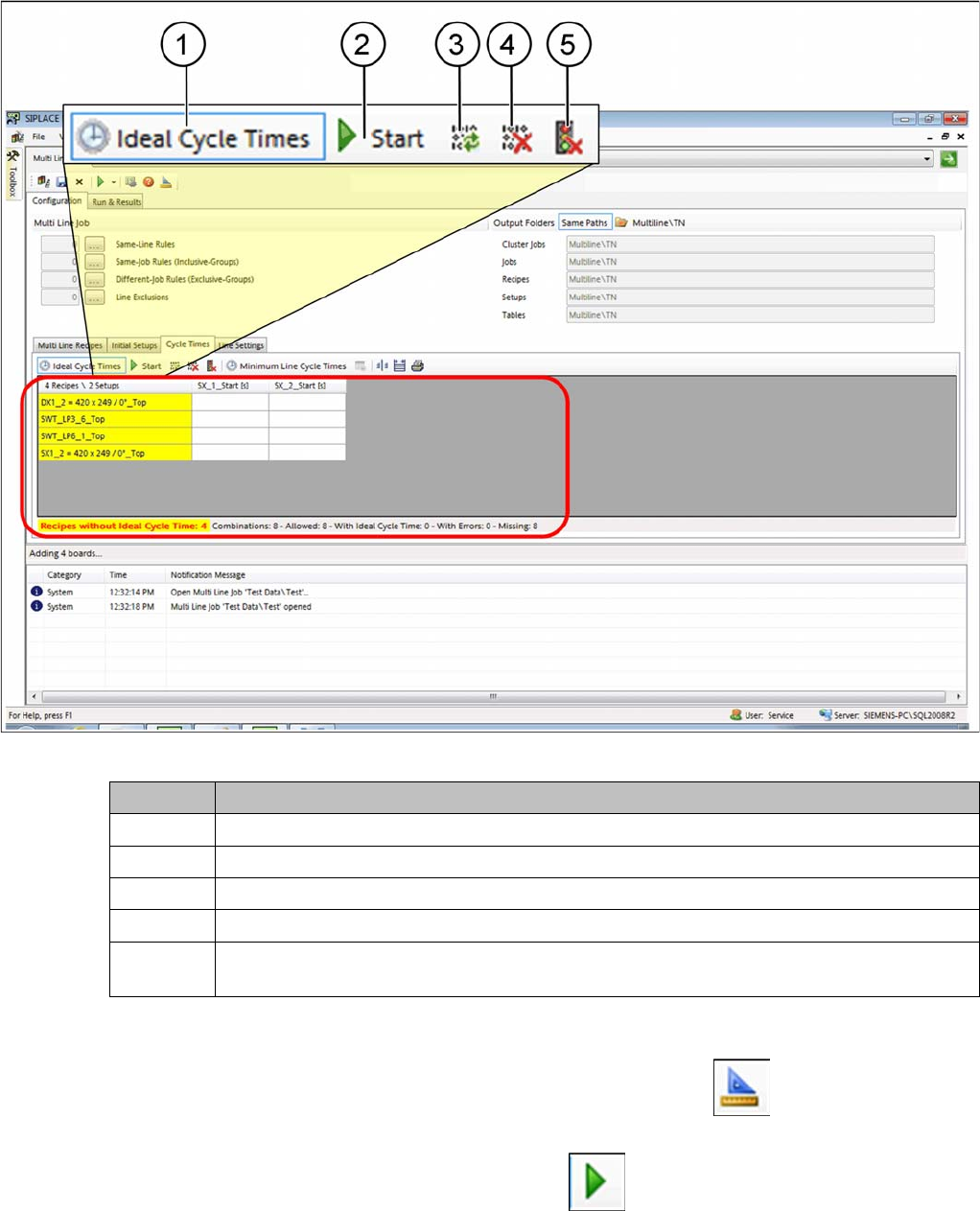
Icon Description
1 Enable the Ideal cycle times icon and the table will show the ideal cycle times.
2 Starts calculation of the ideal cycle times in the multi job optimizer.
3 The ideal cycle times will be refreshed from the clipboard or from temporary jobs.
4 The ideal cycle times will be deleted (even those in the clipboard, if present).
5 Delete the temporary jobs which are generated when calculating the ideal cycle times. This
enables you to release memory capacity in the SIPLACE Pro database.