00197496-01_UM_SiClusterMultiline_DE_EN.pdf - 第164页
Working with Process Requirements and Process Capabilities Process Requirements for Boards in SIPLACE Pro 164 SIPLACE SiCluster Multiline SIPLACE SiCluster Multiline 6.1 6 . 1 P r o c e s s R e q u ir e m e n t s f o r B…
Working with Process Requirements and Process Capabilities
SIPLACE SiCluster Multiline SIPLACE SiCluster Multiline 163
6
6 Working with Process Requirements and Process Capabilities
Working with Process Requirements and Process
Capabilities
Purpose
Through the definition of process requirements in the boards and the process capabilities in the lines, all
process-related restrictions arising from existing equipment before and behind the SIPLACE machines
can be taken into account. These restrictions must be taken into account in order for SiCluster Multiline
to make valid product-line allocations.
Function
The boards and lines can have so-called attributes allocated to them in SIPLACE Pro.
▪ Board sides (top/bottom) contain Process requirements.
▪ Lines have Process capabilities.
▪ These attributes can be used to create rules.
SiCluster Multiline takes into account the process requirements so that boards with certain line process
requirements in SiCluster Multiline are only distributed on those lines which also have these process ca-
pabilities. However, this is only applicable for those process requirements which are marked with the pro-
cess attribute Line process.
If, for example, a board has the process requirement "lead-free soldering", this board will only be distrib-
uted to lines which have the process capability "lead-free soldering".
CAUTION
Attributes in SiCluster Multiline are not synchronous with the attributes in the SIPLACE Pro da-
tabase.
The attributes in SiCluster Multiline are copies of the attributes in the SIPLACE Pro database.
Changes made in SiCluster Multiline are therefore not automatically applied to the SIPLACE
Pro database and vice versa. For test purposes (e.g. for"what if" scenarios) you can make
changes to the attributes in SiCluster Multiline without affecting the data in SIPLACE Pro.
NOTICE
Process capabilities have no exclusive effect
A process capability for the line does not automatically have an excluding effect. You can also
produce recipes on a line which do not need the process capability of that line. This means that
a line may have more process capabilities than needed by the recipes with their process re-
quirements.
NOTICE
Attributes in SIPLACE Data Maintenance Tool
The SIPLACE Data Maintenance tool enables you to create attributes quickly and easily for
multiple objects, without the need to process each object individually. See also "10.4 Inserting
the Attributes with the SIPLACE Data Maintenance Tool" [ ➙ 188].
Working with Process Requirements and Process Capabilities
Process Requirements for Boards in SIPLACE Pro
164 SIPLACE SiCluster Multiline SIPLACE SiCluster Multiline
6.1
6.1 Process Requirements for Boards in SIPLACE Pro
Process Requirements for Boards in SIPLACE Pro
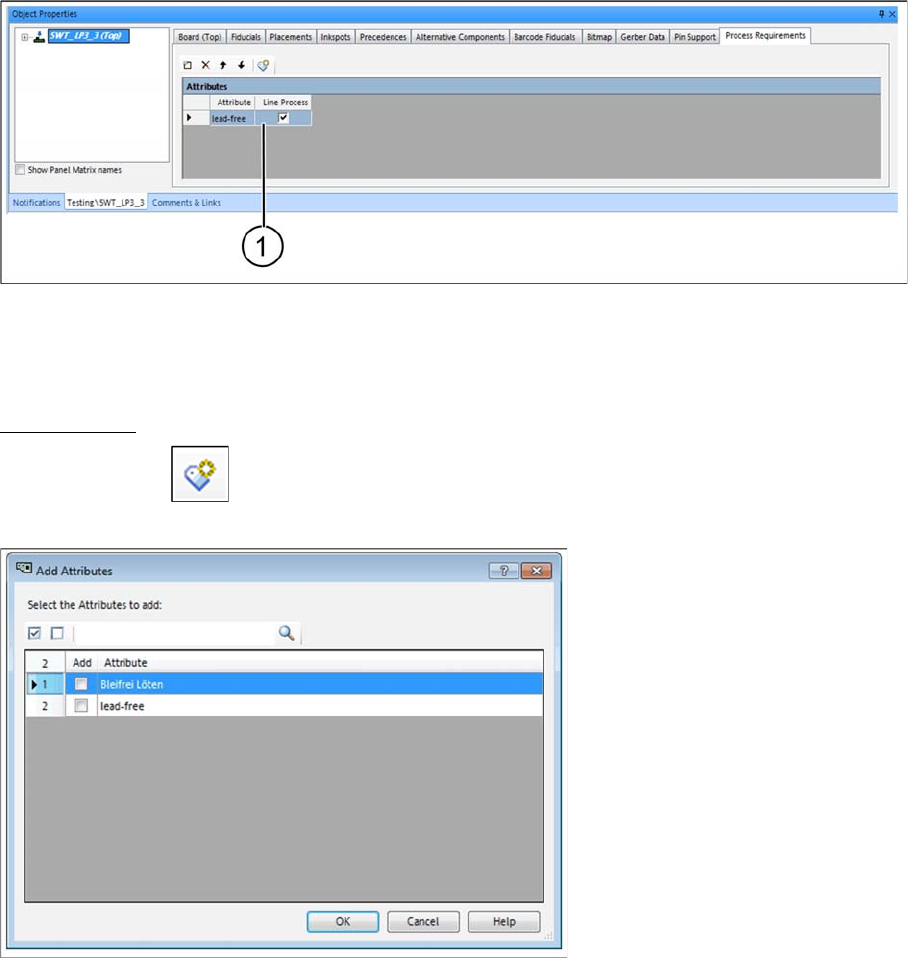
Process requirements can be defined in the boards in SIPLACE Pro Desk. In this example, we want to
produce boards on just one line, which facilitates lead-free soldering.
For this purpose, the attribute "lead-free" is allocated to this board.
► Open the SIPLACE Pro Board Editor and select the Process Requirements tab.
SIPLACE Pro
–
Board Editor: tab: Process requirements
► Enter the attribute "lead-free" at (1) and enable the checkbox Line Process.
⇨ This board can only be produced on lines which also have the attribute "lead-free".
Add attributes
► Select the icon from the toolbar in the table.
⇨ The Add Attributes dialog box will open.
Dialog box: add attributes
The Add Attributes dialog lists all the existing attributes (process capabilities in the line and process re-
quirement for the board). You can select one or more attributes to be entered in the boards.
Working with Process Requirements and Process Capabilities
Process Capability for Lines in SIPLACE Pro
SIPLACE SiCluster Multiline SIPLACE SiCluster Multiline 165
6.2
6.2 Process Capability for Lines in SIPLACE Pro
Process Capability for Lines in SIPLACE Pro
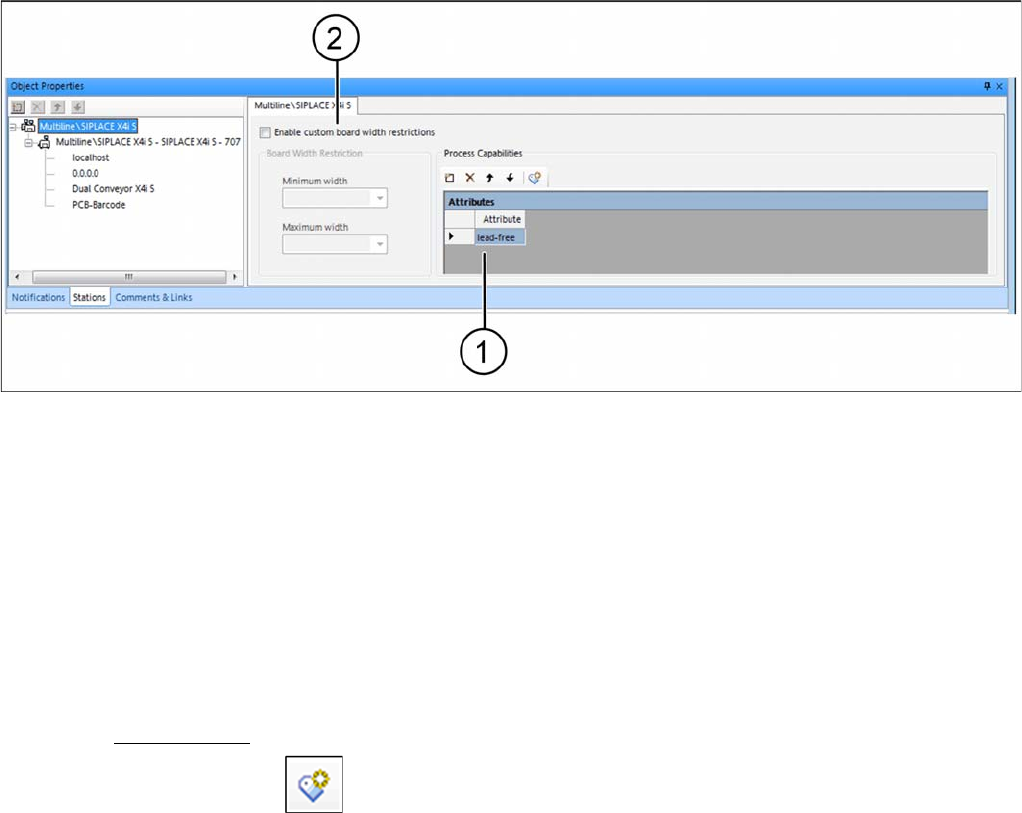
Process capabilities for lines can be defined in SIPLACE Pro Desk. In this example, the lead-free sol-
dering is assigned as a process capability to the line.
For this purpose, the attribute "lead-free" is allocated to this line.
► Open the SIPLACE Pro Line Editor and mark the line in the tree structure of the Stations tab.
SIPLACE Pro - Line Editor
► Go to the Process Capabilities table and enter the attribute "lead-free" (1).
⇨ You can now produce boards on this line which also have the attribute "lead-free".
Enable PCB width restrictions (2) - optional
► Enable the checkbox Enable custom board width restrictions.
► Enter the relevant values at Minimum Width and Maximum Width.
⇨ This enables you to define the minimum and maximum conveyor width in the line (not just for
SIPLACE machines). Boards may then only be allocated to the lines if their width is within the per-
missible range.
Add attributes
► Select the icon from the toolbar in the table.
⇨ The Add Attributes dialog box will open.