00197496-01_UM_SiClusterMultiline_DE_EN.pdf - 第144页
How to Configure a Multi Line Job Ideal Line Cycle Times 4.8.1 Dialog Box: Settings 144 SIPLACE SiCluster Multiline SIPLACE SiCluster Multiline Parameter D escription Ideal cycle time phase Ask before deleting the jobs f…
How to Configure a Multi Line Job
4.8.1 Dialog Box: Settings Ideal Line Cycle Times
SIPLACE SiCluster Multiline SIPLACE SiCluster Multiline 143
Result
Result: ideal cycle times successfully calculated
▪ Calculation of ideal cycle times was successful.
4.8.1
4.8.1 Dialog Box: Settings
Dialog Box: Settings
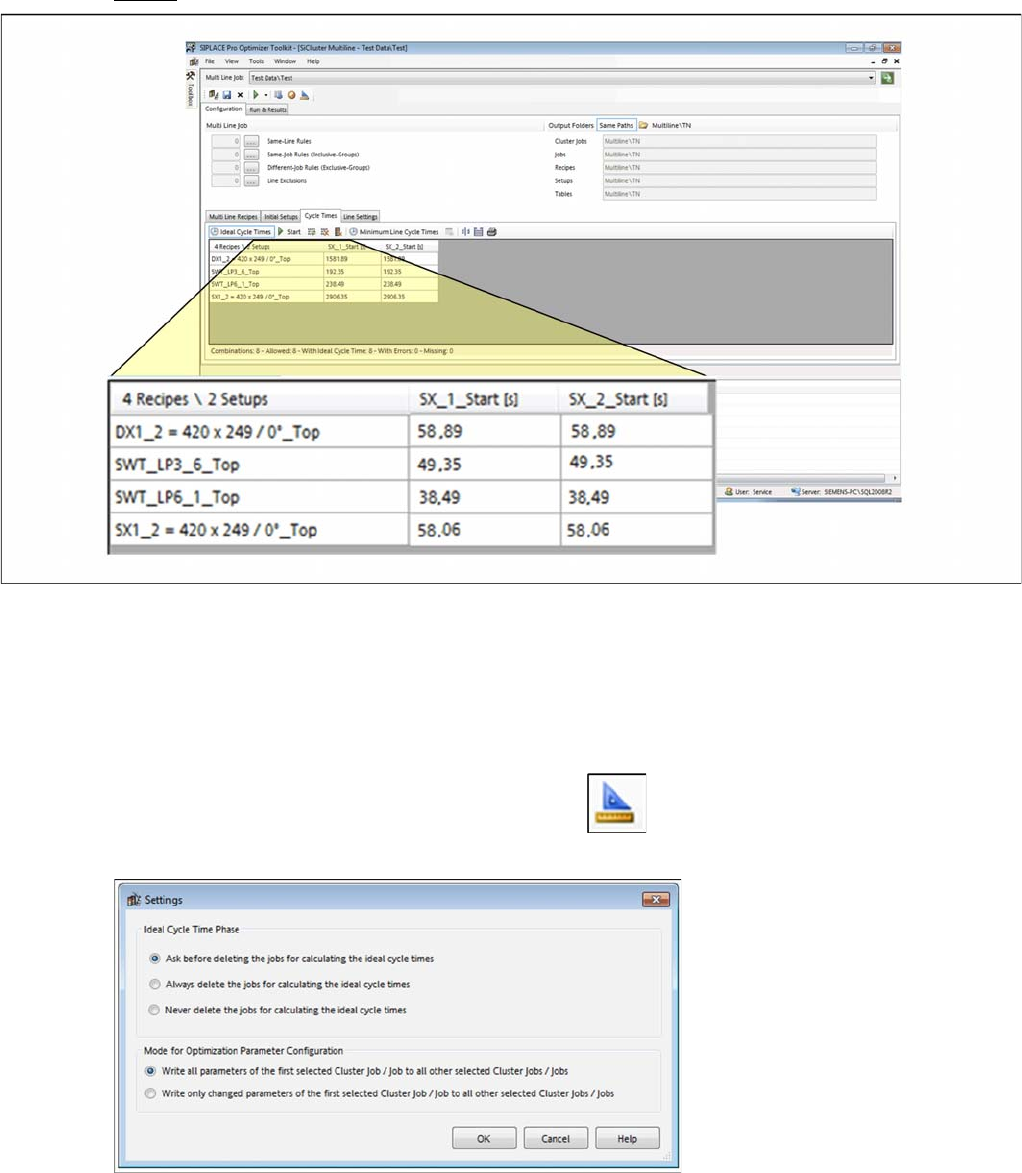
You can define multi line job settings for handling temporary jobs which are created when ideal cycle
times are calculated.
► Go to the SiCluster Multiline menu and select the icon.
⇨ The Settings dialog box is opened.
Dialog box: settings

How to Configure a Multi Line Job
Ideal Line Cycle Times 4.8.1 Dialog Box: Settings
144 SIPLACE SiCluster Multiline SIPLACE SiCluster Multiline
Parameter Description
Ideal cycle time phase
Ask before deleting
the jobs for calculating
the ideal cycle times
Enabled: At the end of ideal cycle time calculation, you will be asked whether
you want to delete the temporary jobs or not.
Always delete the jobs
for calculating the ide-
al cycle times
Enabled: At the end of ideal cycle time calculation, the temporary jobs will be
deleted without asking.
Never delete the jobs
for calculating the ide-
al cycle times
Enabled: The temporary jobs will not be deleted.
Mode for optimization parameter configuration
Either the cluster jobs or the jobs will be affected accordingly, depending on which tab is enabled at
Run & Results (Line KPIs or Cluster Job Details)
Write all parameters of
the first selected clus-
ter job / job to all other
selected cluster jobs /
jobs
All parameters for the first cluster job will be saved in the following cluster jobs.
Write only changed
parameters of the first
selected cluster job /
job to all other select-
ed cluster jobs / jobs
Only individually changed values for the first cluster job will be saved in the fol-
lowing cluster jobs.
How to Configure a Multi Line Job
4.8.1 Dialog Box: Settings Defining Recipe-Specific Cycle Times for Lines (Optional)
SIPLACE SiCluster Multiline SIPLACE SiCluster Multiline 145
4.9
4.9 Defining Recipe-Specific Cycle Times for Lines (Optional)
Defining Recipe-Specific Cycle Times for Lines (Optional)
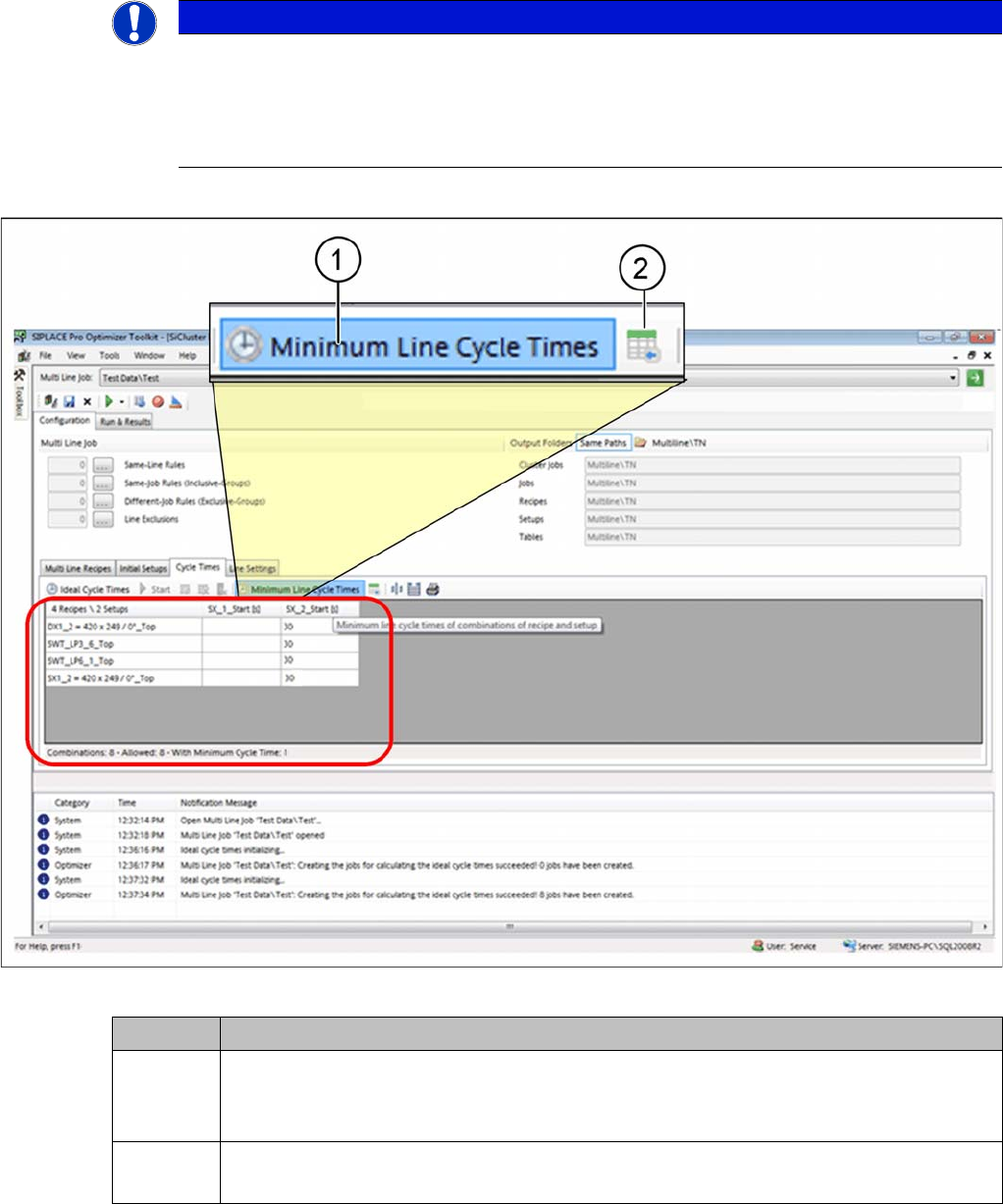
In the Cycle Times tab, you can define whether the ideal cycle times for your production line should be
supplemented by specific recipe-line cycle times. This defines the minimum cycle time for the line. You
can also define recipe-line cycle times just for individual /specific recipes.
► Go to Configuration and select the Cycle Times tab.
Tab: cycle times: defining minimum line cycle times
See also
4.8.1 Dialog Box: Settings [ ➙ 143]
NOTICE
Definition of recipe-specific line cycle times.
The definition of recipe-specific cycle times for the line is advisable if the minimum achievable
cycle times in the whole line is greater than the minimum possible cycle time for the SIPLACE
machine. In this case, the higher recipe-specific line cycle times for the line will be used for time
planning and not the optimized cycle times for the SIPLACE line.
Icon Description
1 ► Enable the Minimum line cycle times icon and the table will show the cycle times.
► Click in the relevant cell of the table and enter the required values. In the example, this
is 30 seconds for the SX_2_Start.
2 You can import these minimum line cycle times with the help of the CSV Import Wizard.
See also "9 Import Wizard for CSV Data" [ ➙ 181].