00197496-01_UM_SiClusterMultiline_DE_EN.pdf - 第186页
Import Wizard for CSV Data CSV Import – Results View 9.2.1 Notes on Processing 186 SIPLACE SiCluster Multiline SIPLACE SiCluster Multiline 9.4 9 . 4 C S V I m p o r t – R e s u lt s V ie w CSV Import – Results View CSV i…
Import Wizard for CSV Data
9.2.1 Notes on Processing CSV Import – Search Pattern
SIPLACE SiCluster Multiline SIPLACE SiCluster Multiline 185
9.3
9.3 CSV Import – Search Pattern
CSV Import – Search Pattern
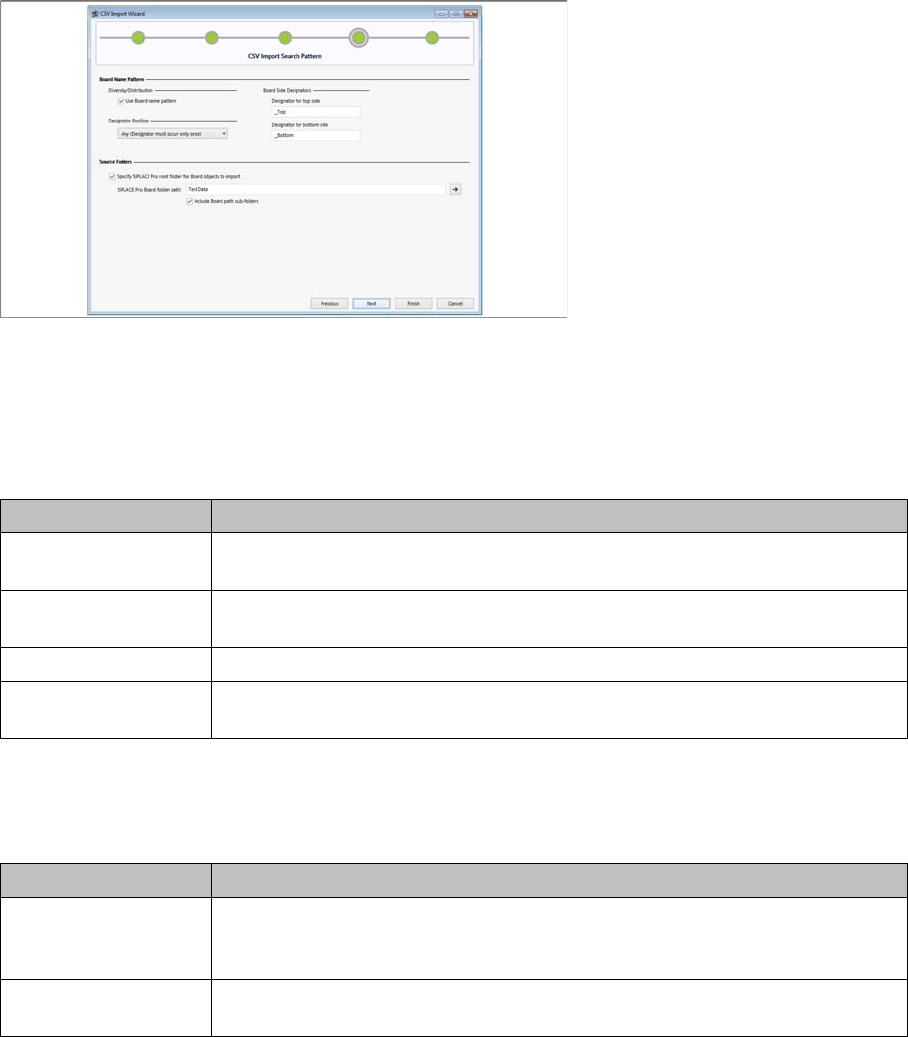
CSV import wizard for CSV data – CSV import search pattern
Edit field: Board name pattern
You can specify so-called name patterns as additional name components for the objects to be imported.
These name patterns are used to locate the specified objects in the CSV file and in the SIPLACE Pro
database.
Edit field: Source folders
Source folders in which the objects are located can be selected for the board and line objects specified
in the CSV file. This means that the CSV file does not need to contain the complete paths.
► Click Next to confirm.
⇨ The CSV Import – Result View dialog box will open.
Parameter Description
Use board name pat-
tern
Enable this option if you want to use the name patterns for boards. This will ac-
tivate the following fields:
Designator Position Specify whether the name pattern should be at the Begin or End of the board
name. If you select Any, the name pattern will be placed at any position.
Designator for top side Enter the name pattern for the top side of the board.
Designator for bottom
side
Enter the name pattern for the bottom side of the board.
Parameter Description
Specify SIPLACE Pro
root folder for board
objects to import
Select the path and the folder in which the boards are located from SIPLACE
Pro.
Include Line path sub-
folders
Enabling this option allows you to search the complete folder tree of the board
source folder for SIPLACE Pro objects.
Import Wizard for CSV Data
CSV Import – Results View 9.2.1 Notes on Processing
186 SIPLACE SiCluster Multiline SIPLACE SiCluster Multiline
9.4
9.4 CSV Import – Results View
CSV Import – Results View
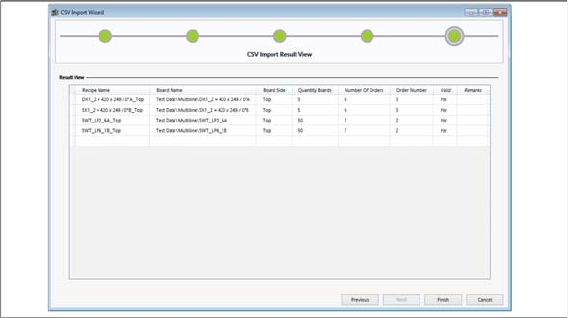
CSV import wizard for CSV data – CSV import results view
Shows an overview of the data to be imported.
The existence of the objects to be imported is checked in the SIPLACE Pro database. Non-existent ob-
jects or those which are not found will be shown in red. An import is possible provided at least one of the
SIPLACE Pro objects has been found.
► Click on the Finish button to import the data in the results view table into SiCluster Multiline.
Tips and Tricks
Creating a Template for Multi Line Jobs
SIPLACE SiCluster Multiline SIPLACE SiCluster Multiline 187
10
10 Tips and Tricks
Tips and Tricks
10.1
10.1 Creating a Template for Multi Line Jobs
Creating a Template for Multi Line Jobs
Create a multi line job with all lines and all settings, including the multiline cluster/optimization settings.
Each time you use SiCluster Multiline, this multi line job will be copied as a template. This means that all
settings are available and you can immediately begin to import the job data with the CSV Import function.
You can then begin the multi line clustering procedure.
10.2
10.2 Optimizing Ideal Cycle Times for all Existing Boards
Optimizing Ideal Cycle Times for all Existing Boards
When introducing SiCluster Multiline, we recommend that you optimize the ideal cycle time for all exist-
ing boards and all lines.
This makes the ideal cycle times available for all recipe-line combinations. When using SiCluster Multi-
line, you can then use the cycle times directly from the clipboard. You will only have to optimize the ideal
cycle times for new boards. The most time needed for optimizing ideal cycle times has been invested
and you can begin the actual mutliline clustering more quickly.
10.3
10.3 Creating a Board as Central Editor for Defining Process Requirements
Creating a Board as Central Editor for Defining Process Require-
ments
Create a board in SIPLACE Pro which is only used to define the process attributes. All the process at-
tributes needed in the production process will be defined here. This board is therefore the central editor
for defining process attributes. The board itself has no placement position, fiducials etc. as it is not in-
tended for placement.