Utah-94-721002-System-Manual.pdf - 第278页
^ää=lfmq=póëíÉãë l ñÑçêÇ =fåëíê ìãÉåíë =m ä~ëã~=q ÉÅÜåçäçÖó== System Manual 10) Manually match to the lowest possible reflected p ower using the AMU control panel, and make sure a plasma is running. Adjust the error sign…
System Manual lñÑçêÇ=fåëíêìãÉåíë=mä~ëã~=qÉÅÜåçäçÖó== ^ää=lfmq=póëíÉãë
Drive C1 negative to the stop position; LED 102 lights; stop point in the range 000 -
050
Drive C2 positive to the stop position; LED 1 lights; stop point in the range 950-999
Drive C2 negative to the stop position; LED 2 lights; stop point in the range 000 - 050
If these aren’t working as stated, refer to section 5 or OIPT Work Instruction No. 39
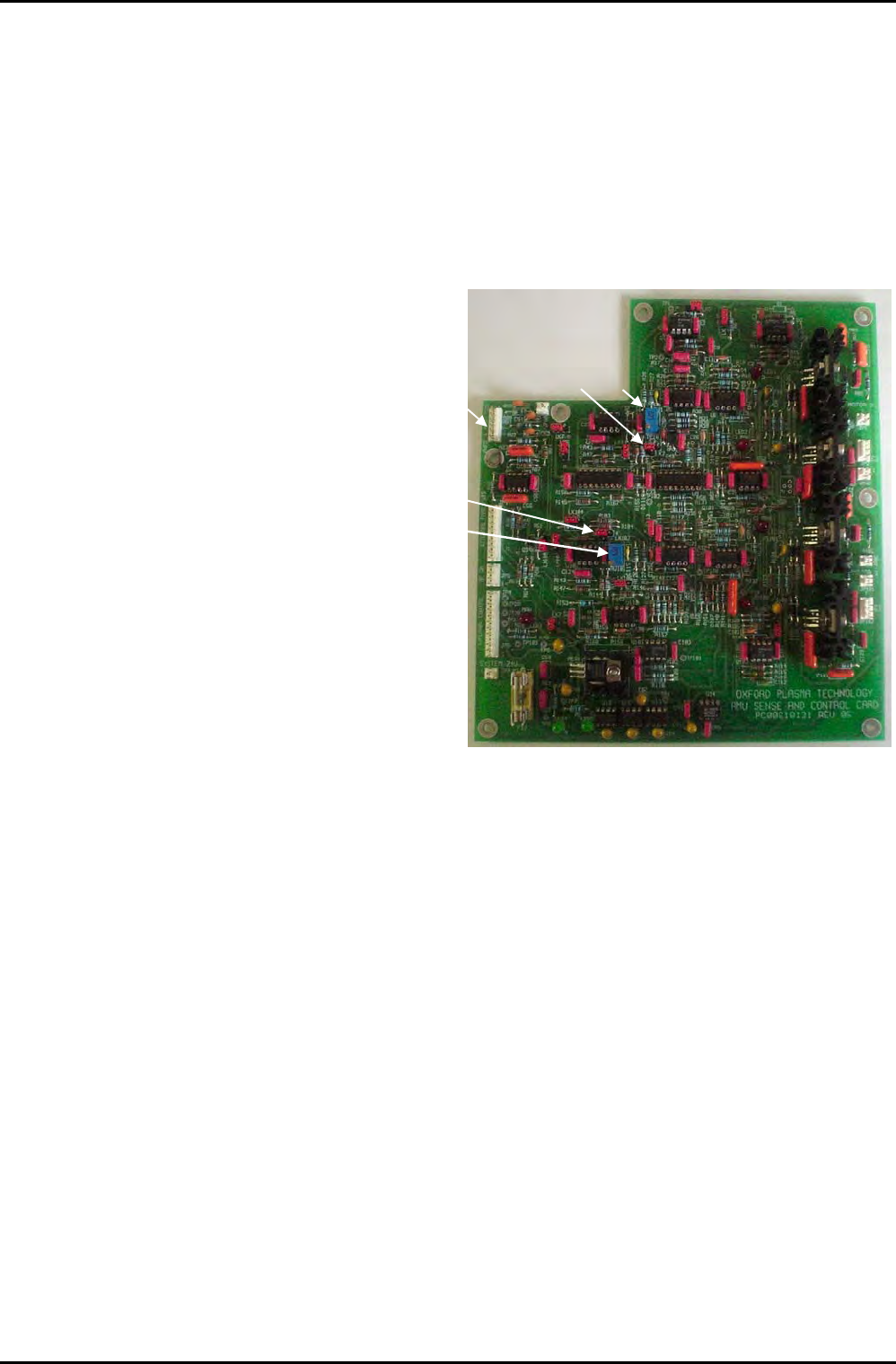
8) Set LK2 and LK 102 to
position ‘b’, and then
turn RV1 and RV101 fully
clockwise until they
begin to click (see Fig 6
or Fig 4).
RV1LK2
JP3
LK102
RV101
Fig 6: Component locations
9) Fit all covers to the AMU ensuring that they are securely fitted and connect the RF
generator to the matching unit. Evacuate the process chamber and turn on a low
power process.
For a Plasmalab system, a suitable process would be:
RF Generator output: 50 W
Pressure: 50 mTorr (RIE), 1 Torr (PECVD), 0.1 Torr (PE)
Gas: 20-100 sccm air, nitrogen or argon.
For an ion beam system, a suitable process would be:
RF generator output: 150 W (3 cm to 5 cm diameter)
300 W (15 cm to 20 cm diameter)
Gas: 10 sccm Argon
It may be necessary to use a gas burst to start the plasma, and it may be
necessary to start the neutralizer, if fitted.
OIPT Automatch Unit
Printed: 5-Jan-06, 8:03 Page 11 of 20 Issue 6: February 05

^ää=lfmq=póëíÉãë lñÑçêÇ=fåëíêìãÉåíë=mä~ëã~=qÉÅÜåçäçÖó== System Manual
10) Manually match to the lowest possible reflected power using the AMU control
panel, and make sure a plasma is running. Adjust the error signal zero
potentiometers RV1 and RV2 (located on the same side of the AMU as the RF in
connector; see Fig 1), while monitoring the two error signals on JP3 pins 1 and 3 (See
Fig 6). These should be less than 20 mV when a match exists. Amplified error signals
are accessible at TP 10 and TP 110; these should be made as low as possible when the
RF is well matched.
For Vacuum Capacitor AMU (AMU board REV05 and earlier):
If it is not possible to find a match position due to the match position being beyond
the range of the capacitors, stop the process and remove the AMU cover again. If C1
is attempting to drive above the maximum position, add 180 pF padding capacitor
(Part Number 94-ECC1218), or turn 2 turns anti-clockwise towards maximum. If C1 is
attempting to drive past the minimum position, remove a padding capacitor if
already fitted, otherwise turn 2 turns clockwise towards minimum. If C2 attempts to
drive above the maximum position turn 2 turns anti-clockwise, if C2 attempts to
drive below the minimum position, turn 2 turns clockwise. Whilst doing this, be
careful not to turn the capacitors beyond their physical end stops.
For Vacuum Capacitor AMU (AMU board with capacitor range mod.):
If C1 attempts to drive above maximum position, add 180 pF padding capacitor. If C1
is attempting to drive past the minimum position, remove a padding capacitor if
already fitted. If C2 attempts to drive past maximum or minimum position, check
that the correct inductor is fitted and that the capacitors are correctly fitted to the
system. If these are correct, the match position is out of the range of C2.
For Air Vane Capacitor AMU:
If C1 or C2 attempts to drive above maximum position, add 180 pF padding
capacitor. If C1 or C2 is attempting to drive past the minimum position, remove a
padding capacitor if already fitted. It is not necessary to reset the positions of the Air
Vane Capacitors.
11) Increase the RF power in a few steps to maximum and check for RF leakage, arcing
or local overheating.
12) Rematch manually, when at maximum RF power, manually to less than 1% reflected
power if possible; less than 3% is the maximum reflected power acceptable. Refine
the zero settings of the error signals.
13) Make a note of the capacitor position values when a good match is achieved. Stop
the process and adjust the park positions to a value below that of the match position
(within around 050 units on the position display), making sure that C2 is closer to its
match position than C1.
Re-start the process with the AMU controller in auto to make sure the match is
successful. If there is a large reflected power, repeat Step 10. If there is a small
amount of reflected power, which can’t be reduced manually, RV1 and RV2 on the
side of the AMU can be used to make finer adjustments when in auto mode.
14) If the capacitors oscillate when in auto, reduce the gain of the control circuit by
slowly turning RV1 and RV101 anti-clockwise (if C2 oscillates adjust RV1, if C1
oscillates adjust RV101) until oscillations stop. If the potentiometer’s RV1 or RV101
begin to click before the oscillations have ceased, turn them fully clockwise until
they begin to click again and change LK2 (corresponding to RV1) or LK102
OIPT Automatch Unit
Issue 6: February 05 Page 12 of 20 Printed: 5-Jan-06, 8:03

System Manual lñÑçêÇ=fåëíêìãÉåíë=mä~ëã~=qÉÅÜåçäçÖó== ^ää=lfmq=póëíÉãë
(corresponding to RV101) to position ‘a’ and begin turning the potentiometers anti-
clockwise again until the oscillations stop.
15) Confirm the automatching behaviour, increasing the RF power to maximum in small
steps, repeating Steps 10 to 13 if necessary.
QK= léÉê~íçê=~ÇàìëíãÉåí=
WARNING
THE FOLLOWING ADJUSTMENT INVOLVES WORKING ON THE SYSTEM WITH
PANELS/COVERS REMOVED. IT SHOULD ONLY BE CARRIED OUT BY TRAINED
PERSONNEL WHO ARE AWARE OF THE HAZARDS INVOLVED.
QKN= a`=Äá~ë=L=mÉ~âJíçJéÉ~â=ëïáíÅÜ=ë ÉííáåÖ=
The DC bias / Peak-to-peak switch is located on the outer case of the AMU, adjacent to RV1
(null adjustment potentiometer). See Fig 1, page 3.
This switch selects one of two sensing output signals from the AMU:
DC bias: This switch setting is the default position. The output is a SCALED dc
voltage proportional to the RF-induced self-bias on the electrode,
sometimes called the 'DC bias'. This is a negative offset voltage on the
electrode with respect to ground, which is inverted and conventionally
referred to as a positive value, typically 100 - 600 Vdc. Normal scaling can
read up to 1000 Vdc. This signal is read by the front-end software with
correct scaling on OIPT tools.
Peak-to-peak: The output is an UNSCALED dc voltage related to the peak-to-peak value
of the RF signal at the output of the automatch. This can be useful when
the scaled dc bias is inaccessible, for example if the electrode has no dc
contact to the plasma because a quartz carrier plate masks the whole
electrode. The value displayed on the PC screen will be an arbitrary value,
not a true peak-to-peak value, but can still be a useful monitor.
Note that the software has no knowledge of the switch setting and is scaled only for the dc
bias setting.
RK= léÉê~íáçå=
If the automatch has been set to ‘auto’, the unit will attempt to reduce the reflected RF
power to minimum without the need for operator adjustments. It will normally reduce
reflected power to less than 2% of forward power.
Use manual matching for the following:
a) One or both capacitors has driven to a limit.
b) To discover if a match exists within the range of the matching unit.
The adjustment panel for the automatch is located behind a hinged cover. Opening the cover
reveals the following controls and indicators:
OIPT Automatch Unit
Printed: 5-Jan-06, 8:03 Page 13 of 20 Issue 6: February 05