EUS0153210_YFact_Standard_E.pdf - 第14页
Chapter 1 Installation of Factor y T ools Contents 1. Installation of Factory T ools 1- 1 1.1 New installation of Factory T ools 1- 1 1.2 Upgrade of Factory T ools 1- 5 1.3 Additional Installation of the Factory T ools F…
vi
Before using Factory Tools
n
Dual Lane board data
Dual Lane Machine uses YGX(Combined) board data, combining YGX and multiple YGX board data.
Kind Description
Single Board Data
YGX
• It is same as the board data before.
• It is used for the production only on single lane.
• It contains lane number information identifying the lane to be used.
(Refer to chapter 3, "7. Multi-lane support" in the P-Tool user’s manual.)
This data is valid only to dual lane machine.
Combined Board Data
YGX (Combined)
• It is new board data that some single board data are combined to one file.
• It is used for the production on both lane.
• It is able to create on P-Tool.
• The direct creation of board data in the form of YGX (Combined) is not
possible. This information is created by combining individual board data.
(Refer to chapter 2, "10.2 Multi Lane Utility".)
• It has board name and comment of all data in internal data. They are original
data to combine.
3.4 Other cautions
The points to note when installing Factory Tools are listed below.
•MakesurethatthedriveintowhichyouaregoingtoinserttheFactoryToolsCD-ROMisrecognizedbyWindows.
•InstallationfromtheCD-ROMviathenetworkisnotguaranteed.
•Powersavingisnotsupported.OncethePCisswitchedtopowersavingmode,anaccesstothehardwarekeywillfail
when the PC is returned from power saving mode.
If you are going to use a USB hardware key, make sure that the OS supports USB devices.
3.5 Package contents
The Factory Tools package contains the following items. Make sure that each of them is included.
CD-ROM
Hardware key
User's manual (this manual)

Chapter 1 Installation of Factory Tools
Contents
1. Installation of Factory Tools 1-1
1.1 New installation of Factory Tools 1-1
1.2 Upgrade of Factory Tools 1-5
1.3 Additional Installation of the Factory Tools Functions 1-7
1.4 Uninstallation of Factory Tools 1-9
2. Installation of hardware key 1-11
2.1 New installation of hardware key 1-11
2.2 Upgrade of hardware key 1-14
2.3 Uninstallation of hardware key 1-17
1-1
1
Installation of Factory Tools
1. Installation of Factory Tools
This section describes on new installation and upgrade of the Factory Tools and installation of additional
function.
1.1 New installation of Factory Tools
The following explains the method for installing the Factory Tools to your PC for the first time.
c
CAUTION
Before installing the Factory Tools for the first time, be sure to install the hardware key. Refer to the “2. Installation of
hardware key” in this chapter for how to install the hardware key.
1
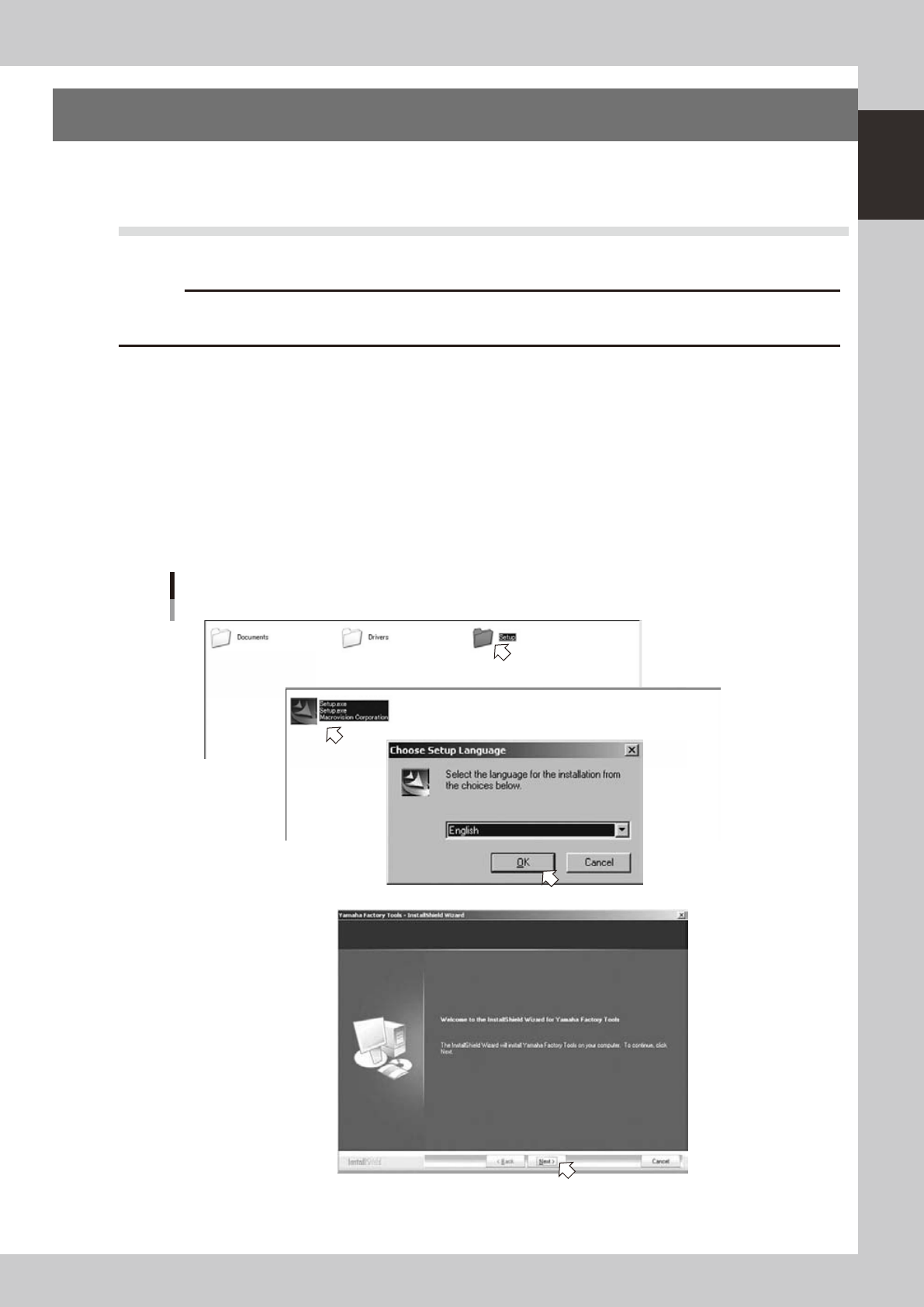
Start the installer.
1. Set the CD-ROM to the PC.
2. Double-click the "My Computer" icon of the PC and select the CD-ROM drive.
3. Open the "Setup" folder and double-click the "Setup.exe".
4. When the "Select language" dialog box is indicated, select a language and click the [OK] button.
The “InstallShield Wizard” will start.
2
Install the Factory Tools.
1. Click the [Next] button in the InstallShield Wizard.
Setup application
Step1
Step1
64100-S0-00