YG12_英文保养手册.pdf - 第48页
2-6 2 Daily maintenance items 3. Cleaning the camera transparent cover Dirt or dust par ticles sticking to the transparent cover of the multi-view camera can cause recognition errors. Periodic inspection and cleaning are…
2-5
2
Daily maintenance items
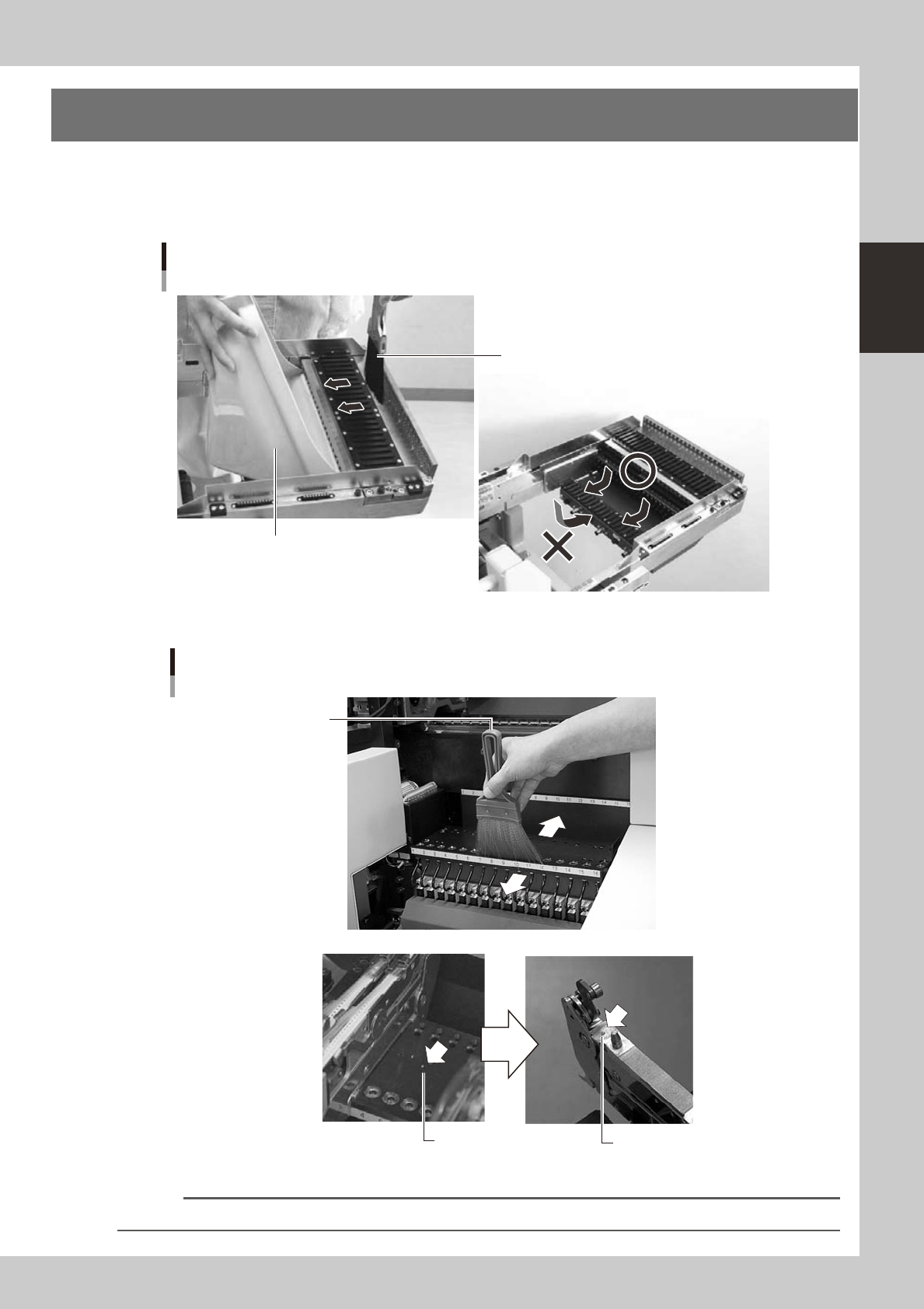
2. Cleaning the feeder plate
Clean the feeder plate by using the brush supplied with the machine. Chips or foreign matter falling on
the feeder plate might bite into the surface during feeder setting and cause the pickup position to deviate.
Periodic inspection and cleaning are recommended to prevent this problem.
n
YS12
Cleaning brush
Cleaning the feeder plate (bank)
Dustpan
53205-L5-10
n
YG12
Chips
Chips adhering to the bottom
of a tape feeder
Cleaning brush
Cleaning the feeder plate
53206-L5-00
Reference
You can clean chips and debris on the feeder plate while dropping them into the holes in the rear of the feeder plate.
2-6
2
Daily maintenance items
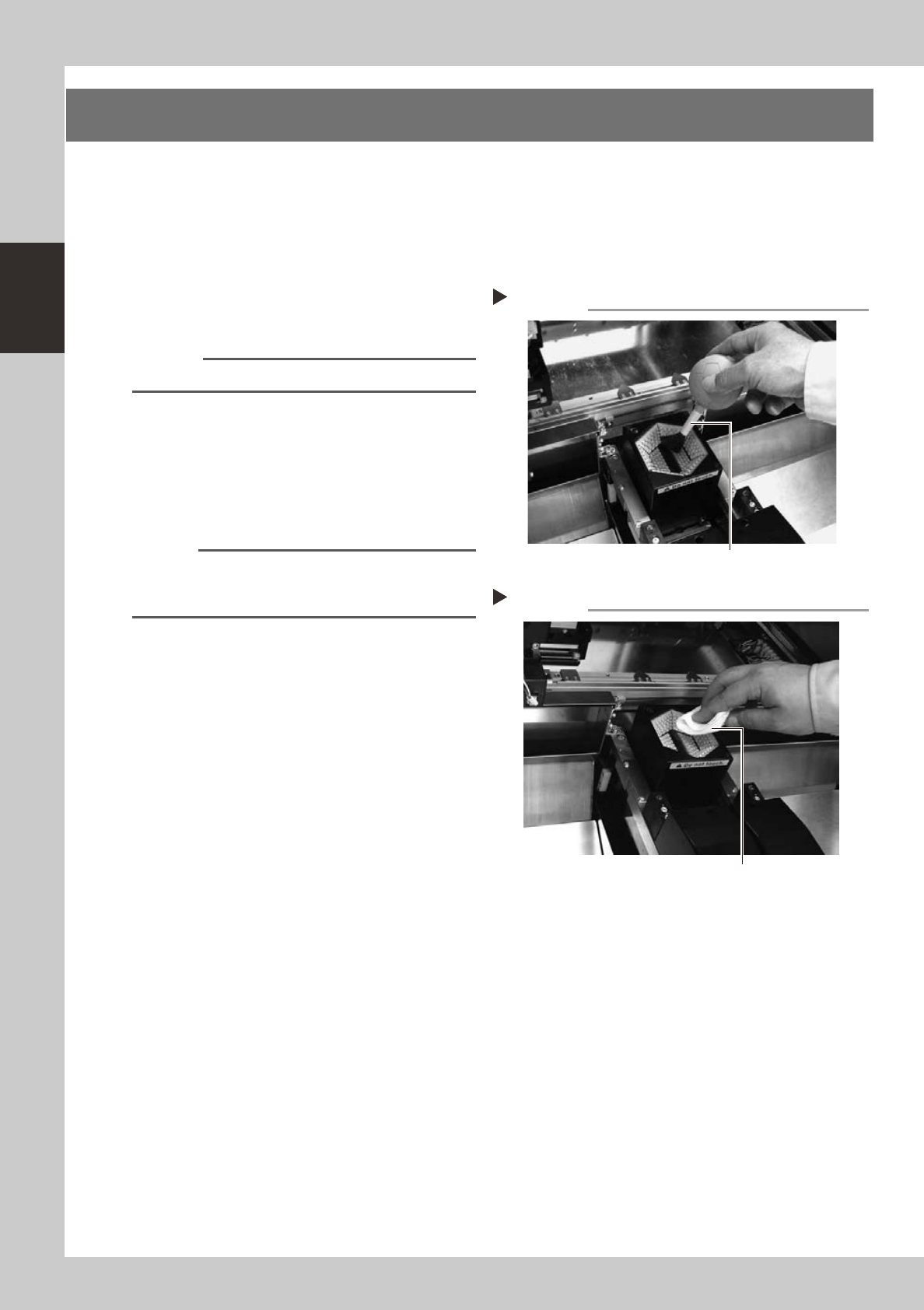
3. Cleaning the camera transparent cover
Dirt or dust particles sticking to the transparent cover of the multi-view camera can cause recognition errors.
Periodic inspection and cleaning are recommended to prevent this problem.
e
To ensure safety, make sure that the machine power switch is off or the emergency stop button is pressed
before starting work.
1
Remove dust on the transparent
cover with the lens blower brush.
53207-L5-00
Reference
A lens blower brush is available as an option.
2
Wipe the transparent cover with a
lint-free cloth.
Apply a few drops of lens cleaner to a
lint-free cleaning cloth or paper towel and
wipe the transparent cover.
53209-L5-00
n
NOTE
Usealint-freecleaningclothorpaperwiper.
A lens cleaner is supplied with the machine. Do not use
other type of cleaner.
Blowing off dust with blower brush
Step 1
Lens blower brush
Wiping the transparent cover
Step 2
Lent-free cleaning cloth or paper wiper

Chapter 3 Periodic maintenance items
Contents
1. Weekly inspection 3-1
1.1 Checking and cleaning the nozzles 3-1
1.1.1 Checking and cleaning the spring-action parts 3-1
1.1.2 Checking the nozzle leaf springs 3-3
1.2 Checking the conveyor sensor condition and operation 3-4
1.3 Checking the board clamp condition and operation 3-5
1.3.1 Checking the board clamp condition 3-5
1.3.2 Checking the board clamp operation 3-5
2. Monthly or bimonthly inspection 3-6
2.1 Cleaning the nozzle air path 3-6
2.2 Inspecting ball screws and linear guides of each axis 3-7
2.3 Cleaning and greasing the X, Y and W axes 3-8
2.3.1 Cleaning and greasing the X, Y and W axis ball screws 3-8
2.3.2 Cleaning and greasing the X, Y and W axes linear guides 3-11
2.4 Inspecting, cleaning and greasing the push-up shaft 3-13
2.5 Inspecting the board conveyor unit 3-15
2.5.1 Inspecting and cleaning the conveyor belt 3-15
3. Three-month inspection 3-16
3.1 Cleaning and replacing the ejector filter 3-16
3.1.1 Checking the ejector vacuum pressure 3-17
3.1.2 Checking the blow valve operation (each head) 3-18
3.1.3 Checking the cleaning blow valve operation (for all heads) 3-18
3.2 Cleaning and lubricating the inside of the spline shaft 3-19
3.2.1 Cleaning the inside of the spline shaft 3-19
3.2.2 Checking the negative pressure 3-22
3.3
Checking the spline shaft movement and lubricating the slide section
3-23
3.4 Checking the SC-axis flex cable 3-24
3.5 Inspecting and cleaning the air/mist filters 3-25