YG12_英文保养手册.pdf - 第54页
3-4 3 Periodic maintenance items 1.2 Checking the conveyor sensor condition and operation T his machine uses a transmission mode fiber sensor as the con veyor sensor . Check w hether the sensor operates correctly even w …
3-3
3
Periodic maintenance items
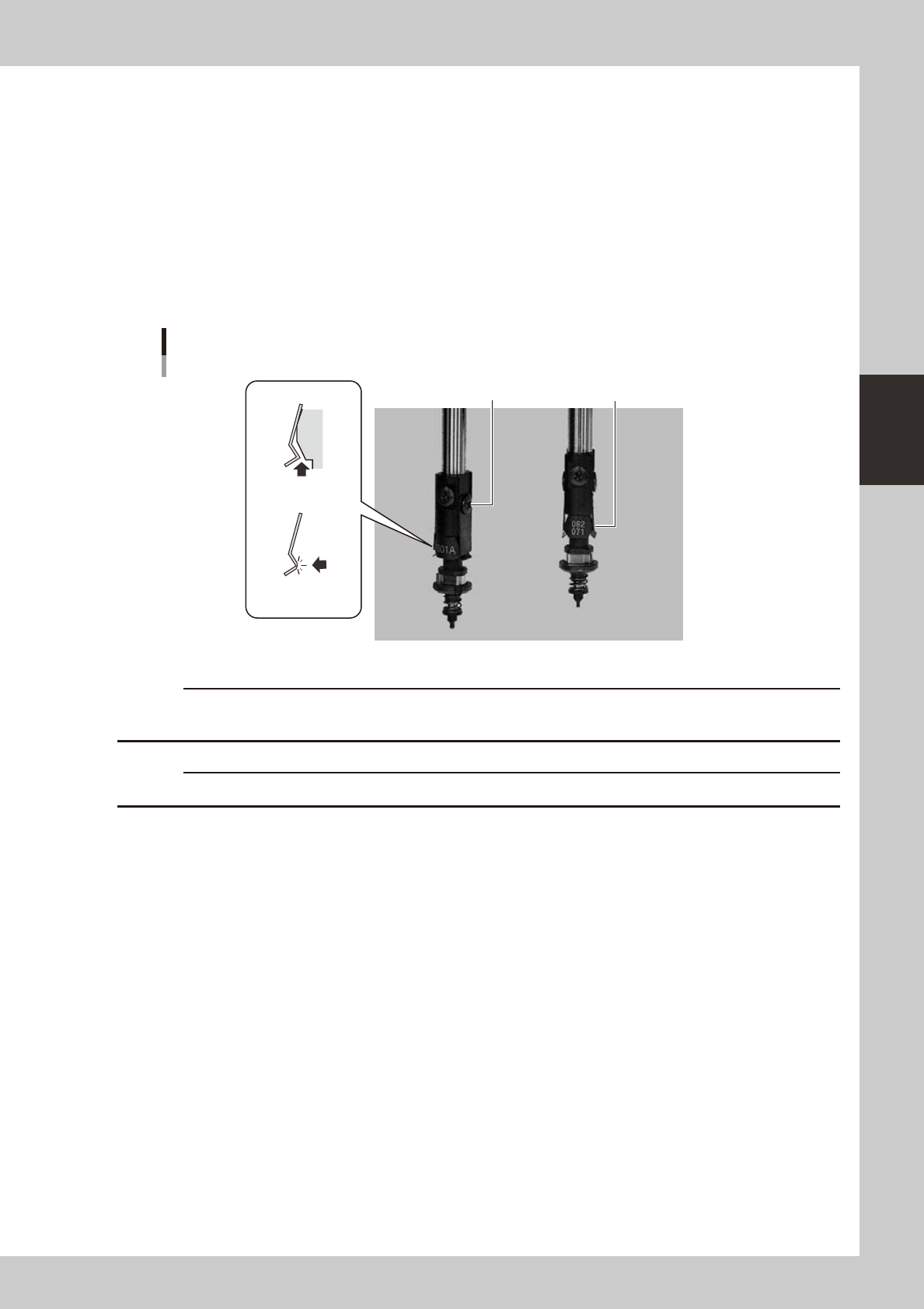
1.1.2 Checking the nozzle leaf springs
If nozzle leaf springs cannot hold a nozzle securely, this adversely affects pickup, recognition and mounting
operations. Periodically check the leaf springs for nozzle holding status.
n
Leaf spring inspection points
Check the following points by removing the nozzle and reattaching it to the nozzle holder.
• The leaf spring has enough gripping force.
• There is no gap between the leaf springs and the nozzle.
• The leaf spring is not warped or deformed.
• The gripping part of the leaf spring is not frayed.
Checking the leaf spring condition
There should be
no gap.
Leaf spring should
not be frayed.
Screw should
be tightened.
Leaf spring should not be
warped or deformed.
53308-L5-00
c
If any of the above points is found to be a problem, remove the nozzle and replace the leaf springs as a pair, by
referring section 1, "Nozzle leaf springs" in Chapter 4.
c
When the machine is equipped with a nozzle station, return the removed nozzles to the nozzle station.
3-4
3
Periodic maintenance items
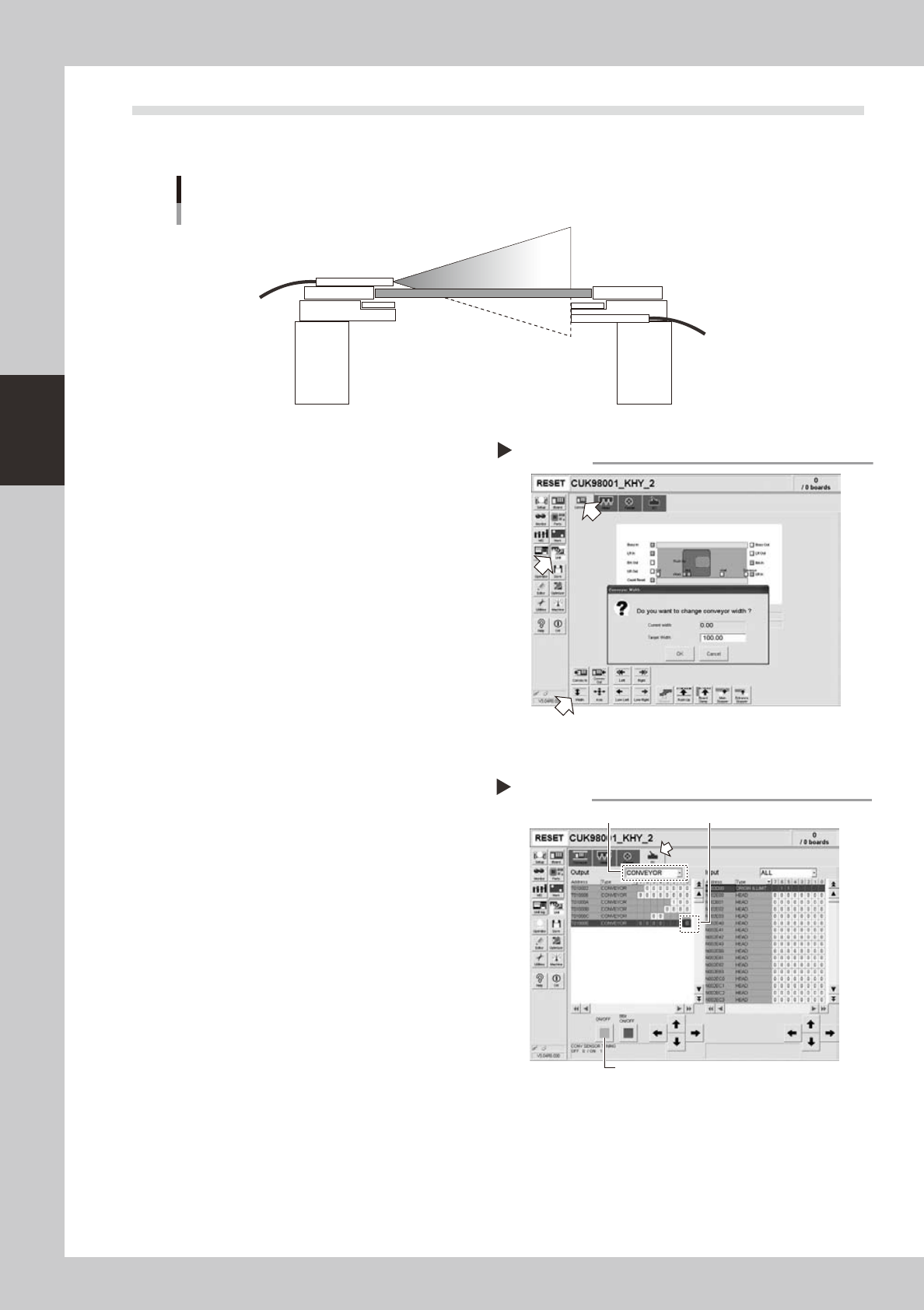
1.2 Checking the conveyor sensor condition and operation
This machine uses a transmission mode fiber sensor as the conveyor sensor.
Check whether the sensor operates correctly even when the conveyor rail width is changed.
Checking the conveyor sensor condition and operation
Light emitter
Light
sensor
53353-L5-00
1
Open the [Unit] – [Conveyor] tab.
2
Press the [Width] button to change
the conveyor width.
In the "Conveyor Width" dialog box that
appears, enter a conveyor width and press
[OK].
The conveyor is changed to the width that
was just entered.
3
Check whether an error has
occurred.
The conveyor sensor is operating properly
unless an error message appears when the
conveyor width is changed. No further
check is necessary.
If an error message appears, then adjust the
sensor with the procedure below.
54301-L5-00
n
Adjusting the conveyor sensor
If an error occurred when the conveyor width was
changed, check the output status of the conveyor
sensor.
1. Open the [Unit] – [I/O] tab.
2. From the "Output" drop-down list, select
"CONVEYOR".
3. Select "CONV SENSOR TUNING" (T01000E0) in the
output I/O list.
4. Press the [ON/OFF] button to switch the I/O status
from "0" (OFF)
→
"1" (ON)
→
"0" (OFF) to perform
auto tuning.
5. On the [Unit] – [Conveyor] tab, press the [Axis]
button again and change the conveyor width. The
sensor is operating properly unless an error message
appears.
54302-L5-00
Checking the conveyor sensor
Step 1-3
Conveyor sensor tuning
2
3
4
3-5
3
Periodic maintenance items
1.3 Checking the board clamp condition and operation
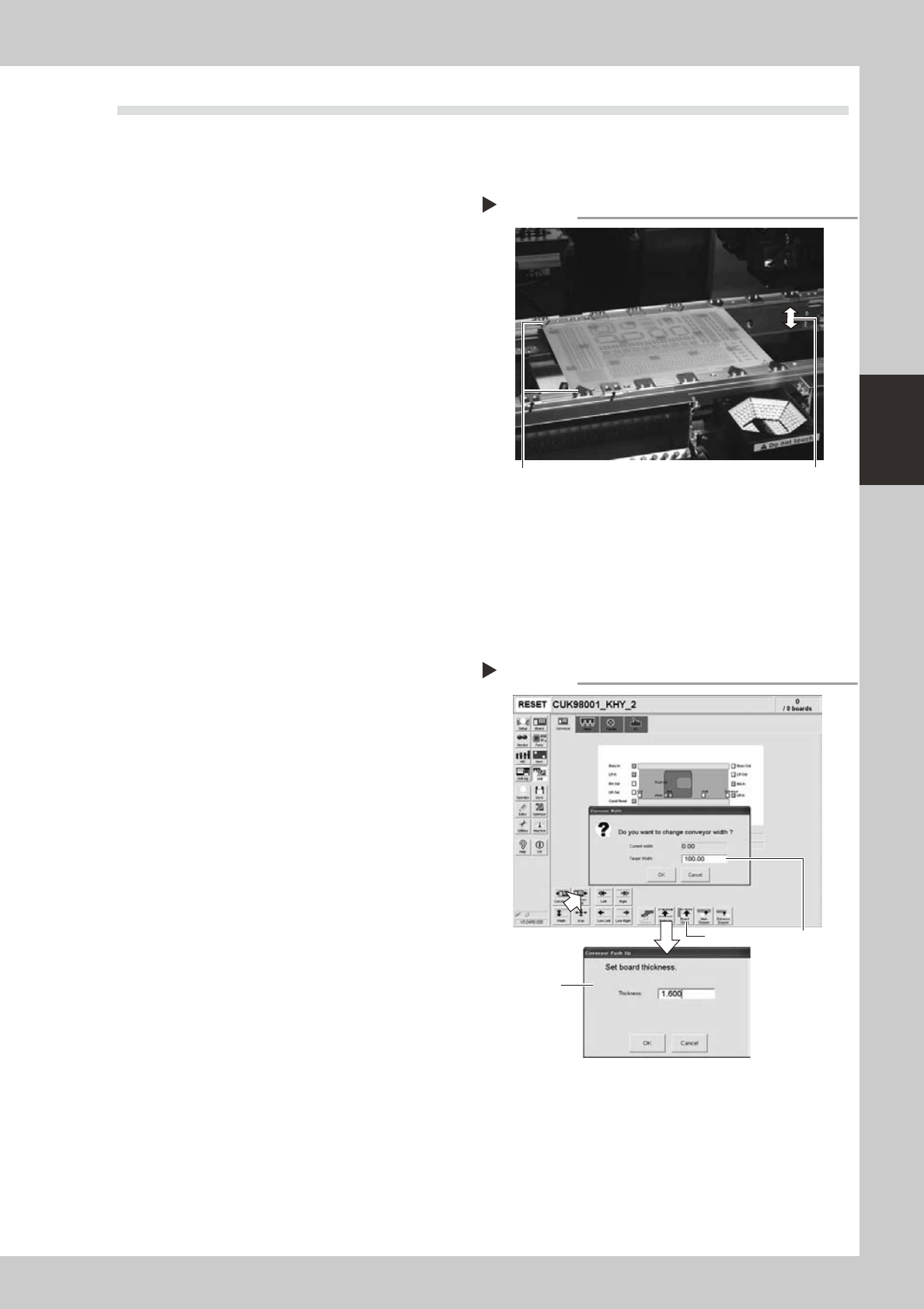
1.3.1 Checking the board clamp condition
Check the following points to see the board clamp condition.
1. The board is clamped without play when the board
clamp is raised.
2. There is no clearance between the board and the
board hold plate when the board clamp is raised.
3. The board is flush with the upper surface of the
conveyor rails when the board clamp is raised.
4. The board clamp unit moves smoothly.
53301-L5-00
1.3.2 Checking the board clamp operation
1
Open the [Unit] – [Conveyor] tab.
2
Press the [Width] button to set the
conveyor width.
In the "Target Width" box in the "Conveyor
Width" dialog box that appears, enter the
board width and press [OK].
The conveyor is changed to the width that
was just entered.
3
Press the [Push Up] button to enter
the board thickness.
In the dialog box that appears, enter the
board thickness and press [OK].
4
Press the [Board Clamp] button to
clamp the board.
5
Press the [Board Clamp] button
again to unclamp the board.
54309-L5-00
Repeat steps 4 and 5 to clamp and unclamp the
board to make sure the clamp unit operates
smoothly.
Checking the clamp condition
Check that there is no clearance
between the board and board hold
plate and also that the board is flush
with the conveyor rails.
Clamp and unclamp the
board to check the
movement.
Checking the clamp operation
Step 2-5
Step2
Step3
Step4, Step5