YG12_英文保养手册.pdf - 第82页
3-32 3 Periodic maintenance items 4.6 Cleaning the multi-view camera lens and lighting unit (1 year) …. option T he multi-view camera lens and lighting unit are enclosed inside the transparent co ver . T o clean the lens…
3-31
3
Periodic maintenance items
4.5 Inspecting and cleaning the controller filter (1 year)
A fan is installed on the lower part of the controller to cool the circuit boards inside the controller. Turning on
the main power starts a continual supply of air. The filter removes dust from the air taken in through the fan.
Accumulated dust may cause faulty operation, so clean the filter periodically.
1
Turn off the air supply and the
power to the machine.
Quit the software and turn off the machine
power switch. Then turn the air supply/
shutoff valve inside the machine lower left
panel to the right.
2
Open the air release valve inside
the tape cutter.
Discharge any remaining air that is
accumulated inside the tape cutter.
c
To remove the tape cutter duct, any air remaining in the
tape cutter must be discharged to free the tape cutter
blade.
3
Remove the front tape cutter ducts.
Use a Phillips screwdriver to remove the
screws securing the left and right tape cutter
ducts, and remove the ducts. (Remove a
total of 6 screws.)
c
Removing the tape cutter ducts exposes the tape cutter
blade. Coming in contact with the blade may cause
cuts and injuries, so be careful not to touch the blade.
4
Remove the front lower panel to
access to the controller.
Remove the front panel under the machine
front base, where the controller is installed.
5
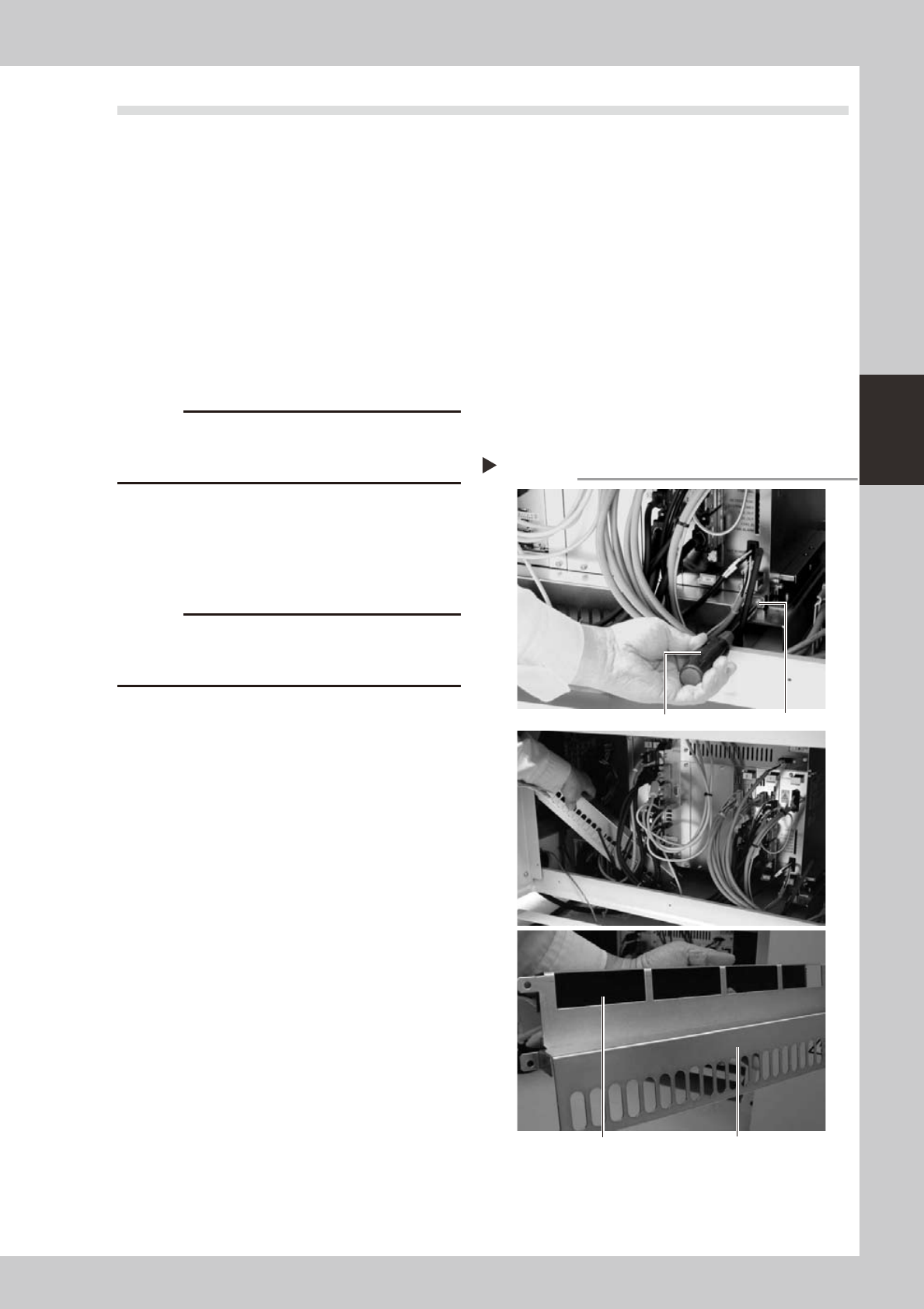
Remove the filter.
Use a Phillips screwdriver to remove the
screws on the left and right of the filter
frame, and remove the filter along with the
filter frame.
53350-L5-00
6
Clean or replace the filter.
The filter is attached to the filter frame.
Check for dirt and clean by air blow. If the
dirt is too tough to remove, then replace the
filter.
7
Reinstall the filter.
Reinstall the filter back to its original position.
Reinstall the front panel and the tape cutter
ducts.
8
Close the air release valve inside
the tape cutter.
9
Turn on the machine power and
start the air supply.
Turn on the machine power switch and also
start the air supply by turning the air supply/
shutoff valve inside the machine lower left
panel to the left.
Removing the filter
Step 5
Phillips screwdriver
Screw (1 each on left and right)
Filter coverFilter is attached to filter frame.
3-32
3
Periodic maintenance items
4.6
Cleaning the multi-view camera lens and lighting unit (1 year) …. option
The multi-view camera lens and lighting unit are enclosed inside the transparent cover. To clean the lens and
lighting unit, remove the transparent cover. If the transparent cover is dirty, clean it (see section 5, "Cleaning
the camera transparent cover", in Chapter 2).
1
Turn off the power to the machine.
Quit the software and turn off the machine
power switch.
2
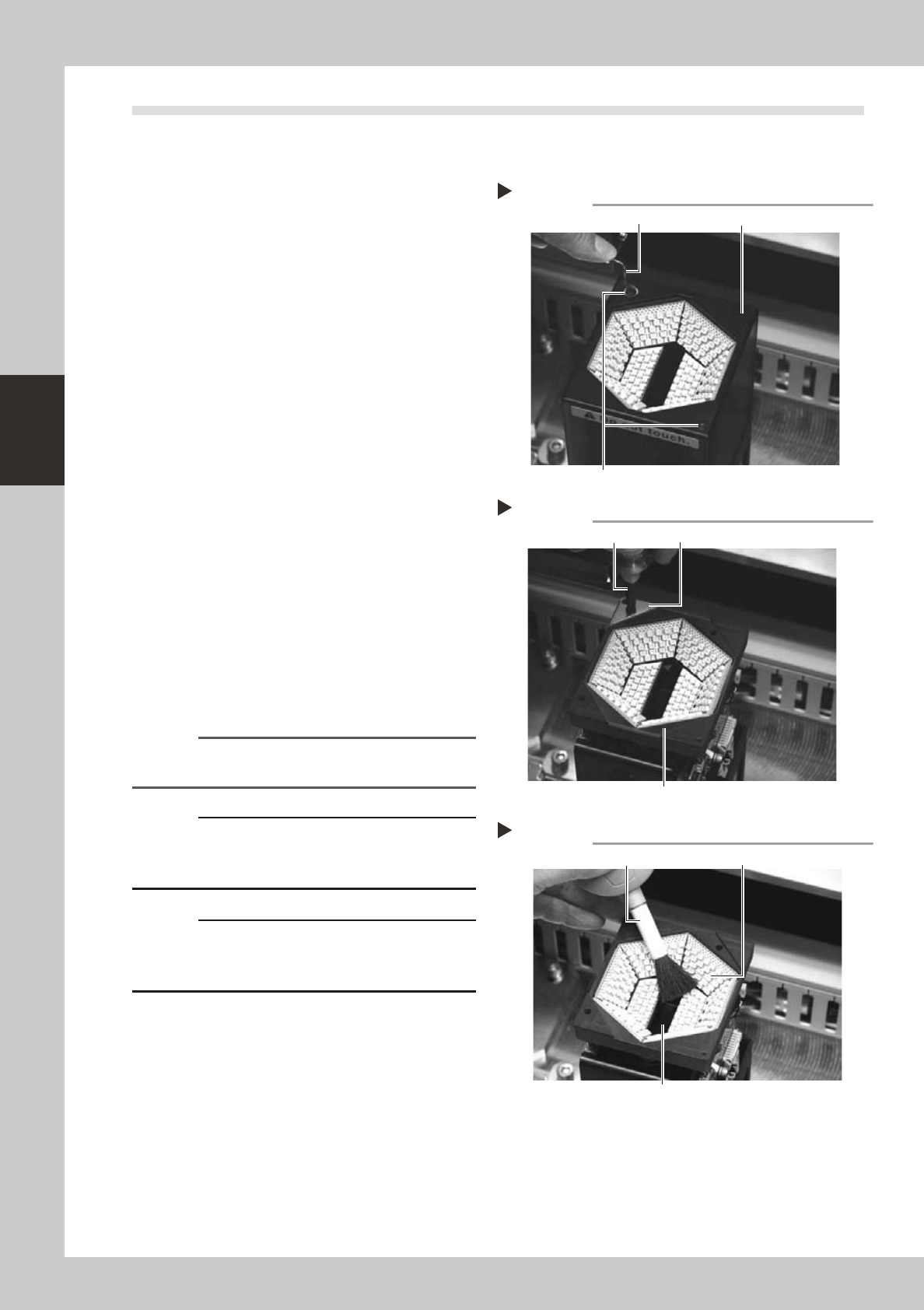
Remove the upper cover of the
multi-view camera.
Use a hex wrench to remove the two
thin-head screws on the upper cover of the
multi-view camera. Then carefully lift the
multi-view camera cover straight up and
remove it.
53341-L5-00
3
Remove the transparent protective
glass.
Use a Phillips screwdriver to remove the
screws securing the glass mount plate.
53342-L5-00
4
Clean the lighting unit.
1. Many LEDs are mounted on the lighting
board.Usealensbrushtocleanthe
LEDs.
2. A half mirror is located in the center
opening of the lighting unit. Clean the
half mirror using a lens brush, lint-free
cotton swab, lens cleaner, etc.
53343-L5-00
Reference
Lens brush, lint-free cotton swab, and lens cleaner are
available as options.
c
or may cause short-circuits.
c
The half mirror is very thin with a thickness of 1.0mm.
Even a small shock can cause cracks. Use extreme
caution when cleaning the half mirror.
Removing the multi-view camera cover
Step 2
Hex wrench
Thin-head screw
Multi-view camera cover
Removing the protective glass
Step 3
Phillips screwdriver
Protective glass
Glass mount plate
Cleaning the multi-view camera lighting unit
Step 4
Lens brush
Half mirror glass
LED
3-33
3
Periodic maintenance items
5
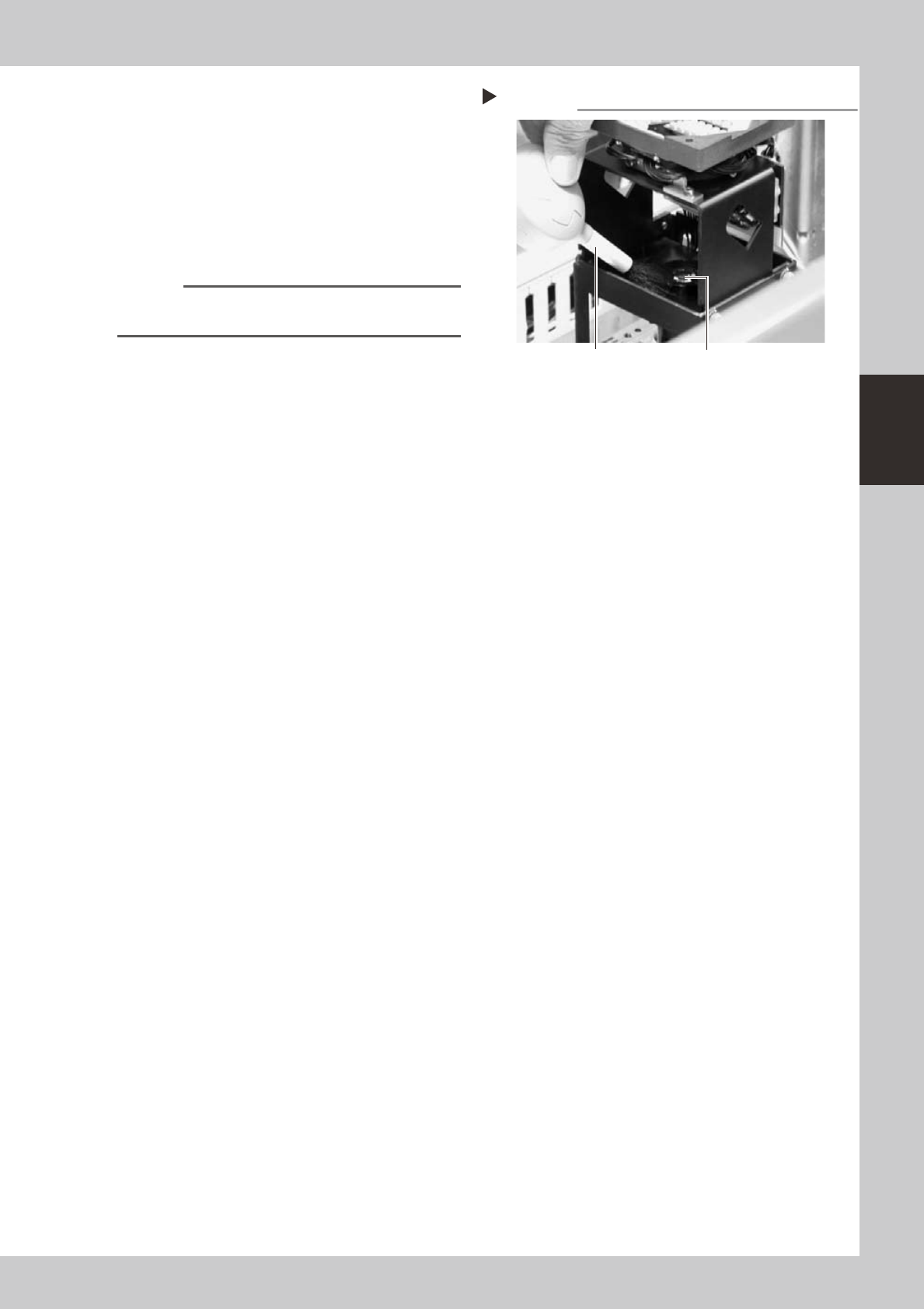
Clean the multi-view camera lens.
The multi-view camera lens is located under
the lighting unit. Remove the dust on the
lens surface using the lens brush or lint-free
cotton swab.
If it is difficult to remove dust, moisten the
lint-free cotton swab with lens cleaner and
wipe off the lens. Then clean the lens with a
dry lint-free cotton swab.
53344-L5-00
Reference
Lens brush, lint-free cotton swab, and lens cleaner are
available as options.
Cleaning the multi-view camera lens
Step 5
Lens brush
Multi-view camera lens