YG12_英文保养手册.pdf - 第80页
3-30 3 Periodic maintenance items 4.4 Checking the nozzle station sensor condition (1 year) … option When the machine is equipped with a nozzle station (option), c heck the nozzle station sensors to see if they are worki…
3-29
3
Periodic maintenance items
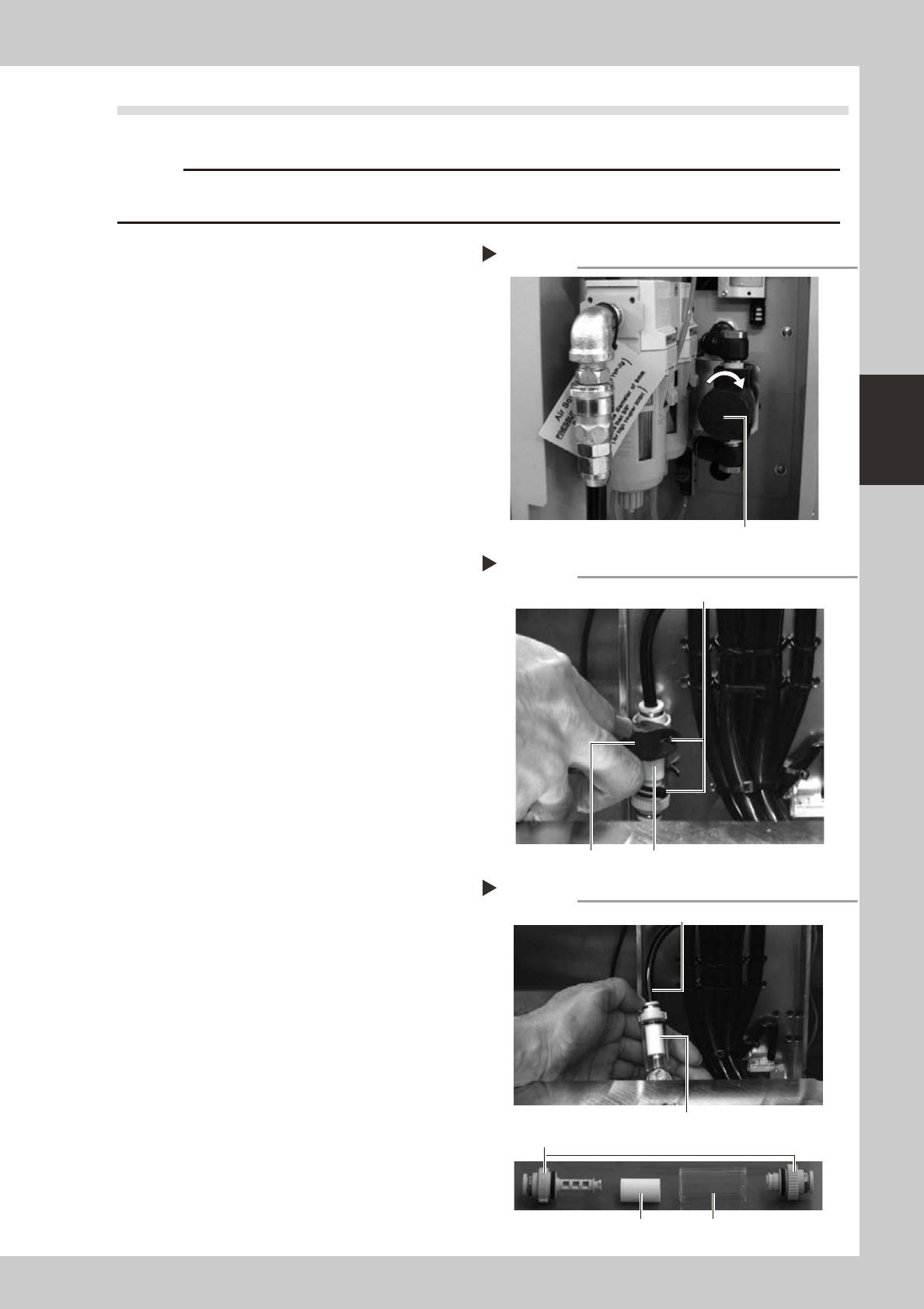
4.3 Cleaning and replacing the blow station filter (1 year)
To clean or replace the blow station filter, follow the steps below.
c
of the blow station by the user will void the warranty.
1
Turn off the air supply and the
power to the machine.
1. Quit the software and turn off the
machine power switch.
2. Turn the air supply/shutoff valve inside
the machine lower left panel to the right,
to stop the air supply.
53346-L5-00
2
Cut the cable ties on the filter.
Using a wire cutter or similar tool, cut the
cable ties that hold the filter unit inside the
blow station stand.
53347-L5-00
3
Disconnect the air hose from one
end of the filter unit and take out
the filter.
1. Disconnect the air hose from one end of
the in-line filter unit.
2. Remove the filter joint caps on both sides
of the filter by rotating them 90 degrees.
3. Pull the transparent case to remove it
and take out the filter.
53348-L5-00
4
Clean the filter.
Use an air blow gun to blow air through the
filter from the inside and from the outside. If
the filter is excessively dirty and cannot be
cleaned, replace it with a new filter.
Shutting off the air supply
Step 1
Air supply/shutoff valve
Cutting the cable tie
Step 2
Cable tie
Wire cutter In-line filter unit
Taking out the filter
Step 3
Air hose
Filter
Transparent filter case
In-line filter unit
Filter joint caps
3-30
3
Periodic maintenance items
4.4 Checking the nozzle station sensor condition (1 year) … option
When the machine is equipped with a nozzle station (option), check the nozzle station sensors to see if they
are working correctly.
c
If a nozzle station sensor fails to detect a nozzle, the nozzle change cannot be performed correctly and the machine
operation may be interrupted due to a nozzle detection error.
e
1
Press the emergency stop button.
The machine should be in emergency stop
to ensure safety during work.
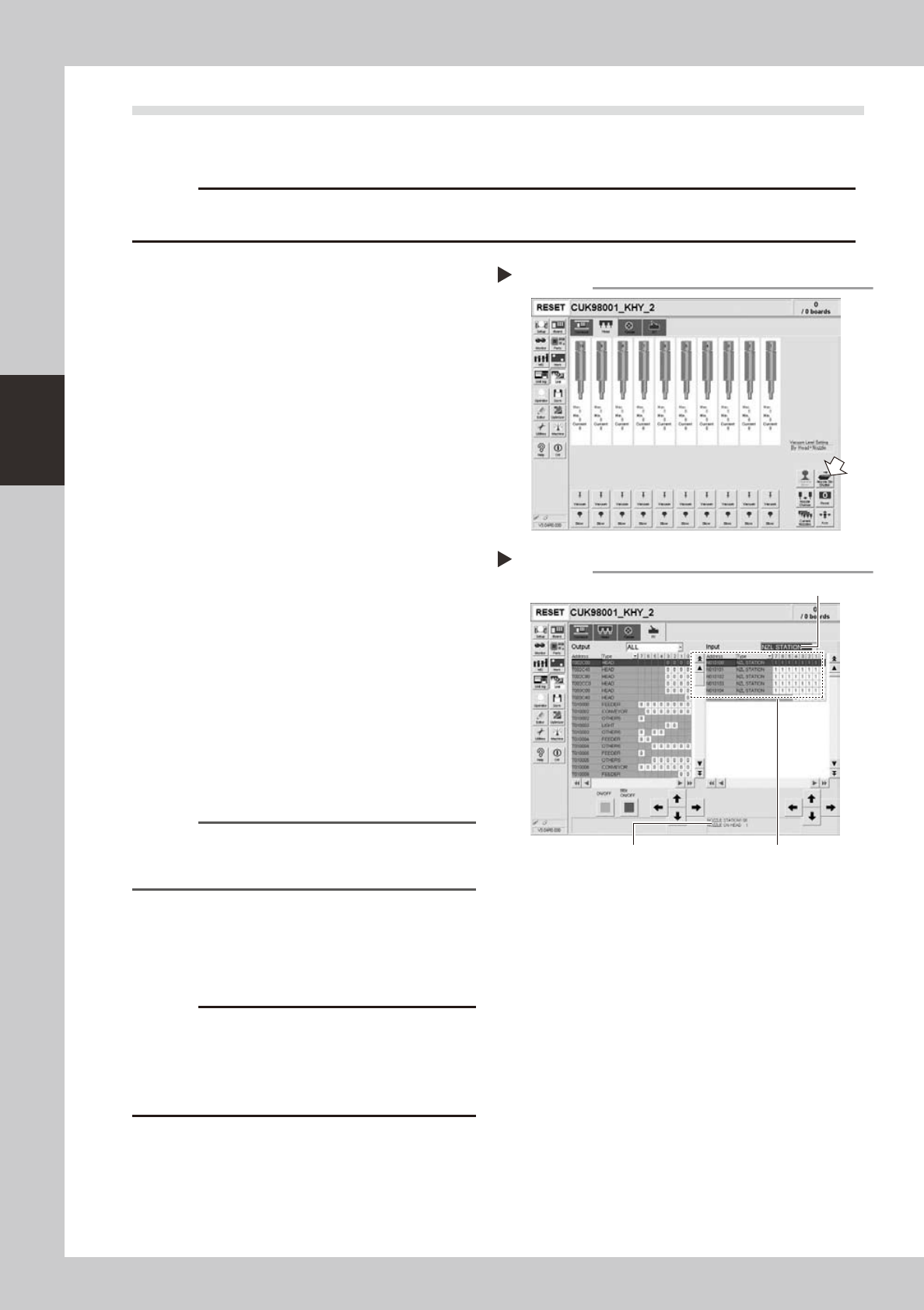
2
Open the nozzle station shutter.
1. Openthe[Unit]-[Head]tab.
2. Press the [Nozzle Stn Shutter] button to
open the nozzle station shutter.
54303-L5-00
3
Check the detection status of the
nozzle station sensors.
Check to see if the nozzle station sensors
detect the presence or absence of nozzles.
1. Openthe[Unit]-[I/O]tab.
2. From the "Input" drop-down list, select
"NZL STATION".
3. While extracting a nozzle from the nozzle
station and returning it to the same
position, check whether the
corresponding sensor detects the nozzle
correctly.
The detection status on the screen should
read "1" when the nozzle is extracted
from the nozzle station, and should read
"0" when the nozzle is in the nozzle
station.
54306-L5-00
Reference
The nozzle station position No. where a nozzle was
extracted or inserted is displayed on the lower part of
the "Input" status screen.
4
Close the nozzle station shutter.
On the [Unit]-[Head] tab, press the [Nozzle
Stn Shutter] button to close the nozzle station
shutter.
c
If the detection status of a nozzle station sensor is
unstable or a senor fails to detect a nozzle, then contact
and cleaning of the nozzle station sensors by the user
will void the warranty.
Opening the shutter
Step 2
Checking the nozzle detection status
Step 3
Select "NZL STATION".
Nozzle station position No. is
displayed here.
Shows the presence or absence
of nozzles detected by sensors.
3-31
3
Periodic maintenance items
4.5 Inspecting and cleaning the controller filter (1 year)
A fan is installed on the lower part of the controller to cool the circuit boards inside the controller. Turning on
the main power starts a continual supply of air. The filter removes dust from the air taken in through the fan.
Accumulated dust may cause faulty operation, so clean the filter periodically.
1
Turn off the air supply and the
power to the machine.
Quit the software and turn off the machine
power switch. Then turn the air supply/
shutoff valve inside the machine lower left
panel to the right.
2
Open the air release valve inside
the tape cutter.
Discharge any remaining air that is
accumulated inside the tape cutter.
c
To remove the tape cutter duct, any air remaining in the
tape cutter must be discharged to free the tape cutter
blade.
3
Remove the front tape cutter ducts.
Use a Phillips screwdriver to remove the
screws securing the left and right tape cutter
ducts, and remove the ducts. (Remove a
total of 6 screws.)
c
Removing the tape cutter ducts exposes the tape cutter
blade. Coming in contact with the blade may cause
cuts and injuries, so be careful not to touch the blade.
4
Remove the front lower panel to
access to the controller.
Remove the front panel under the machine
front base, where the controller is installed.
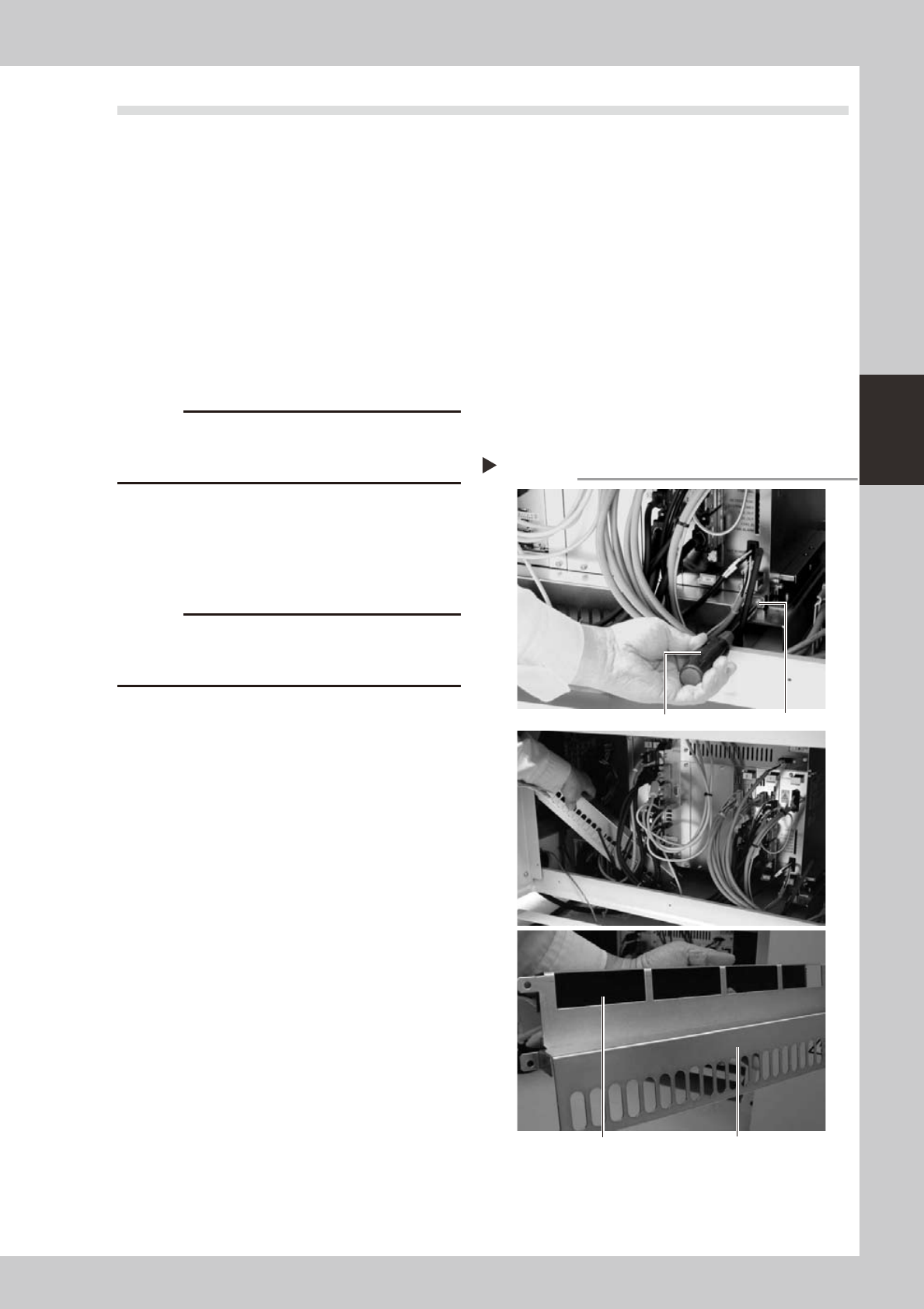
5
Remove the filter.
Use a Phillips screwdriver to remove the
screws on the left and right of the filter
frame, and remove the filter along with the
filter frame.
53350-L5-00
6
Clean or replace the filter.
The filter is attached to the filter frame.
Check for dirt and clean by air blow. If the
dirt is too tough to remove, then replace the
filter.
7
Reinstall the filter.
Reinstall the filter back to its original position.
Reinstall the front panel and the tape cutter
ducts.
8
Close the air release valve inside
the tape cutter.
9
Turn on the machine power and
start the air supply.
Turn on the machine power switch and also
start the air supply by turning the air supply/
shutoff valve inside the machine lower left
panel to the left.
Removing the filter
Step 5
Phillips screwdriver
Screw (1 each on left and right)
Filter coverFilter is attached to filter frame.