PPS Pro version 8.2.pdf - 第100页
User Manual 4022 591 98247 96 PPS-Pro v8.2 05.07 Guidelines for using PPS-Pro 3.2.6.3 Use Correct CON file When a con file is m odified, check if the related feeder s are assign ed to realistic feeder bar position s an d…
4022 591 98247 User Manual
05.07 PPS-Pro v8.2 95
Guidelines for using PPS-Pro
all packages that can be placed with the ‘CLM II’ in ‘RNET’ mode. Of course, for
the ‘RNET’ and ‘CNET’ packages themselves only the first nozzle fields will be
used to assign one of the ‘RNET’ nozzles.
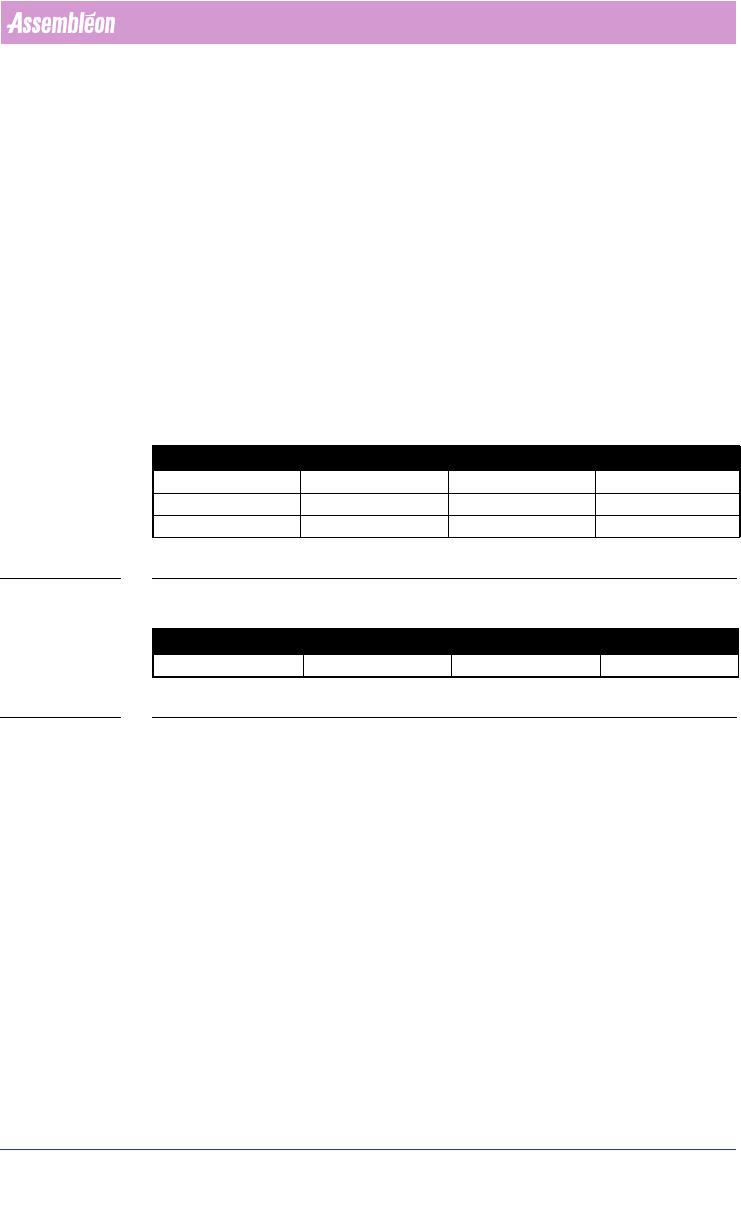
3.2.5 Line time and MAX machine time can differ
■ Description:The visualisation of the ‘Line time’ can differ from the time
which is mentioned for the fastest optimized machine. For the first three
examples the line time corresponds with the highest machine time
(see
TABLE 3 on page 95). However it is possible that sometimes the machine
time increases a bit, while the line time remains its best found time (see
TABLE 4 on page 95).
■ Advice: we advice to stop the optimizer only when the following condition
has been reached. The Line time corresponds with the maximum
optimized time of all machines and if that specific time is satisfying.
TABLE 3 Line time and equal or less machine time
TABLE 4 Line time and increase machine time differ
3.2.6 Feeders
3.2.6.1 Length of (stick)feeder name for ACM
On the ACM the feeder name is a reference to a feeder file on the machine,
therefore the name may not exceed 8 characters.
3.2.6.2 Pre-assign unused part
When a non-used part type, is pre-assigned to a placement module (PM) and
to a specific feeder, then after optimization, the CON file does not contain a
description for the matching PM, concerning to the nozzle and feeder. This
only occurs when no other feeder is assigned at all to the PM.
Line time Machine 1 time Machine 2 time Machine 3 time
12 11 12 10
11 10 11 10
10 9 10 9
Line time Machine 1 time Machine 2 time Machine 3 time
10 9 11 9

User Manual 4022 591 98247
96 PPS-Pro v8.2 05.07
Guidelines for using PPS-Pro
3.2.6.3 Use Correct CON file
When a con file is modified, check if the related feeders are assigned to
realistic feeder bar positions and take the size of the feeder into account. The
optimizer considers the CON file as ‘correct’ data.
■
3.2.7 ACM / FCM
3.2.7.1 Alignment for ACM
■ Description: The ACM offers two levels of alignment, global and local
alignment.
• Local alignment: Currently, only part fiducials in MDF will result in a
local alignment matrix for the ACM AS for the parts they belong to.
• Global alignment: If circuit fiducials are present for all circuits in the
MDF, they will be used for global alignment. If not, the panel fiducials
will be used. This means, that in case there are both panel and circuit
fiducials the panel fiducials will be ignored.
3.2.7.2 ACM placement exceeds 2000 parts
■ Description: It is possible to create a program with more than 2000 parts
for an ACM, there is no warning or error message.
■ Advice: The ACM cannot handle more than 2000 parts so check this value
manually if the program has been made.
3.2.7.3 Component assignment for FCM Base 1 + WVM and FCM
Base 2 in one line
■ Description: In lines with a combination of FCM Base 1 and FCM Base 2
machines, if the FCM Base 1 has WVM(s), the optimizer will assign all
parts in tape >16 mm to either Base 1 or Base 2.
■ Advice: None.
3.2.7.4 BVM settings for all FCM machines in one line must be
identical
For technical reasons either all FCM machines in one line should have BVM or
shouldn’t have BVM. Mixtures of machines with and without BVM in one line
are not supported.
4022 591 98247 User Manual
05.07 PPS-Pro v8.2 97
Guidelines for using PPS-Pro
3.2.7.5 Maximum length of Machine and Line identifiers on the
FCM and ACM
The ALE file specification document does not specify a maximum string length
for these identifiers. Note however that for the supported Assembléon
machines currently the following maximum string lengths apply:
■ FCM line identifiers: max. 12 characters for FCMs with version 2 Action
Spec.
■ FCM line identifiers max. 20 characters for FCMs with version 3 Action
Spec.
■ FCM machine identifiers max. 20 characters.
■ ACM line identifiers max. 20 characters.
NOTE: An automatic truncation of the identifiers will take place when they exceed
the specified maximum length.
3.2.7.6 No warning message when using fixed setup with FCM
feeder bar optimization
■ Description: When the Bank Attribute “FeederBarType” in the ALE file is
not specified, and a fixed setup (.con file) is used, the .con file will not be
used by the optimizer. Currently no warning message is generated to
inform you on this.
■ Advice: When using.con files, always specify the Bank Attribute “Feeder-
BarType” in the ALE file.
3.2.8 FCM/Multiflex
PPS-Pro distinguishes three FCM models:
1. Classic (FC SW 5.2 and previous)
2. Multiflex (FC SW 6.x)
3. Multiflex Extended (FC SW 6.x plus memory extension board on all CLM
heads)
The following guidelines must be considered because of the new Multiflex
models.
■ A work cell in a line can only be a Multiflex cell (full support of Multiflex
functionality such as bad mark grouping and fiducial arrangements) if all
FCMs in the line are a Multiflex.
■ For a combination of FCM I and FCM Multiflex in one cell, the full Multiflex
functionality will not be supported.