PPS Pro version 8.2.pdf - 第18页
User Manual 4022 591 98247 14 PPS-Pro v8.2 05.07 General Introduction ■ Ta b (see SCREEN 7 on page 13) • Style in text: T ab nam es are printed in italic . Fir st the tab name foll owed b y “tab” . • Example: Gener al ta…
4022 591 98247 User Manual
05.07 PPS-Pro v8.2 13
General Introduction
1.8 Window, Dialog
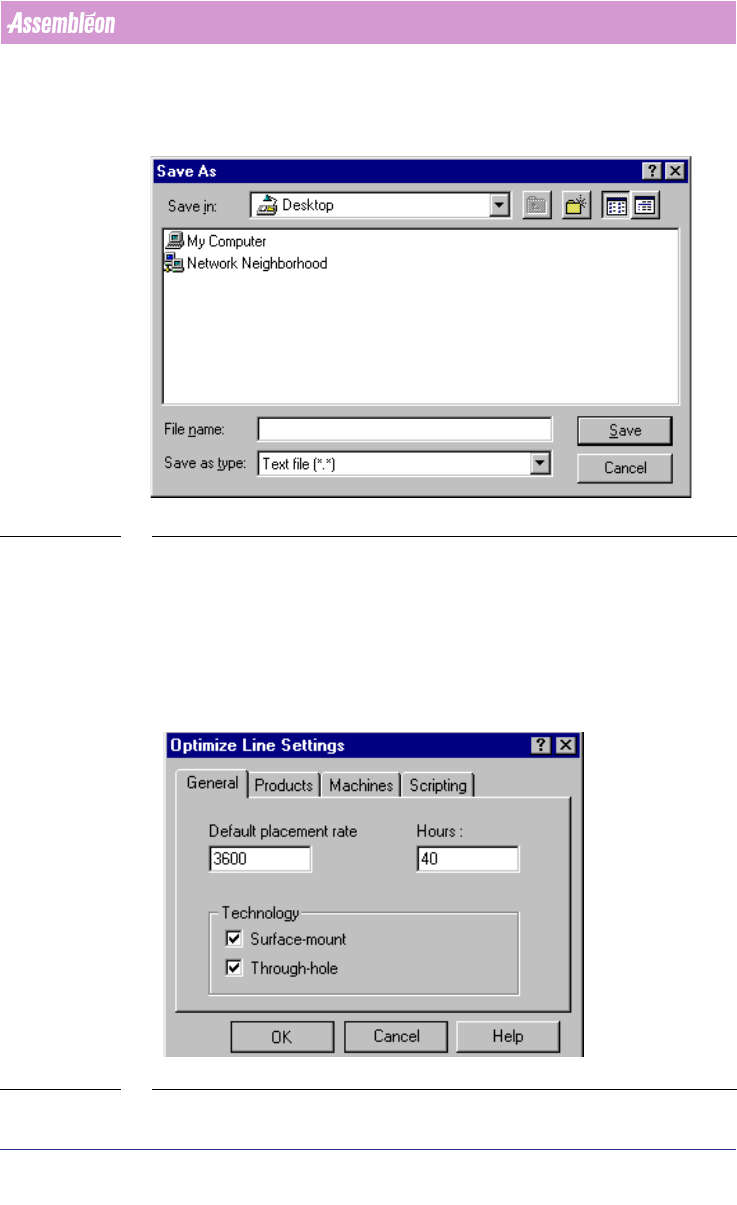
SCREEN 6 Save dialog
■ Style in text: Window and Dialog names (see SCREEN 6 on page 13) are
printed in italic. First the name of the window/dialog followed by
“window” or “dialog”.
■ Example: Save As dialog.
1.9 Tab, Field, Frame, Button
SCREEN 7 Tab - Field - Frame - Button

User Manual 4022 591 98247
14 PPS-Pro v8.2 05.07
General Introduction
■ Tab (see SCREEN 7 on page 13)
• Style in text: Tab names are printed in italic. First the tab name
followed by “tab”.
• Example: General tab, Products tab.
■ Field (see SCREEN 7 on page 13)
• Style in text: Names of fields are printed in italic. First the name of
the field followed by the type of the field. The corresponding value is
printed between single quotes.
• Example: The value of Hours textfield is ‘40’.
■ Frame (see SCREEN 7 on page 13)
• Style in text: Names of frames are printed just as they appear, followed
by “frame”.
• Example: Technology frame.
■ Button (see SCREEN 7 on page 13)
• Style in text: Button names are printed in bold.
• Example: Cancel button.
1.10 Miscellaneous
■ Names
• Style in text: Names are printed between ‘single quotes’.
• Example: ’PPS-Pro 8.1 SP1’.
4022 591 98247 User Manual
05.07 PPS-Pro v8.2 15
PPS-Pro GUI
CHAPTER 2 PPS-Pro GUI
2.1 Survey
This chapter gives some miscellaneous information of PPS-Pro. For more
detailed information and guidelines for specific machine types please refer to
the guidelines
(see CHAPTER 3 "Guidelines for using PPS-Pro" on page 89).
2.2 Synonyms
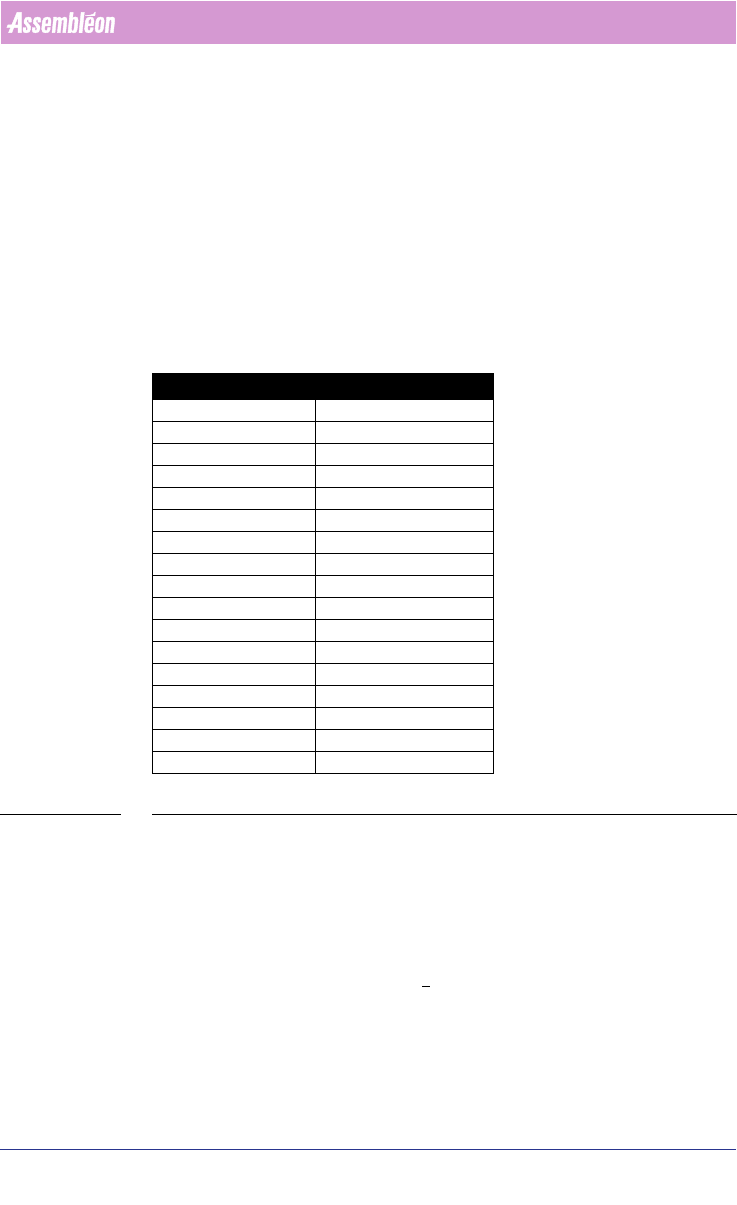
For users of GemLine PPS the list of synonyms can be used (see TABLE 1 on
page 15).
TABLE 1 Synonyms
2.3 Menu
This paragraph gives a short description of the most important menu-items.
2.3.1 Tools
The most important items from the Tools menu are explained below.
■ Assembly Line Editor: Editor to visualize an ALE file. It also gives the
ability to adjust the ALE file.
■ DXF Importer: The Drawing Exchange File (DXF) importer converts data
from an AutoCAD DXF format into a Manufacturing Data Format (MDF).
GemLine PPS PPS-Pro
Component Code Part Number
PCB Name Panel
Electrical Reference Reference Designator
Package Type Package
--- Outline
Reference Hole Tooling Hole
Fixed Setup Setup
--- Multiple Board
Circuit Fiducials Board Fiducials
PCB Fiducials Panel Fiducials
Local Fiducials Part Fiducials
PCB Badmarks Panel rejection Marks
Circuit Badmarks Board Badmarks
Component Fiducials Part Fiducials
Availability Inventory
Head/Nozzle Tool
NEU TEU, Nest