PPS Pro version 8.2.pdf - 第20页
User Manual 4022 591 98247 16 PPS-Pro v8.2 05.07 PPS-Pr o GUI ■ ECA: The En gineering Chan ge Analy ser (ECA) compar es MDF files an d/or Co m po ne nts Parts L is t (C P L) fi le s. ■ HPLG Importer : Convert s HPLG data…
4022 591 98247 User Manual
05.07 PPS-Pro v8.2 15
PPS-Pro GUI
CHAPTER 2 PPS-Pro GUI
2.1 Survey
This chapter gives some miscellaneous information of PPS-Pro. For more
detailed information and guidelines for specific machine types please refer to
the guidelines
(see CHAPTER 3 "Guidelines for using PPS-Pro" on page 89).
2.2 Synonyms
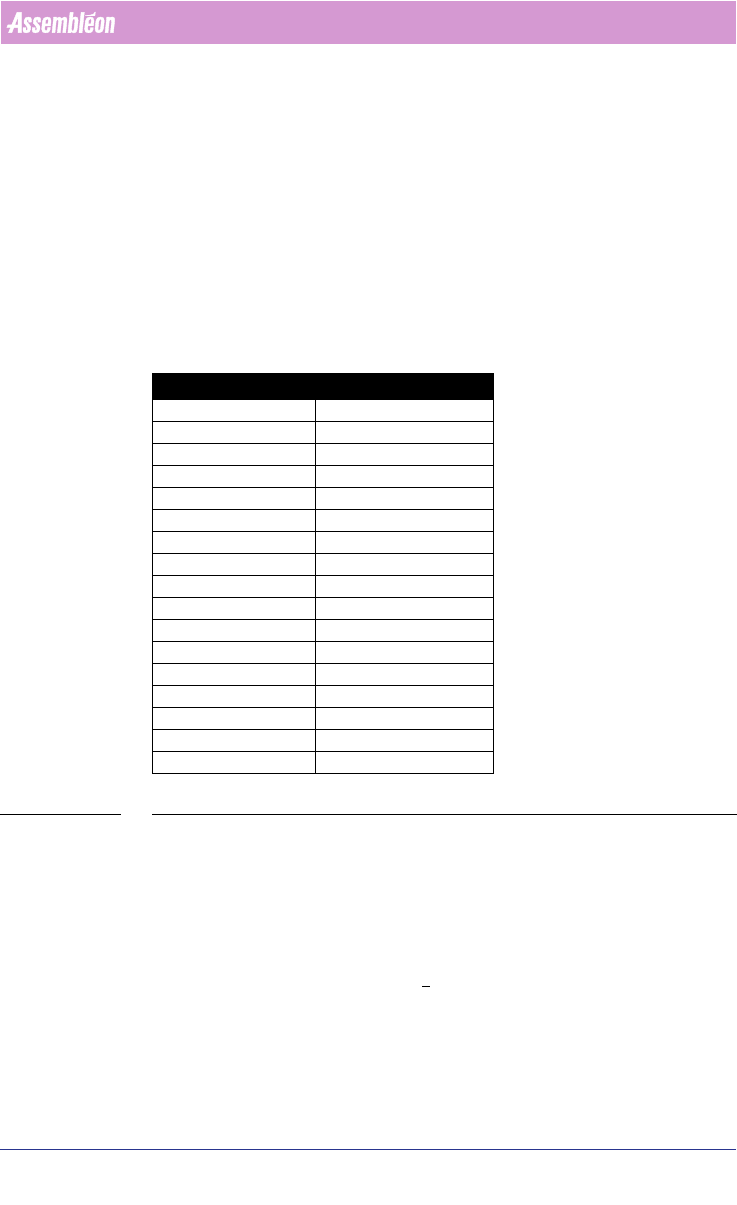
For users of GemLine PPS the list of synonyms can be used (see TABLE 1 on
page 15).
TABLE 1 Synonyms
2.3 Menu
This paragraph gives a short description of the most important menu-items.
2.3.1 Tools
The most important items from the Tools menu are explained below.
■ Assembly Line Editor: Editor to visualize an ALE file. It also gives the
ability to adjust the ALE file.
■ DXF Importer: The Drawing Exchange File (DXF) importer converts data
from an AutoCAD DXF format into a Manufacturing Data Format (MDF).
GemLine PPS PPS-Pro
Component Code Part Number
PCB Name Panel
Electrical Reference Reference Designator
Package Type Package
--- Outline
Reference Hole Tooling Hole
Fixed Setup Setup
--- Multiple Board
Circuit Fiducials Board Fiducials
PCB Fiducials Panel Fiducials
Local Fiducials Part Fiducials
PCB Badmarks Panel rejection Marks
Circuit Badmarks Board Badmarks
Component Fiducials Part Fiducials
Availability Inventory
Head/Nozzle Tool
NEU TEU, Nest
User Manual 4022 591 98247
16 PPS-Pro v8.2 05.07
PPS-Pro GUI
■ ECA: The Engineering Change Analyser (ECA) compares MDF files and/or
Components Parts List (CPL) files.
■ HPLG Importer: Converts HPLG data into MDF data.
■ MDF Check: Update your PSI file with parts and packages found in the MDF
file, updates the MDF file with corporate and vendor part numbers from
the Components Parts List (CPL) file, and verifies that the centre of SMT
parts is being used.
■ Part Information Manager: Editor to visualize a PSI file. It also gives the
ability to adjust the PSI file.
■ Setup Editor: Allows you to edit and validate setups (.con files).
■ Setup Changeover Estimator (SCOE) provides detailed information about
production changeovers from one product to another.
■ Setup Change Report Utility: don’t use this utility for Assembléon
machines, use the Setup Changeover Estimator instead.
2.3.2 Help
To access online help proceed with the following steps.
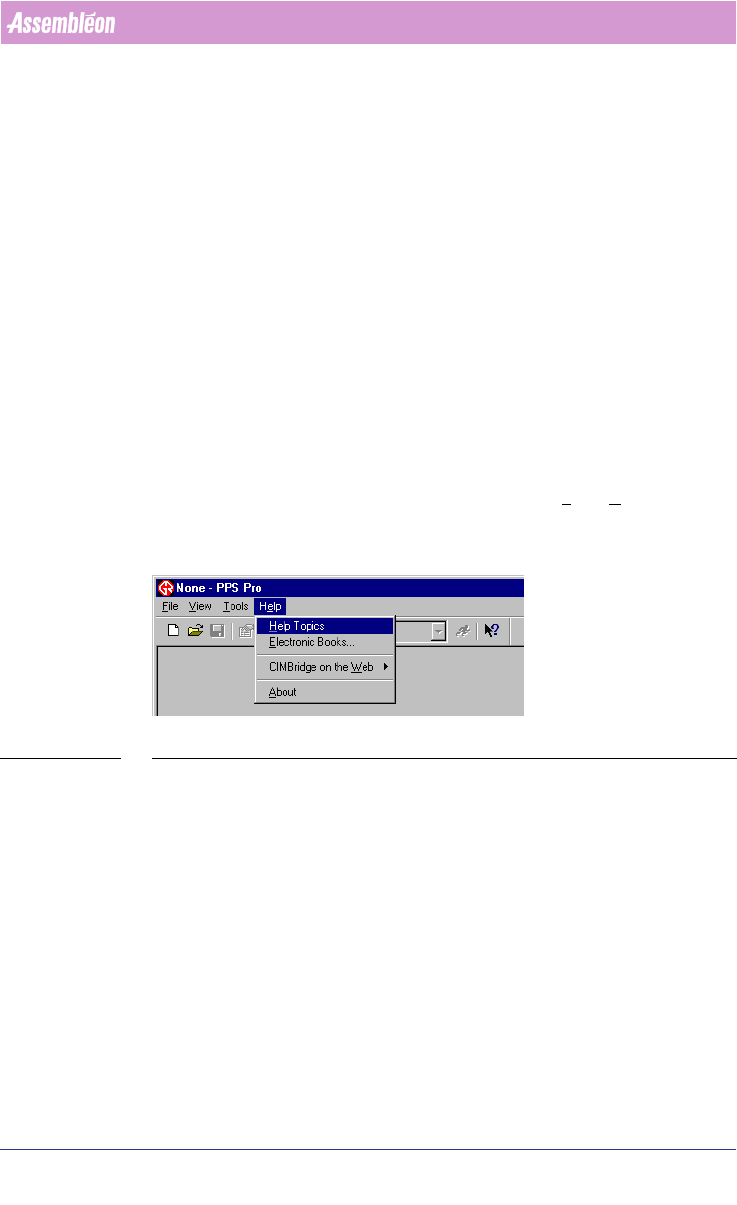
1. From the PPS-Pro graphical user interface select Help > Help Topics (see
SCREEN 8 on page 16).
SCREEN 8 PPS-Pro Help menu
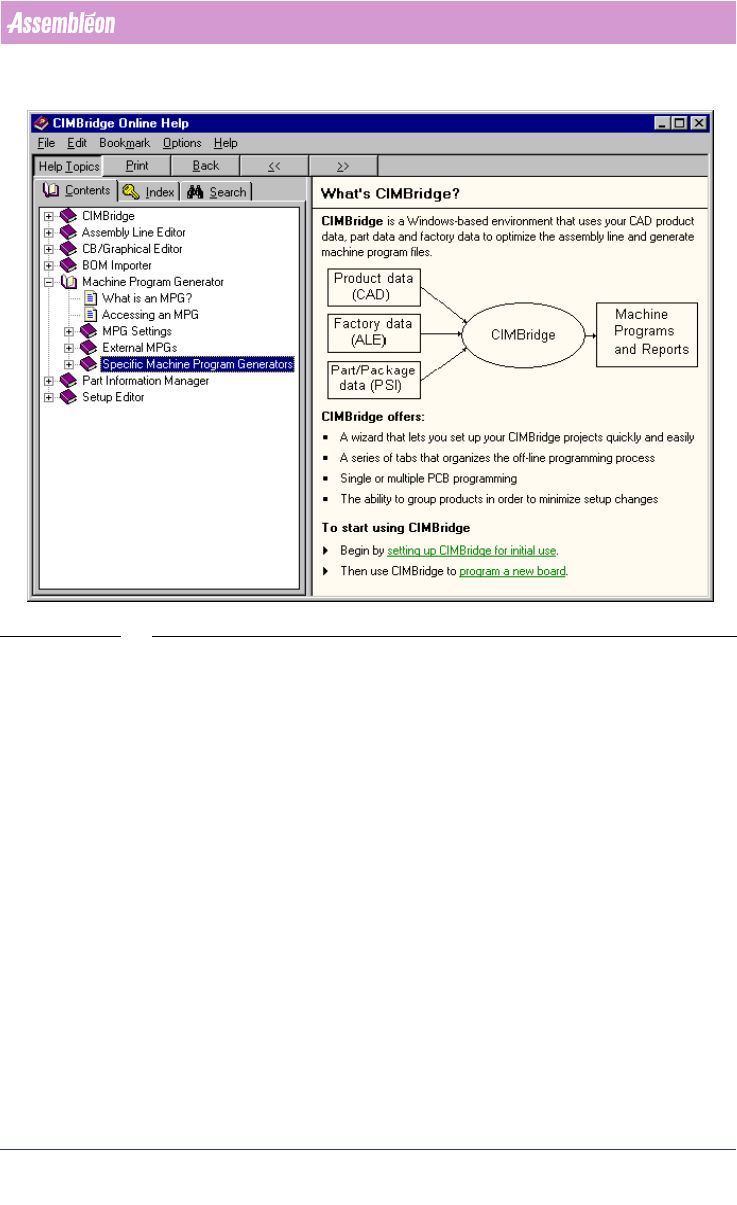
2. In the Online Help window, select the book ‘Machine Program Generator’.
After that, select the book ‘Specific Machine Program Generators’
(see
SCREEN 9 on page 17).