PPS Pro version 8.2.pdf - 第53页
4022 591 98 247 User Manual 05.07 PPS-Pro v8.2 49 PPS-Pro GUI Each “ba d” board (c ircuit) con tains a circuit ba dmark (see FIGURE 4 on pag e 48) . Badmark s are detected by a cam era. This camera will perf orm (in th i…
User Manual 4022 591 98247
48 PPS-Pro v8.2 05.07
PPS-Pro GUI
2.15 Fiducial arrangement
A fiducial arrangement is an arbitrary set of fiducials plus an arbitrary set of
boards (=circuits) grouped together.
The purpose of the fiducial arrangement is to use the same fiducials for the
alignment of several boards (circuits). The result is a reduced number of
fiducials, which reduces the time required for fiducial measurements.
The creation of fiducial arrangement groups is performed using the MDF editor
(see 2.17 on page 50). One fiducial set per arrangement group can be defined
by the user. A maximum of 64 (on FCMs in extended mode 512) arrangements
per PCB can be defined.
2.16 BadMark Group
A badmark group (Reject Group) is a single panel-level badmark plus an
arbitrary set of board instances grouped together.
A number of applications are characterized by the fact that their PCBs have
many identical boards (=circuits).
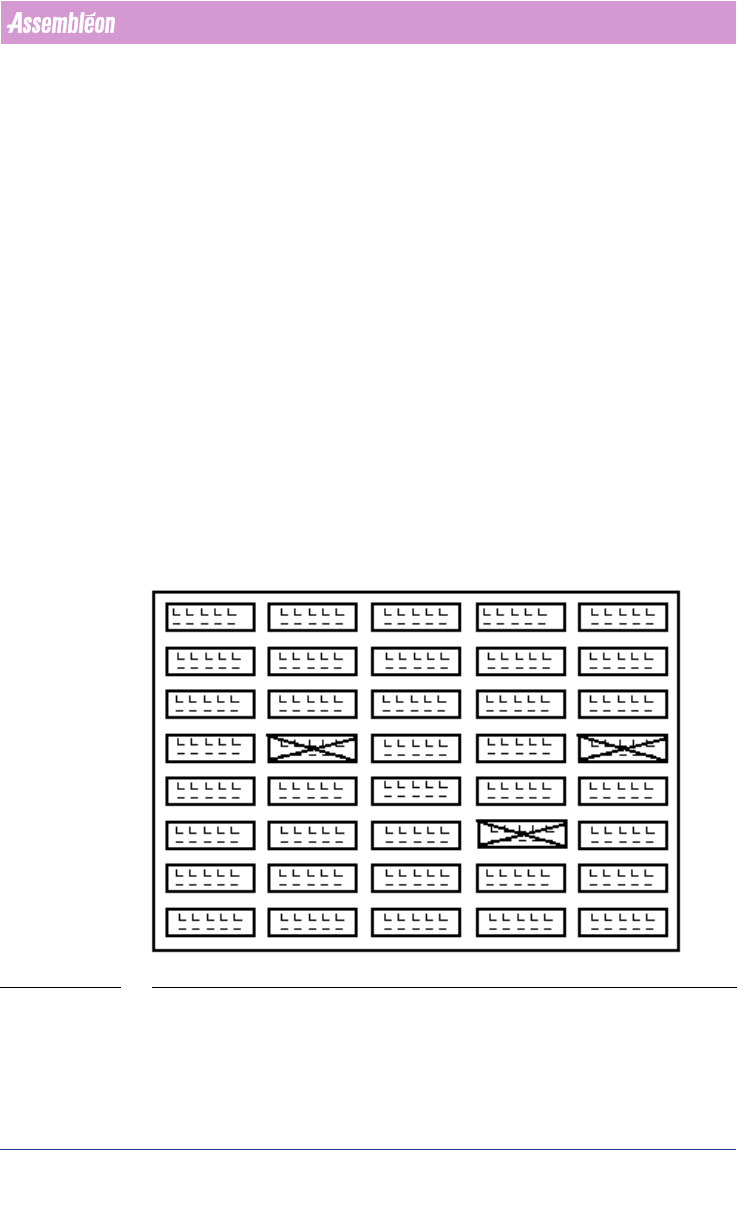
Often there are tens to hundreds of identical boards per PCB (see FIGURE 4 on
page 48).
FIGURE 4 Circuit Badmarks
In many cases the circuit patterns on the PCB are tested in an earlier phase
and some of them are marked “bad” in this phase. This means the Machine
should not mount components on these boards (indicated by the crosses).

4022 591 98247 User Manual
05.07 PPS-Pro v8.2 49
PPS-Pro GUI
Each “bad” board (circuit) contains a circuit badmark (see FIGURE 4 on page
48). Badmarks are detected by a camera.
This camera will perform (in this example) 144 badmark measurements (1 per
circuit) In doing so, the processing time increases the pick-and-place time of
the placement modules. To decrease this influence, the processing time can be
reduced by introducing master badmarks. (And/or area badmarks on A-Series
lines)
Each badmark group has one master badmark. To maintain downward compat-
ibility, the pcb master badmark can also be used.
Two common types of badmarks exist:
1. Panel badmark;
2. Board (circuit) badmark;
In grouping mode multiple panel badmarks can be used. (see 2.19 "Set
Badmark Grouping" on page 56)
For A-Series users it is also possible to specify Area badmarks. (see 2.20 "Area
Badmarks (A-Series)" on page 57)
If more than one badmark type is used and one circuit is bad, the next ‘lower’
level type of badmark has to be provided.
Example: the badmark corresponding to the circuit, the master badmark of
the badmark group (FCM) or Area badmark (A-Series) to which the circuit
belongs, and the PCB master badmark.
For PowerLine users it is important to know that, if all three badmark levels
are available in the PCB description, the generated action specification will
not contain the PCB master badmark, only the circuit badmark and the group
master badmarks will be propagated to the Machine action specification or
Placement Program.
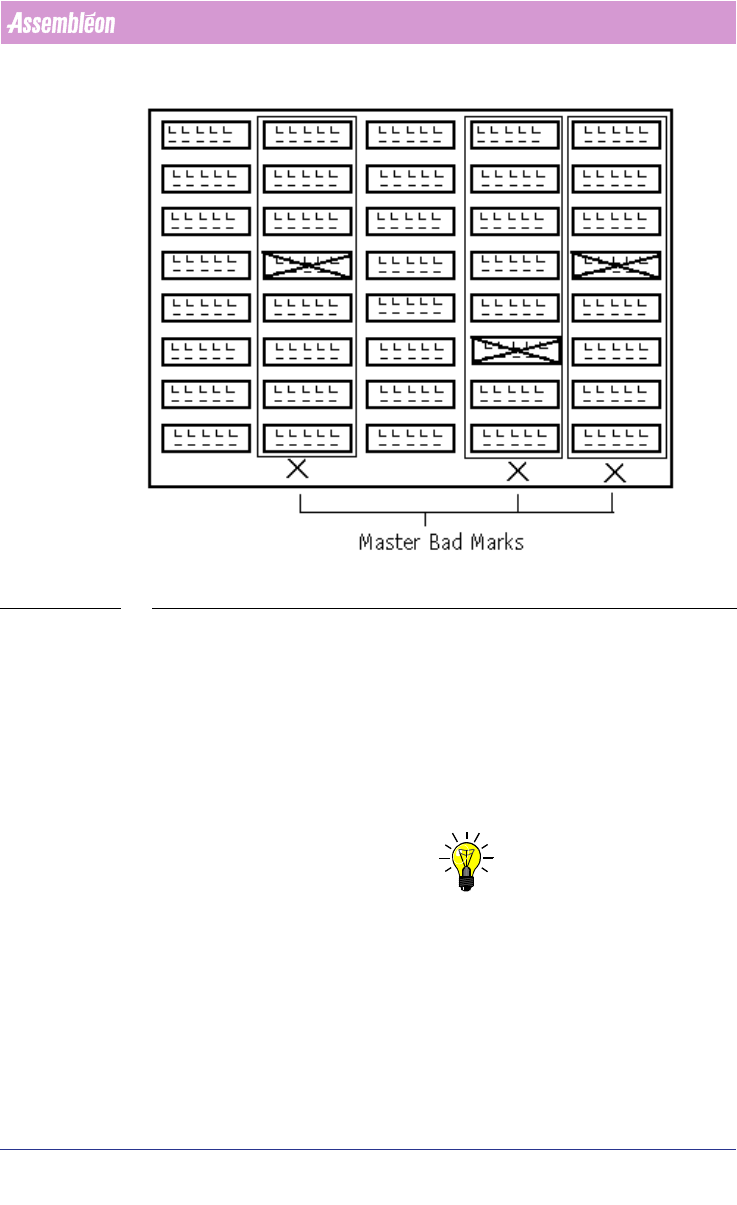
2.16.1 Panel Badmark
A panel badmark corresponds to a group of boards (circuits), each with its
own circuit badmark. If circuit badmarks are also present then panel
badmark(s) will become master badmark(s), they can be interpreted as a
“search” mark indicating that a search for circuit badmarks is necessary
(see
FIGURE 5 on page 50). A panel badmark may appear anywhere on the PCB.
Typically, master badmarks can be placed along a border of the PCB to reduce
travel time between master badmarks.
The figure 5 shows the PCB with 3 panel badmarks indicating a bad circuit in
their respective badmark groups.
User Manual 4022 591 98247
50 PPS-Pro v8.2 05.07
PPS-Pro GUI
FIGURE 5 Panel Badmarks
The processing of these badmarks takes place as follows: the camera starts
measuring the master badmarks on the PCB. Whenever a master badmark is
measured as being ‘bad’, the circuit badmarks of the circuits in the badmark
group will be measured. When a master badmark is not set, then no corre
-
sponding circuit within the badmark group is marked “bad”. Badmark meas-
urement of these circuits can therefore be skipped and time will be saved.
2.17 Fiducal and badmark group editing in the MDF
NOTE: When there are no Badmarks in the MDF-file they have to be added manually
with the MDF editor. Adding is done by Add/Board Reject..., here Board and/
or Panel Badmarks can be created
Fiducial arrangements and badmark groups are not actually tangible entities
that you can see on a board but they are board specific data. This information
is stored within the MDF file. The ‘Group mode’ is provided in which fiducial
arrangements and badmark groups may be created, viewed, deleted, edited
and scrutinized.