00191297-02.pdf - 第342页
8 Error Informat ion User Manual SIPLACE S-23 HM 8.3 Clearing errors Software Version SR.405.xx 05/ 99 Issue 340
User Manual SIPLACE S-23 HM 8 Error Information
Software Version SR.405.xx 05/99 Issue 8.3 Clearing errors
339
8.3 Clearing errors
Once an error has been eliminated, it must be cleared. This is not necessary in the case of errors
which cause a machine stoppage since they are automatically cleared when assembly is
resumed. 8
Once cleared, the error message is no longer displayed in the status bar. However, it is still
entered in the error table for the corresponding error type (see example in Fig. 8.2 - 2). 8
8
È After eliminating the current error, click the Clear error button in main view. The error message
is removed from the status bar and assembly can be continued.
8 Error Information User Manual SIPLACE S-23 HM
8.3 Clearing errors Software Version SR.405.xx 05/99 Issue
340
User Manual SIPLACE S-23 HM 9 Online Help System
Software Version SR.405.xx 05/99 Issue 9.1 General
341
9 Online Help System
9.1 General
The help system integrated in the station computer software allows you to call up online help on
the functions, menus and icons available in the station computer’s user interface as well as to
consult general station computer information.
The corresponding sections of this chapter contain more detailed information on the various help
system functions. 9
9.1.1 Functions in the "Help" menu
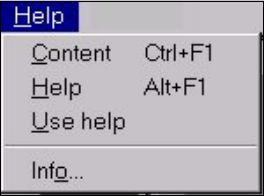
È Click Help in the menu bar of the view which is currently active in the SC user interface.
The "Help" menu is opened.
This menu contains all the options which are necessary to call up help on the functions of the
SC user interface, general help on help system operation or information on the station
computer and the installed software. 9
9
9