1_NXT Conveyor(1.0)E.pdf - 第25页
2.4 Calibrating the conveyor motors 1. Turn the CID power OFF. 2. Disconnect the CN4-1 and CN4-2 connectors from the conveyor controller board as shown below. 3. Turn the CID power ON. 4. Turn the CID power OFF. 5. Recon…
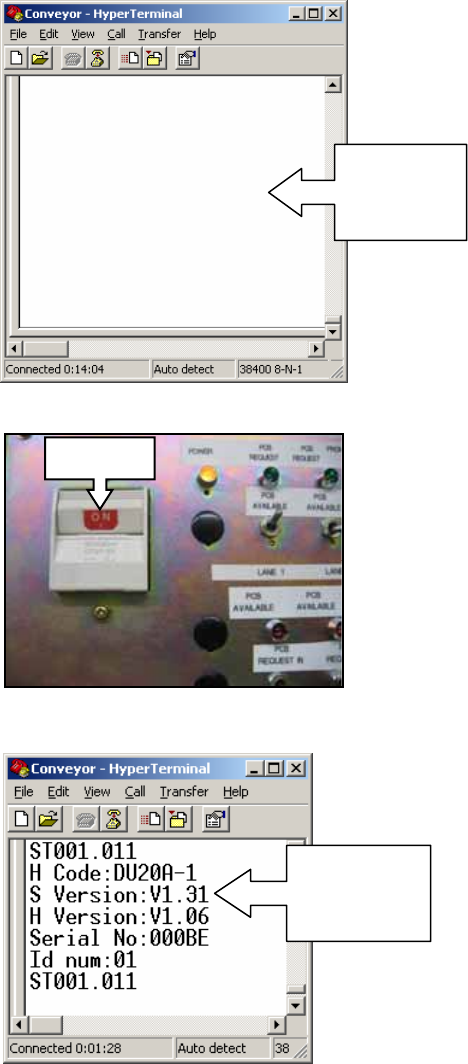
7. Select [Programs] – [Accessories] – [Communications] – [HyperTerminal] – [Conveyor]
to open the HyperTerminal window.
8. Turn ON the CID power.
9. The conveyor firmware version should display in the HyperTerminal window as shown:
10. If the firmware version does not display, check the cable connections.
Open
Hyper
Terminal
ON
Conveyor
firmware
version
NXT Repair Training Textbook
Conveyor Unit
FK-9F98-43-0E
Edition 1.0 23 / 46 FUJI Machine Mfg. Co., Ltd.
2.4 Calibrating the conveyor motors
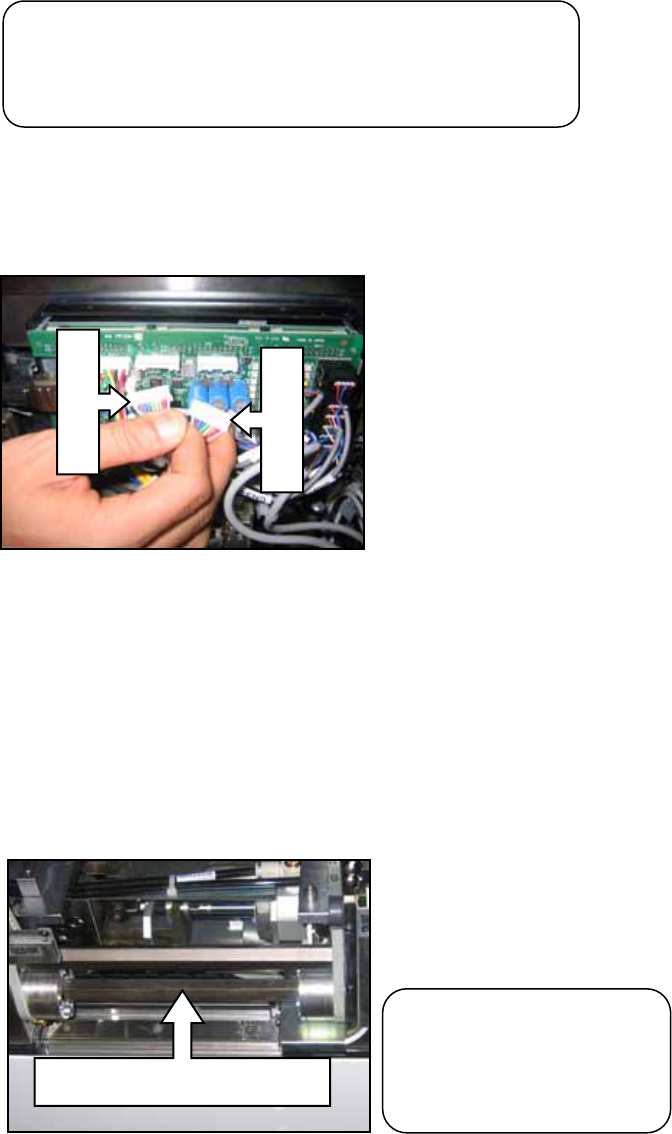
1. Turn the CID power OFF.
2. Disconnect the CN4-1 and CN4-2 connectors from the conveyor controller board as
shown below.
3. Turn the CID power ON.
4. Turn the CID power OFF.
5. Reconnect the CN4-1 and CN4-2 cables.
6. Turn the CID power ON and the calibration proceeds automatically. The shaft shown
in the photo below will rotate slightly.
7. Wait approximately 10 seconds and then turn the CID power OFF.
CN4-1
CN4-2
This shaft rotates slightly
Caution! The motion of
the motor may be
unstable if this calibration
is not carried out correctly.
Note: this calibration procedure is necessary if the
conveyor motor encoder cables have been
disconnected from the conveyor controller board.
NXT Repair Training Textbook
Conveyor Unit
FK-9F98-43-0E
Edition 1.0 24 / 46 FUJI Machine Mfg. Co., Ltd.
2.5 Transmitting K-parameter and bank program files (test version)
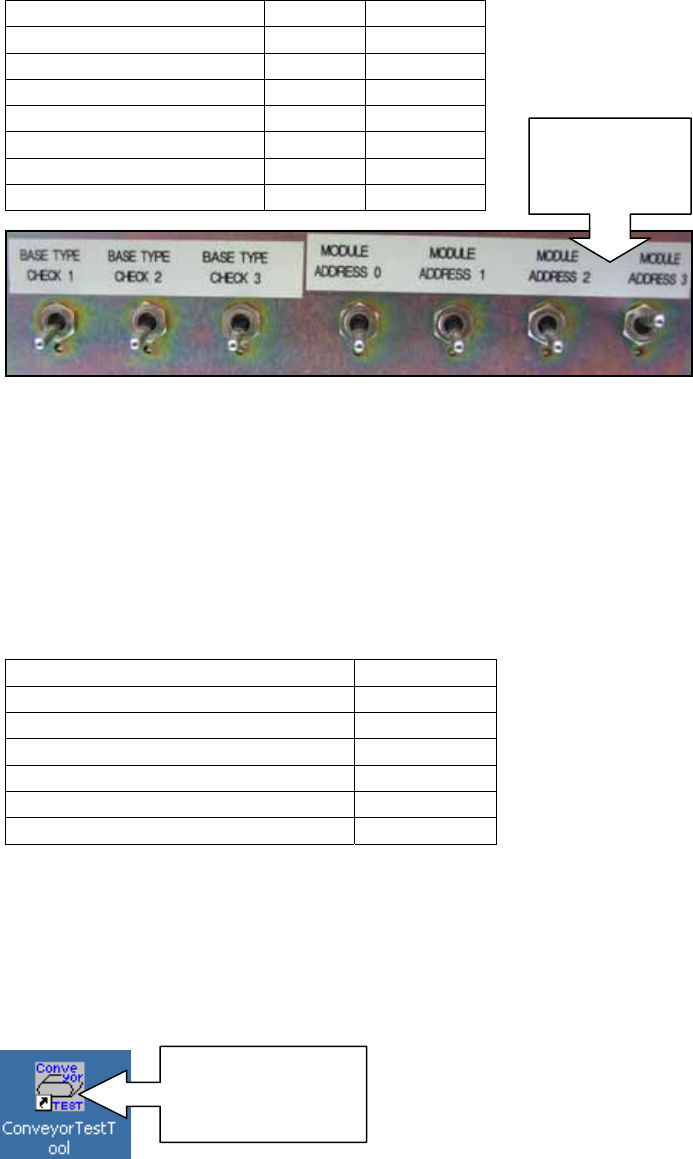
1. Set the toggle switches on the CID as shown.
2. Select [Programs] – [Accessories] – [Communications] – [HyperTerminal] – [Conveyor]
to open the HyperTerminal window.
3. From the [Transfer] menu select [Send Text File…] and select the text file from the
following path: Conveyor/Data/Double Conveyor or Single Conveyor depending on the
conveyor type.
4. Refer to the following table and choose the appropriate text file to transmit:
5. Click [Open] to transmit the text file to the conveyor.
6. Wait until all the data has been transmitted then select [File] – [Exit] – [Yes] to
disconnect Hyper Terminal.
7. Double click the ConveyorTestTool icon on the desktop to open the ConveyorTestTool
software.
8. Select the [Transport] tab and click [Load].
Toggle Switch Status Position
BASE TYPE CHECK 1 OFF Down
BASE TYPE CHECK 2 OFF Down
BASE TYPE CHECK 3 OFF Down
MODULE ADDRESS 0 OFF Down
MODULE ADDRESS 1 OFF Down
MODULE ADDRESS 2 OFF Down
MODULE ADDRESS 3 ON Up
Conveyor Type Text file
M3 Single Conveyor M3S-84.01
M6 Single Conveyor M63-84.01
M3 Double Conveyor (old type) M3-83.06
M3 Double Conveyor (new type) M3-84.00
M6 Double Conveyor (old type) M6-83.06
M6 Double Conveyor (new type) M6-84.00
Set the
dipswitches
as shown
Double Click to
open the
ConveyorTestTool
NXT Repair Training Textbook
Conveyor Unit
FK-9F98-43-0E
Edition 1.0 25 / 46 FUJI Machine Mfg. Co., Ltd.