00195440-05-SG_D-Series_FSE-EN.pdf - 第56页
4 Communication and Control 4.2 Network 4.1.8 Networking Overview 56 Student Guide SIPLACE D-Series (FSE) 4.1.8 4 . 1 . 8 N e t w o r k in g O v e r v ie w Networking Overview Overview of network connections The fixed TC…
4 Communication and Control
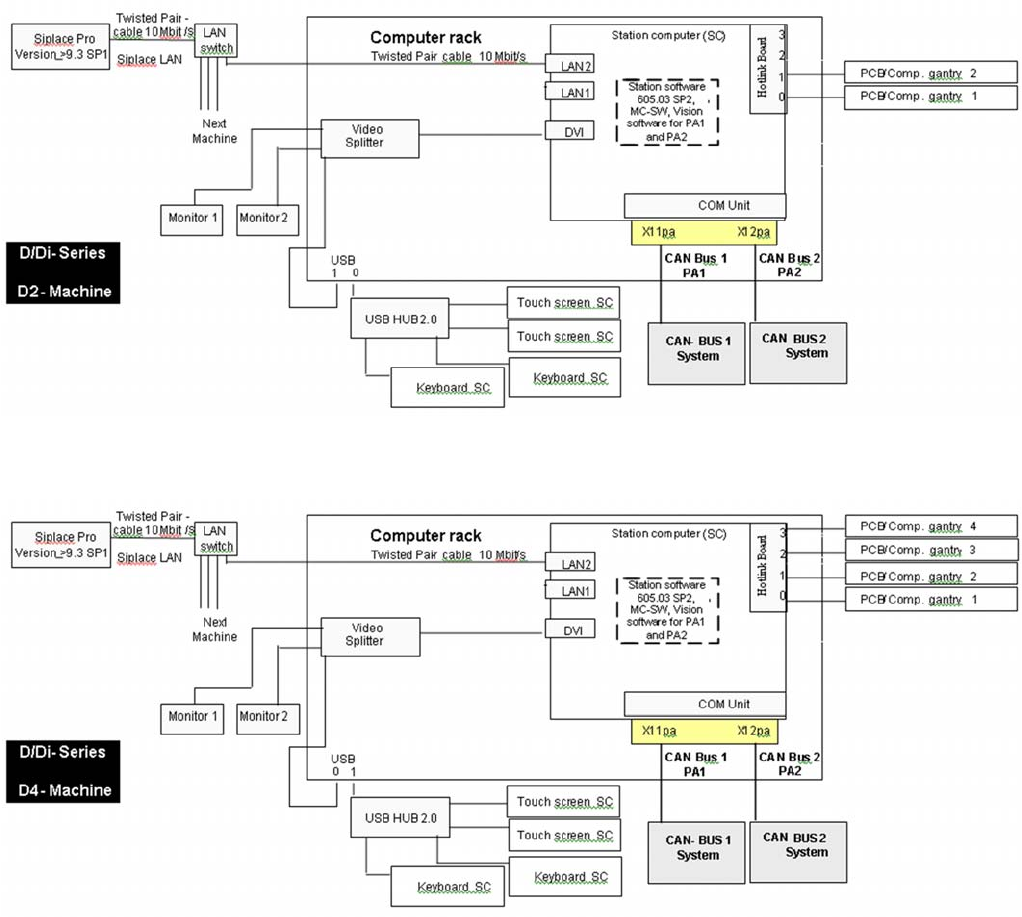
4.1.6 Communication Structure D2i 4.1 Overview
Student Guide SIPLACE D-Series (FSE) 55
4.1.6
4.1.6 Communication Structure D2i
Communication Structure D2i
4.1.7
4.1.7 Communication Structure D4i
Communication Structure D4i
4 Communication and Control
4.2 Network 4.1.8 Networking Overview
56 Student Guide SIPLACE D-Series (FSE)
4.1.8
4.1.8 Networking Overview
Networking Overview
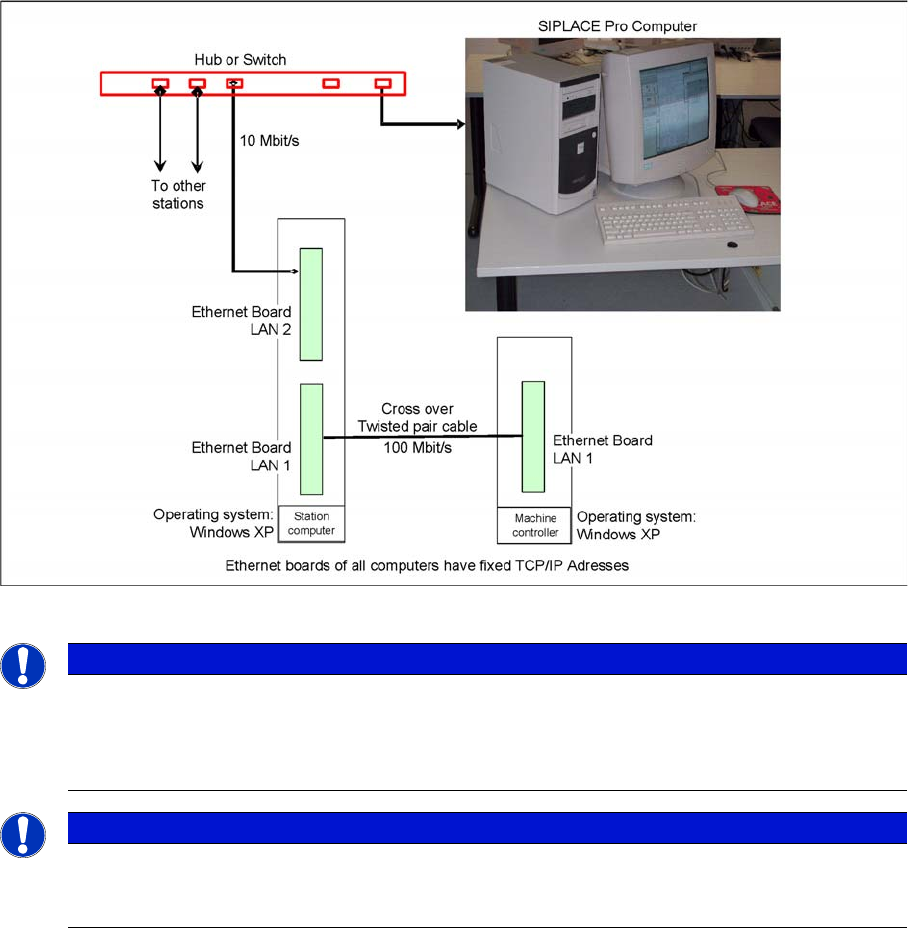
Overview of network connections
The fixed TCP/IP addresses of the computers may not be changed and are the same at all machines.
Overview network addresses
▪ Station computer: 192.168.255.249 – "Connection to MC" (100 Mbit/s)
▪ Machine controller: 192.168.255.250
▪ Station computer connection to main computer<. 172.xxx.yyy.zzz – "Connection to SIPLACE Pro"
(10 Mbit/s)
The address of the SIPLACE Pro computer is not specified as a fixed entry. Each controlling SIPLACE
Pro computer has access rights to this station, as soon as it is connected to it.
4.2
4.2 Network
Network
4.2.1
4.2.1 Checking the Network Addresses
Checking the Network Addresses
4.2.1.1
4.2.1.1 Station Computer
Station Computer
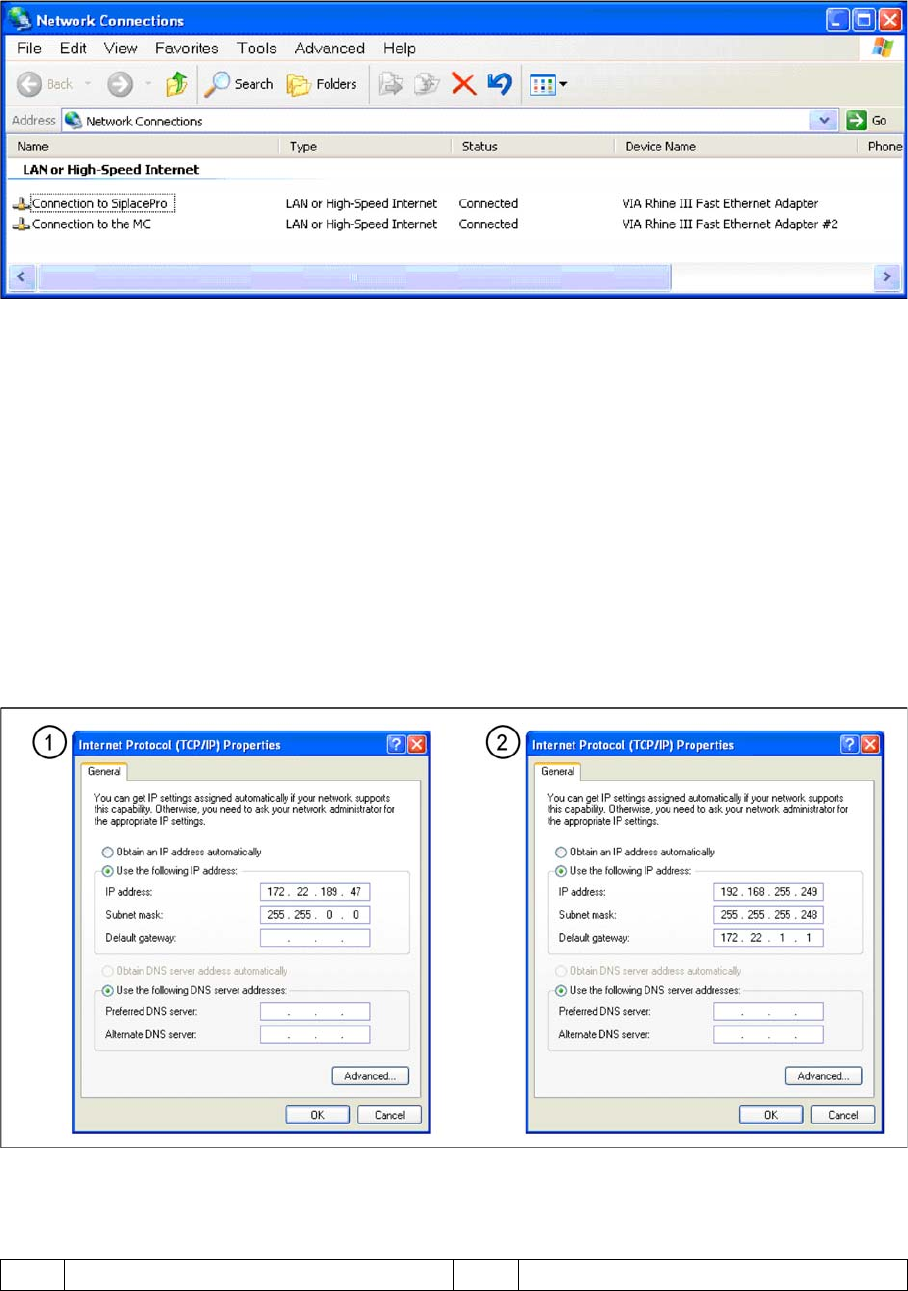
The station computer has two network cards, which can be directly set in Windows:
Windows XP main view:
NOTICE
Valid from 6 03.xx-SW
If the SIPLACE GUI at the station computer can not be operated, the MC operating system can
be shut down via the station computer operating system GUI (Start --> Programs --> Siplace -
-> Shutdown all), as an exception.
NOTICE
The SIPLACE Vision software runs on the station computer.
The station computer is directly connected via a twisted pair crossover cable to the machine
controller.
4 Communication and Control
4.2.1 Checking the Network Addresses 4.2 Network
Student Guide SIPLACE D-Series (FSE) 57
▪ Start --> Settings --> Network connections
▪ Select one of the two network cards (see below)
▪ Right-click Properties with the mouse.
▪ , select TCP/IP and --> Properties (see below)
Network card 1 "connection to SIPLACE Pro":
The network connection between the station computer and SIPLACE Pro is realized via the LAN 1 con-
nection of the dual LAN unit in the station computer. The network address is not fixed and can defined
at the customer site.
IP Address LAN Example: 172.22.208.181
This TCP/IP ADDRESS must be typed in, during the configuration of the station in Siplace Pro.
Network card 2 "connection to the MC":
The internal network address for the station computer is a fixed local area network address, which must
not be changed.
▪ Station computer: 192.168.255.249
Note: For Single BoxPC there will be no network address setting for MC.
Network cards in the station computer
Legend
1 External IP address for SR 2 Internal IP address for SR