00195440-05-SG_D-Series_FSE-EN.pdf - 第58页
4 Communication and Control 4.2 Network 4.2.1 Checking the Network Addresses 58 Student Guide SIPLACE D-Series (FSE) FSE Note 4.2.1.2 4 . 2 . 1 . 2 M a c h in e C o n t r o lle r Machine Controller Check the internal TCP…
4 Communication and Control
4.2.1 Checking the Network Addresses 4.2 Network
Student Guide SIPLACE D-Series (FSE) 57
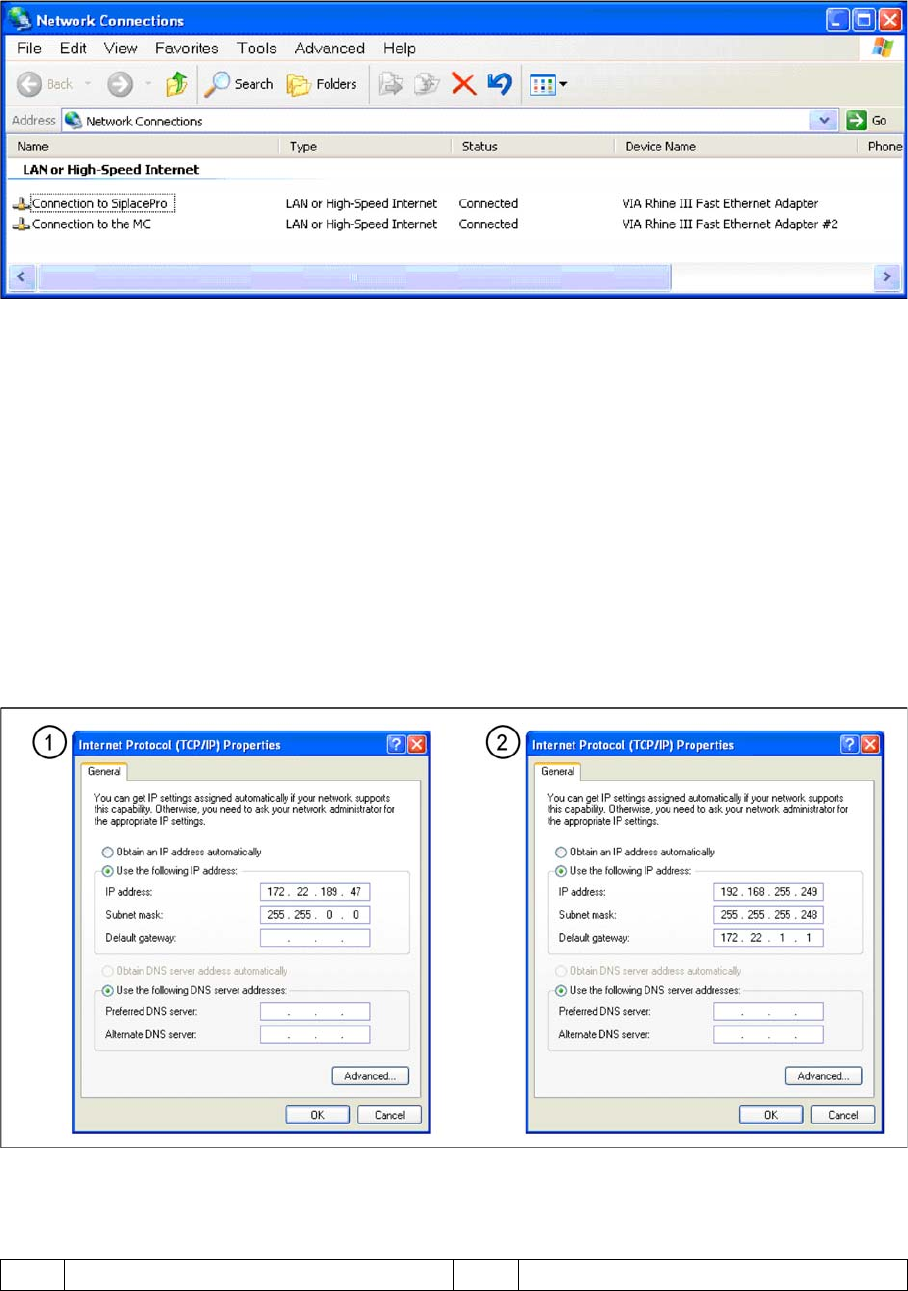
▪ Start --> Settings --> Network connections
▪ Select one of the two network cards (see below)
▪ Right-click Properties with the mouse.
▪ , select TCP/IP and --> Properties (see below)
Network card 1 "connection to SIPLACE Pro":
The network connection between the station computer and SIPLACE Pro is realized via the LAN 1 con-
nection of the dual LAN unit in the station computer. The network address is not fixed and can defined
at the customer site.
IP Address LAN Example: 172.22.208.181
This TCP/IP ADDRESS must be typed in, during the configuration of the station in Siplace Pro.
Network card 2 "connection to the MC":
The internal network address for the station computer is a fixed local area network address, which must
not be changed.
▪ Station computer: 192.168.255.249
Note: For Single BoxPC there will be no network address setting for MC.
Network cards in the station computer
Legend
1 External IP address for SR 2 Internal IP address for SR
4 Communication and Control
4.2 Network 4.2.1 Checking the Network Addresses
58 Student Guide SIPLACE D-Series (FSE)
FSE Note
4.2.1.2
4.2.1.2 Machine Controller
Machine Controller
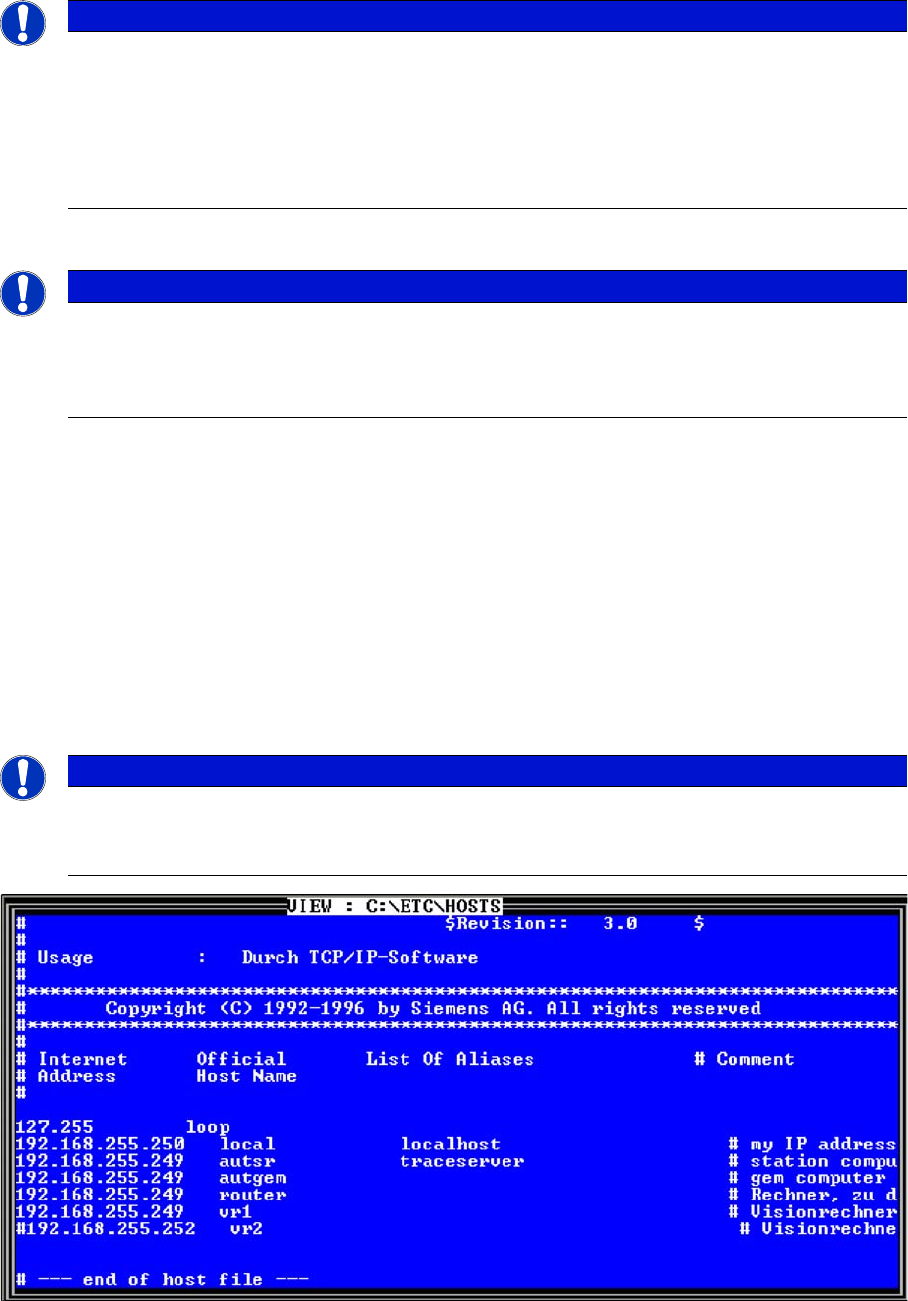
Check the internal TCP/ IP address for the machine controller
▪ Put the keyboard to the MC and switch the multiplexer on the MC
▪ Switch ON the machine.
▪ Switch over to console 4 (press F4), enter sc and press Enter.
▪ Go to the folder ETC and press Enter.
▪ On the right-hand side of your screen, select the hostfile.
▪ Press V to open the file. Check the entries. Close it with ESC.
The internal network address for the machine computer is a fixed local area network address don‘t
change this address.
▪ Machine controller: 192.168.255.250
Entries in the hostfile
Note: There will be no MC in a Single BoxPC system.
NOTICE
In the MC, the RMOS operating system has been replaced by Windows 98.
When upgrading "older" machines with 076 CPUs (USB1.0), this takes approx. 4 hours.
X machines with 086er CPUs (USB2.0) need roughly 45 mins. to replace the operating system.
The FAT formatted hard disk has been changed to FAT16 Windows format.
► When upgrading to 603, follow the instructions carefully. Downgrading again involves ex-
tensive and complex manual programming and installation consequences.
NOTICE
Cause of Hazard
These entries only apply up until software version 602.xx with the operating system RMOS.
From software version 60, the network checks are performed as customary for Windows XP
systems.
NOTICE
Cause of Hazard
The MC remote connection can also be used to check and edit entries from the station comput-
er.
4 Communication and Control
4.3.1 Communication in SIPLACE D1/D1i 4.3 CAN Bus
Student Guide SIPLACE D-Series (FSE) 59
4.3
4.3 CAN Bus
CAN Bus
4.3.1
4.3.1 Communication in SIPLACE D1/D1i
Communication in SIPLACE D1/D1i
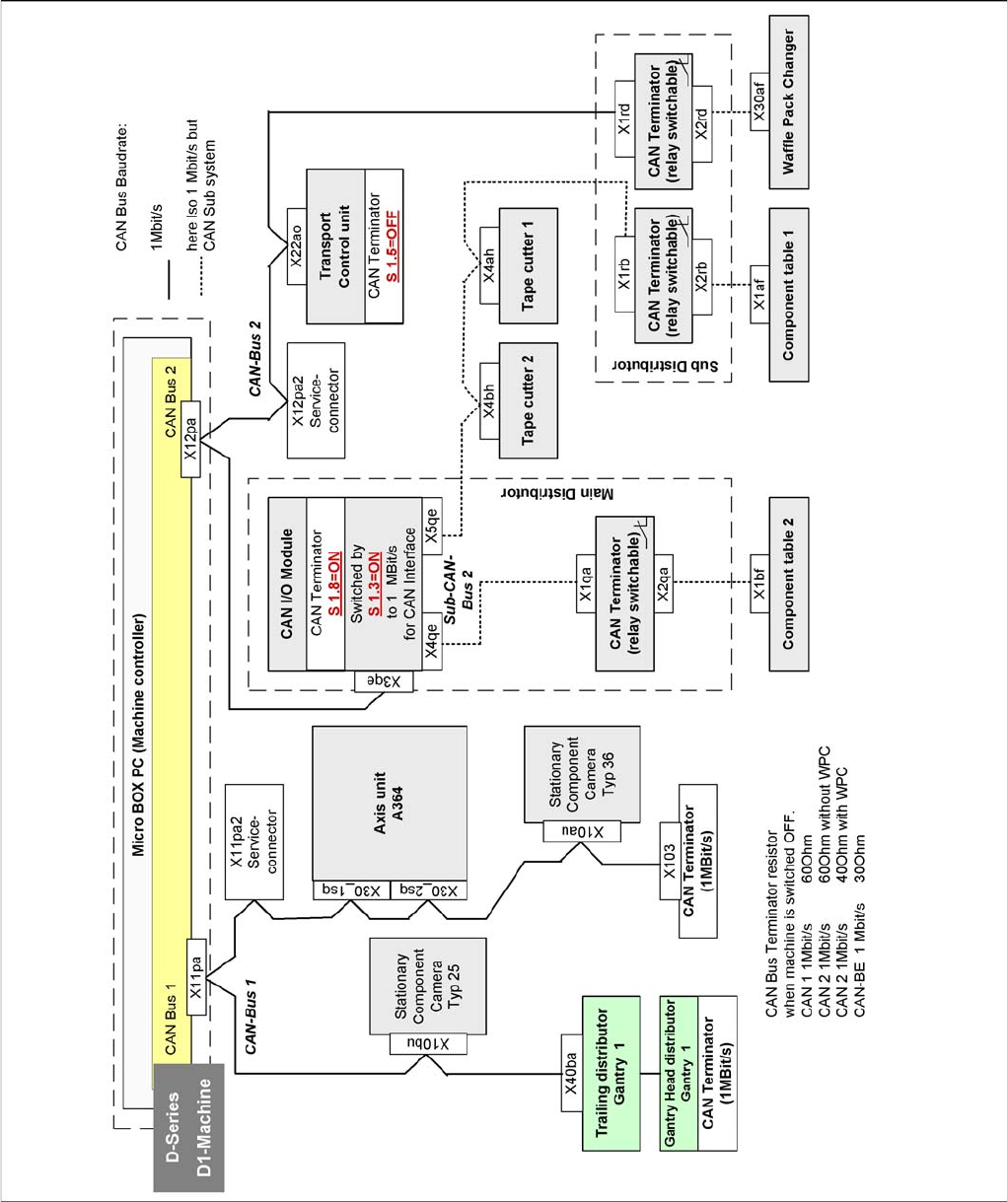
Overview of communication in SIPLACE D1/D1i