User-Manual-NeoDen-K1830-20200618.pdf - 第12页
On the file list page, s elect a n existing file or a dd a new file an d n ame it, and then se lect the file for e diting. The editing page is shown as fo llows: 2.1 PCB forw ard settings In manu al pro gramming, this it…
2.PCB Editing
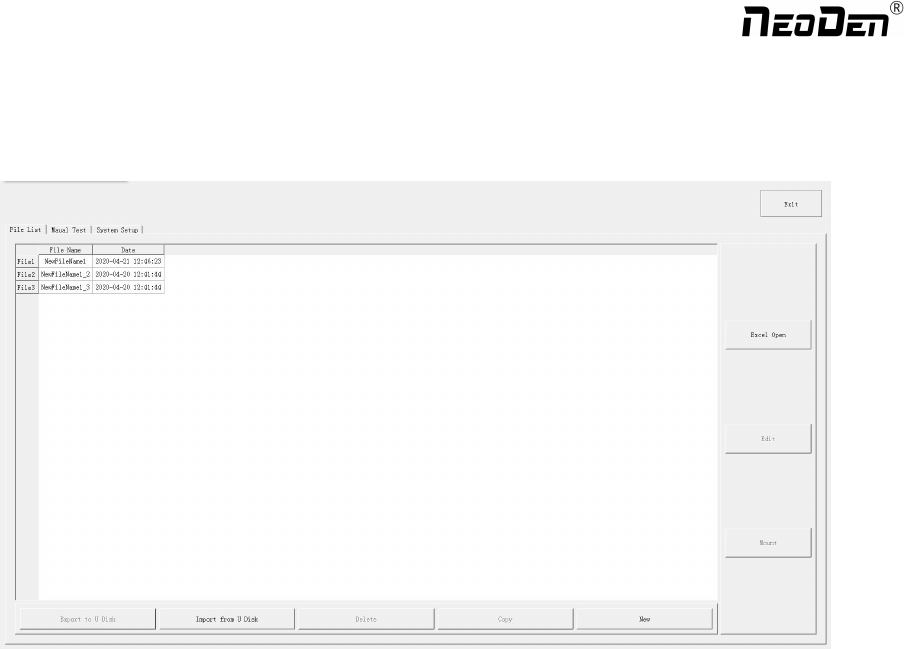
File list introduction::
(1) Excel Open:The Excel table of the file can be modified directly in the table for some routine operations,
simplifying the programming operation.
(2) Edit: select a file and click Edit to enter the corresponding editing interface.
(3) Processing: after editing the file, after checking the correctness, select the file and click processing to mount.
(4) Export file: After connecting an U disk, select the file and click Export, after the successful notice pops up, the
export is finished.
(5) Import from U disk: for the files that have been edited offline, they can be directly imported from U disk for
mounting. After connecting U disk, click Import from U disk, select the corresponding files in the new window, and
click OK. When the imported files are showed in the file list, the operation is finished.
(6) Delete: select the corresponding file, click delete, a prompt window will pop up, and click Yes.
(7) Copy: select the corresponding file, click Copy, and the file list will generate a file of xxxcopy1. In order to
prevent misoperation, a new file can be copied before operation.
(8) Add a new file: click Add to open the input window, input the file name, and click OK. At this time, when the file
list interface displays new files, the operation is successful.
11
Zhejiang NeoDen Technology Co.,Ltd.
On the file list page, select an existing file or add a new file and name it, and then select the file for editing. The editing
page is shown as follows:
2.1 PCB forward settings
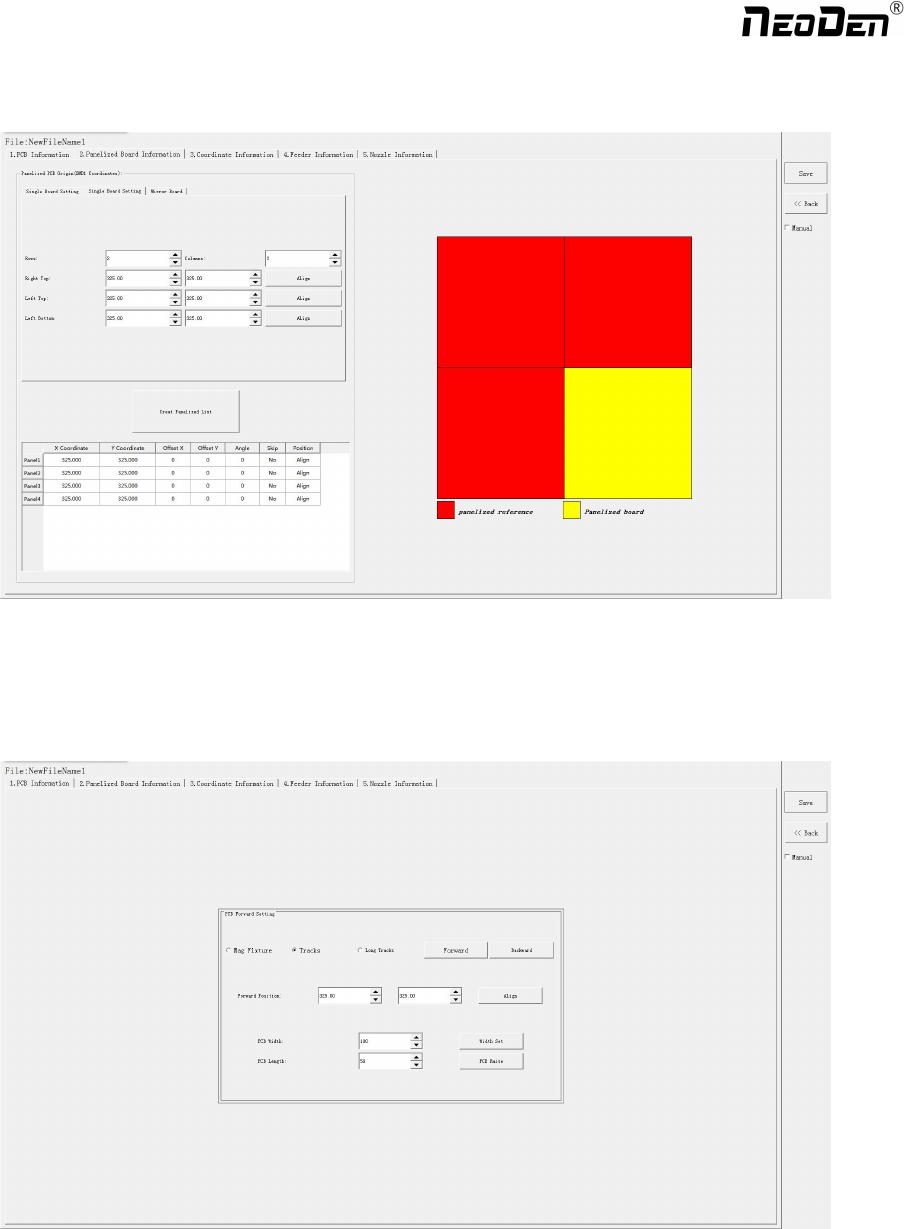
In manual programming, this item is the primary editing item, and the board entry setting is as shown in the figure:
2.1.1 Mag Fixture
Select tray to fix the board feeding mode, place the PCB to be installed in the proper position in the mounting area, and then
click "top plate control" to fix the PCB.
12
Zhejiang NeoDen Technology Co.,Ltd.

2.1.2 Tracks:
Select the “Tracks”on PCB Feed Setting interface:
Tracks width setting:Set correct PCB width value until the PCB can move smoothly
PCB Feed Test:Put PCB to “Tracks Section 1”,Click “forward”, PCB will move to “Tracks section 2” and stop at the
cylinder thimble position through the sensor,cylinder will raise the PCB, then thimble will go down, PCB feeding complete.
The adjustment method of the tracks width:Put the PCB on the front conveyor,feed the PCB to the tracks of pick and place
machine, gently push the PCB back and forth by hand to leave a tiny gap of about 1mm in the rail(add extra 1mm from PCB
width), click”Width set” and follow the prompt window to check whether meet the zero return condition. After zero return,
it will be adjusted to setted width.
2.1.3 Long Tracks:
Select the “Long Tracks”on PCB Feed Setting interface,then all track sections start work simultaneously.
Tracks width setting:Set correct PCB width value until the PCB can move smoothly
PCB Feed Test:The long tracks sends feed signal to the front conveyor, and feed PCB to cylinder thimble 1 position,
cylinder will raise the PCB,then thimble 1 will go down,PCB feeding phase 1 is completed.After above placement is
completed, the PCB in the waiting area is released, feed to cylinder thimble 2 position, cylinder will raise the PCB,then
thimble 2 will go down,PCB feeding phase 2 is completed.After above placement is completed, the PCB in the waiting area
is released, feed to cylinder thimble 3 position, cylinder will raise the PCB,then thimble 3 will go down,PCB feeding phase
3 is completed.
2.2 PCB Eject setting
After click “Eject”no matter under Mag fixture or Rail mode,the thimble will go down in “track section 2”,”track section
3”begin to work and PCB will feed to back conveyor
2.3 PCB Forward Position Setting
Need set the PCB forward position before click “forward”
Step:Click “Align”and enter the “align”interface,set the forward position according to the photo took by mark camera,and
select “align method-nozzle 1”,then click “save”to save the forward position information.
13
Zhejiang NeoDen Technology Co.,Ltd.