User-Manual-NeoDen-K1830-20200618.pdf - 第41页
14.PCB Ra ise Initiali ze: initial ize the PCB raise func tion 15.Wi d th Initializ e: initial ize the width o f rails ba ck to zero. 41 Zhejiang NeoDen T echnology Co.,Ltd.
40
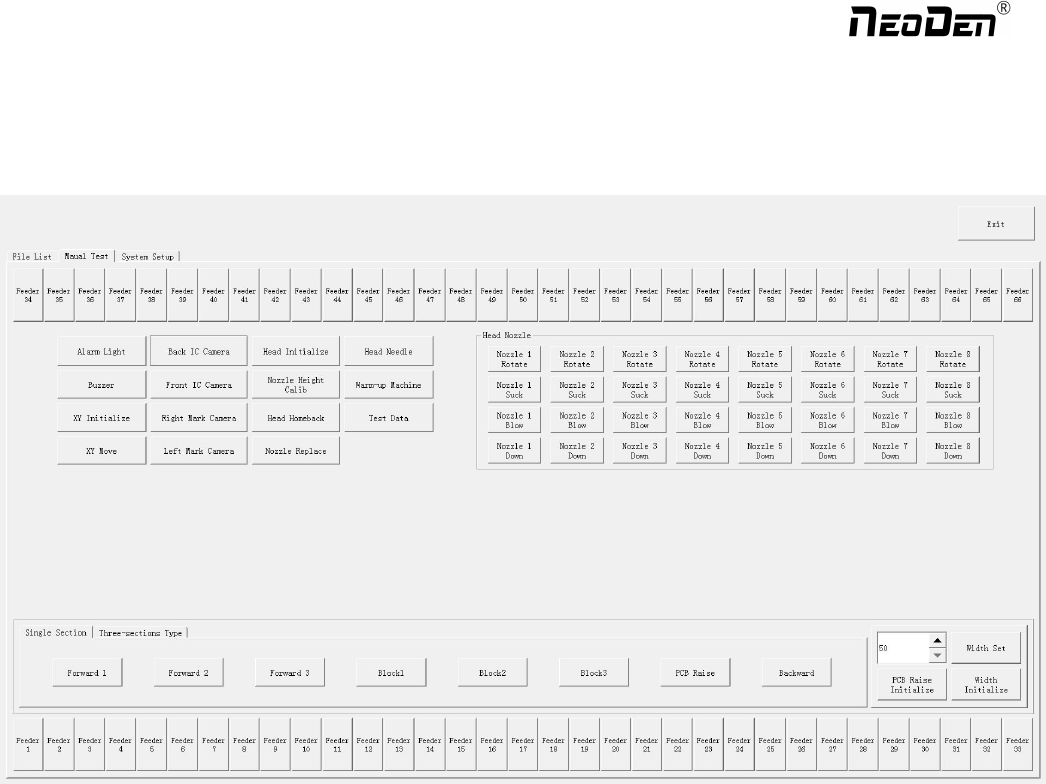
9. Manual Test
This interface is used to test each part’s function.
1.Feeder No.1-No.66: after loading tape reel on feeder, click the feeder to test its feeding function.
2.Alarm light: click it to test if the light could work correctly, the color should change from red, green to yellow by
sequence.
3.Buzzer: click it to test if it works
4.XY initialize: click to have XY back to zero
5.XY Move: click this button to enter vision interface, the movement mode are optional, use the crosshair to move the head.
6.Front IC Camera, Back IC Camera: click to test the photograph function.
7.Right Mark Camera,Left Mark Camera: click to test the photograph function.
8.Head initialize: head initialization can be executed before mounting
9.Nozzle Height Calib: click to calibrate 8 nozzles’ initial heights
10.Head Home back: click to move the head back to original left top position
11.Nozzle Replace: click to replace nozzles, the head will move to its position for easier replacement.
12.Head Nozzle: click to test rotation, suction, blow and moving down functions of nozzle NO.1-NO.8.
13.Width Set: after the initialization of rails width, enter the expected width, click Width Set, the rails be widened
accordingly
Zhejiang NeoDen Technology Co.,Ltd.

14.PCB Raise Initialize: initialize the PCB raise function
15.Width Initialize: initialize the width of rails back to zero.
41
Zhejiang NeoDen Technology Co.,Ltd.

42
10.
First trial and test
10.1 Program first dry run
Usually we would suggest you to have a dry run (no components are loaded) before production test. After it
goes smoothly, you can start to produce few boards.
10.2 First production test
1 Make a programming file
2 Test the file to pick and place components.
10.3 Component Inspection
Inspection items
●Check if the specification, direction, polarity of components is aligned with what they should be.
●Whether the components are damaged or the pins are distorted.
●Whether the component is off beyond allowance.
The inspection methods vary from the equipment that you have.
Except visual inspection, all of amplifier, microscope, online or offline AOI equipment can be applied if the
pitch of IC is quite small to check.
Please follow SOP to do inspection or any other general standards (IPC Standard and SJ /
T10670-1995 SMT
General Technical Requirements). Adjust the programming file according to the placement
effect after the first production test.
If there is any issue of specification, direction and polarity, please follow process file to amend. If the components are
off, please adjust the file by following two methods
1. If the placement effects of all components are off in the same direction, it would be the
fiducial issues. Please resolve this issue by adjusting the coordinate of fiducials according to its value
of deviation
2. If there are several components off beyond allowance, you’d better adjust their coordinates on working file with
down-looking camera. If there are couple of issues occur during test, some other points need to be considered.
●Frequent pickup failure. Some suggestions are listed below
(1) The pick height is inappropriate, please revise the value after an inspection or a pick-test
(2) The pick offset needs an adjustment, it should be aligned with the center of component reel
Zhejiang NeoDen Technology Co.,Ltd.