User-Manual-NeoDen-K1830-20200618.pdf - 第18页
Nozzle down test:If choose left or right mark camera alignment meth od,this fu nction will turn to gray and n ot avail able to op erate.If ch oose n ozzle1-8 alignment metho d,this fu nction will be blac k and available …
17
Row panelized: several same PCBs are arranged in horizontal direction, and the nearby rows are mirrored
Column panelized: several same PCBs are arranged in vertical direction, and the nearby columns are mirrored
(2)Panelized Board Row and Column
The row and column are determined by the positioning of PCB on working area. The direction along the rails is the column,
the direction perpendicular to the rail is row, then please enter data in the row and column.
(3)Please refer to the data collecting method of each position information as following:
After select the corresponding mirror board panelized method(column or row)and data of column&row,may occur the
situation of the align interface turn to gray and can’t be edited,then no need do position align.
Based on actual mirror board data,right side is showing corresponding images and can find the first component on it.
●The data of “right top”on original board: on the alignment interface, find the right top panel that is nearest to the right
side but farthest to the feeding position, then find the first component which on the chip list of this panel, align the center of
this component, click save and cancel, it will return to the “PCB information” automatically.
●The data of “left top”on original board: on the alignment interface,find the left top panel,then find the component same as
the component that aligned on the “right top”,align the center of this component, click save and cancel, it will return to the
“PCB information” automatically.
●The data of “left bottom”on original board:on the alignment interface,find the left bottom panel,then find the component
same as the component that aligned on the “right top”, align the center of this component. After saving the data, it will
return to the “PCB information” automatically.
●The data of “left bottom”on mirror board:on the alignment interface,find the left bottom panel,then find the component
same as the component that aligned on the “right top”, align the center of this component. After saving the data, it will
return to the “PCB information” automatically.
After setup, click “create panelized list”, the panelized list will be generated accordingly in the blank. You can also
double-confirm each position by clicking “Align”. Note:The angel difference between original and mirror board is 180
degree,original board is 0 degree,mirror is 180 degree.
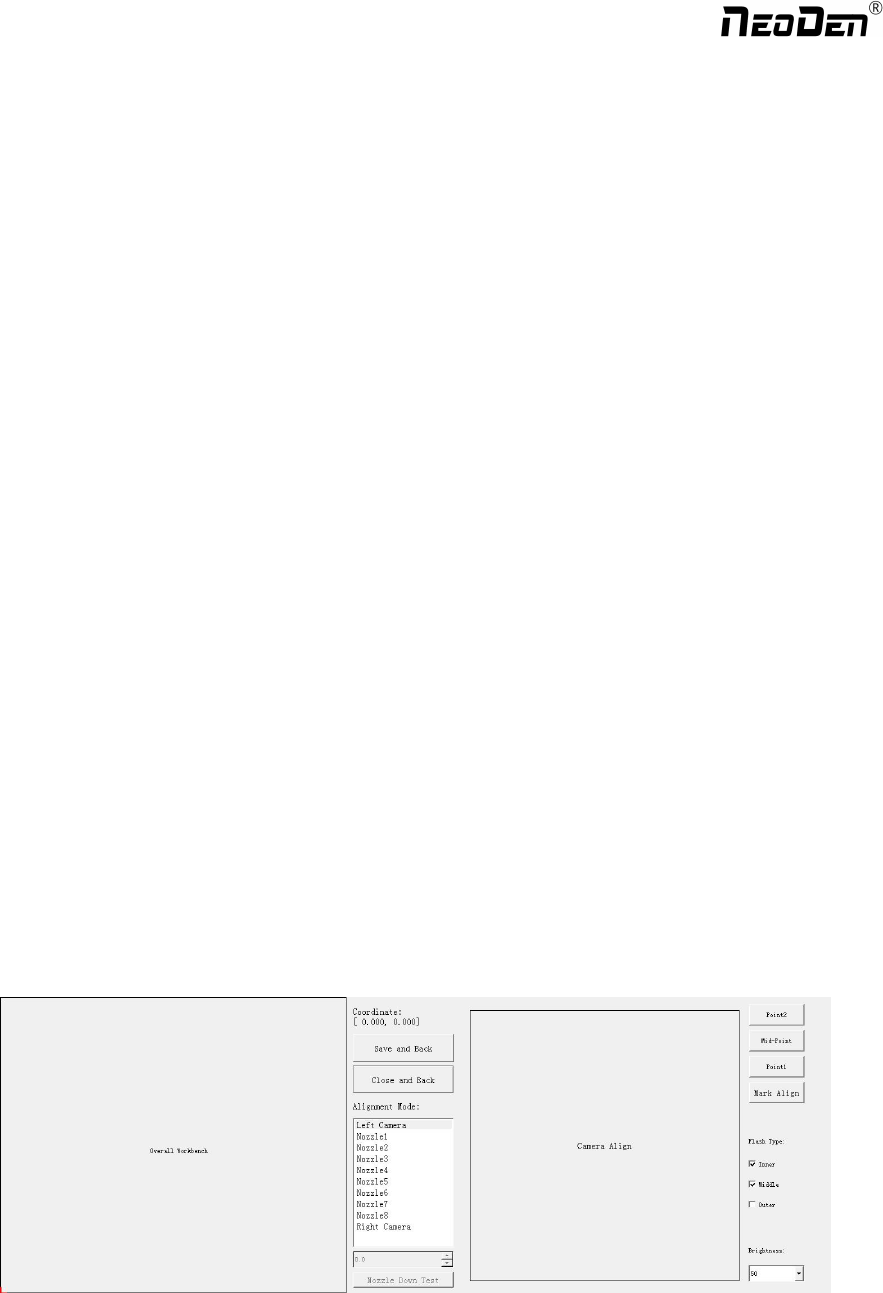
Introduction of Align interface:See below fig.
Save and Back:After align the center of components,click “save and back”to save the date.
Close and Back:Refer to exit the current interface.
Alignment Method:Include left mark camera,nozzle 1-8,right mark camera,choose the alignment method according to
the actual situation,right side will show the real image by mark camera alignment.
Zhejiang NeoDen Technology Co.,Ltd.
Nozzle down test:If choose left or right mark camera alignment method,this function will turn to gray and not available
to operate.If choose nozzle1-8 alignment method,this function will be black and available to operate.Insert a pick height
value and then click “nozzle down test”to judge whether the setted pick height is reasonable or not.
Point 1,Point 2,Middle point :Use to confirm the IC center coordinate.For example,if choose alignment mthod”left
mark camera”,first select the first pitch center in left-bottom corner,click point 1,then select the second pitch center in
right-top,click point 2,finally click middle point,the machine can calculate out the IC center coordinate.
Light source:outer ring,middle ring,Inner ring,Mark point generally select to use outer or inner ring,select
corresponding light source according to PCB kind.
Brightness:Image recognize brightness can be adjusted on the drop-down list
3.2 PCB angle
PCB angle detect should be under the mode of Single board and manual programming,PCB angle will influence the
accuracy of mounting. The angle closer to 0 degree the better, and the angel deviation need to be within 1 degree. The angle
of PCB is generated according to panelized PCB coordinate, but we can also adjust the angle by manual. Click “Angle
Detect” button, according to the index of machine to choose two points, then a new PCB angle will be generated. (Note, the
two points need to be paralleled)
4. Coordinate information
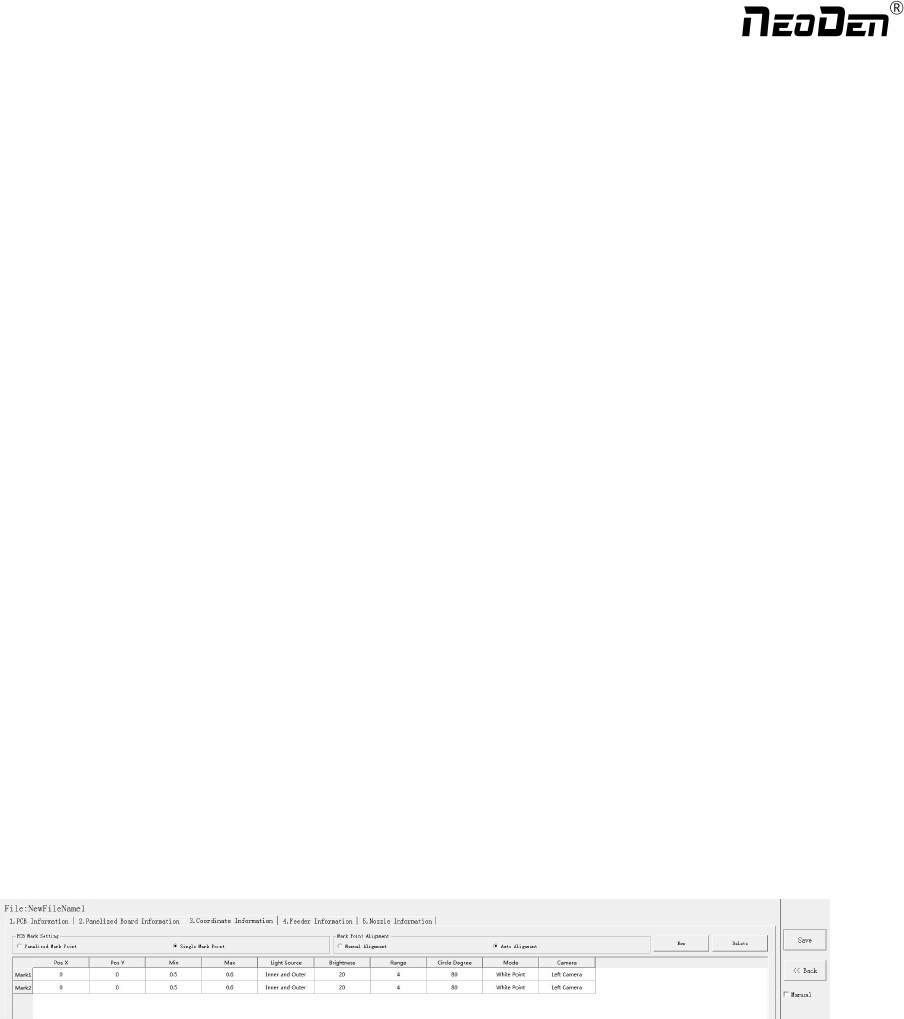
4.1 PCB Mark setting
Function: After finishing mark setting, when the machine is working, the specific position and direction of PCB can confirm
via setting mark. Only in this way the next step of mounting work can carry out.PCB mark setting interface see below fig.
(1) Panelized mark point
It is mainly used for multiple identical PCB boards consistent of the whole board, when place every panel board, the
machine will rescan small panel board’s mark point.
(2)Single mark point
It is mainly used for a single PCB board and multiple identical PCB boards consistent of the whole board (Notice:
coordinate programming is done as a single board)
Generally, need to select 2 or 3 mark points.
4.2 Mark point alignment
Manual alignment:If there is no mark point on the PCB, which can through some location holes and set up some special
reference point manually to replace and confirm reference position. Note:Generally use SMD1 coordinate in chip list and
the one that is relatively easy to find far away from SMD1 as mark points,In this way, the relative placement effect will be
18
Zhejiang NeoDen Technology Co.,Ltd.
better during placement,the reference point is determined manually.
Auto alignment:The machine will scan and align mark points automatically.
4.3 Mark Point information
Mark point Coordinate:Import the coordinate automatically status: the data collection of mark point, which through PCB
circuit board to find mark point coordinate information directly, and input directly. Manual programming status:Select mark
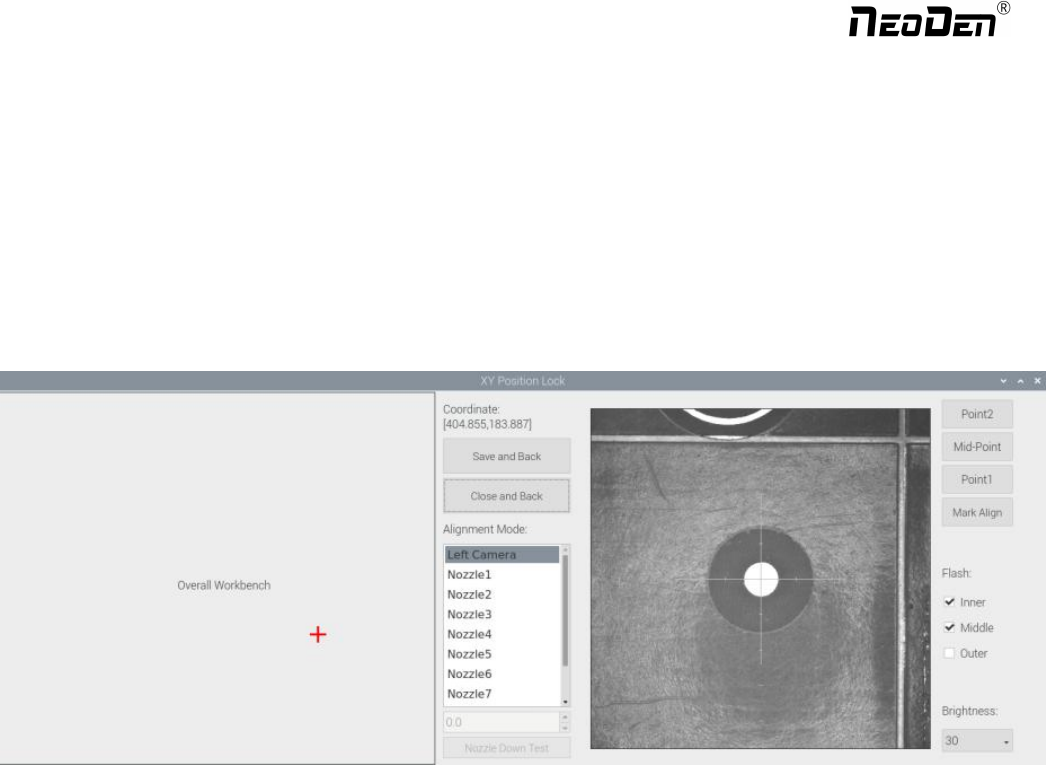
point on the list and click “align”,enter the image capture page,and then find the center of the mark point via movement,
click "Mark align" see below figure, and then click "Save and Back" to go back to main page.
Min, max value: means the size of mark point, it has a floated value, which can prevent recognizing mark point wrongly.
Light source: Dividing into inner and outer, if select the hole as mark point which need to choose the inner of light source; If
select bright spot as fiducial which need to choose the outer of light source.
Brightness:The brightness when align the mark point,if select bright spot,generally set 20,can adjust according to actual
situation.
Range:If there are interference points near the Mark point, you can input a certain value and ensure identify the Mark point
more accurately.
Circle Degree:Input reasonable circle degree value,can avoid interference from other points effectively.
Mode:Dividing into white point and black point, select black point mode if have hole and bright point,select white point
mode if have bright point.
Camera:Support select left camera and right camera(user can select the camera for calibration according to the actual
situation),also can select default setting camera,the machine will use corresponding camera during work.
Except for the coordinate of Mark point, the settings of min,max, light source, brightness, range, circle degree, mode,
camera are same no matter automatically imported or manually imported.
Mark point add and delete: Click “new”to add the mark point,click “delete”to remove the selected mark point you want.
19
Zhejiang NeoDen Technology Co.,Ltd.