User-Manual-NeoDen-K1830-20200618.pdf - 第33页
33 8.System Setup If any revision is required, we s uggest y ou co ntact o ur engineer to get detail ed ins truction first. (P .S . All para meters were set up bef ore shi pping, usually no adjustment is required.) This …
32
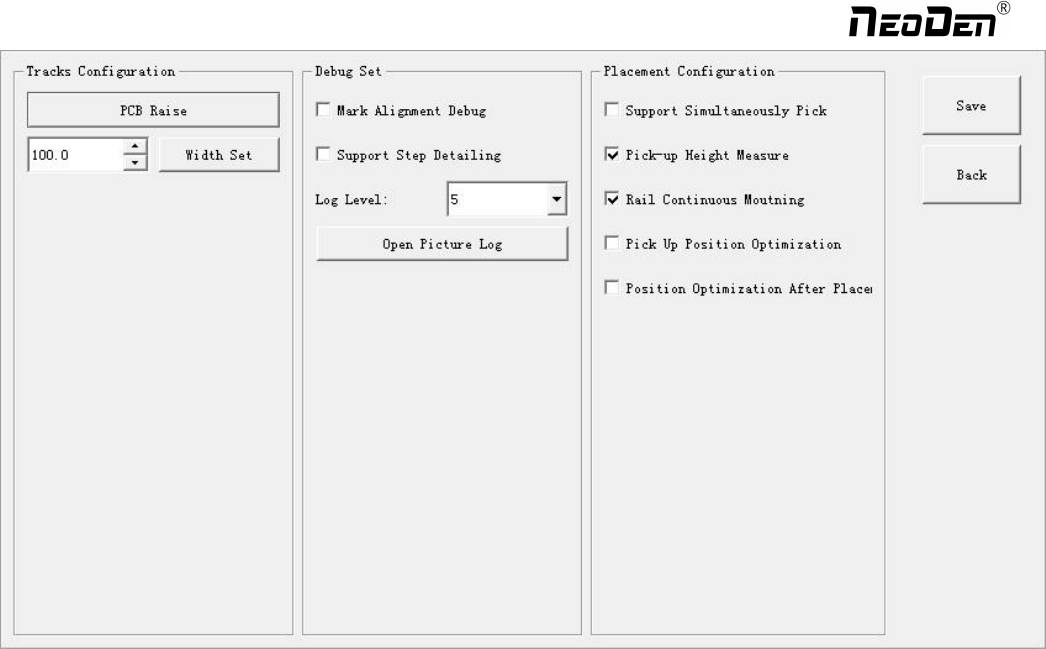
Tracks configuration: PCB Raise and Width Set are totally same as PCB Information interface.
Debug Set: details can be showed once you select the related item.
Support step detailing: once selected, every time you click “Step”, the machine will only execute one command. This is
strongly recommended for the first assembly procedure.
Log level: the level sequence from low to high is from class1 to class5. Higher level, more information.
Open picture log: press this button, the file for stocking recognition photos will be opened from which recognition details
can be checked.
Placement configuration:
(1)Support simultaneously pick: once selected, the nozzle head with same pick height can be downward to pick
components at the same time, it will greatly improve placement speed (It is recommended for component size bigger
than 0603).
(2) Rail continuous mounting: this is for PCB continuously feeding to realize automatic operation.
(3) Pick up position optimization: once selected this function, nozzle head can automatically optimize the pick position ( It
is recommended only for small components ).
(4) Position optimization after placement: If this function be selected in the first time, the position will be auto optimized in
future placement.
Exit: once assembly finished, please directly click this button and back to home interface.
File edit: If there’re many times of pick failure or big placement offset, which need to re-edit the file, please directly press
this button and it will directly turn to the file edit interface, after edit finished, save and back to the assembly interface will
be OK.
Zhejiang NeoDen Technology Co.,Ltd.
33
8.System Setup
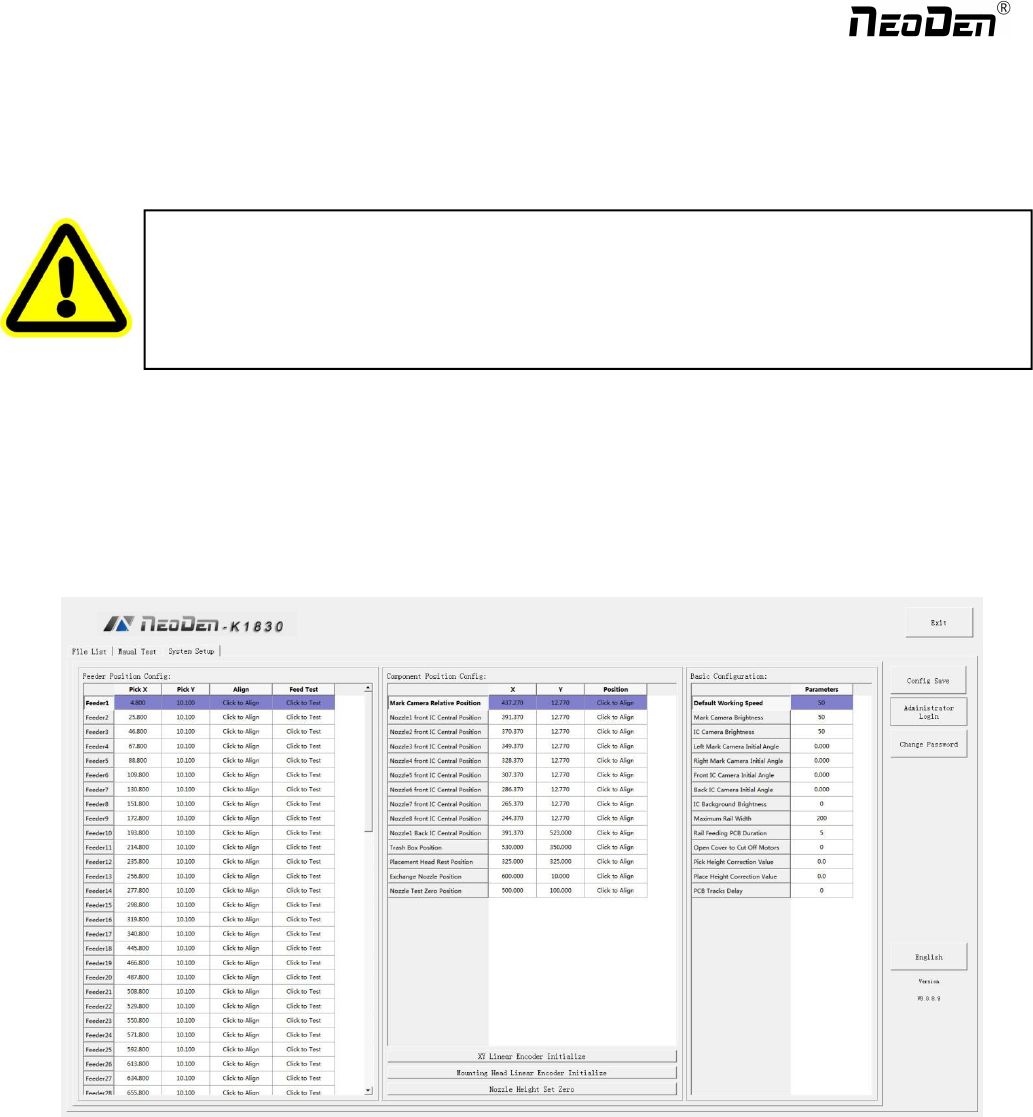
If any revision is required, we suggest you contact our engineer to get detailed instruction first. (P.S. All parameters
were set up before shipping, usually no adjustment is required.) This section will provide a brief introduction for all
parameters, to get detailed adjustment instruction, please contact our technical engineer.
Right buttons functions:
Config save: to click Save after changing the parameter
Administrator login: to prevent any misoperation, this interface will be inactive and greys out. To make it inactive,
Administrator needs to login.
Change password: before Administration login in, this function is not visible.
If the password needs to be changed, please login and click Change password. A window will pop out, enter the original
password. Then follow steps to enter the new password. A successful window will pop out when it’s finished.
Version: the current software version will be displayed below.
警告:本部分的功能是针对贴片机机器参数设置,所修改的参数会引起全部贴装文件的参数
改变,更改参数有导致设备无法使用的可能,所以请慎重修改!
Warning: this part aims at machine’s global parameter settings, any modified parameter will
influence all working files, when modify this part please consider seriously.
Zhejiang NeoDen Technology Co.,Ltd.
When any software upgrade is required, please copy the upgrade file into the subdirectory of U disk, click “software
upgrade” to load it. Then follow instructions to upgrade it.
English: this machine supports Chinese and English. To convert it into English, a password is required.
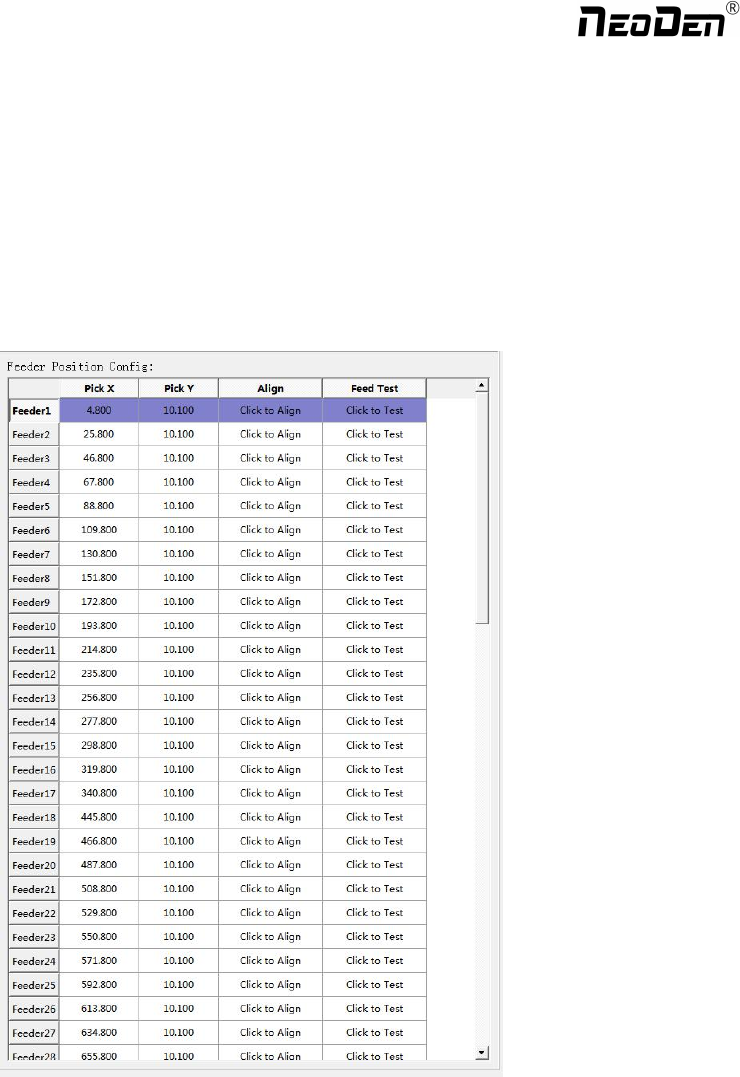
8.1 Feeder Position Config
This interface is used to setup pick offset and test feeding for each feeder.
The left column refers to feeder No., Pick X and Pick Y refer to the coordinates of pick offset. After “click to align”, this
interface will be displayed. Align the center of component (edge of tablet), then save it.
34
Zhejiang NeoDen Technology Co.,Ltd.