User-Manual-NeoDen-K1830-20200618.pdf - 第37页
Brightness: the brightne ss of m ark c amera can b e adjus ted acc ordingly . 3.IC C amera Positi on Nozzle 1 front IC Ce ntral Position : click to align,nozzl e 1 w ill mo ve to front IC camera a nd take ph otos. Onc …
36
Function: this interface is mainly used to calibrate nozzles’ positions.
P.S. Password is required to activate the items to avoid misoperation, please contact technical engineer before
calibrating.
1.Fiducial Camera Relative Position
Steps:
●Put a cooling pad on PCB, click “Rails 2” and fix the PCB on rails.
● Go to the Manual Test interface, move the head to make the nozzles stay above the cooling pad, then click “Nozzle 1
Trail” and “Back”.
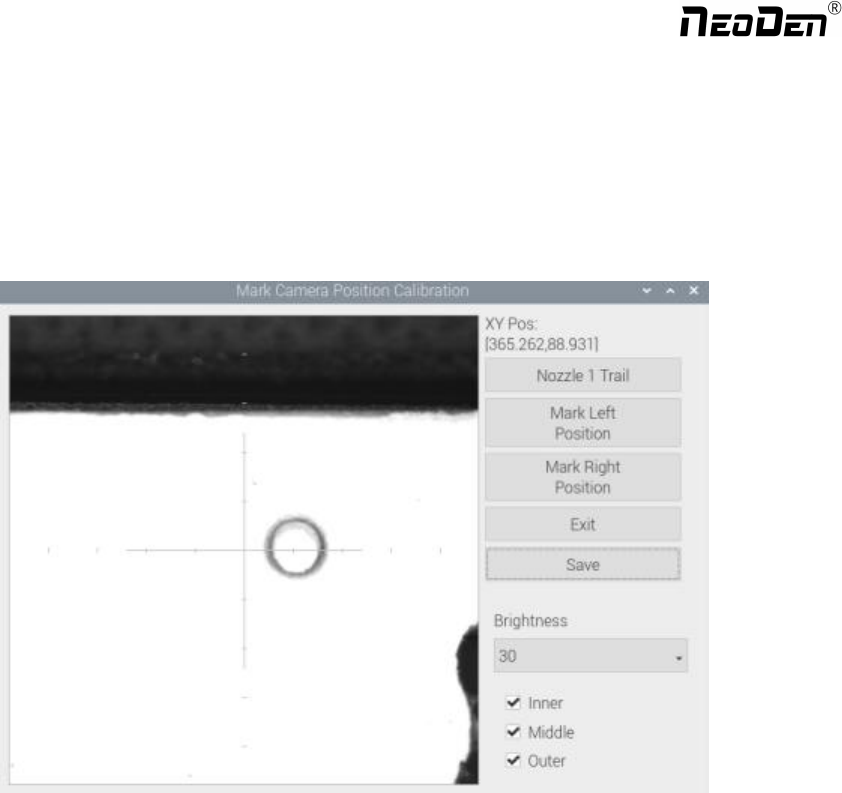
●Go to the System Setup interface, ”click to align” on Fiducial Camera Relative Position.A prompt window will pop
up, ”If continue to leave trace at current position?“ After clicking ”Yes” to enter this interface (see Figure ), then click
“Nozzle 1 Trail”, the nozzle will move downwards and rotate until get a round mark. Follow the same steps to get the trail
of Nozzle #8 , then check the offset between the round mark and the white crosshair, if it’s within 0.1mm, the trail is done.
P.S. If the offset is overly beyond 0.1mm, please kindly contact NeoDen support team.
Mark Left Position: to use the left camera align the round mark
Mark Right Position:to use the right camera align the round mark
Exit: exit without operation
Save: save the date after operation
Zhejiang NeoDen Technology Co.,Ltd.
Brightness: the brightness of mark camera can be adjusted accordingly.
3.IC Camera Position
Nozzle 1 front IC Central Position: click to align,nozzle 1 will move to front IC camera and take photos. Once the
photo is displayed, to align the central position of nozzle with white crosshair and save the data.(P.S. Once the Nozzle
1 front IC Central Position, nozzle 2-8 central position will be changed based on nozzle 1.) Apply the same operation
for Nozzle 2 front IC Central Position and Nozzle 8 front IC Central Position.
Nozzle 1 back IC Central Position: click to align, nozzle 1 will move to back IC camera and take photos. Once the
photo is displayed, to align the central position of nozzle with white crosshair and save the data.
4.Trash Box Position: after Administration Login, click to align the position of trash box accordingly.
Placement Head Reset Position:after Administration Login, click to align the position of Placement Head Reset accordingly.
Exchange Nozzle Position:after Administration Login, click to align the position of exchanging nozzles accordingly.
5.XY Linear Encoder Initialize
6.Mounting Head Linear Encoder Initialize
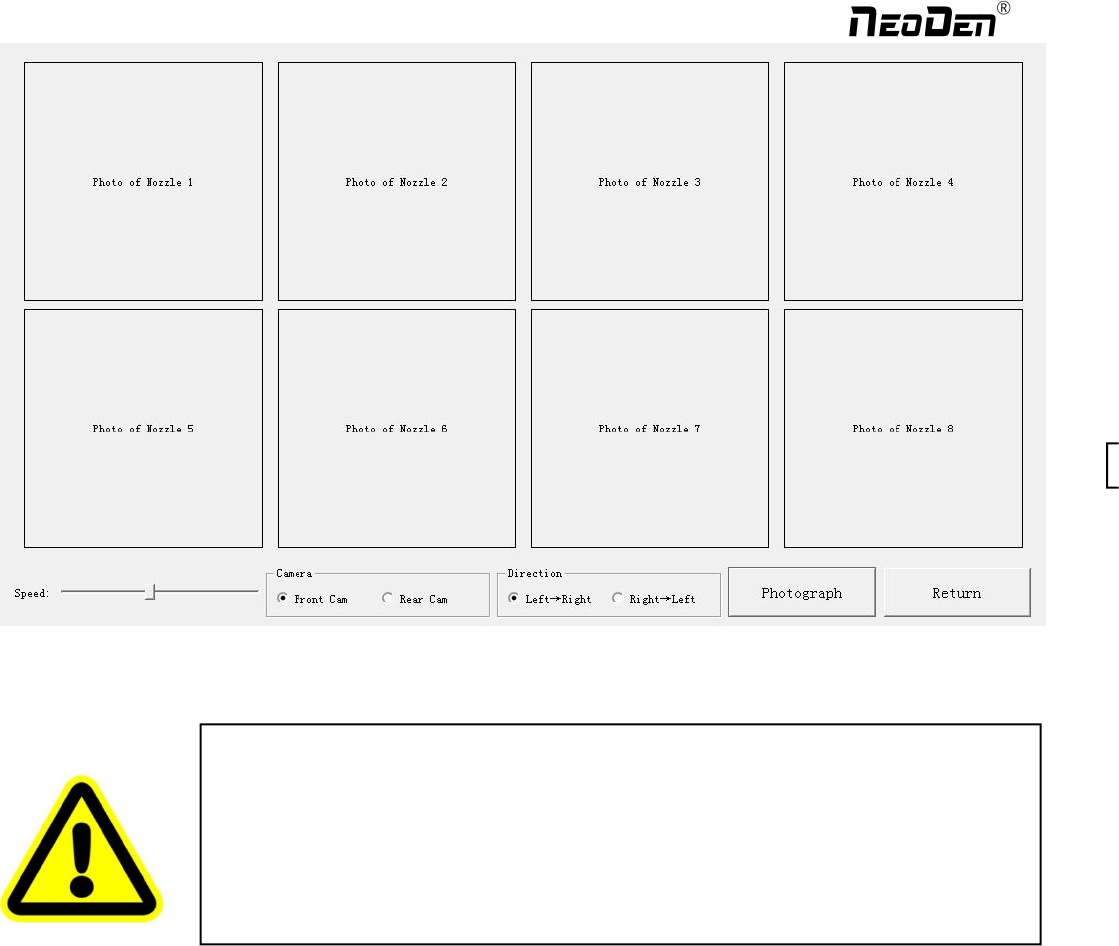
7.Flying Photograph Test: click ctrl+t shortcut keys to show this test function. Click to test, the central positions of nozzle
1-8 will be displayed. Select front camera, back camera, direction, speed before clicking photograph, a photo will be
displayed after that.
Warning: this is only for factory setting. DON’T click before getting any instruction from
NeoDen technical engineer.
Warning: this is only for factory setting. DON’T click before getting any instruction from
NeoDen technical engineer.
37
Zhejiang NeoDen Technology Co.,Ltd.
8.Nozzle Height Set Zero
8.3 Basic Configuration
Warning: this is only for factory setting. DON’T click before getting any instruction from
NeoDen technical engineer.
38
Zhejiang NeoDen Technology Co.,Ltd.