3OM-1054-002.pdf - 第160页
(3) Component Shape: Other Leaded (Complex) *1 T ype Different items will be displayed in "*5", depending on which type is selected in this text box. Standard "Width [mm]" and "Length [mm]" …

3.2 "Shape Data" Tab
(2) Component Shape: Connector (Complex)
*1 Type
Different items will be displayed in "*5", depending on which
type is selected in this text box.
Standard
"Width [mm]" and "Length [mm]" appear in "*5".
Electd
"Shape", "Width [mm]", and "Length [mm]" appear in "*5".
Others
"Width [mm]", "Length [mm]", and "Full Length [mm]" appear
in "*5".
*2 # Of types, *3 # Of groups
*4 Extended setting
Different items will be displayed in "*6", depending on which
parameter ("Disable" or "Enable") is set in this text box.
Disable
"Type No.", "Direction [°]", "# of Leads [pcs.]", "Pitch [mm]",
"Center Posn (Latl) Det [mm]", and "Top Posn (Long) Det
[mm]" appear in "*6".
Enable
"Type No.", "Direction [°]", "# of Leads [pcs.]", "Pitch [mm]",
"Center Posn (Latl) Det [mm]", "Top Posn (Long) Det [mm]",
"Missing Lead Start", "# of Missing Leads [pcs.]", and "Insp
Condtn" appear in "*6".
*5 Lead Type Data
Shape, Width [mm], Length [mm], Full Length [mm]
*6 Lead Group Data
Type No., Direction [°], # of Leads [pcs.], "Pitch [mm]", "Cen-
ter Posn (Latl) Det [mm]", Top Posn (Long) Det [mm], Miss-
ing Lead Start, # of Missing Leads [pcs.], Insp Condtn
01 12-003 3-25
AGS01EDTP

(3) Component Shape: Other Leaded (Complex)
*1 Type
Different items will be displayed in "*5", depending on which
type is selected in this text box.
Standard
"Width [mm]" and "Length [mm]" appear in "*5".
Electd
"Shape", "Width [mm]", and "Full Length [mm]" appear in "*5".
Others
"Width [mm]", "Length [mm]", and "Full Length [mm]" appear
in "*5".
*2 # Of types, *3 # Of groups
*4 Extended setting
ifferent items will be displayed in "*6", depending on which
parameter ("Disable" or "Enable") is set in this text box.
Disable
"Type No.", "Direction [°]", "# of Leads [pcs.]", "Pitch [mm]",
"Center Posn (Latl) Det [mm]", and "Top Posn (Long) Det
[mm]" appear in "*6".
Enable
"Type No.", "Direction [°]", "# of Leads [pcs.]", "Pitch [mm]",
"Center Posn (Latl) Det [mm]", "Top Posn (Long) Det [mm]",
"Missing Lead Start", "# of Missing Leads [pcs.]", and "Insp
Condtn" appear in "*6".
*5 Lead Type Data
Shape, Width [mm], Length [mm], Full Length [mm]
*6 Lead Group Data
Type No., Direction [°], # of Leads [pcs.], Pitch [mm], Center
Posn (Latl) Det [mm], Top Posn (Long) Det [mm], Missing
Lead Start, # of Missing Leads [pcs.]
3.2 "Shape Data" Tab
01 12-003 3-26 AGS01EDTP
3.3 "Recognition Data" Tab
• Sheet Layout
When the "Recognition Data" tab is pressed, the "Recognition Data"
tab sheet appears.
The "Recognition Data" tab sheet can be classified by shapes and
divided into two kinds as follows.
• Cylindrical, Square, Deform (Simple)
• IC (Simple), Other Leaded (Simple), Connector (Simple)
3.3.1 Cylindrical, Square, and Deform (Simple)
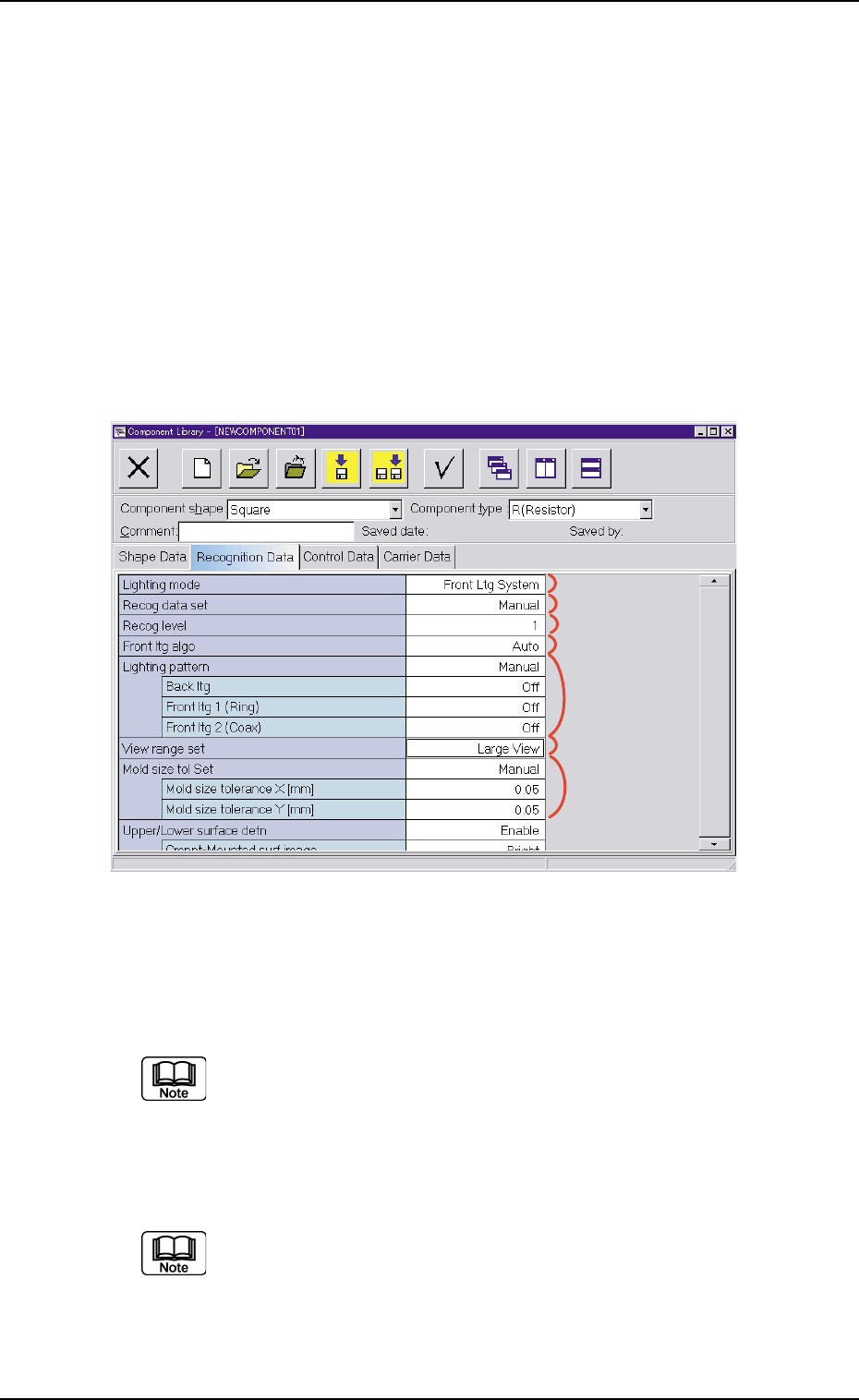
Fig. 3C13 "Recognition Data" Tab Sheet ("Square" Selected)
• Sheet Composition
Each parameter is displayed or can be entered.
Refer to "4.1.3 Basic Usage of Text Boxes" (Section 2) for the
detailed information on how to enter each parameter.
*1 Lighting mode, *2 Recog data set, *3 Recog level,
*4 Back ltg algo (Front ltg algo), *6 View range set
"Back ltg algo" or "Front ltg algo" appears in "*4", depending on
which lighting mode is selected in the "Lighting mode" text box.
3.3 "Recognition Data" Tab
*1
*2
*3
*4
*5
*6
*7
0307-006 3-27 AGS01EDTP