00196602-05_SM_SIPLACE_X-Feeder_EN.pdf - 第32页
6 Repairing the X Feeder modules 6.4 Tape Drive 32 Service Manual SIPLACE X-Feeder 4 - 88 mm 11/2017 6.4.2.1 Removing the Splice Sensor (8 - 12 mm) ► Remove the left side cover (see 6.3.1 "Removing the Left Side Cov…
6 Repairing the X Feeder modules
6.4 Tape Drive
Service Manual SIPLACE X-Feeder 4 - 88 mm 11/2017 31
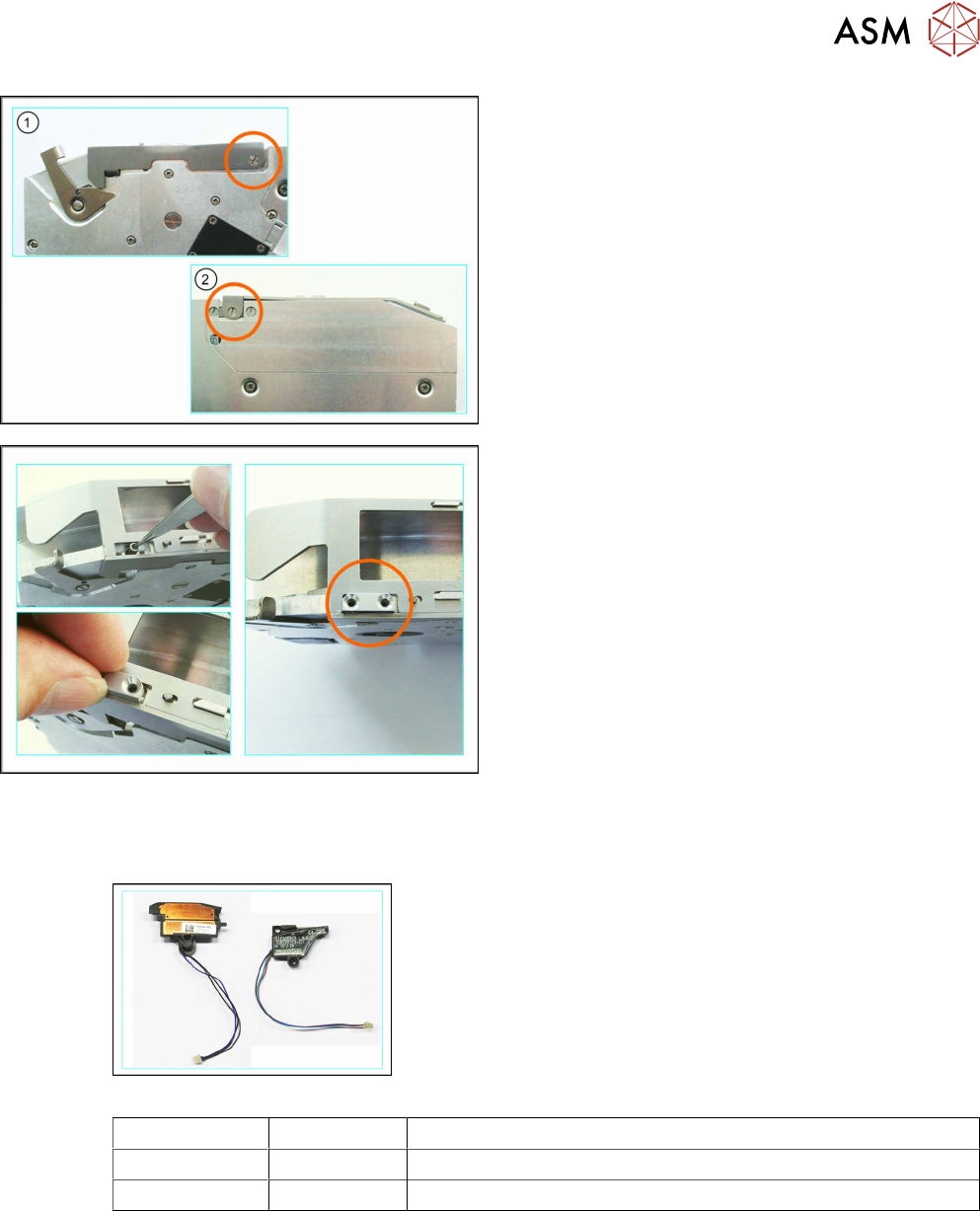
► (1) Fasten the pickup window to the left side of
the feeder module.
Use the bearing screw X16-88, item no.
03021264-xx for this.
► (2) Fix the pickup window to the right-hand side
of the feeder module.
When using feeder modules with widths of 16,
32–56 and 88mm, use the bearing screw
X16-88, item no. 03021264-xx
For feeder modules with widths of 24mm and
72mm, use the shorter bearing screw X24x72,
item no. 03012350-xx.. You will need to place a
washer underneath when fitting this screw (bush-
ing), item no. 03007433-xx.
► Insert the tape spring into the hole.
► Hold the spring holder so that the straight side is
on the outside.
► Position the spring holder with the recess on the
tape spring.
► Initially fix the spring holder loosely with a screw.
Do not tighten the screw yet, to avoid distorting
the spring holder and screws.
► Fix the spring holder with the second screw.
► Now tighten the first screw.
6.4.2 Splice Sensor
Required spare parts
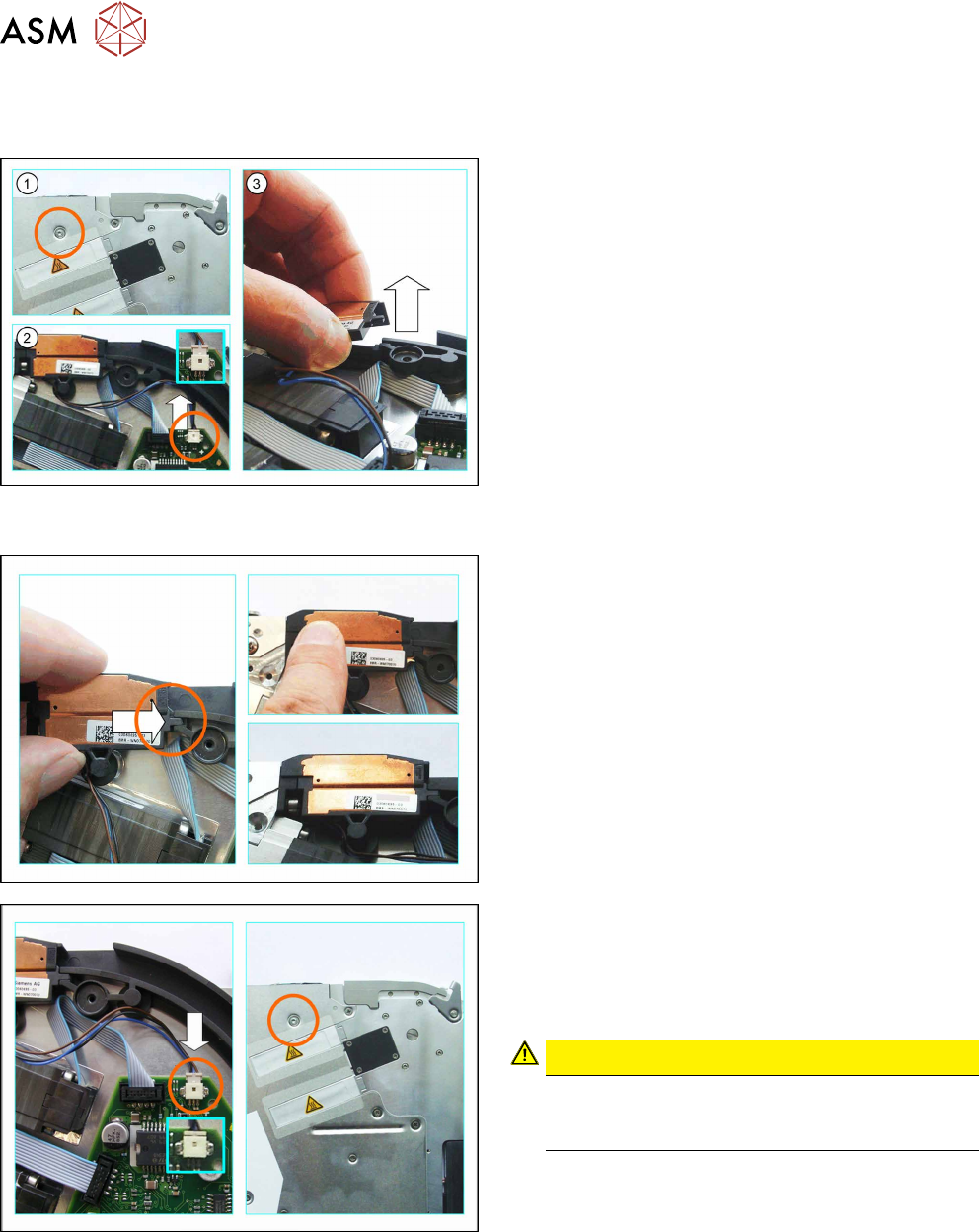
Example:splice sensor 8-12mm (left), 16-88mm(right)
Feeder module Item no. Designation
8–12mm 03060695-Sxx Splice sensor B3+ / X8-X12
16–88mm 03038133-Sxx Splice sensor S5
Required tools
●
TORX screwdriver size T8
●
Phillips screwdriver
6 Repairing the X Feeder modules
6.4 Tape Drive
32 Service Manual SIPLACE X-Feeder 4 - 88 mm 11/2017
6.4.2.1 Removing the Splice Sensor (8 - 12 mm)
► Remove the left side cover (see 6.3.1 "Removing the Left Side Cover" [}23]).
► (1) Loosen the screw on the right side cover, as
marked in the diagram.
► (2) Carefully push the connector up and out of
the connection marked in the diagram, using a
small slotted screwdriver or similar tool.
Push the connector and do NOT pull on the
cable.
► Lift the splice sensor up and out of the holding
device.
6.4.2.2 Fitting the Splice Sensor (8 - 12 mm)
► Push the splice sensor from the left, with the
snap tab, as far as the stop in the holding device
on the tape duct.
► Press the splice sensor on the left side, down into
the recess next to the tape drive.
► Make sure that the smooth side of the connector
is at the top.
► Carefully insert the connector as far as the stop,
into the connection on the board, as marked in
the diagram.
CAUTION!
Do not push the connector with force into the
connection, otherwise individual pins may break
off or be distorted.
.
► Fix the splice sensor to the right side cover with
the mushroom head cutting screw (T2.5x6mm).
► Fit the left side cover into place (see section 6.3.2 "Fitting the Left Side Cover" [}24]).
► Fit the rear slide bearing (see 6.2.2 "Fitting the Rear Sliding Guide" [}22]).
6 Repairing the X Feeder modules
6.4 Tape Drive
Service Manual SIPLACE X-Feeder 4 - 88 mm 11/2017 33
6.4.2.3 Removing the Splice Sensor (16 - 88 mm)
► Remove the left side cover (see 6.3.1 "Removing the Left Side Cover" [}23]).
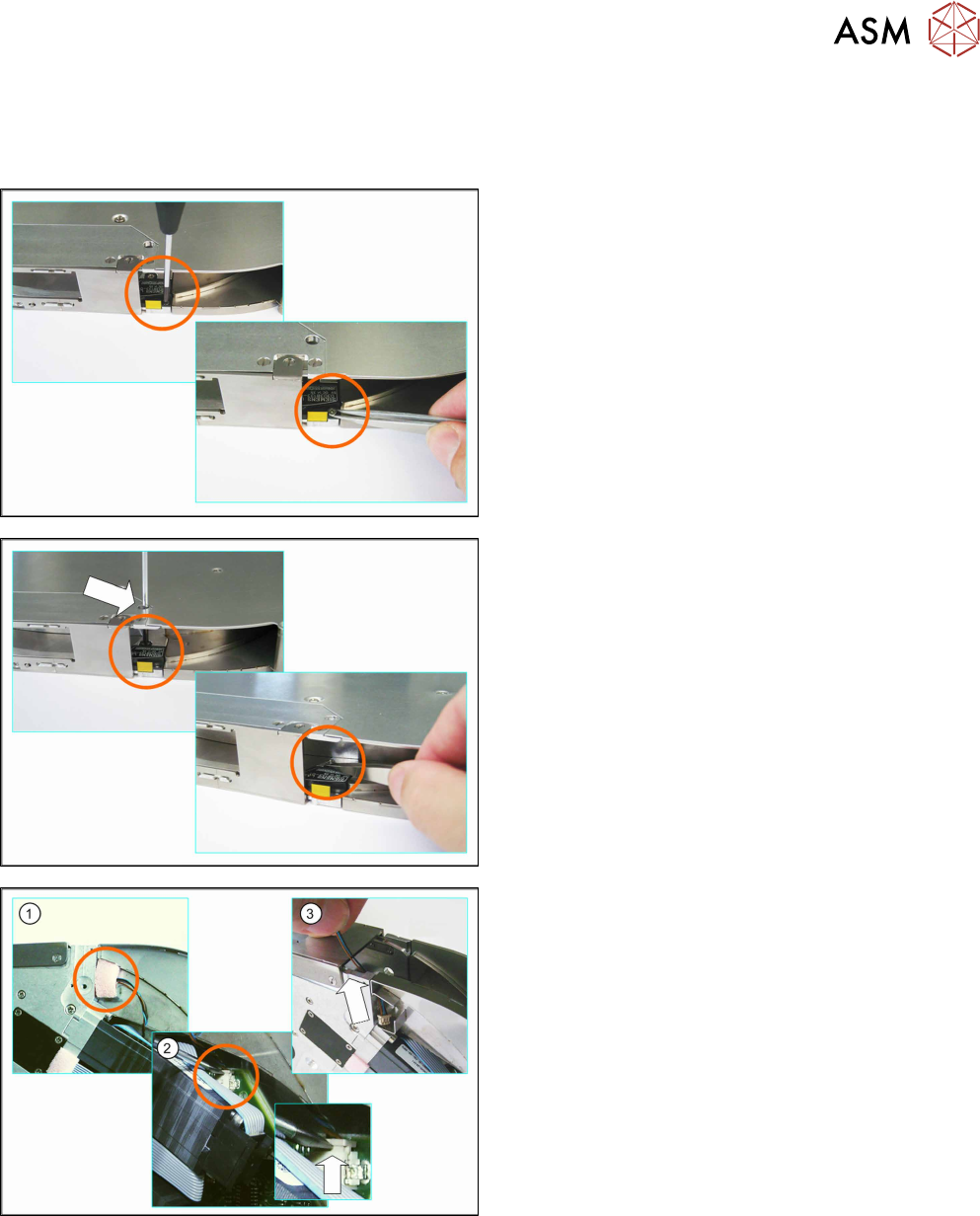
► Carefully place the feeder module down on its left side.
► Loosen the screw marked in the diagram.
► Remove the screw e.g. with a pair of tweezers.
► Insert the Phillips screwdriver through the marked
opening in the side cover.
► Loosen the back screw marked in the diagram.
► Remove the screw e.g. with a pair of tweezers.
► Carefully place the feeder module on its right
side.
► (1) Loosen the foam rubber which closes the
opening to the tape duct.
► (2) Unplug the splice sensor connector from the
connection on the board.
Use a small slotted screwdriver or similar tool to
help you.
Push the connector up and out of the connection
(see small diagram).
Do NOT pull on the cable.
► (3) Remove the splice sensor from the tape duct
and pull the cable and connector up and out of
the opening.