Printer 600 Machine Programming.pdf - 第99页
0$&+,1 (352*5$0 0,1* 0(18 3$5 $0( 7(5 6 Software Version 07SP04 User Manual 1.99 value for Knead Paste Pre ssure, ie when t his par ameter is al tered Knead Paste Pres sure fo llow s it. FWD St art Pressure This pa…
0$&+,1(352*5$00,1*
0(183$5$0(7(56
1.98 User Manual Software Version 07SP04
stroke.
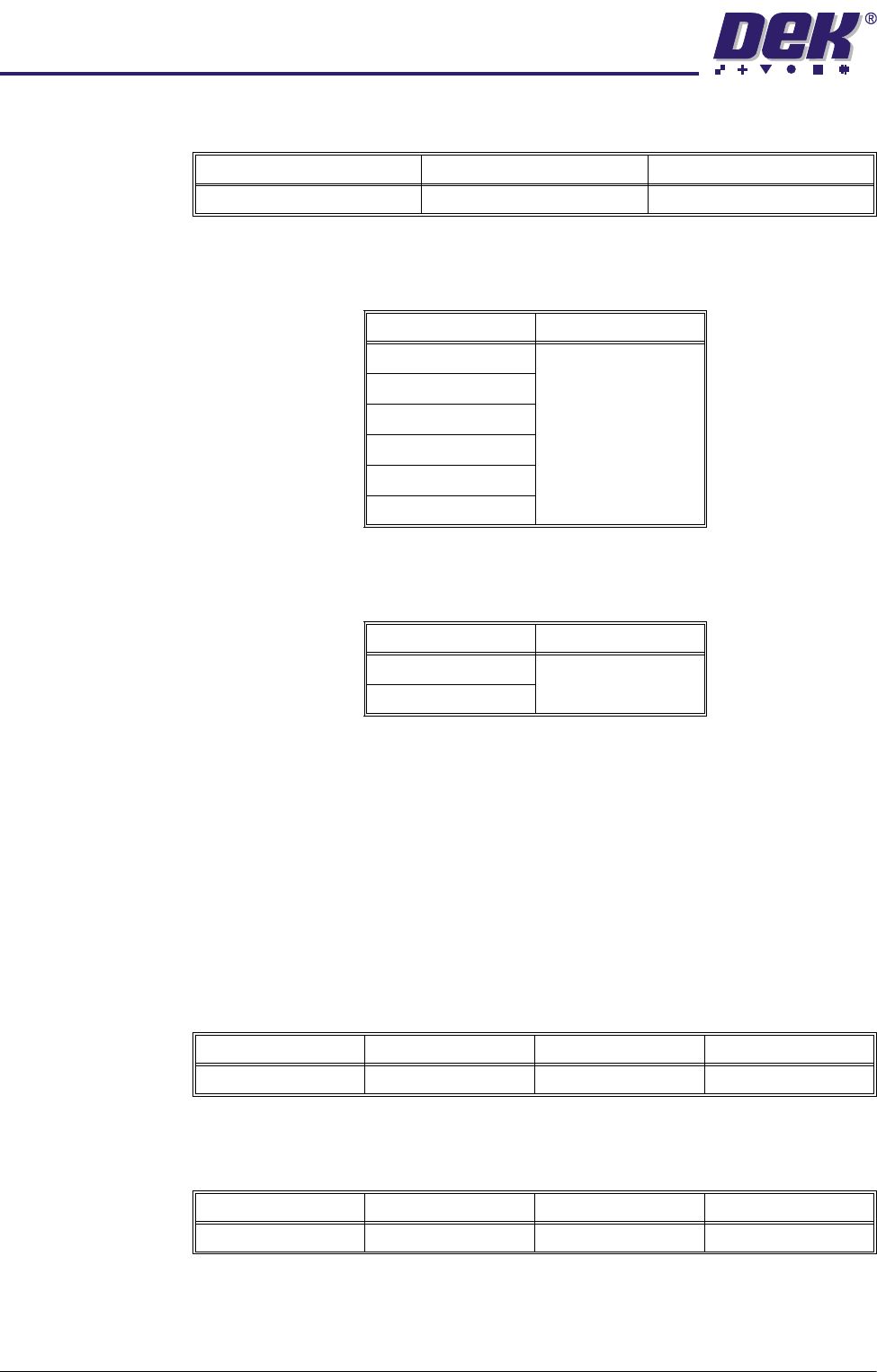
Transfer Head Size This parameter specifies the size of the transfer head (distance between the
skis) fitted to the ProFlow unit. Options are:
Stencil Protection This parameter sets whether tooling to support the stencil, outside the board
and clamp envelopes, is in use. Options are:
NOTE
This parameter is only displayed while ProFlow is fitted. If Knead Off Image is
enabled, Stencil Protection must be switched Off. Stencil Protection when
enabled prevents the following:
• Knead Off Image
• Rising Table from going to Print Height without a board
• Rails from supporting the Transfer Head
System Pressure This is the amount of print pressure (downward force) applied onto the stencil
by the ProFlow unit.
Print Paste
Pressure
This is the pressure applied to paste in the ProFlow unit while kneading and
printing.
NOTE
Only available while ProFlow and the Software Controlled Air Regulator (SCAR)
are fitted and Advanced ProFlow is set to Disabled. This is also the default
Minimum Maximum Increment
0.0mm 5.0mm 0.02mm
Option Default
150mm 300mm
300mm
350mm
400mm
450mm
500mm
Options Available Default
On On
Off
Minimum Maximum Increment Default
0.0Kg 20.0Kg 0.2Kg 4.0Kg
Minimum Maximum Increment Default
0.0 bar 4.0 bar 0.2 bar 2.0 bar
0$&+,1(352*5$00,1*
0(183$5$0(7(56
Software Version 07SP04 User Manual 1.99
value for Knead Paste Pressure, ie when this parameter is altered Knead Paste
Pressure follows it.
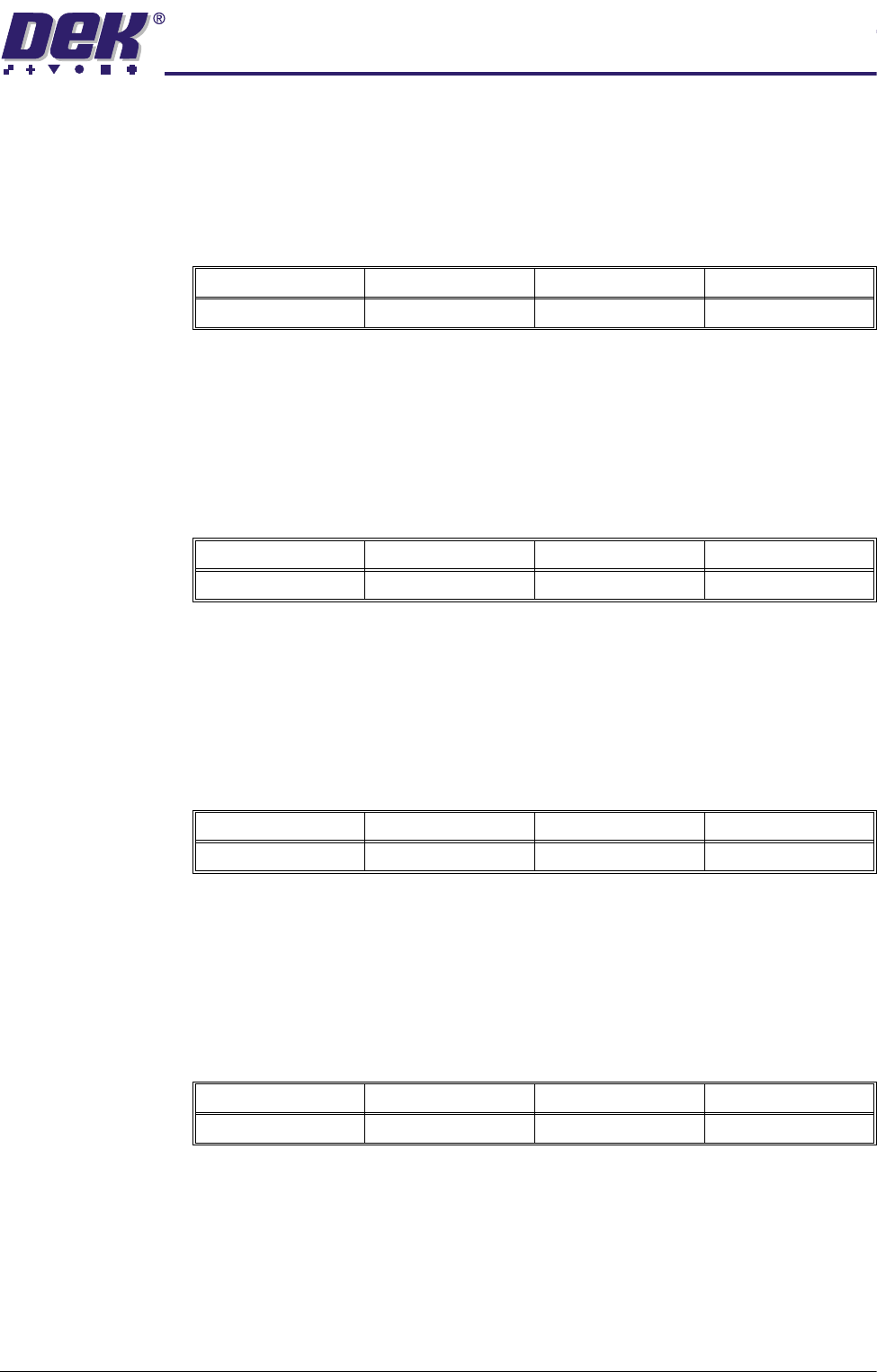
FWD Start
Pressure
This parameter sets the start pressure that is applied to paste in the ProFlow
unit during the forward print stroke. The transition between start and stop
pressure is linear with repect to time.
NOTE
This parameter is only available while ProFlow is fitted and Advanced ProFlow
is enabled.
FWD End Pressure This parameter sets the end pressure that is applied to paste in the ProFlow unit
during the forward print stroke. The transition between start and stop pressure
is linear with repect to time.
NOTE
This parameter is only available while ProFlow is fitted and Advanced ProFlow
is enabled.
RWD Start
Pressure
This parameter sets the start pressure that is applied to paste in the ProFlow
unit during the rearward print stroke. The transition between start and stop
pressure is linear with repect to time.
NOTE
This parameter is only available while ProFlow is fitted and Advanced ProFlow
is enabled.
RWD End Pressure This parameter sets the end pressure that is applied to paste in the ProFlow unit
during the rearward print stroke. The transition between start and stop pressure
is linear with repect to time.
NOTE
This parameter is only available while ProFlow is fitted and Advanced ProFlow
is enabled.
Idle Paste
Pressure
This is the pressure applied to paste in the ProFlow unit between kneading and
Minimum Maximum Increment Default
0.0 bar 4.0 bar 0.2 bar 2.0 bar
Minimum Maximum Increment Default
0.0 bar 4.0 bar 0.2 bar 2.0 bar
Minimum Maximum Increment Default
0.0 bar 4.0 bar 0.2 bar 2.0 bar
Minimum Maximum Increment Default
0.0 bar 4.0 bar 0.2 bar 2.0 bar
0$&+,1(352*5$00,1*
0(183$5$0(7(56
1.100 User Manual Software Version 07SP04
printing and between print strokes.
NOTE
Only available while ProFlow and the Software Controlled Air Regulator (SCAR)
are fitted.
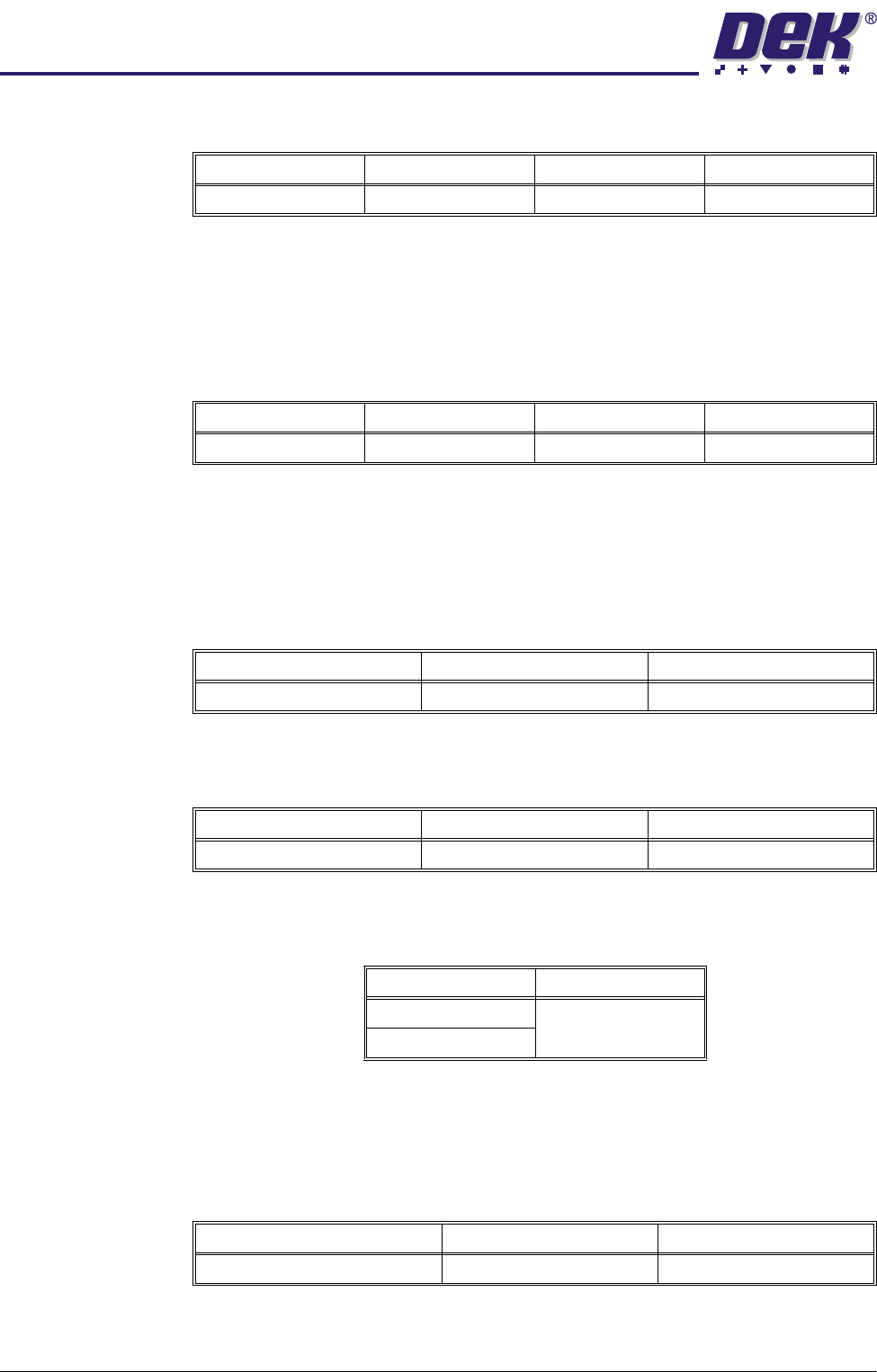
Knead Paste
Pressure
This parameter sets the pressure to be applied, while using ProFlow, when
kneading.
NOTE
The default value for this parameter is Print Paste Pressure, ie when the Print
Paste Pressure is altered, Knead Paste Pressure follows it.
Knead Deposits This parameter sets the number of print strokes to be carried out on each of the
kneaded boards.
Knead Boards This parameter sets the number of boards to be printed using the knead
sequence.
Knead Off-image This parameter sets whether ProFlow is to knead in an off-image area of the
stencil. Options are:
NOTE
With Knead Off Image enabled, Stencil Protection must be switched Off.
Paste Knead
Period
This parameter sets the time period between print cycles which, if exceeded,
initiates a paste knead sequence.
Knead Before Print This parameter sets ProFlow to knead before printing the first board and the
amount of boards to be printed between kneading.
Minimum Maximum Increment Default
0.0 bar 4.0 bar 0.2 bar 0.0 bar
Minimum Maximum Increment Default
0.0 bar 4.0 bar 0.2 bar see Note
Minimum Maximum Increment
2201
Minimum Maximum Increment
1101
Options Available Default
Enabled Enabled
Disabled
Minimum Maximum Increment
0 (paste kneading switched off) 30 minutes 1 minute