OM-1076-001.pdf - 第121页
(B02_05) Lighting Pattern Set a lighting pattern to be used for component recognition. Applicable Components : Applicable for all subjected components (1) Ltg Pattern Designation Select one of the following options to de…
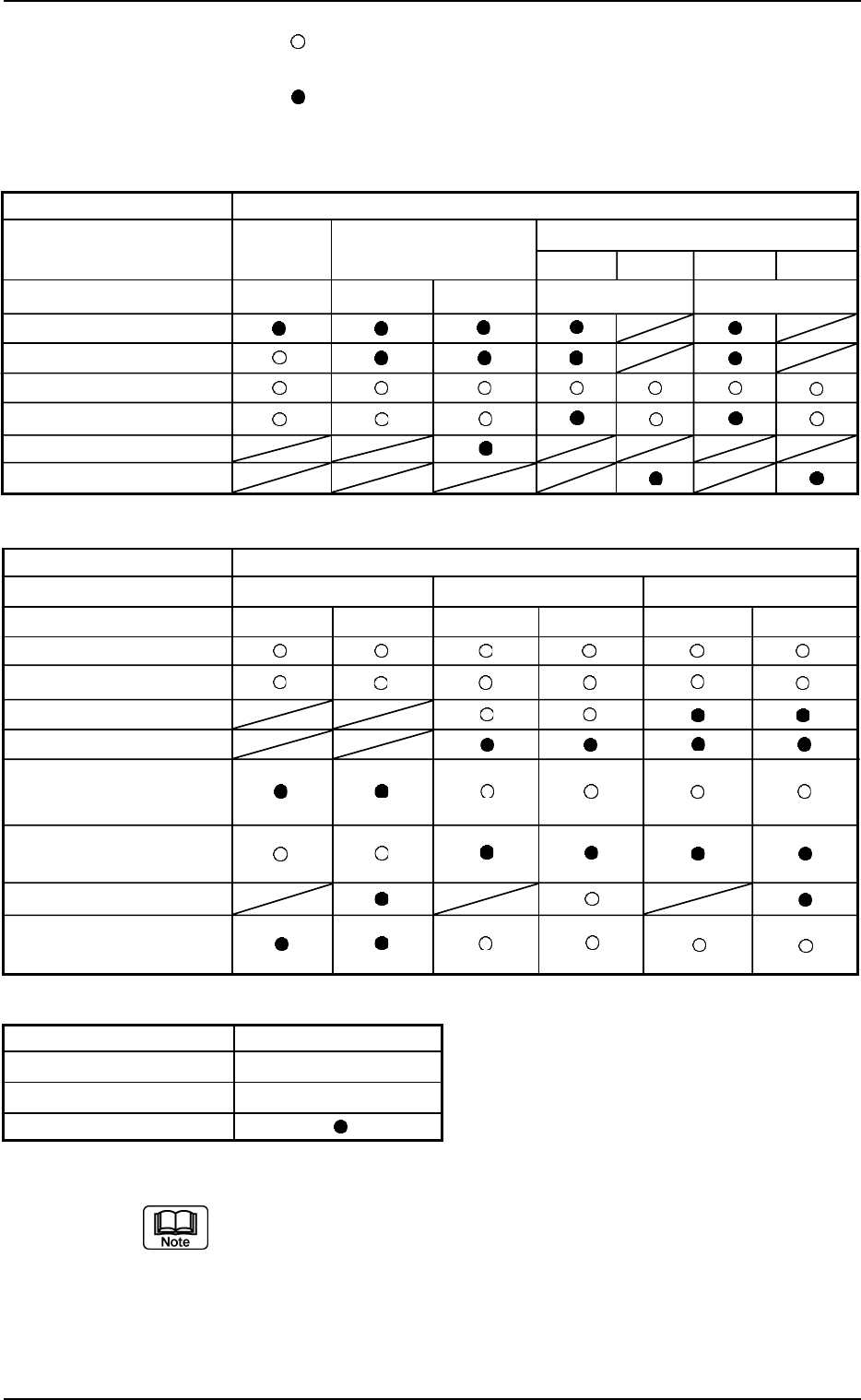
: This represents an option for a recognition system. Be sure
to select one option.
: This is an option for a recognition system when "Auto" is
selected. One option is selected indispensably.
Table B20
B02 Recognition Data (B02_04)
0111-002 2-89 Tg0502-PM-CL
Applicable Components : Applicable for all subjected components
The above parameter can be specified only when "Manual" is selected in
the "Recognition data set" text box.
Leadless Component
Cylindrical Square Deform
Simple Complex Simple Complex
Back Ltg Back Ltg Front Ltg Back Ltg Front Ltg
Component Shapes
Component Type
Recognition System
Corner
Edge
CG (Angle Detected)
CG
(No Angle)
Edge
(
Rectangle
)
Line
Table B22
Component Shapes Area Array
Component Type BGA/CSP
Recognition System Front Ltg
Grid Pattern
Leaded Component
IC Connector Other Leaded
Back Ltg Front Ltg Back Ltg Front Ltg Back Ltg Front Ltg
Table B21
Component Shapes
Component Type
Recognition System
CG (Angle Detected)
CG
(No Angle )
Lead
Lead (Special)
Multi-pin Lead
(Standard )
Multi-pin Lead
(General )
Lead (Standard 2)
Multi-pin Lead
(Standard 2)
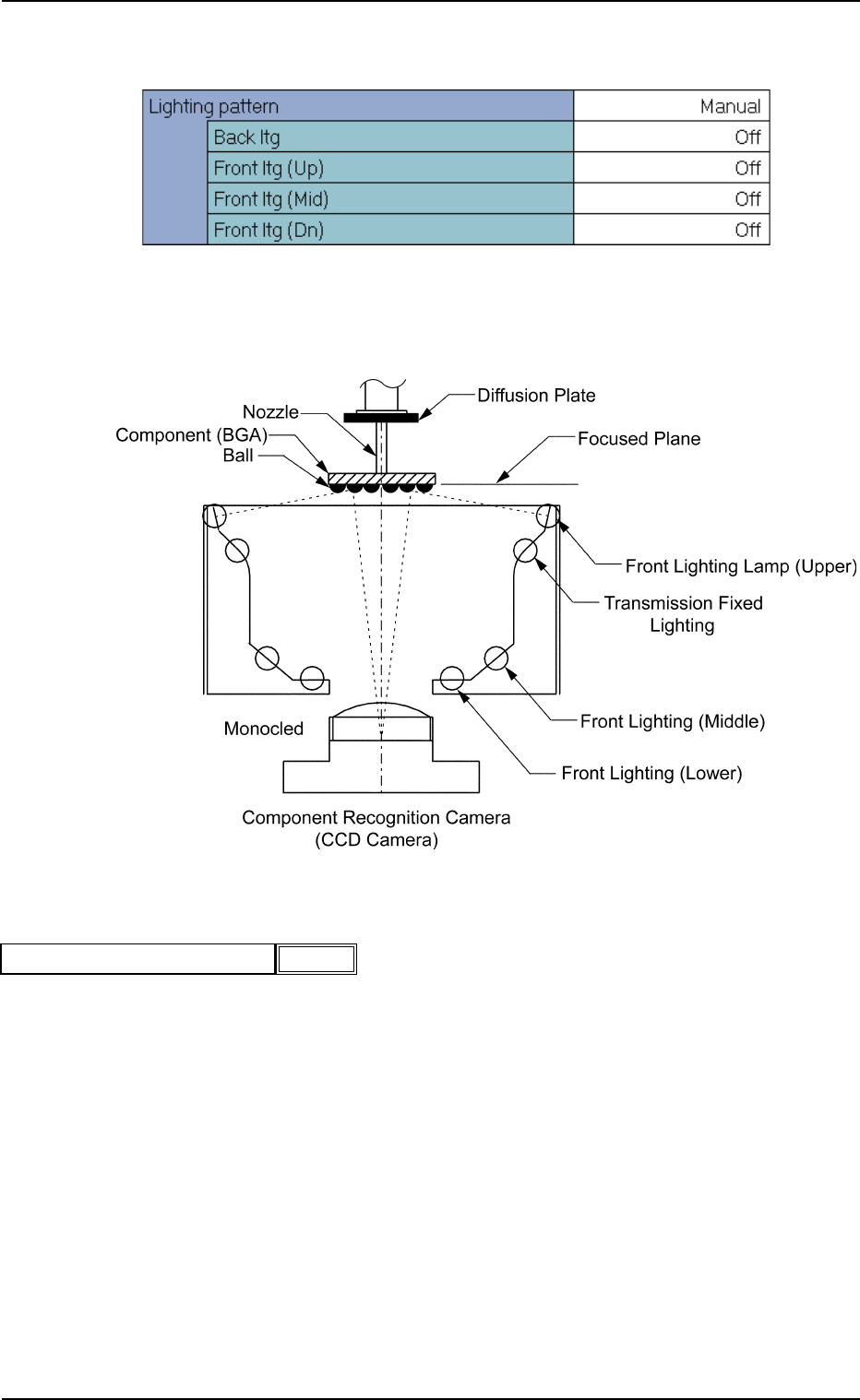
(B02_05) Lighting Pattern
Set a lighting pattern to be used for component recognition.
Applicable Components : Applicable for all subjected components
(1) Ltg Pattern Designation
Select one of the following options to designate a lighting pattern.
Auto : The lighting patterns are automatically set for all lighting
units.
Manual : The lighting patterns can be set individually for each light-
ing unit.
0111-002 2-90
Tg0502-PM-CL
B02 Recognition Data (B02_05)
Fig. B194
Auto
Ltg pattern designation
Fig. B192 Edit Window (Example) for Cylindrical Components
Fig. B193
(a) When the recognition cannot be made correctly due to improper light-
ing condition, set proper lighting patterns for the selected component.
(b) When "Back Ltg System" is selected in the "Lighting System" text
box, the recognition is processed based on the recognition algorithm
for the back lighting system. When "Front Ltg System" is selected,
the recognition is processed based on the recognition algorithm for
the front lighting system.
(c) To set a parameter, select "Manual" in the "Recognition data set" text
box.
(2) Lightening Pattern Back Ltg
When the Lighting Pattern Designation is set to "Manual", select the
pattern for the back lighting recognition lamp from the following op-
tions:
Off Std
−−
−−
−80%
−−
−−
−60%
−−
−−
−40%
−−
−−
−20%
++
++
+20%
++
++
+40%
++
++
+60%
++
++
+80%
(3) Lightening Pattern Front Ltg (Up)
When the Lighting Pattern Designation is set to "Manual", select the
lighting pattern for the front lighting recognition lamp on the upper
side (mainly used for the BGA components) from the following op-
tions:
Off Std
−−
−−
−80%
−−
−−
−60%
−−
−−
−40%
−−
−−
−20%
++
++
+20%
++
++
+40%
++
++
+60%
++
++
+80%
(4) Lightening Pattern Front Ltg (Mid)
When the Lighting Pattern Designation is set to "Manual", select the
lighting pattern for the front lighting recognition lamp on the middle
side from the following options.
Off Std
−−
−−
−80%
−−
−−
−60%
−−
−−
−40%
−−
−−
−20%
++
++
+20%
++
++
+40%
++
++
+60%
++
++
+80%
(5) Lightening Pattern Front Ltg (Dn)
When the Lighting Pattern Designation is set to "Manual", select the
lighting pattern for the front lighting recognition lamp on the lower side
from the following options.
Off Std
−−
−−
−80%
−−
−−
−60%
−−
−−
−40%
−−
−−
−20%
++
++
+20%
++
++
+40%
++
++
+60%
++
++
+80%
0111-002 2-91
Tg0502-PM-CL
B02 Recognition Data (B02_05)
Fig. B197
Off
Front ltg (Mid)
Fig. B198
Off
Front ltg (Dn)
Fig. B196
Off
Front ltg (Up)
Off
Back ltg
Fig. B195