OM-1076-001.pdf - 第46页
A02 Control Data (A02_10) 01 11-002 2-27 Tg0502-PM-CL (A02_10) Error Process 2 The set parameter is used to monitor continuous pick-up errors (an error caused continuously with a component being picked up) caused due to …
0111-002 2-26 Tg0502-PM-CL
A02 Control Data (A02_09)
(A02_09) Error Process 1
When no component can be picked up (Missing components), the
machine stops in an error condition according to the number of errors.
Set a parameter in this data box to designate the number of continu-
ous component missing errors to be counted in order to stop the ma-
chine in an error condition.
Data Input Range: 1 to 9
1 : The machine stops in an error condition after no component (rec-
ognition error) is detected once.
2 : The machine stops in an error condition after no component (rec-
ognition error) is detected continuously twice on the same feeder.
n : The machine stops in an error condition after no component (rec-
ognition error) is detected continuously "n" times on the same
feeder.
(a) Recommended Data
Components packaged in 8 mm Tape : 2
Components packaged in 12 mm or Wider Tape : 1
Components packaged in Tray or Stick Feeder : 1
Pick-up error on the tape of width 12 mm or more in the component
(tray or vibration stick component) might cause malfunction. There-
fore, we recommend stopping the machine when the error is first de-
tected.
(b) When the alternate function is activated, the set parameter becomes
one of the requirements for alternate operation start.
Fig.B43
Error process 1
1
A02 Control Data (A02_10)
0111-002 2-27 Tg0502-PM-CL
(A02_10) Error Process 2
The set parameter is used to monitor continuous pick-up errors (an
error caused continuously with a component being picked up) caused
due to component recognition error. The machine stops in an error
condition according to the number of error times. Set the number of
continuous component recognition errors in this data box.
Data Input Range: 1 to 9
1 : The machine stops in an error condition after a component recog-
nition error is detected once.
2 : The machine stops in an error condition after a component recog-
nition error is detected continuously twice on the same feeder.
n : The machine stops in an error condition after a component recog-
nition error is detected continuously "n" times on the same feeder.
(a) Recommended Data
Tape Component : 9
Components in Tray or Stick Feeder : 1
A pick-up error in the tray or vibration stick component might develop
into successive pick-up errors and cause interference with pick-up
nozzle. Therefore, we recommend stopping the machine when the
error is first detected.
(b) When the alternate function is activated, the set parameter becomes
one of the requirements for the alternate operation start.
Fig.B44
Error process 2
1
A03 Carrier Data
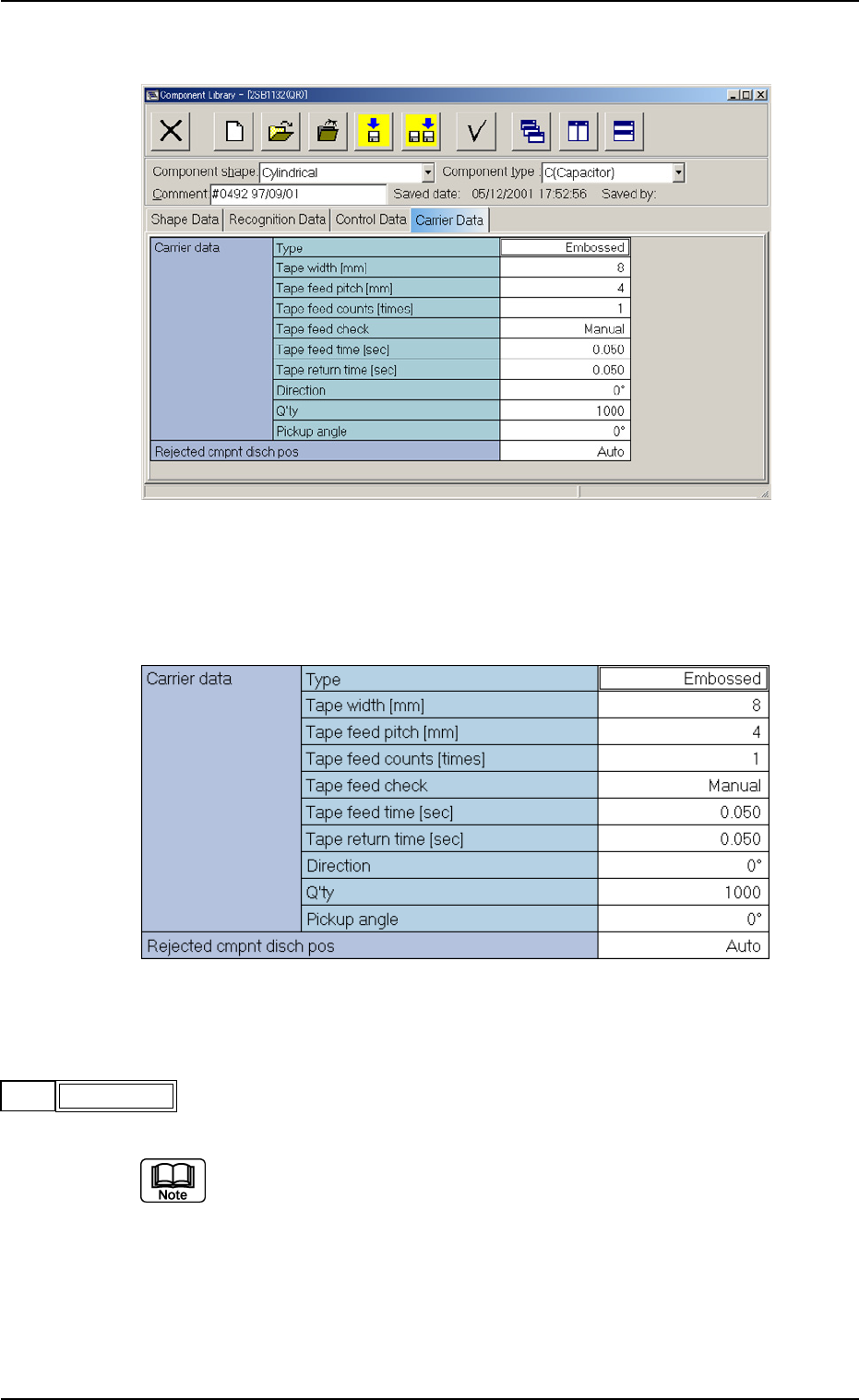
(A03_01) Carrier Data (Tape)
(1) Type
Select one of the following options as a type of a component carrier.
Paper Embossed Adhesive Vibratory Stick Tray
No types other than the above are used in TIM-X series.
A03 Carrier Data (A03_01)
0206-003 2-28 Tg0502-PM-CL
Fig. B45 Edit Window (Example) for Cylindrical Component
Fig. B46 Edit Window (Example) for Cylindrical Components
Embossed
Type
Fig. B47