2500_Users_Manual-.pdf - 第153页
Operation Figure 4-31 Overview: Running a Kit (the number by each screen refers to the number of the step describing it on the previous page ProMaster 2500 User Manual 4-39
↵
↵
↵
↵
↵
Operation
Running
a
Kit
Kits
operate
very
much
like
Tasks.
If
you
are
familiar
with
running
a
Task,
you
will
find
that
the
steps
required
to
run
a
Kit
are
almost
the
same.
The
process
of
running
a
Kit
is
outlined
in
the
steps
below.
Refer
to
Figure
4-31
to
see
the
TaskLink
screens
associated
with
these
steps.
1.
Select
a
Kit
from
the
Run
Task/Kit
list
box.
Kit
names
are
displayed
on
the
screen
with
bold
characters,
Tasks
appear
as
normal
characters.
2.
The
next
screen
asks
if
you
want
to
perform
all
the
Tasks
in
the
Kit
or
select
just
one
Task.
In
most
cases
you
will
perform
all
the
Tasks
in
the
Kit
(the
default
selection).
Press
to
run
the
entire
Kit.
3.
The
Process
Devices
dialog
box
appears,
prompting
you
for
the
number
of
Kits
to
Build
and
a
Session
LD.
Enter
the
number
of
devices
you
want
to
program
and
then
press
.
Note:
The
Session
LD.
is
an
arbitrary
string
of
printable
characters
that
will
appear
in
the
log
file
for
your
reference.
4.
You
will
now
see
the
normal
series
of
Task
dialog
boxes
appear.
Answer
these
as
you
do
when
running
a
single
Task.
5.
When
the
first
Task
has
successfully
programmed
the
number
of
devices
defined
in
the
Process
Devices
dialog
box,
a
programming
summary
screen
displays
the
results
for
the
Task
just
completed.
Press
to
go
on
to
the
second
Task
in
the
Kit.
6.
If
your
system
administrator
has
created
a
message
screen
with
special
instructions
for
the
next
Task,
that
screen
is
displayed.
Once
you
have
completed
these
steps,
press
and
TaskLink
will
begin
running
the
second
Task
in
the
Kit.
If
no
message
screen
has
been
created,
the
second
Task
started
running
when
you
pressed
in
step
5.
Note:
Remember
that
between
Tasks
in
the
Kit,
you
may
have
to
reconfigure
协
e
2500
for
a
new
device
package
type.
This
may
require
adjusting
the
track,
changing
labels,
changing
and/or
configuring
the
programming
module,
and
the
normal
steps
required
before
starting
any
new
Task.
7.
Continue
in
this
sequence
of
steps
until
the
last
Task
has
completed.
At
the
end
of
the
Kit's
run,
a
Kit
Processing
Results
screen
appears
with
a
summary
of
the
Kit
results.
4-38
ProMaster
2500
User
Manual
Operation
Figure
4-31
Overview:
Running
a
Kit
(the
number
by
each
screen
refers
to
the
number
of
the
step
describing
it
on
the
previous
page
ProMaster
2500
User
Manual
4-39
TRACK AIR
ADJUSTMENT
KNOB
2386-1
Operation
Adjusting
Track
Air
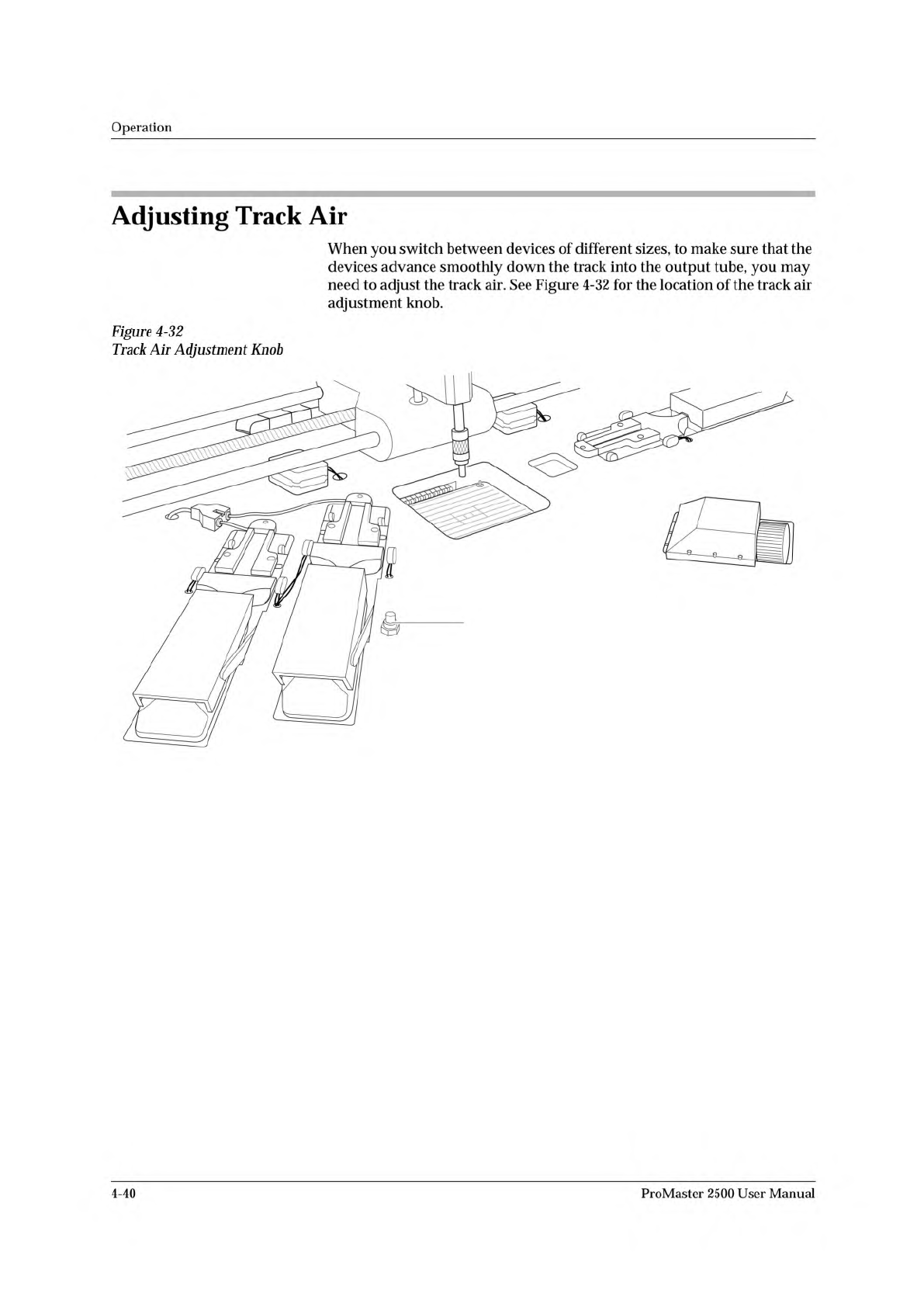
When
you
switch
between
devices
of
different
sizes,
to
make
sure
that
the
devices
advance
smoothly
down
the
track
into
the
output
tube,
you
may
need
to
adjust
the
track
air.
See
Figure
4-32
for
the
location
of
the
track
air
adjustment
knob.
Figure
4-32
Track
Air
Adjustment
Knob
4-40
ProMaster
2500
User
Manual